
MySQL
PIVOT
In MySQL, the concept of "pivoting" refers to transforming rows into columns. While MySQL does not have a built-in PIVOT function like some other databases, you can achieve pivot-like results using a combination of GROUP BY, CASE, and aggregate functions like SUM() or COUNT(). Pivot tables are useful when you want to summarize or rearrange data for reporting purposes, such as converting sales data or employee statistics into a more readable format.
Here’s how to perform pivoting in MySQL, along with examples for new students:
Basic Concept of Pivoting:
- Pivoting involves transforming data where unique values in one column become column headers, and the corresponding data is summarized or displayed under those headers.
- Example Scenario: You want to pivot employee data to show the count of employees per department.
Using
GROUP BYandCASEfor Pivoting:- To pivot data in MySQL, use the
GROUP BYclause along withCASEstatements to create columns dynamically based on specific values. - Example:
SELECT branch_id, COUNT(CASE WHEN department_id = 1 THEN 1 END) AS HR_Department, COUNT(CASE WHEN department_id = 2 THEN 1 END) AS Sales_Department, COUNT(CASE WHEN department_id = 3 THEN 1 END) AS IT_Department FROM employees GROUP BY branch_id;- This query pivots the employee data to count the number of employees in each department for every branch.
- To pivot data in MySQL, use the
Using
SUM()for Pivoting with Aggregates:- You can use aggregate functions like
SUM()orCOUNT()along withCASEto generate pivoted results for numerical data. - Example:
SELECT department_id, SUM(CASE WHEN gender = 'Male' THEN salary ELSE 0 END) AS Total_Male_Salary, SUM(CASE WHEN gender = 'Female' THEN salary ELSE 0 END) AS Total_Female_Salary FROM employees GROUP BY department_id;- This query calculates the total salary of male and female employees in each department.
- You can use aggregate functions like
Using
COUNT()for Frequency Pivoting:- You can count occurrences of specific values and pivot them into columns using
COUNT()andCASE. - Example:
SELECT branch_id, COUNT(CASE WHEN gender = 'Male' THEN 1 END) AS Male_Employees, COUNT(CASE WHEN gender = 'Female' THEN 1 END) AS Female_Employees FROM employees GROUP BY branch_id;- This query shows the count of male and female employees in each branch.
- You can count occurrences of specific values and pivot them into columns using
Pivoting with Dynamic Values:
- While MySQL cannot easily handle dynamic pivoting (where column values are created dynamically based on the dataset), you can manually define the columns as demonstrated above. For truly dynamic pivots, a scripting language like Python or PHP is often used to build queries based on the dataset.
Pivoting with Multiple Conditions:
- You can use multiple
CASEconditions to create more complex pivot tables. - Example:
SELECT department_id, SUM(CASE WHEN salary > 50000 THEN 1 ELSE 0 END) AS High_Salary_Employees, SUM(CASE WHEN salary <= 50000 THEN 1 ELSE 0 END) AS Low_Salary_Employees FROM employees GROUP BY department_id;- This query counts the number of high- and low-salary employees in each department.
- You can use multiple
Pivoting Data for Reporting:
- Pivot tables are often used in reporting to summarize and present data more clearly. You can create custom reports by combining different aggregate functions and conditions.
- Example:
SELECT branch_id, COUNT(CASE WHEN hire_date >= '2023-01-01' THEN 1 ELSE 0 END) AS Hires_2023, COUNT(CASE WHEN hire_date < '2023-01-01' THEN 1 ELSE 0 END) AS Hires_Before_2023 FROM employees GROUP BY branch_id;- This query shows the count of employees hired in 2023 and before 2023 for each branch.
Performance Considerations:
- Pivoting large datasets using
GROUP BYandCASEcan be resource-intensive. Make sure the columns used in conditions andGROUP BYclauses are indexed to improve performance.
- Pivoting large datasets using
These examples show how to manually pivot data in MySQL using GROUP BY, CASE, and aggregate functions. While MySQL lacks a built-in PIVOT function, these techniques allow you to create flexible, pivot-style reports based on your data.
To gain complete access, login with gmail or outlook, no need of signup, click here

SQL PIVOT TECHNIQUE
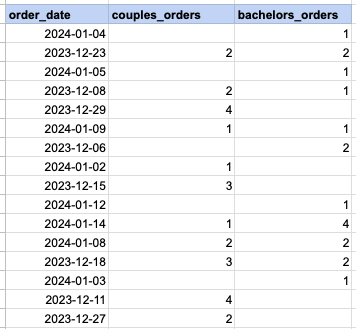
Let's delve into the specifics of implementing the pivot technique across different SQL databases like MySQL, PostgreSQL, Oracle, and Microsoft SQL Server. In our example, we aim to utilize the SQL pivot method to organize daily order counts, distinguishing between orders placed by couples and those by bachelors.
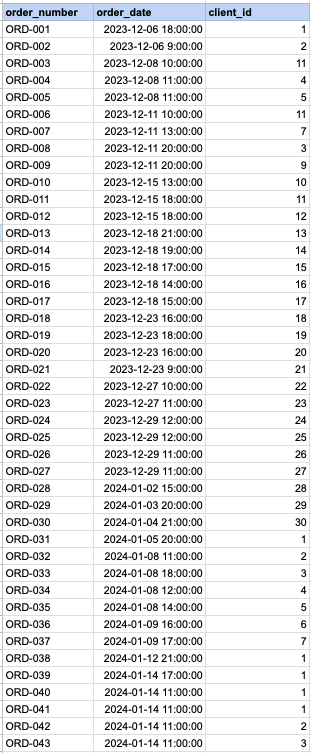
Raw data from order table
Step1, Get client's marital status
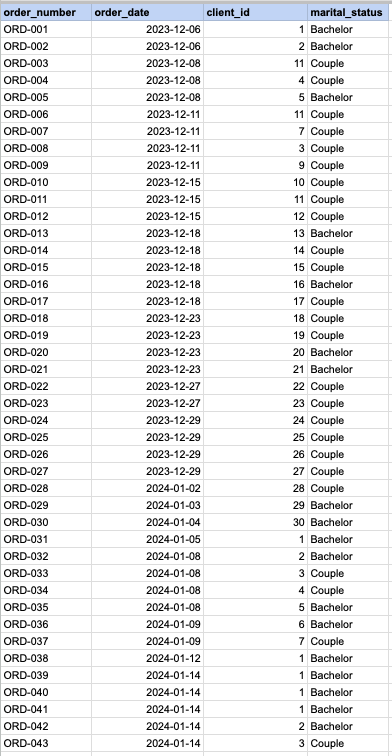
Utilize below query to merge the 'Orders' table with the 'Clients' table, thereby obtaining the marital status of clients from the 'Clients' table. Additionally, transform the 'OrderDateTime' into just the 'OrderDate'.
SELECT a.order_number, DATE(a.order_date), a.client_id , CASE WHEN b.married_flag = 1 THEN 'Married' ELSE 'Single' END AS marital_status FROM act_order a INNER JOIN org_client b on b.client_id = a.client_id order by order_id;Step 1 output
MySQL and PostGreSQL PIVOT technique
SELECT DATE(a.order_date) as order_date, SUM(CASE WHEN b.married_flag = 1 THEN 1 END) AS couples_orders, SUM(CASE WHEN b.married_flag = 0 THEN 1 END) AS bachelors_orders FROM act_order a INNER JOIN org_client b on b.client_id = a.client_id GROUP BY DATE(a.order_date);MS SQL SERVER PIVOT technique
SELECT * FROM (SELECT CONVERT(DATE, a.order_date) as order_date, a.client_id, CASE WHEN b.married_flag = 1 THEN 'Married' ELSE 'Single' END AS marital_status FROM act_order a INNER JOIN org_client b on b.client_id = a.client_id ) t PIVOT( COUNT(client_id) FOR marital_status IN ( [Married], [Single]) ) AS pivot_table;Oracle PIVOT technique
SELECT * FROM (SELECT TO_CHAR(a.order_date,'DD/MM/YY') as order_date, a.client_id, CASE WHEN b.married_flag = 1 THEN 'Married' ELSE 'Single' END AS marital_status FROM act_order a INNER JOIN org_client b on b.client_id = a.client_id ) t PIVOT( COUNT(client_id) FOR marital_status IN ('Married','Single') )FINAL OUTPUT
Comments Not Found