
MySQL
'=' (equal to) Operator
In MySQL, the = (equal) operator is one of the most commonly used operators in Data Query Language (DQL) for filtering rows where a column's value matches a specified value. It is often used in the WHERE clause to compare values in queries, allowing you to retrieve records that match a given condition. Whether you're comparing numbers, strings, or dates, the = operator is essential for building effective SQL queries.
Here’s a breakdown of how to use the = operator with examples and helpful tips for new students:
Basic Syntax for
=(Equal):- The
=operator is used to return rows where the column value matches the specified value exactly. - Syntax:
SELECT * FROM employees WHERE department_id = 3;- This query retrieves all employees who belong to department 3.
- The
Using
=with String Comparisons:- The
=operator can also be used to compare string values. String comparisons are case-insensitive in MySQL unless explicitly set otherwise. - Example:
SELECT * FROM employees WHERE last_name = 'Smith';- This query returns all employees whose last name is "Smith".
- The
Using
=with Date Values:- You can also use the
=operator to filter rows based on date values. - Example:
SELECT * FROM employees WHERE hire_date = '2022-01-01';- This query retrieves all employees who were hired on January 1, 2022.
- You can also use the
Combining
=with Other Conditions:- You can combine the
=operator with other operators likeANDorORto create more complex conditions. - Example:
SELECT * FROM employees WHERE department_id = 3 AND salary = 50000;- This query returns employees who belong to department 3 and have a salary of exactly 50,000.
- You can combine the
Using
=with NULL Values:- The
=operator cannot be used to check forNULLvalues directly becauseNULLrepresents an unknown value. Instead, you should useIS NULLto check forNULLvalues. - Example:
SELECT * FROM employees WHERE manager_id IS NULL;- This query retrieves all employees who do not have a manager assigned (i.e., where the
manager_idisNULL).
- The
Using
=in Joins:- The
=operator is commonly used inJOINoperations to match rows between related tables based on a common key. - Example:
SELECT e.employee_id, e.first_name, d.department_name FROM employees e JOIN departments d ON e.department_id = d.department_id;- This query joins the
employeesanddepartmentstables where thedepartment_idmatches.
- The
Performance Considerations:
- The
=operator is highly efficient, especially when comparing values in indexed columns. Ensure that commonly queried columns, such asidordepartment_id, are indexed for better performance. - Example:
SELECT * FROM employees WHERE employee_id = 1001;- If
employee_idis indexed, this query will perform faster.
- The
Case Sensitivity in
=Comparisons:- In MySQL, string comparisons using
=are case-insensitive by default. However, if you need a case-sensitive comparison, you can use theBINARYkeyword. - Example:
SELECT * FROM employees WHERE BINARY first_name = 'John';- This query will return rows where the first name matches "John" exactly, including case sensitivity.
- In MySQL, string comparisons using
These examples demonstrate the versatility of the = operator in MySQL. Whether you're comparing numbers, strings, or dates, this operator is essential for querying specific values and filtering data efficiently.
To gain complete access, login with gmail or outlook, no need of signup, click here
Test code
Fetch records for clients identified as female.
SELECT *
FROM org_client
WHERE gender = 'F';Fetch orders where the order statuses are equal to 5.
SELECT *
FROM act_order
WHERE order_status_id = 5;Retrieve orders with shipping dates matching December 12th.
SELECT *
FROM act_order
WHERE shipped_date = '2023-12-12';

-- Oracle WHERE shipped_date = 12/12/23';Example 1:
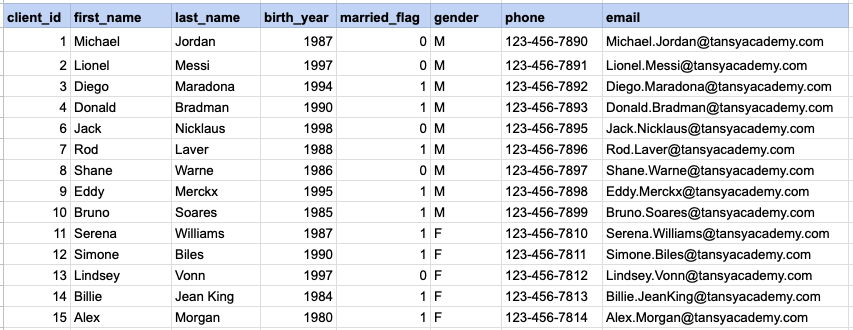
Let's explore the procedure of retrieving information from a designated table using the SQL '=' (equal to) operator with string data. Fetch records for clients identified as females.
Example 1 - Raw data from client table
Example 1 - Query
SELECT * FROM org_client WHERE gender = 'F';Example 1 - Query data mapping
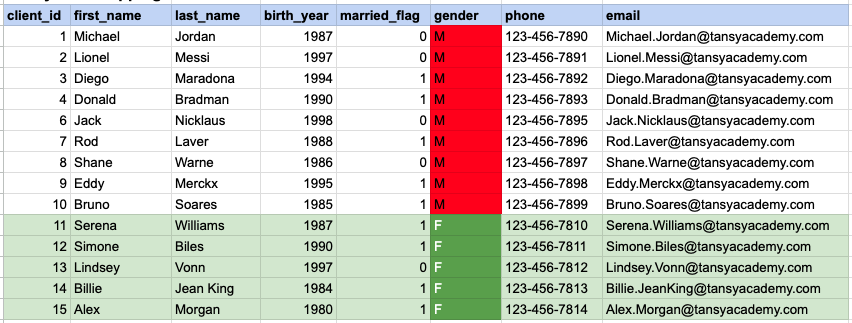
In the provided image, the green color signifies the data that has been selected or satisfies the conditions specified in our query. Data points in red indicate information that does not meet the criteria set by the query.
Example 1 - Query Output

Example 2:
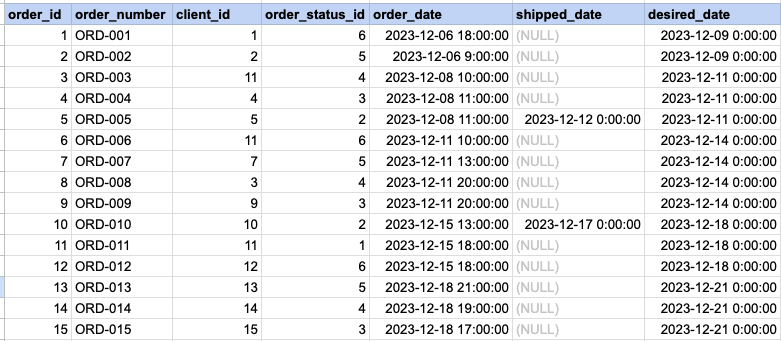
Let's delve into the process of retrieving information from a specified table using the SQL '=' (equal) operator with numeric data. Retrieve orders with statuses that match the value 5.
Example 2 - Raw data from orders table
Example 2 - Query
SELECT * FROM act_order WHERE order_status_id = 5;Example 2 - Query data mapping
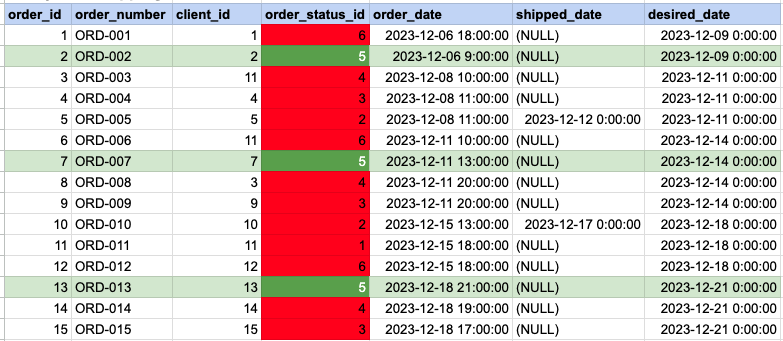
In the provided image, the green color signifies the data that has been selected or satisfies the conditions specified in our query. Data points in red indicate information that does not meet the criteria set by the query.
Example 2 - Query Output

Example 3:
Let's explore the process of retrieving information from a designated table using the SQL '=' (equal) operator with date data. Fetch orders with shipping dates that match December 12th.
Example 3 - Raw data from orders table
Example 3 - Query
SELECT * FROM act_order WHERE shipped_date = '2023-12-12';Example 3 - Query data mapping
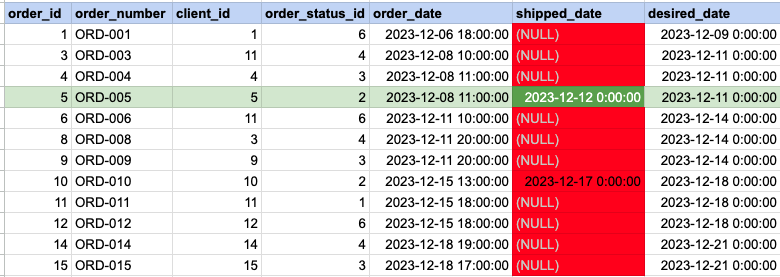
In the provided image, the green color signifies the data that has been selected or satisfies the conditions specified in our query. Data points in red indicate information that does not meet the criteria set by the query. Please be aware that the query will attempt to filter based on the value of December 12th. Since many records have NULL for the shipped date value, NULL cannot be compared as it is not an actual value. Consequently, these null records will be excluded from the results as well.
Example 3 - Query Output

Comments Not Found