
MySQL
Sub Queries
In MySQL, subqueries are queries nested inside another SQL query. They allow you to perform more complex queries by using the result of one query as input for another. Subqueries can be used in various parts of a query, including the SELECT, FROM, WHERE, and HAVING clauses. Subqueries are an essential tool when you need to break down complex problems into smaller, more manageable queries.
Here’s a detailed guide on using subqueries in MySQL, along with examples and tips for new students:
Basic Subquery in the
WHEREClause:- Subqueries are often used in the
WHEREclause to filter rows based on the result of another query. - Syntax:
SELECT first_name, last_name FROM employees WHERE department_id = (SELECT department_id FROM departments WHERE department_name = 'HR');- This query returns the names of employees who work in the HR department by using a subquery to find the
department_idfor HR.
Additional Points:
- The subquery returns a single value, which is used in the
WHEREcondition of the main query. - The main query will only return results where the
department_idmatches the result of the subquery.
- Subqueries are often used in the
Subquery in the
SELECTClause:- You can use a subquery in the
SELECTclause to include a calculated value in the result set. - Example:
SELECT first_name, last_name, (SELECT department_name FROM departments WHERE department_id = employees.department_id) AS department_name FROM employees;- This query retrieves the employee names and their respective department names by using a subquery in the
SELECTclause.
- You can use a subquery in the
Subquery in the
FROMClause:- Subqueries in the
FROMclause are treated like temporary tables and allow you to join the result of the subquery with other tables. - Example:
SELECT e.first_name, e.last_name, dept_avg.avg_salary FROM employees e JOIN (SELECT department_id, AVG(salary) AS avg_salary FROM employees GROUP BY department_id) AS dept_avg ON e.department_id = dept_avg.department_id;- This query retrieves employee names along with the average salary for their department by using a subquery in the
FROMclause.
- Subqueries in the
Using Subqueries with
IN:- Subqueries are commonly used with the
INoperator to filter rows based on a set of values returned by the subquery. - Example:
SELECT first_name, last_name FROM employees WHERE department_id IN (SELECT department_id FROM departments WHERE branch_id = 1);- This query retrieves employees who work in departments that belong to branch 1.
- Subqueries are commonly used with the
Using Subqueries with
EXISTS:- The
EXISTSoperator is used with subqueries to check whether the subquery returns any rows. - Example:
SELECT first_name, last_name FROM employees e WHERE EXISTS (SELECT 1 FROM departments d WHERE d.department_id = e.department_id AND d.department_name = 'Sales');- This query retrieves employees who belong to the Sales department by using the
EXISTSoperator.
- The
Correlated Subqueries:
- A correlated subquery is a subquery that references columns from the outer query. It is executed once for each row in the outer query.
- Example:
SELECT first_name, last_name FROM employees e WHERE salary > (SELECT AVG(salary) FROM employees WHERE department_id = e.department_id);- This query retrieves employees who earn more than the average salary in their department using a correlated subquery.
Subqueries with
HAVING:- You can use subqueries with the
HAVINGclause to filter groups based on aggregate values. - Example:
SELECT department_id, COUNT(*) AS employee_count FROM employees GROUP BY department_id HAVING COUNT(*) > (SELECT AVG(emp_count) FROM (SELECT department_id, COUNT(*) AS emp_count FROM employees GROUP BY department_id) AS dept_counts);- This query retrieves departments with more employees than the average department size.
- You can use subqueries with the
Performance Considerations:
- Subqueries can be resource-intensive, especially correlated subqueries, which are executed for each row in the outer query. Consider using joins or restructuring the query for better performance.
- Example:
SELECT first_name, last_name FROM employees WHERE salary > (SELECT MAX(salary) FROM employees WHERE department_id = 3);- This query retrieves employees who earn more than the highest salary in department 3.
Subqueries in MySQL provide a powerful way to break down complex queries into smaller, manageable parts. Whether you’re filtering data, calculating values, or joining results from multiple queries, subqueries give you the flexibility to build more complex queries.
To gain complete access, login with gmail or outlook, no need of signup, click here

Test code
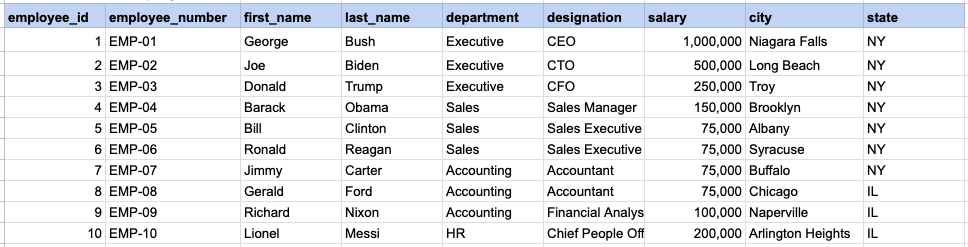
Display the names of employees earning more than the company's average salary.
SELECT employee_number, first_name, last_name, designation, salary
FROM org_employee
WHERE salary >= (SELECT AVG(salary) FROM org_employee);SQL SUB QUERY EXAMPLE
Raw data from employee table
Query
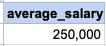
SELECT employee_number, first_name, last_name, designation, salary FROM org_employee WHERE salary >= (SELECT AVG(salary) FROM org_employee);Step1, Execute sub query
First, run the subquery '(SELECT AVG(salary) FROM org_employee)' to obtain its result, which in this instance is the average salary.
Sub query output
Step 2, apply sub query output as filter criteria on main query
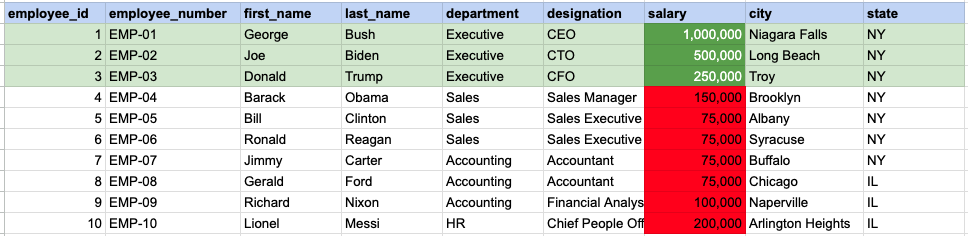
In this step, we filter for employees whose salary is greater than or equal to 250,000, which is the average salary determined from the subquery output.
FINAL, main query output

Comments Not Found