
MySQL
BETWEEN Operator
The BETWEEN operator in MySQL is part of the Data Query Language (DQL) and is used to filter query results based on whether a value falls within a specified range. It is often used for numeric, date, or text ranges and includes both the starting and ending values in the range. This operator simplifies the process of defining ranges in queries, making the code more readable and efficient.
Here’s how to use the BETWEEN operator, with examples and helpful tips for new students:
Basic Syntax of
BETWEEN:- The
BETWEENoperator allows you to filter results that fall within a specified range, including the boundaries. - Syntax:
SELECT * FROM employees WHERE salary BETWEEN 50000 AND 100000;- This query returns all employees with salaries between 50,000 and 100,000, inclusive.
- The
Using
BETWEENwith Date Ranges:- The
BETWEENoperator can be used with date ranges to filter records based on specific time periods. - Example:
SELECT * FROM employees WHERE hire_date BETWEEN '2020-01-01' AND '2023-12-31';- This will return all employees hired between January 1, 2020, and December 31, 2023.
- The
Text-Based Ranges with
BETWEEN:- You can also use
BETWEENfor text values, which filters results based on lexicographical order. - Example:
SELECT * FROM employees WHERE last_name BETWEEN 'A' AND 'M';- This will return employees whose last names start with any letter from 'A' to 'M'.
- You can also use
Combining
BETWEENwith Other Conditions:- You can combine
BETWEENwith other operators likeANDandORto refine your query further. - Example:
SELECT * FROM employees WHERE salary BETWEEN 50000 AND 100000 AND department_id = 3;- This query returns employees with salaries between 50,000 and 100,000, but only in department 3.
- You can combine
Performance Benefits:
- Using
BETWEENin queries can be more efficient than using multiple>=and<=conditions, especially when the column involved is indexed. - Example of an alternative query without
BETWEEN:
SELECT * FROM employees WHERE salary >= 50000 AND salary <= 100000;- Using
Handling Edge Cases:
- The
BETWEENoperator is inclusive of the boundary values, meaning if a value exactly matches the lower or upper boundary, it will still be included in the result set. - Example:
SELECT * FROM employees WHERE salary BETWEEN 60000 AND 60000;- This will return any employee with a salary of exactly 60,000.
- The
Using
NOT BETWEEN:- You can use
NOT BETWEENto exclude values within a specific range. - Example:
SELECT * FROM employees WHERE salary NOT BETWEEN 30000 AND 50000;- This query will return employees whose salaries are either below 30,000 or above 50,000.
- You can use
The BETWEEN operator is a straightforward yet powerful way to filter data based on ranges, whether it’s numerical values, dates, or text. It enhances query readability and performance, making it a vital tool for managing data efficiently.
To gain complete access, login with gmail or outlook, no need of signup, click here

Test code
Retrieve clients by employing the BETWEEN SQL operator on numeric data, selecting those whose birth year falls within the range of 1985 and 1995.
SELECT *
FROM org_client
WHERE birth_year BETWEEN 1985 AND 1995;Retrieve employees using the BETWEEN SQL operator on currency data, selecting those whose salary falls within the range of 50000 and 100000.
SELECT *
FROM org_employee
WHERE salary BETWEEN 50000 AND 100000;Retrieve order data by utilizing the BETWEEN SQL operator on datetime values, selecting those with an order date falling between '2023-12-10' and '2023-12-17'.
SELECT *
FROM act_order
WHERE order_date BETWEEN '2023-12-10' AND '2023-12-17';

--Oracle
SELECT *
FROM act_order
WHERE order_date BETWEEN to_date('10/12/23') AND to_date('17/12/23');Example 1:
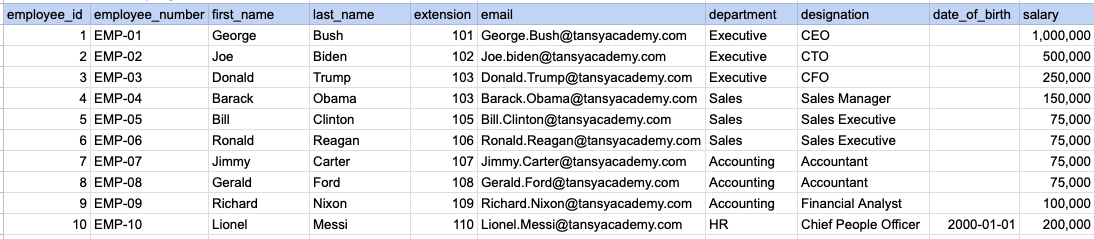
Let's explore the procedure of extracting information from a designated table using the BETWEEN SQL operator with currency data. In this instance, our goal is to fetch employee data where the salary falls between 100k and 250k.
Example 1 - Raw data from employee table
Example 1 - Query
SELECT * FROM org_employee WHERE salary BETWEEN 100000 AND 250000;Example 1 - Query data mapping
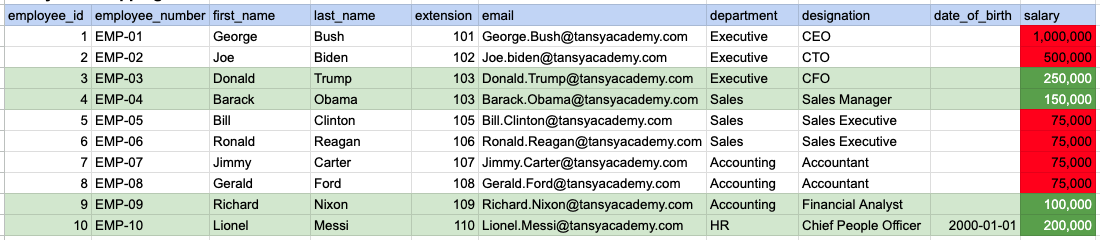
In the provided image, the green color signifies the data that has been selected or satisfies the conditions specified in our query. Data points in red indicate information that does not meet the criteria set by the query.
Example 1 - Query Output

Example 2:
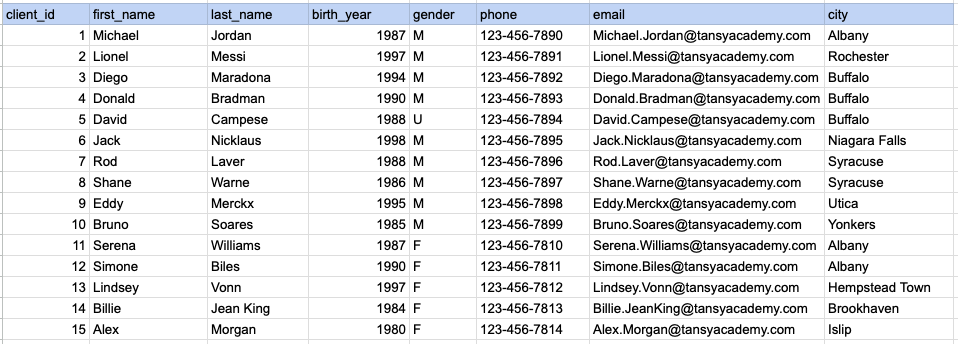
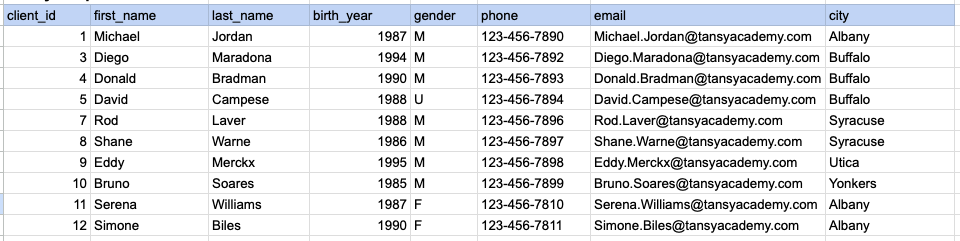
Let's explore the procedure for extracting information from a designated table using the BETWEEN SQL operator on integer data. In this instance, our goal is to fetch client data where the birth year falls between 1985 and 1995.
Example 2 - Raw data from client table
Example 2 - Query
SELECT * FROM org_client WHERE birth_year BETWEEN 1985 AND 1995;Example 2 - Query data mapping
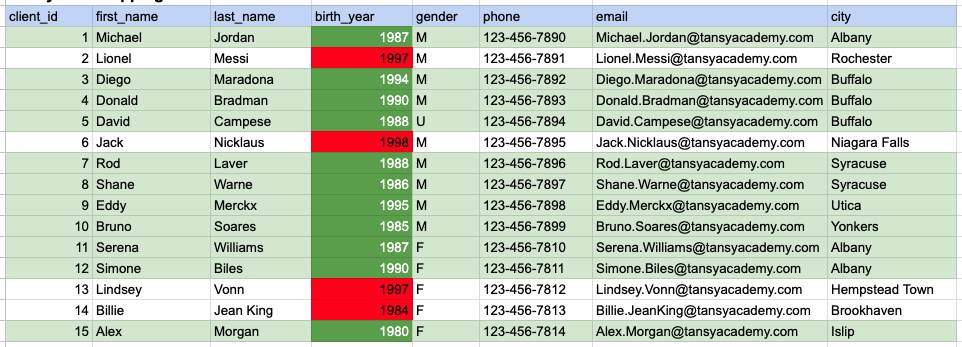
In the provided image, the green color signifies the data that has been selected or satisfies the conditions specified in our query. Data points in red indicate information that does not meet the criteria set by the query.
Example 2 - Query Output
Example 3:
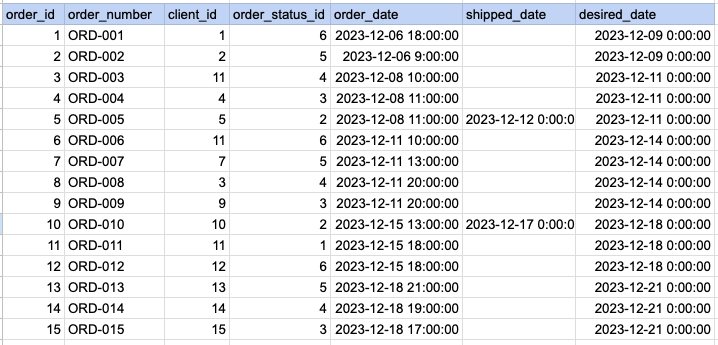
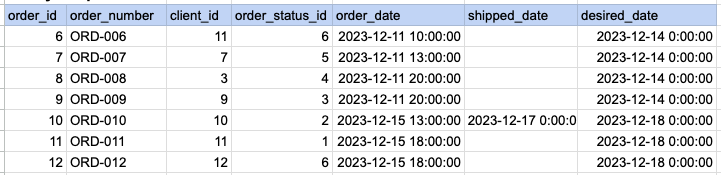
Let's explore the procedure for extracting information from a designated table using the BETWEEN SQL operator on date time data. In this instance, our goal is to fetch order data where the order date falls between Dec 12th and Dec 17th.
Example 3 - Raw data from order table
Example 3 - Query
SELECT * FROM act_order WHERE order_date BETWEEN '2023-12-10' AND '2023-12-17';Example 3 - Query data mapping
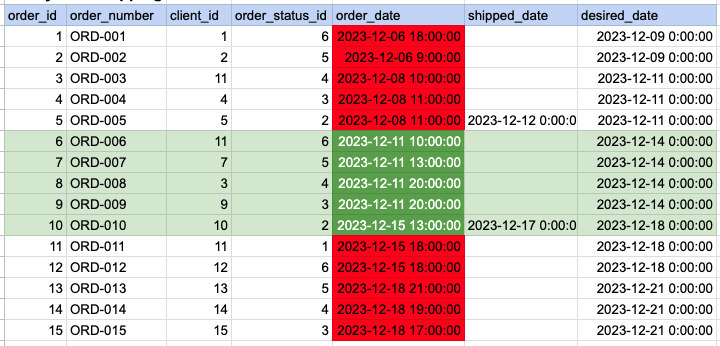
In the provided image, the green color signifies the data that has been selected or satisfies the conditions specified in our query. Data points in red indicate information that does not meet the criteria set by the query.
Example 3 - Query Output
Comments Not Found