
MySQL
SQL Aliases
In MySQL, an alias is a temporary name assigned to a table or column within a query. Aliases are useful for renaming columns or tables to make the output more readable or to simplify the query structure when dealing with complex queries, such as joins. Aliases only exist for the duration of the query and do not affect the actual table or column names in the database.
Here’s an overview of how to use aliases in MySQL, along with examples for new students:
Basic Syntax for Column Aliases:
- Column aliases are used to rename the result of a column in the output of a query. The
ASkeyword is often used but is optional. - Syntax:
SELECT first_name AS 'First Name', last_name AS 'Last Name' FROM employees;- This query renames the
first_nameandlast_namecolumns in the output as "First Name" and "Last Name".
Additional Points:
- You can use aliases without the
ASkeyword, though usingASis more explicit and improves readability. - Aliases can be particularly useful when you have calculated columns.
- Column aliases are used to rename the result of a column in the output of a query. The
Using Aliases for Calculated Columns:
- When performing calculations in your query, aliases make the result more understandable.
- Example:
SELECT salary, salary * 12 AS 'Annual Salary' FROM employees;- This query calculates the annual salary (monthly salary multiplied by 12) and labels the result as "Annual Salary".
Table Aliases:
- Table aliases are used to assign a temporary name to a table, which is helpful in queries that join multiple tables or when the table names are long.
- Example:
SELECT e.first_name, d.department_name FROM employees AS e JOIN departments AS d ON e.department_id = d.department_id;- In this query, the
employeestable is aliased aseanddepartmentsasd, simplifying the references to those tables.
Using Aliases in Joins:
- Aliases are particularly useful in queries that involve self-joins or joining multiple tables.
- Example:
SELECT m.first_name AS 'Manager Name', e.first_name AS 'Employee Name' FROM employees AS e JOIN employees AS m ON e.manager_id = m.employee_id;- This query uses aliases (
efor employees andmfor managers) to retrieve the names of employees and their respective managers from the sameemployeestable.
Aliases with Functions and Aggregates:
- Aliases can also be applied to results from aggregate functions like
COUNT(),SUM(), orAVG(). - Example:
SELECT department_id, COUNT(*) AS 'Employee Count' FROM employees GROUP BY department_id;- This query returns the count of employees in each department and labels the count as "Employee Count".
- Aliases can also be applied to results from aggregate functions like
Handling Aliases with Spaces:
- If your alias contains spaces, it should be enclosed in single or double quotes.
- Example:
SELECT first_name AS 'First Name', last_name AS 'Last Name'
FROM employees;
Using Aliases with Subqueries:
- Aliases can be used to simplify references to subquery results.
- Example:
SELECT e.first_name, e.last_name, sub.avg_salary FROM employees e JOIN (SELECT department_id, AVG(salary) AS avg_salary FROM employees GROUP BY department_id) sub ON e.department_id = sub.department_id;- This query uses an alias (
sub) for the subquery result and references it in the main query to get the average salary per department.
Performance Considerations:
- While aliases do not affect query performance directly, using them can make queries more readable, especially when dealing with long or complex column and table names.
Aliases are a useful tool in SQL that simplify your queries and make the results more readable. They’re especially helpful when dealing with complex joins, calculations, or when the actual column or table names are not meaningful or are too long.
To gain complete access, login with gmail or outlook, no need of signup, click here
Test code
A SQL query employing aliases for columns and tables. Column aliases contribute to improved column name readability, while table aliases serve to abbreviate table names.
SELECT
    a.order_number as "Order Number",
    cast(a.order_date as date) as "Order Date",
    cast(a.order_date as time) as "Order Time",
    b.order_status as "Order Status"
FROM act_order a
INNER JOIN act_lkp_order_status b on b.order_status_id = a.order_status_id ;

-- Oracle TO_CHAR( a.order_date,'HH:MI:SS AM')Example 1:Table and Column ALIAS
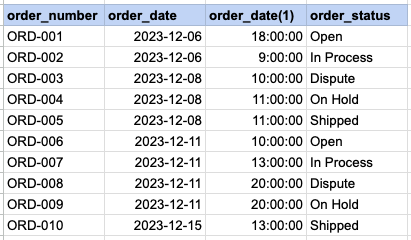
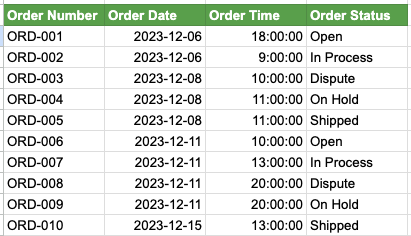
We have two SQL queries for comparison. In Query 1, SQL aliases are not used, leading to less clear output column names, particularly the one extracting time from the order date. In contrast, Query 2 employs SQL aliases, resulting in a more easily understandable column headers, such as Order Time. Additionally, it is evident that lengthy table names are extensively used throughout Query 1, whereas in Query 2, table aliases are employed to abbreviate these table names.'
Example 1 - Query with no alias
SELECT act_order.order_number, cast(act_order.order_date as date), cast(act_order.order_date as time), act_lkp_order_status.order_status FROM act_order INNER JOIN act_lkp_order_status on act_lkp_order_status.order_status_id = act_order.order_status_id ;Example 1 - Query with alias
SELECT a.order_number as 'Order Number', cast(a.order_date as date) as 'Order Date', cast(a.order_date as time) as 'Order Time', b.order_status as 'Order Status' FROM act_order a INNER JOIN act_lkp_order_status b on b.order_status_id = a.order_status_id ; -- Oracle TO_CHAR(a.order_date,'HH:MI:SS AM')Example 1 - Query output with no ALIASES
Example 1 - Query output using ALIASES
Comments Not Found