
MySQL
Data Types
In MySQL, data types define the type of data that can be stored in a column. Choosing the appropriate data type helps ensure efficient storage and processing. For example, employee IDs should be stored as integers, while names and descriptions are stored as text. Below, you’ll find a list of commonly used data types, categorized for different types of information, followed by table definitions for company-related data like employees, departments, and branches.
Common Data Types in MySQL
Below is a list of 30+ data types commonly used in MySQL, organized by their function.
- Numeric Data Types: These data types are used for storing numbers, often for IDs, salaries, and counts.
- INT: Stores whole numbers. Example: Employee ID.
- BIGINT: Stores large integers.
- SMALLINT: Stores smaller integers with less storage.
- TINYINT: Stores very small integers (0-255).
- DECIMAL(p,s): Stores fixed-point numbers. Example: Salaries.
- FLOAT: Stores floating-point numbers for precision-based calculations.
- DOUBLE: A double-precision floating-point number, for more precision than
FLOAT. - BIT: Stores bit values (0 or 1). Example: Active/Inactive status.
- BOOL/BOOLEAN: Alias for
TINYINT(1), stores true/false values.
- String Data Types: These types store text data such as names, emails, and descriptions.
- CHAR(n): Fixed-length strings. Example: Department codes.
- VARCHAR(n): Variable-length strings. Example: Employee names.
- TEXT: Large text fields, often used for descriptions.
- TINYTEXT: Smaller text fields.
- MEDIUMTEXT: Medium-sized text fields.
- LONGTEXT: Very large text fields.
- BINARY(n): Fixed-length binary data.
- VARBINARY(n): Variable-length binary data.
- ENUM: A string object that can have one value chosen from a list. Example: Employee job roles.
- SET: Similar to
ENUMbut allows multiple values from a list.
- Date and Time Data Types: Used to store date and time values, ideal for tracking employee start dates or branch creation dates.
- DATE: Stores only the date (YYYY-MM-DD).
- TIME: Stores time (HH:MM:SS).
- DATETIME: Stores both date and time (YYYY-MM-DD HH:MM:SS).
- TIMESTAMP: Records date and time with time zone info.
- YEAR: Stores a year as a 4-digit value.
- Spatial Data Types: These types are used to store geographical data like branch locations.
- GEOMETRY: Stores geometric data.
- POINT: Represents a point in space (X, Y coordinates).
- LINESTRING: Stores a path consisting of points.
- POLYGON: Stores polygons, often used for mapping areas.
- Other Data Types: Specialized types for unique use cases.
- JSON: Stores JSON-formatted data. Example: Employee attributes.
- BLOB: Stores binary large objects, like files or images.
- TINYBLOB: Smaller binary large objects.
- MEDIUMBLOB: Medium-sized binary large objects.
- LONGBLOB: Large binary large objects.
- UUID: A 128-bit universally unique identifier.
Key Data Types in Company Management Tables
- Company Table
- Stores details about the company
- Common data types used:
CREATE TABLE Company ( CompanyID INT PRIMARY KEY AUTO_INCREMENT, CompanyName VARCHAR(100) NOT NULL, FoundedDate DATE, Headquarters VARCHAR(255) ); - Employees Table
- This table holds employee information
- Common data types used:
CREATE TABLE Employees ( EmployeeID INT PRIMARY KEY AUTO_INCREMENT, FirstName VARCHAR(50) NOT NULL, LastName VARCHAR(50) NOT NULL, DepartmentID INT, Salary DECIMAL(10, 2), HireDate DATE ); - Departments Table
- Stores department details like department name and codes.
- Common data types used:
CREATE TABLE Departments ( DepartmentID INT PRIMARY KEY AUTO_INCREMENT, DepartmentName VARCHAR(100) NOT NULL, DepartmentCode CHAR(5) NOT NULL ); - Branches Table
- Stores details of branch locations, including geographical data.
- Common data types used:
CREATE TABLE Branches (
  BranchID INT PRIMARY KEY AUTO_INCREMENT,
  BranchName VARCHAR(100) NOT NULL,
  Location POINT
);
Complete Code Sample
Here’s the combined SQL code for defining Company, Employees, Departments, and Branches tables with appropriate data types.
CREATE TABLE Company (
  CompanyID INT PRIMARY KEY AUTO_INCREMENT,
  CompanyName VARCHAR(100) NOT NULL,
  FoundedDate DATE,
  Headquarters VARCHAR(255)
);

CREATE TABLE Employees (
  EmployeeID INT PRIMARY KEY AUTO_INCREMENT,
  FirstName VARCHAR(50) NOT NULL,
  LastName VARCHAR(50) NOT NULL,
  DepartmentID INT,
  Salary DECIMAL(10, 2),
  HireDate DATE
);

CREATE TABLE Departments (
  DepartmentID INT PRIMARY KEY AUTO_INCREMENT,
  DepartmentName VARCHAR(100) NOT NULL,
  DepartmentCode CHAR(5) NOT NULL
);

CREATE TABLE Branches (
  BranchID INT PRIMARY KEY AUTO_INCREMENT,
  BranchName VARCHAR(100) NOT NULL,
  Location POINT
);
This content provides an overview of 30+ MySQL data types, ensuring that each column in the Company, Employees, Departments, and Branches tables can store the right kind of data.
Sample implementation of MySQL data types
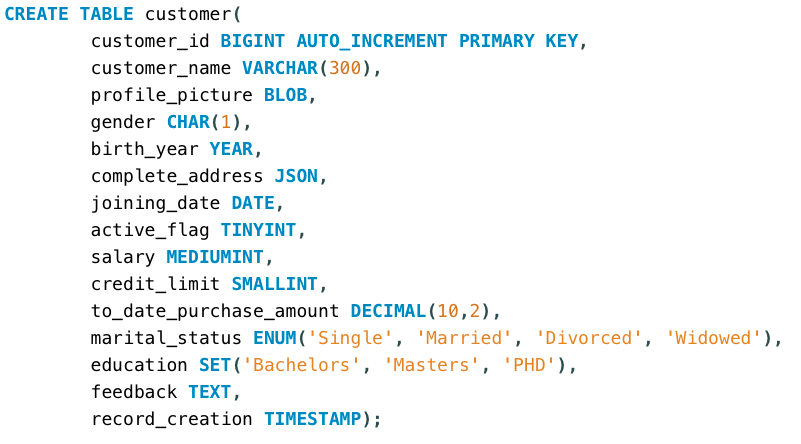
CREATE TABLE customer(
customer_id BIGINT AUTO_INCREMENT PRIMARY KEY,
customer_name VARCHAR(300),
profile_picture BLOB,
gender CHAR(1),
birth_year YEAR,
complete_address JSON,
joining_date DATE,
active_flag TINYINT,
salary MEDIUMINT,
credit_limit SMALLINT,
to_date_purchase_amount DECIMAL(10,2),
marital_status ENUM('Single', 'Married', 'Divorced', 'Widowed'),
education SET('Bachelors', 'Masters', 'PHD'),
feedback TEXT,
record_creation TIMESTAMP);
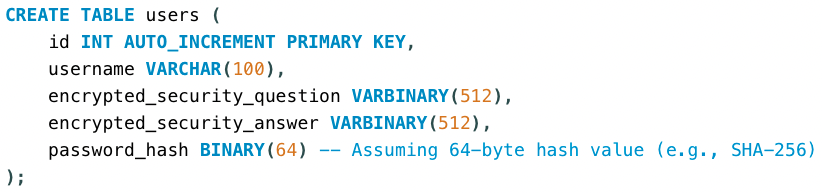
CREATE TABLE users (
id INT AUTO_INCREMENT PRIMARY KEY,
username VARCHAR(100),
encrypted_security_question VARBINARY(512),
encrypted_security_answer VARBINARY(512),
password_hash BINARY(64) -- Assuming 64-byte hash value (e.g., SHA-256)
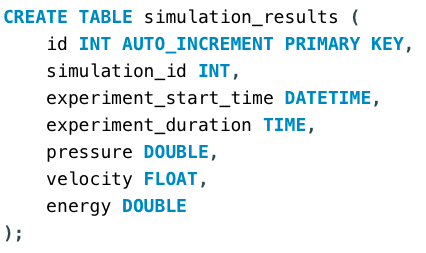
);CREATE TABLE simulation_results (
id INT AUTO_INCREMENT PRIMARY KEY,
simulation_id INT,
experiment_start_time DATETIME,
experiment_duration TIME,
pressure DOUBLE,
velocity FLOAT,
energy DOUBLE
);To gain complete access, login with gmail or outlook, no need of signup, click here

Comments Not Found