
MySQL
DISTINCT
In MySQL, the DISTINCT keyword is part of the Data Query Language (DQL) and is used to return only unique (distinct) values from a column or set of columns in a query. This is particularly useful when you want to eliminate duplicate data from your result set and only display unique records. By applying DISTINCT, you can get a clearer view of the distinct values in a dataset, helping in reporting, analysis, and decision-making.
Here’s an overview of how to use the DISTINCT keyword along with examples and useful tips for new students:
Basic Usage of
DISTINCT:- The
DISTINCTkeyword eliminates duplicate rows from the result set of a query. - Syntax:
SELECT DISTINCT department_id FROM employees;- This query returns the distinct department IDs from the
employeestable, i.e., it will only show each department ID once, even if multiple employees belong to the same department.
- The
Using
DISTINCTon Multiple Columns:- You can apply
DISTINCTto multiple columns to get unique combinations of values. - Example:
SELECT DISTINCT department_id, job_title FROM employees;- This query will return distinct pairs of
department_idandjob_title. A combination of the same department and job title will appear only once.
- You can apply
Combining
DISTINCTwith Other Clauses:- You can combine
DISTINCTwith other clauses likeWHERE,ORDER BY, andLIMIT. - Example:
SELECT DISTINCT branch_id FROM employees WHERE salary > 60000 ORDER BY branch_id;- This query returns distinct
branch_idvalues from employees who earn more than 60,000, sorted in ascending order.
- You can combine
Counting Distinct Values:
- You can use the
COUNT()function withDISTINCTto count the number of unique values in a column. - Example:
SELECT COUNT(DISTINCT department_id) FROM employees;- This query returns the number of distinct departments in the
employeestable.
- You can use the
Performance Considerations:
- Using
DISTINCTcan sometimes slow down a query if applied to large datasets, as the database engine has to remove duplicates. Be mindful of performance when using it in complex queries with large tables.
- Using
DISTINCTand NULL Values:DISTINCTtreatsNULLvalues as equal, meaning if a column contains multipleNULLvalues, they will be treated as a single distinct value.- Example:
SELECT DISTINCT manager_id FROM employees;- If multiple rows have a
NULLmanager_id, only oneNULLwill be returned.
These examples illustrate how the DISTINCT keyword can be a powerful tool for filtering out duplicate rows and obtaining unique values in your query results. It is often used in reporting, analytics, and when trying to understand the variety of values in specific columns of a table.
To gain complete access, login with gmail or outlook, no need of signup, click here

Test code
Select distinct/unique state names from clients table.
SELECT DISTINCT state
FROM org_client
ORDER BY state;Select distinct/unique city names from clients table.
SELECT DISTINCT city
FROM org_client
ORDER BY city;Applying DISTINCT to multiple columns, retrieve unique combinations of city and state names from the clients table. City Springfield appears twice with different states, such as Springfield in IL state and with Springfield in OR state.
SELECT DISTINCT city, state
FROM org_client
ORDER BY city, state;Retrieve unique order dates from the orders table using the SELECT DISTINCT statement. The provided query utilizes the DATE() function to truncate the time part, ensuring that only distinct dates are displayed. If the time part is not removed, multiple rows for same date may appear in the result set.
-- MySQL and Postgres
SELECT DISTINCT DATE(order_date)
FROM act_order
ORDER BY DATE(order_date);

-- Oracle and MS SQL Server
SELECT CAST(order_date AS DATE) FROM act_order ORDER BY CAST(order_date AS DATE);Retrieve unique product type IDs from the products table using the SELECT DISTINCT statement against numeric values.
SELECT DISTINCT product_type_id
FROM prd_product
ORDER BY product_type_id;Example 1:
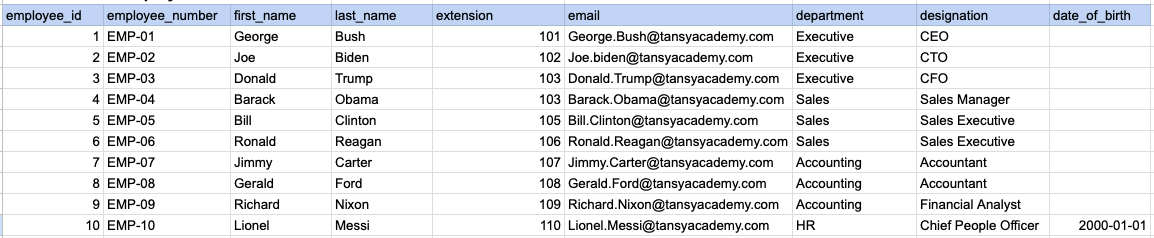
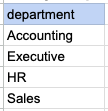
Let's understand the process of extracting data from a specified table using DISTINCT sql clause. In this case, we aim to retrieve distinct/unique department names from the employee table.
Example 1 - Raw data from employee table
Example 1 - Query
SELECT DISTINCT department FROM org_employee ORDER BY department;Example 1 - Query data mapping
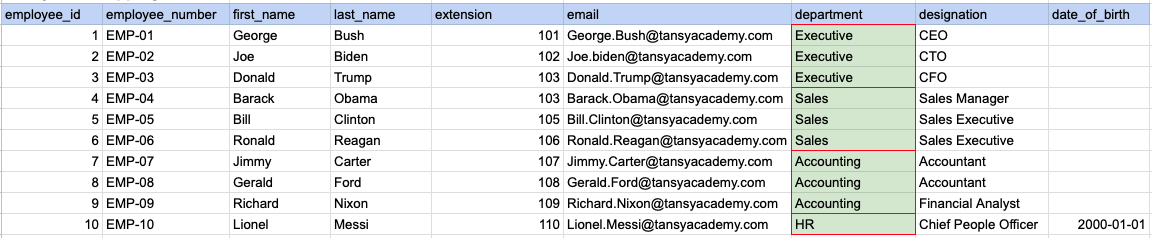
In the image above, the green color indicates the data that has been chosen or meets the criteria for our query.
Example 1 - Query Output
Example 2:
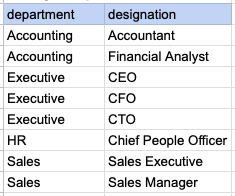
Let's understand the process of extracting multiple columns from a specified table using DISTINCT sql clause. Here, a row will be considered as distinct if all selected columns together form a unique combination.
Example 2 - Raw data from employee table
Example 2 - Query
SELECT DISTINCT department, designation FROM org_employee ORDER BY department, designation ;Example 2 - Query data mapping
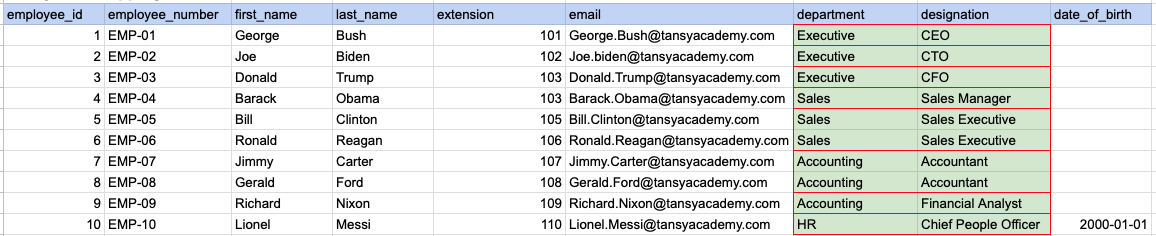
In the image above, the green color indicates the data that has been chosen or meets the criteria for our query.
Example 2 - Query Output
Example 3:
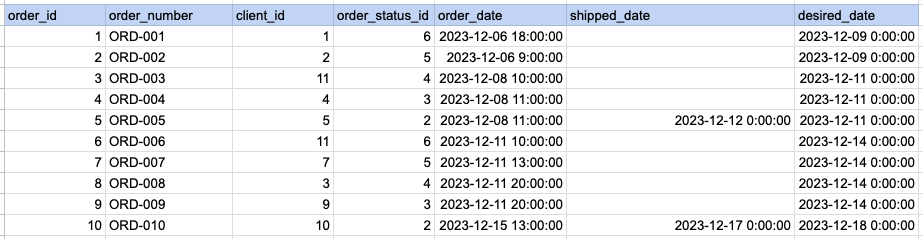
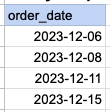
Let's understand the process of extracting order date using DISTINCT sql clause on timestamp column. Here we are trying to get distinct order dates.
Example 3 - Raw data from order table
Example 3 - Query
SELECT DISTINCT DATE(order_date) as order_date FROM act_order ORDER BY DATE(order_date);Example 3 - Step 1 Extract date from order date and time column.
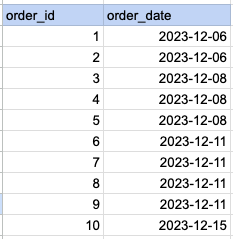
As step 1 first we have to extract date part alone from date and time.
Example 3 - Query data mapping
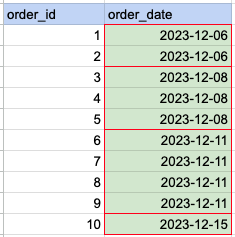
In the image above, the green color indicates the data that has been chosen or meets the criteria for our query.
Example 3 - Query Output
Comments Not Found