
MySQL
LIKE Operator
In MySQL, the LIKE operator is used in the Data Query Language (DQL) to perform pattern matching on string values. This operator allows you to search for a specified pattern in a column, using wildcards to define flexible search conditions. The LIKE operator is particularly useful when you want to find values that contain, begin with, or end with specific characters.
Here’s an overview of how to use the LIKE operator in MySQL, along with examples for new students:
Basic Syntax of
LIKE:- The
LIKEoperator is used withWHEREto search for a specified pattern in a string column. - Syntax:
SELECT * FROM employees WHERE first_name LIKE 'J%';- This query returns all employees whose first names start with the letter "J". The
%wildcard represents any sequence of characters.
- The
Using
%Wildcard:- The
%wildcard is used to match any number of characters, including zero characters. You can use%before, after, or in between characters in the pattern. - Example:
SELECT * FROM employees WHERE last_name LIKE '%son';- This query returns all employees whose last names end with "son", such as "Johnson" or "Wilson".
- The
Using
_Wildcard:- The
_wildcard matches exactly one character. This is useful for finding patterns where a specific number of characters is known. - Example:
SELECT * FROM employees WHERE department_name LIKE 'R_n%';- This query returns departments where the name starts with "R", followed by any single character, and then "n". For example, it would match "Runway" or "Rentals".
- The
Case Sensitivity of
LIKE:- By default,
LIKEis case-insensitive in MySQL. This means it will match patterns regardless of whether they are uppercase or lowercase. - Example:
SELECT * FROM employees WHERE last_name LIKE 'smi%';- This query returns rows where the last name starts with "smi", matching "Smith", "Smit", etc.
- By default,
Using
NOT LIKE:- The
NOT LIKEoperator is used to exclude rows that match a specific pattern. - Example:
SELECT * FROM employees WHERE first_name NOT LIKE 'A%';- This query returns all employees whose first names do not start with the letter "A".
- The
Combining
LIKEwith Other Conditions:- You can combine
LIKEwith other conditions, such asANDorOR, to create more complex queries. - Example:
SELECT * FROM employees WHERE first_name LIKE 'J%' AND department_id = 2;- This query returns employees whose first names start with "J" and who work in department 2.
- You can combine
Using
LIKEin Joins:- You can also use
LIKEin queries involvingJOINoperations. - Example:
SELECT e.first_name, d.department_name FROM employees e JOIN departments d ON e.department_id = d.department_id WHERE d.department_name LIKE 'Mark%';- This query returns employees working in departments whose names start with "Mark", such as "Marketing".
- You can also use
Performance Considerations:
- Using
LIKEwith wildcards, especially at the beginning of the pattern (%something), can slow down query performance on large datasets. Indexing can help optimize performance. - Example:
SELECT * FROM employees WHERE email LIKE '%@company.com';- This query retrieves employees with email addresses ending in "@company.com". However, this type of query can be slow if the column is not indexed.
- Using
The LIKE operator is a powerful tool for performing flexible searches in MySQL. Understanding how to use it effectively, along with wildcards like % and _, allows you to query data that matches specific patterns, making it an essential tool for text-based searches.
To gain complete access, login with gmail or outlook, no need of signup, click here

Test code
Retrieve entries for clients with last names that begin with 'Me%', where '%' signifies the possibility of zero or more characters following 'Me'.
SELECT *
FROM org_client
WHERE last_name LIKE 'Me%';Fetch records for clients whose first names conclude with '%ne'.
SELECT *
FROM org_client
WHERE first_name LIKE '%ne';Fetch records for clients with the second character in their last name being 'a'.
SELECT *
FROM org_client
WHERE last_name LIKE '_a%';Fetch records for clients with last names that include 'an' at any position. To ensure compatibility and avoid potential case-sensitive database issues, we will convert the entire last name column to lowercase before making the comparison.
SELECT *
FROM org_client
WHERE lower(last_name) LIKE '%an%';Fetch records for clients whose last names have 'i' as the second character and 's' as the last character.
SELECT *
FROM org_client
WHERE last_name LIKE '_i%s';Retrieve entries for clients with first names that begin with 'D' and end with 'd'.
SELECT *
FROM org_client
WHERE first_name LIKE 'D%d';Example 1:
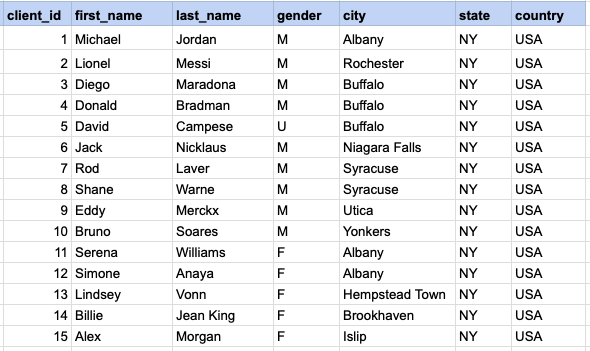
Let's delve into the process of extracting data from a specified table using the SQL LIKE operator. Retrieve entries for clients with last names that begin with 'Me%', where '%' signifies the possibility of zero or more characters following 'Me'.
Example 1 - Raw data from client table
Example 1 - Query
SELECT * FROM org_client WHERE last_name LIKE 'Me%';Example 1 - Query data mapping
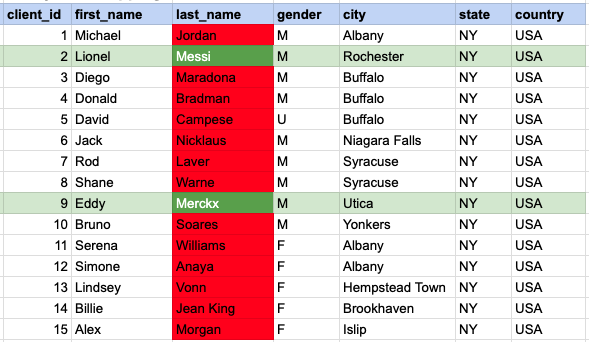
In the provided image, the green color signifies the data that has been selected or satisfies the conditions specified in our query. Data points in red indicate information that does not meet the criteria set by the query.
Example 1 - Query Output

Example 2:
Fetch records for clients whose first names conclude with '%ne'.
Example 2 - Query
SELECT * FROM org_client WHERE first_name LIKE '%ne';Example 2 - Query data mapping
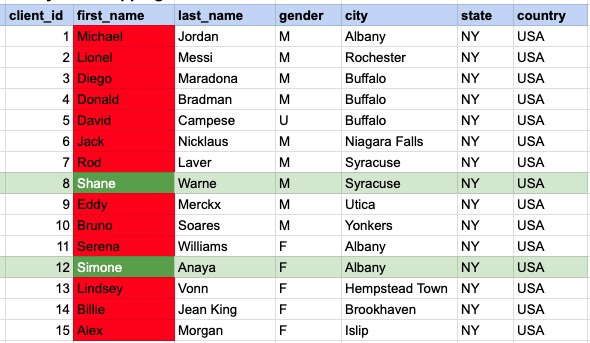
In the provided image, the green color signifies the data that has been selected or satisfies the conditions specified in our query. Data points in red indicate information that does not meet the criteria set by the query.
Example 2 - Query Output

Example 3:
Fetch records for clients with the second character in their last name being 'a'.
Example 3 - Query
SELECT * FROM org_client WHERE last_name LIKE '_a%';Example 3 - Query data mapping
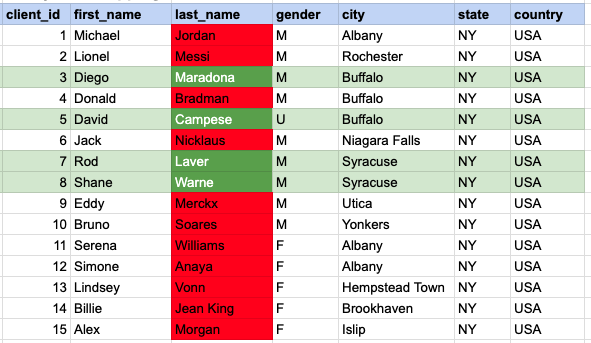
In the provided image, the green color signifies the data that has been selected or satisfies the conditions specified in our query. Data points in red indicate information that does not meet the criteria set by the query.
Example 3 - Query Output

Example 4:
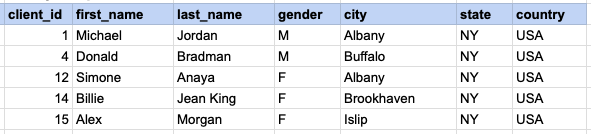
Fetch records for clients with last names that include 'an' at any position. To ensure compatibility and avoid potential case-sensitive database issues, we will convert the entire last name column to lowercase before making the comparison.
Example 4 - Query
SELECT * FROM org_client WHERE lower(last_name) LIKE '%an%';Example 4 - Query data mapping
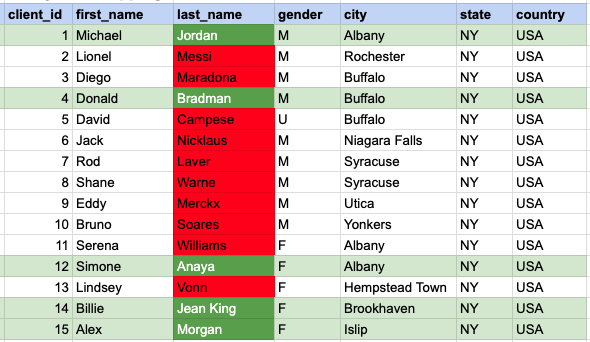
In the provided image, the green color signifies the data that has been selected or satisfies the conditions specified in our query. Data points in red indicate information that does not meet the criteria set by the query.
Example 4 - Query Output
Example 5:
Fetch records for clients whose last names have 'i' as the second character and 's' as the last character.
Example 5 - Query
SELECT * FROM org_client WHERE last_name LIKE '_i%s';Example 5 - Query data mapping
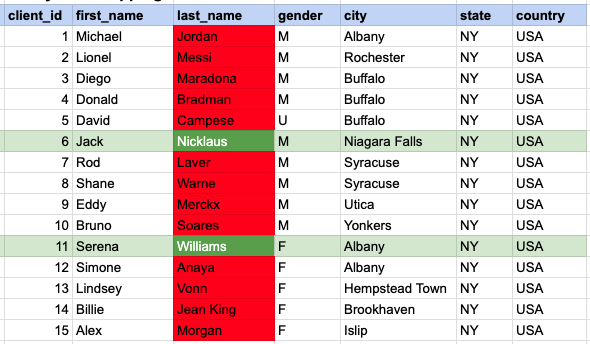
In the provided image, the green color signifies the data that has been selected or satisfies the conditions specified in our query. Data points in red indicate information that does not meet the criteria set by the query.
Example 5 - Query Output

Example 6:
Retrieve entries for clients with first names that begin with 'D' and end with 'd'.
Example 6 - Query
SELECT * FROM org_client WHERE first_name LIKE 'D%d';Example 6 - Query data mapping
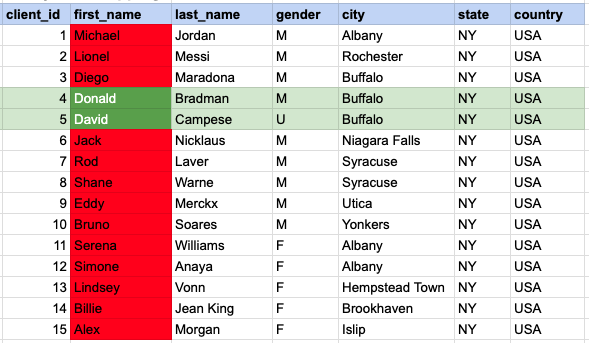
In the provided image, the green color signifies the data that has been selected or satisfies the conditions specified in our query. Data points in red indicate information that does not meet the criteria set by the query.
Example 6 - Query Output

Comments Not Found