
MySQL
COALESCE
In MySQL, the COALESCE function is used to return the first non-NULL value from a list of expressions. It’s particularly useful when you’re dealing with fields that may contain NULL values and you want to ensure that your query returns a meaningful result. If all expressions evaluate to NULL, COALESCE will return NULL.
Here’s how the COALESCE function works, along with examples for new students:
Basic Syntax of
COALESCE():- The
COALESCE()function takes two or more arguments and returns the first non-NULLvalue. - Syntax:
SELECT COALESCE(NULL, 'Fallback Value') AS result;- This query returns
'Fallback Value'because the first argument isNULL.
- The
Using
COALESCE()to HandleNULLValues:- You can use
COALESCE()to provide a default value when a column containsNULL. - Example:
SELECT first_name, last_name, COALESCE(salary, 0) AS salary FROM employees;- This query replaces
NULLvalues in thesalarycolumn with0.
- You can use
Handling Multiple Columns with
COALESCE():- You can use
COALESCE()to choose the first non-NULLvalue from multiple columns. - Example:
SELECT first_name, COALESCE(phone_number, email, 'No Contact') AS contact_info FROM employees;- This query retrieves the phone number, but if it’s
NULL, it retrieves the email. If both areNULL, it returns'No Contact'.
- You can use
Using
COALESCE()with Calculations:- You can apply
COALESCE()to numeric fields, ensuring that your calculations don’t fail due toNULLvalues. - Example:
SELECT first_name, last_name, COALESCE(bonus, 0) + salary AS total_compensation FROM employees;- This query calculates total compensation, ensuring that the
bonusis treated as0if it’sNULL.
- You can apply
Replacing
NULLin Concatenations:COALESCE()can be useful when concatenating strings that might containNULLvalues.- Example:
SELECT CONCAT(first_name, ' ', COALESCE(middle_name, ''), ' ', last_name) AS full_name FROM employees;- This query ensures that the
middle_nameis treated as an empty string if it’sNULL, so theCONCATfunction still works.
Using
COALESCE()with Subqueries:- You can use
COALESCE()with subqueries to provide default values when subqueries returnNULL. - Example:
SELECT first_name, last_name, COALESCE((SELECT bonus FROM bonuses WHERE employee_id = e.employee_id), 0) AS bonus FROM employees e;- This query assigns a default bonus of
0if the subquery does not return a value.
- You can use
Using
COALESCE()inORDER BY:- You can use
COALESCE()in theORDER BYclause to ensure thatNULLvalues don’t affect the sorting of results. - Example:
SELECT first_name, last_name, salary FROM employees ORDER BY COALESCE(salary, 0) DESC;- This query sorts employees by salary in descending order, treating
NULLsalaries as0.
- You can use
COALESCE()with Multiple Arguments:- You can pass multiple arguments to
COALESCE()to check several columns or expressions in order. - Example:
SELECT first_name, COALESCE(phone_number, email, address, 'No Contact Info') AS contact_info FROM employees;- This query checks for the first non-
NULLvalue in thephone_number,email, andaddresscolumns.
- You can pass multiple arguments to
Performance Considerations:
- While
COALESCE()is a powerful function, excessive use in large datasets may impact performance. Be mindful of its application in performance-critical queries.
- While
The COALESCE function is an excellent tool for handling NULL values and ensuring that your query returns usable results even when some data is missing. It’s a versatile function, allowing you to provide fallback values and manage NULL values gracefully in your queries.
To gain complete access, login with gmail or outlook, no need of signup, click here

Test code
Replace descriptions with the string 'Not provided' wherever the description is null.
SELECT product_id, product_name, COALESCE(description,'Not Provided')
FROM prd_product ORDER BY product_id;TheCOALESCEfunction in SQL returns the first non-null expression among its arguments. This function is useful for handling cases where data may be missing and a default value is needed.
Syntax of COALESCE
COALESCE(expression1, expression2, ..., expressionN)- The function evaluates the expressions in order.
- It returns the first non-null expression.
- If all expressions are null,
COALESCEreturns null.
Example Usage of COALESCE
Here's an SQL query example usingCOALESCE:
SELECT COALESCE(address, phone, email, 'Unknown') AS contact_info FROM customers;This example attempts to find the first non-null contact information for each customer and defaults to 'Unknown' if all are null.
COALESCE with LEFT JOIN
COALESCEcan be used withLEFT JOINto provide a default value when the joined table has no match:
SELECT customers.name, COALESCE(orders.order_number, 'No Orders') as order_info
FROM customers
LEFT JOIN orders ON customers.customer_id = orders.customer_id;
In this scenario, if a customer has no orders, 'No Orders' is returned instead of null.
COALESCE EXAMPLE
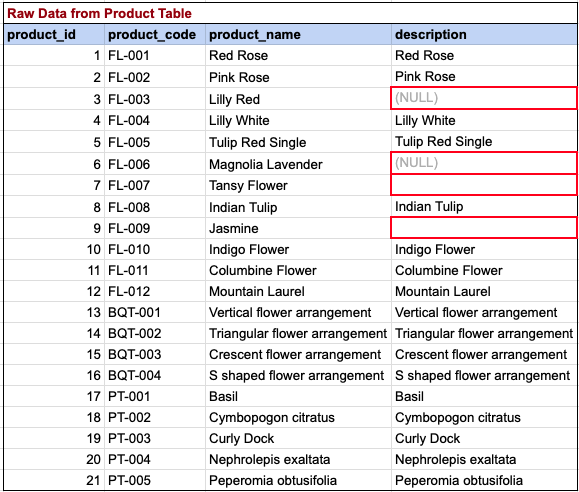
Here, we are attempting to substitute descriptions with the string 'Not provided' in cases where the description is null.
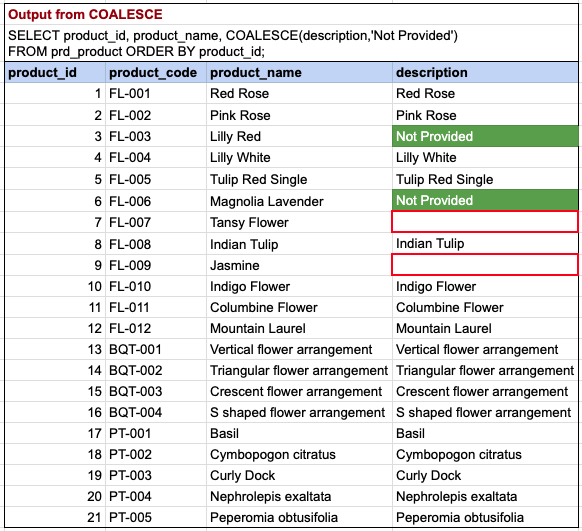
Please note that the query has successfully replaced null descriptions for product IDs 3 and 6 with the desired string 'Not Provided'. However, descriptions for product IDs 7 and 9 remain as empty strings. It's important to differentiate between an empty string and NULL. Our query was designed to replace NULL values, not empty strings.
Comments Not Found