
MySQL
CASE statement
In MySQL, the CASE statement is used to add conditional logic to your SQL queries. It functions like an IF-THEN-ELSE structure in programming languages, allowing you to return different values based on specific conditions. The CASE statement is particularly useful when you want to transform or categorize data within your query results. It can be used within SELECT, UPDATE, and ORDER BY statements.
Here’s how to use the CASE statement in MySQL, with examples and tips for new students:
Basic Syntax of the
CASEStatement:- The
CASEstatement evaluates conditions in order and returns the first matching result. If no condition is met, an optionalELSEclause can define a default value. - Syntax:
SELECT first_name, last_name, CASE WHEN salary > 50000 THEN 'High Salary' WHEN salary BETWEEN 30000 AND 50000 THEN 'Medium Salary' ELSE 'Low Salary' END AS salary_category FROM employees;- This query categorizes employees based on their salary into "High Salary", "Medium Salary", or "Low Salary".
- The
Using
CASEwith Multiple Conditions:- You can include multiple conditions in the
CASEstatement to handle various scenarios. - Example:
SELECT employee_id, first_name, CASE WHEN department_id = 1 THEN 'HR' WHEN department_id = 2 THEN 'Engineering' ELSE 'Other' END AS department_name FROM employees;- This query assigns human-readable department names based on the
department_idof each employee.
- You can include multiple conditions in the
Using
CASEwithELSE:- The
ELSEpart of theCASEstatement is optional but useful to handle all cases where no condition is met. - Example:
SELECT first_name, last_name, CASE WHEN hire_date > '2023-01-01' THEN 'New Hire' ELSE 'Existing Employee' END AS employee_status FROM employees;- This query categorizes employees as "New Hire" or "Existing Employee" based on their hire date.
- The
Using
CASEinORDER BY:- The
CASEstatement can be used withinORDER BYto customize the sorting logic. - Example:
SELECT first_name, last_name, salary FROM employees ORDER BY CASE WHEN salary > 50000 THEN 1 WHEN salary BETWEEN 30000 AND 50000 THEN 2 ELSE 3 END;- This query sorts employees based on salary categories, where high salaries are prioritized in the ordering.
- The
Using
CASEwith Aggregate Functions:- You can combine
CASEwith aggregate functions likeSUM(),COUNT(), andAVG()to perform conditional aggregations. - Example:
SELECT department_id, SUM(CASE WHEN salary > 50000 THEN 1 ELSE 0 END) AS high_salary_count FROM employees GROUP BY department_id;- This query counts how many employees in each department have a salary greater than 50,000.
- You can combine
Nesting
CASEStatements:CASEstatements can be nested inside each other to handle more complex conditional logic.- Example:
SELECT first_name, last_name, CASE WHEN salary > 50000 THEN CASE WHEN hire_date < '2020-01-01' THEN 'Senior High Salary' ELSE 'Junior High Salary' END ELSE 'Other' END AS salary_category FROM employees;- This query categorizes employees with high salaries as either "Senior" or "Junior" based on their hire date.
Performance Considerations:
- The
CASEstatement is evaluated row by row, so it can impact performance on large datasets. For better performance, ensure that conditions in theCASEstatement can be optimized with indexes if possible.
- The
Handling
NULLValues inCASE:- You can include
NULLchecks within aCASEstatement to handle missing data. - Example:
SELECT first_name, last_name, CASE WHEN manager_id IS NULL THEN 'No Manager' ELSE 'Has Manager' END AS manager_status FROM employees;- This query checks whether an employee has a manager or not.
- You can include
The CASE statement is a powerful tool in MySQL that allows you to introduce conditional logic directly into your SQL queries. It’s flexible and can be used in various contexts, including SELECT, ORDER BY, and aggregation, giving you more control over your data transformations.
To gain complete access, login with gmail or outlook, no need of signup, click here

Test code
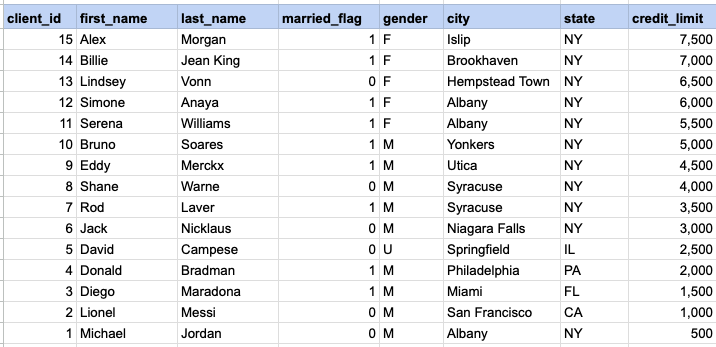
Organize customers based on their credit limit. The client category is a temporary column created with the CASE statement as part of the SELECT statement and is not present in the database table.
SELECT client_id,	first_name,	last_name
    married_flag ,gender ,city ,state ,credit_limit,
    CASE WHEN credit_limit >= 7000 then 'Platinum'
		 WHEN credit_limit >= 5000 then 'Gold'
		 ELSE 'Silver'
  END  client_category
FROM org_client
ORDER BY credit_limit DESC;Translate gender abbreviations into full descriptive text.
SELECT client_id,	first_name,	last_name
    CASE
		WHEN gender = 'F' then 'Female'
		WHEN gender = 'M' then 'Male'
		ELSE 'No Data'
	END as gender
FROM org_client;Generate counts for categories using a CASE statement.
SELECT COUNT(CASE WHEN gender = 'F' then 1 END) as female_count,
COUNT(CASE WHEN gender = 'M' then 1 END) as male_count
FROM org_client
;Example 1:
Organize customers based on their credit limit. The client category is a temporary column created with the CASE statement as part of the SELECT statement and is not present in the database table.
Example 1 - Raw data from client table
Example 1 - CASE statement
SELECT client_id, first_name, last_name, married_flag ,gender ,city ,state ,credit_limit, CASE WHEN credit_limit >= 7000 then 'Platinum' WHEN credit_limit >= 5000 then 'Gold' ELSE 'Silver' END client_category FROM org_client ORDER BY credit_limit DESCExample 1 - Query data mapping and final output
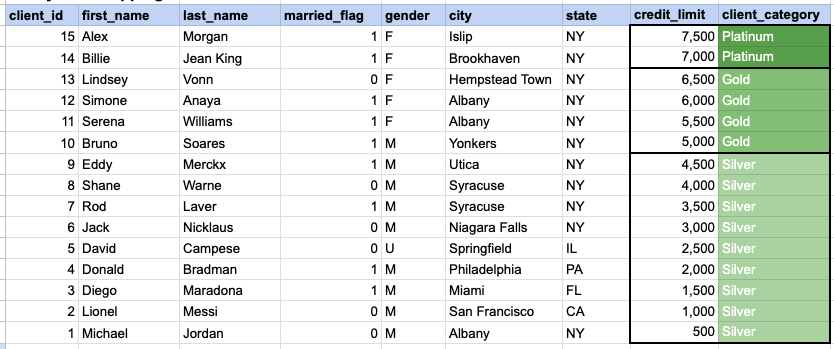
In the provided image, the client category is a temporary column generated as part of the SELECT statement. This column does not exist in the database, and its values are generated based on the conditions specified in the CASE statement.
Comments Not Found