
MySQL
CONCAT
The CONCAT function in MySQL is part of the Data Query Language (DQL) and is used to combine two or more strings into a single string. This function is highly useful when you want to merge values from different columns or add additional text to a result set. It is commonly used in reports, displaying full names, and formatting output that combines data from multiple fields.
Here’s how to use the CONCAT function, along with examples and useful tips for new students:
Basic Syntax of
CONCAT:- The
CONCATfunction can combine two or more strings or column values into a single result. - Syntax:
SELECT CONCAT(first_name, ' ', last_name) AS full_name FROM employees;- This query combines the
first_nameandlast_namecolumns into afull_namecolumn, with a space between the two names.
- The
Concatenating Multiple Columns:
- You can concatenate more than two columns or values by simply adding them to the
CONCATfunction. - Example:
SELECT CONCAT(first_name, ' ', last_name, ' - ', job_title) AS employee_info FROM employees;- This will return a string that combines the employee's first name, last name, and job title, with appropriate spaces and dashes for clarity.
- You can concatenate more than two columns or values by simply adding them to the
Using
CONCATwith Static Text:- You can include static text within the
CONCATfunction to format your output. - Example:
SELECT CONCAT('Employee: ', first_name, ' ', last_name) AS employee_label FROM employees;- This query prepends the string "Employee: " before the full name of each employee.
- You can include static text within the
Handling NULL Values in
CONCAT:- If any of the values passed to
CONCATisNULL, the entire result will beNULL. To avoid this, you can useCOALESCEto replaceNULLwith an empty string. - Example:
SELECT CONCAT(COALESCE(first_name, ''), ' ', COALESCE(last_name, '')) AS full_name FROM employees;- This query ensures that if
first_nameorlast_nameisNULL, it will be treated as an empty string, preventing the entire result from becomingNULL.
- If any of the values passed to
Combining
CONCATwith Other Functions:- You can use
CONCATin combination with other SQL functions likeUPPER()orLOWER()to format the concatenated string. - Example:
SELECT CONCAT(UPPER(first_name), ' ', LOWER(last_name)) AS formatted_name FROM employees;- This query converts the
first_nameto uppercase and thelast_nameto lowercase in the final concatenated string.
- You can use
Using
CONCAT_WSfor Custom Delimiters:- If you want to concatenate values with a specific delimiter, you can use
CONCAT_WS(Concatenate With Separator) instead ofCONCAT. - Example:
SELECT CONCAT_WS('-', first_name, last_name, department_id) AS employee_info FROM employees;- This query combines the first name, last name, and department ID with a hyphen (
-) separating the values.
- If you want to concatenate values with a specific delimiter, you can use
Performance Considerations:
- Using
CONCATis efficient for string concatenation, but make sure to handle large datasets carefully, especially if performing complex concatenations or including many columns.
- Using
The CONCAT function is a versatile tool for combining values in MySQL queries. Whether you’re formatting output, displaying full names, or merging various data points, CONCAT can help you organize and present your data more effectively.
To gain complete access, login with gmail or outlook, no need of signup, click here

Test code
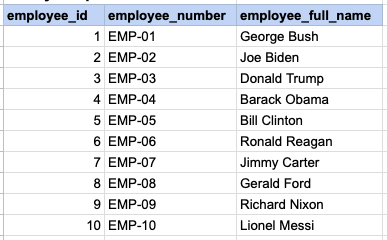
Combine the first name and last name to create the full name of the employee.
--MySQL
SELECT
    employee_id, employee_number,
    concat(first_name , '  ' , last_name) as employee_full_name
FROM org_employee;

-- Postgres, Oracle and MS SQL
SELECT
    employee_id, employee_number,
    first_name || ' ' || last_name as employee_full_name
FROM org_employee;SQL CONCAT, combine multiple columns
Example 1 - Raw data from employee table
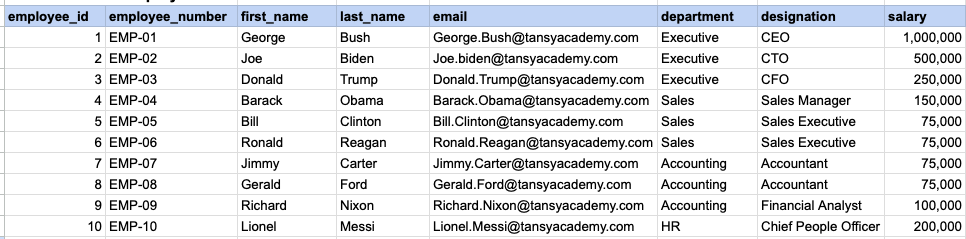
Example 1 - CONCAT employee first and last name
SELECT employee_id, employee_number, concat(first_name, ' ', last_name) as employee_full_name FROM org_employee;Example 1 - Query data mapping
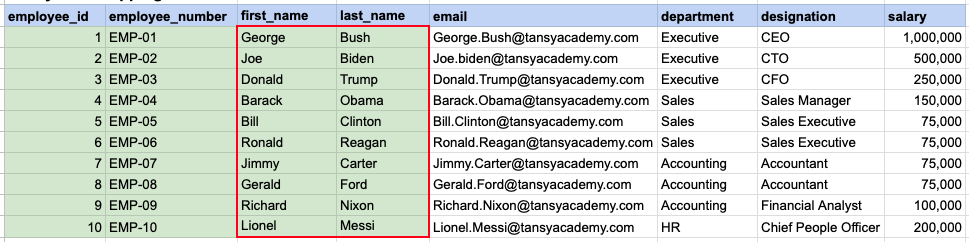
The contents of the first_name and last_name columns will be merged to create a unified column, separated by a space.
Example 1 - Query Output
Example 2 - Raw data from client table
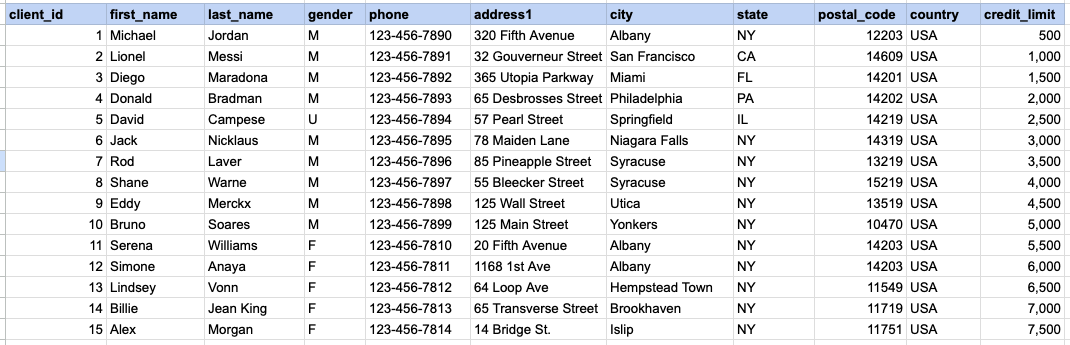
Example 2 - CONCAT client name and address
SELECT client_id, first_name || ' ' || last_name as client_full_name, address1 || ', ' || city || ', ' || state || ' ' || postal_code as client_address FROM org_client;Example 2 - Query data mapping
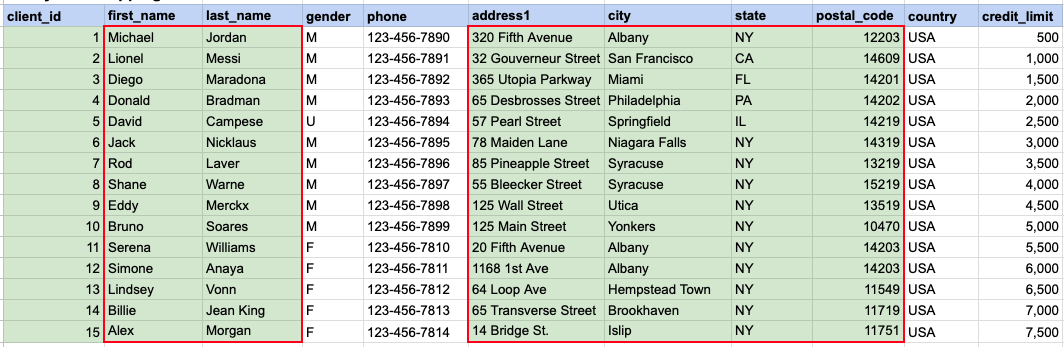
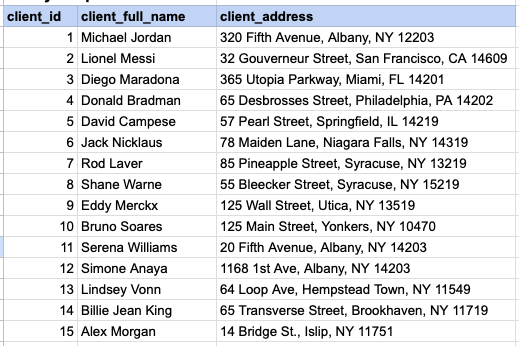
The first_name and last_name columns will be amalgamated to generate a consolidated column named 'client full name', with a space as the separator. Subsequently, the address, city, state, and zip will be amalgamated to produce the client's address.
Example 2 - Query Output
Comments Not Found