
MySQL
LIMIT
The LIMIT clause in MySQL is part of the Data Query Language (DQL) and is used to restrict the number of rows returned by a query. It is especially useful when working with large datasets, allowing you to retrieve a subset of rows to review, analyze, or display in batches. By controlling the result set size, you can optimize both performance and usability, particularly in applications displaying data.
Here’s a breakdown of how to use the LIMIT clause along with some useful tips for new students:
Basic Usage of
LIMIT:- The
LIMITclause is used to specify the maximum number of rows returned by a query. - Syntax:
SELECT * FROM employees LIMIT 5;- This query will return only the first 5 rows from the
employeestable.
- The
Using
LIMITwith Offset:- You can combine
LIMITwith an offset to skip a specified number of rows and then fetch the remaining ones. - Syntax:
SELECT * FROM employees LIMIT 5 OFFSET 10;- This will skip the first 10 rows and return the next 5 rows.
- You can combine
Alternative Syntax for
LIMITwith Offset:- Alternatively, you can pass two parameters to
LIMIT, where the first parameter is the offset and the second is the row count.
SELECT * FROM employees LIMIT 10, 5;- This query will start at row 11 (offset 10) and return 5 rows.
- Alternatively, you can pass two parameters to
Use with
ORDER BYfor Sorted Results:- It's common to use
LIMITin combination withORDER BYto control which rows are returned based on sorting.
SELECT * FROM employees ORDER BY hire_date DESC LIMIT 3;- This returns the 3 most recently hired employees.
- It's common to use
Performance Benefits of
LIMIT:- When working with large datasets, using
LIMITcan improve query performance by reducing the number of rows the server has to process and return. This is especially useful in web applications that display paginated data.
- When working with large datasets, using
Pagination with
LIMIT:- The
LIMITclause is often used in conjunction with pagination. For example, when displaying data across multiple pages in an application.
SELECT * FROM employees ORDER BY employee_id LIMIT 10 OFFSET 20;- This retrieves the third page of data if each page contains 10 records.
- The
These examples show how the LIMIT clause can be effectively used in different scenarios. Whether you're working with pagination, sorting, or large datasets, LIMIT helps you manage the size and structure of your query results.
To gain complete access, login with gmail or outlook, no need of signup, click here

Test code
Return rows starting from 10 to 20, specify range, this is used for pagination technique.
SELECT *
FROM act_order
LIMIT 10,20;Example 1:
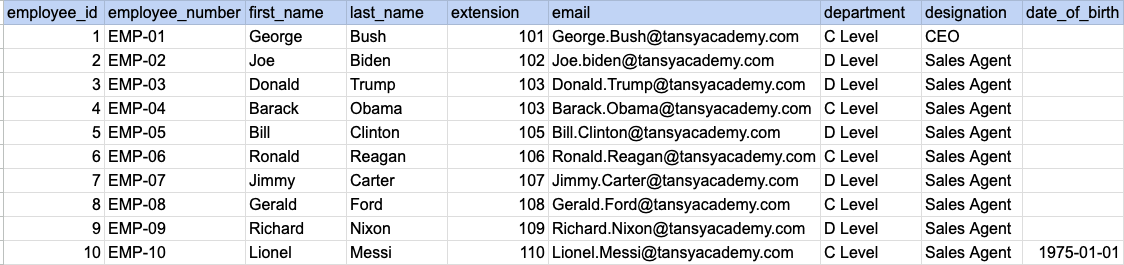
Let's understand the process of extracting data from a specified table using LIMIT clause. In this case, we aim to retrieve top 5 rows from the employee table.
Example 1 - Raw data from employee table
Example 1 - Query
SELECT * FROM org_employee LIMIT 5;Example 1 - Query data mapping
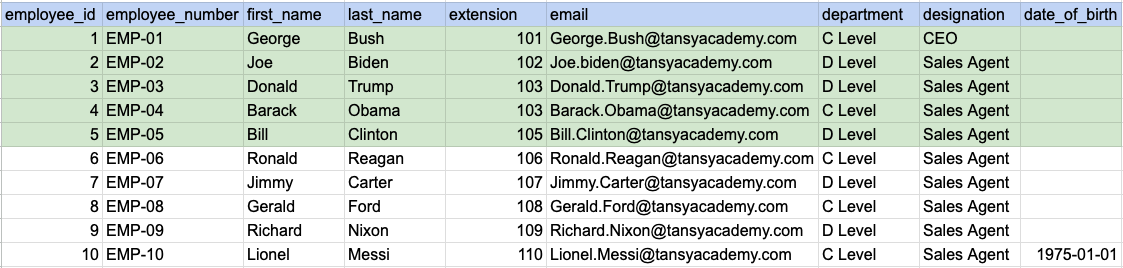
In the image above, the green color indicates the data that has been chosen or meets the criteria for our query.
Example 1 - Query Output

Example 2:
Let's understand the process of extracting data from a specified table using LIMIT clause in combination with offset. <SELECT column1, column2 FROM table_name LIMIT offset, number_of_rows;>. Here, offset is the number of rows to skip, and number_of_rows is the maximum number of rows to return. In this exmaple we are trying to skip 3 rows and retreive next 6 rows
Example 2 - Raw data from employee table
Example 2 - Query
SELECT * FROM org_employee LIMIT 3,6;Example 2 - Query data mapping
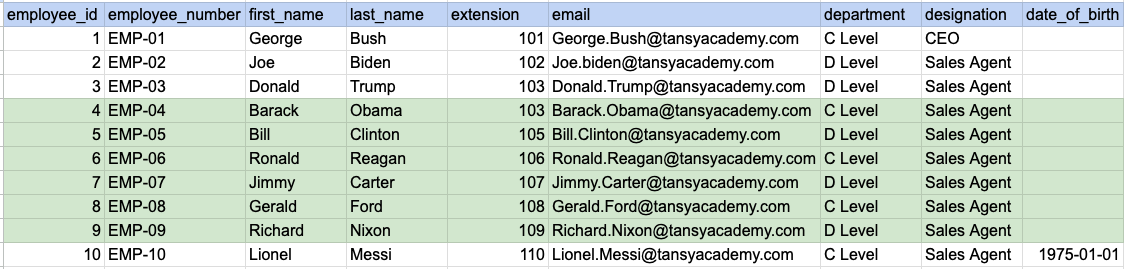
In the image above, the green color indicates the data that has been chosen or meets the criteria for our query.
Example 2 - Query Output

Example 3:
Let's understand the process of extracting data using LIMIT in combination with ORDER BY clause. Here we are trying to order the data by last name and then select top 4 rows.
Example 3 - Raw data from employee table
Example 3 - Query
SELECT * FROM org_employee ORDER BY last_name LIMIT 4;Example 3 - Step 1 Order the raw data by last name
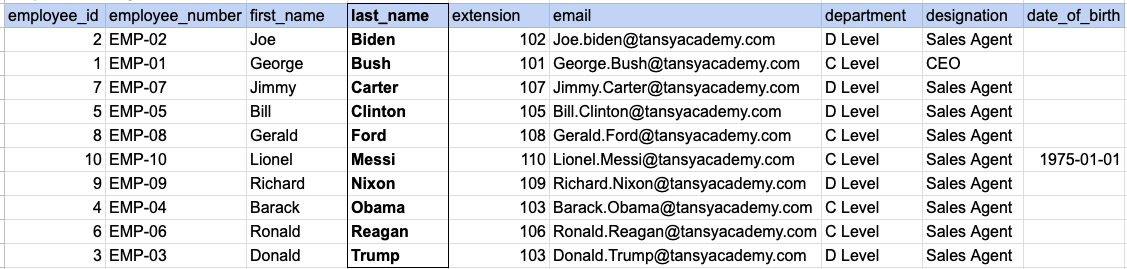
As step 1 first we have to order our raw data by last name as shown in above image.
Example 3 - Query data mapping
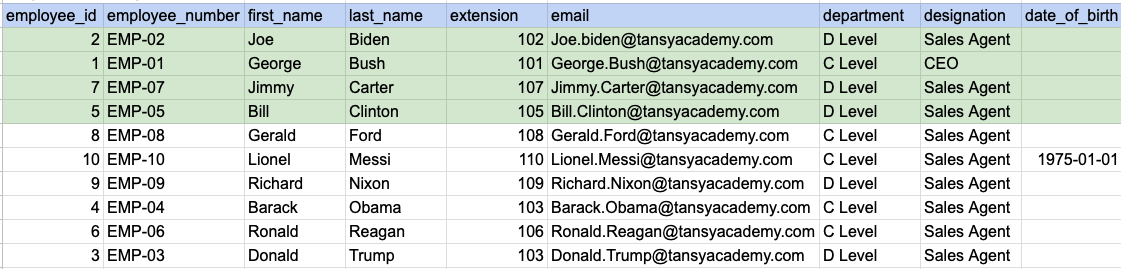
In the image above, the green color indicates the data that has been chosen or meets the criteria for our query.
Example 3 - Query Output

Comments Not Found