
Oracle
Database View
In Oracle, a database view is a virtual table that provides a way to simplify complex queries or present data in a specific format. Unlike a physical table, a view does not store data itself but provides a way to access and manipulate data from one or more tables. Views can be used to simplify data retrieval, enhance security by restricting access to specific data, and present data in a more user-friendly format.
Here’s a basic overview of database views in Oracle:
Creating a View
- To create a view, you use the
CREATE VIEWstatement followed by a query that defines the view’s content. - Example:
CREATE VIEW book_summary AS
SELECT book_id, title, author_id
FROM books
WHERE available = 'Y';
- To create a view, you use the
Querying a View
- You can query a view just like a regular table.
- Example:
SELECT * FROM book_summary;
Updating Data through a View
- You can perform
INSERT,UPDATE, andDELETEoperations on views, but this depends on the complexity of the view and the underlying tables. - Example of updating data:
UPDATE book_summary
SET title = 'New Title'
WHERE book_id = 1;
- You can perform
Dropping a View
- To remove a view, use the
DROP VIEWstatement. - Example:
DROP VIEW book_summary;
- To remove a view, use the
View with Joins
- Views can include joins to combine data from multiple tables.
- Example:
CREATE VIEW author_books AS
SELECT a.author_id, a.name, b.title
FROM authors a
JOIN books b ON a.author_id = b.author_id;
Using Views for Security
- Views can restrict access to sensitive data by only exposing certain columns or rows.
- Example:
CREATE VIEW public_books AS
SELECT title, author_id
FROM books
WHERE available = 'Y';
By utilizing views, you can streamline data access, simplify query writing, and ensure that sensitive information is protected.
Definition
A view is a result set of a stored query on the data, which the database users can query just like they would in a real table. Unlike a real table, a view does not store data physically; it is a set of queries that dynamically retrieve data from the database tables as needed.
Uses and Advantages
- Security: Views can be used to restrict user access to specific rows and columns of data.
- Simplicity: Complex queries can be encapsulated in views.
- Consistency: Views can present a consistent, unchanging image of the structure of the database.
- Logical Data Independence: Views provide a layer of abstraction.
- Data Integrity: Views can be used to ensure data integrity by exposing only valid data to the user.
Types of Views
- Updatable Views: Views that allow data modification operations.
- Read-Only Views: Views that do not allow data modification operations.
- Materialized Views: A materialized view is a database object that contains the results of a query and is stored on disk, acting like a cache to improve query performance. Unlike standard views that dynamically retrieve data every time they are accessed, materialized views hold the actual query result and can be indexed, thus significantly speeding up access to complex aggregated or joined data. They are particularly useful in data warehousing scenarios where queries are run on large volumes of data and require heavy computation. However, because they store a snapshot of the data, materialized views must be refreshed periodically to remain up-to-date with the underlying data changes. This trade-off between data freshness and query speed is a key consideration when deciding to use materialized views in a database system.
Creating a View
Here is the basic SQL syntax for creating a view:
CREATE VIEW view_name AS
SELECT column1, column2, ...
FROM table_name
WHERE condition;
Example
Consider you have a table employees with columns id, name, salary, department. You can create a view to show only the name and department:
CREATE VIEW department_view AS
SELECT name, department
FROM employees;
Modifying a View
To change a view, you generally have to drop and recreate it. Some SQL dialects support the CREATE OR REPLACE VIEW statement.
CREATE OR REPLACE VIEW department_view AS
SELECT name, department
FROM employees;
Removing a View
To remove a view from the database, you use the DROP VIEW statement:
DROP VIEW view_name;
Limitations and Considerations
- Views do not have associated indexes, so queries might be slower than direct table queries.
- Some views are not updatable.
- Overusing views can lead to maintenance challenges and performance issues.
In summary, views are a powerful feature in SQL databases that provide a way to simplify complex operations, enhance security, and offer a level of abstraction for database operations.
DATABASE VIEW EXAMPLE
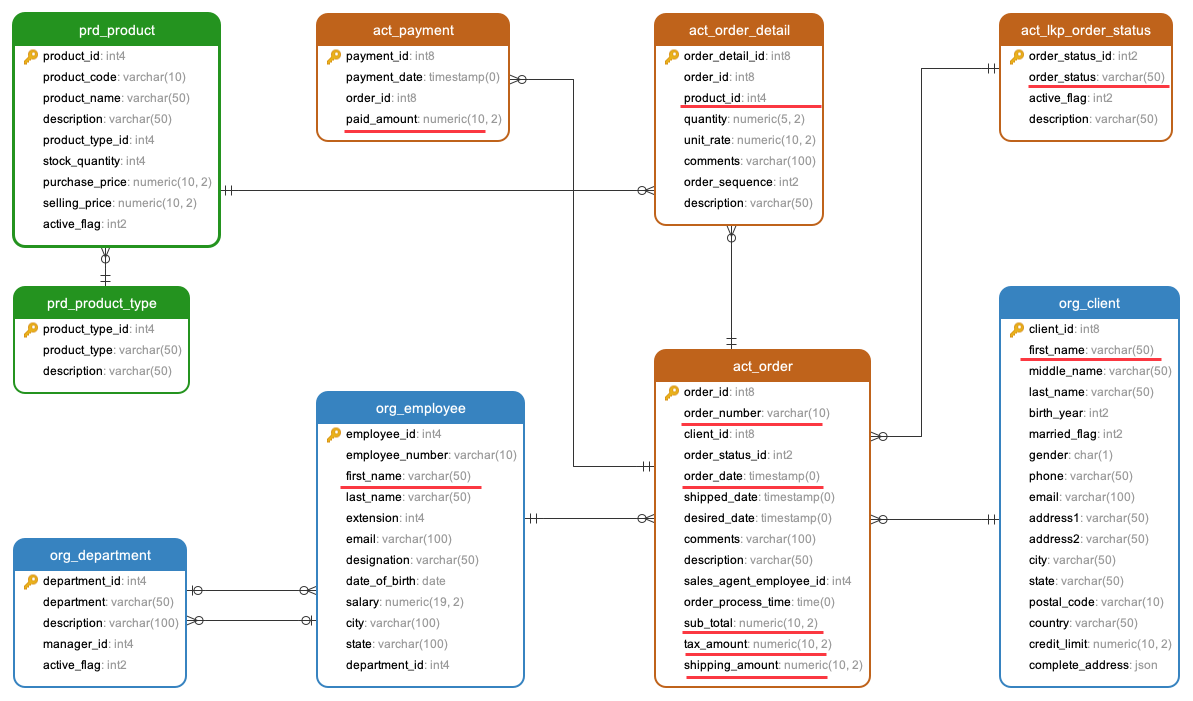
Let's establish a database view to consolidate data for the order management system. Our objective is to extract the client's name, their order numbers, including the order date, order number, number of products ordered, order status, order amount, paid amount, and the agent who processed the order on their behalf. This requirement is depicted in the data model below, with the necessary columns highlighted with red lines.
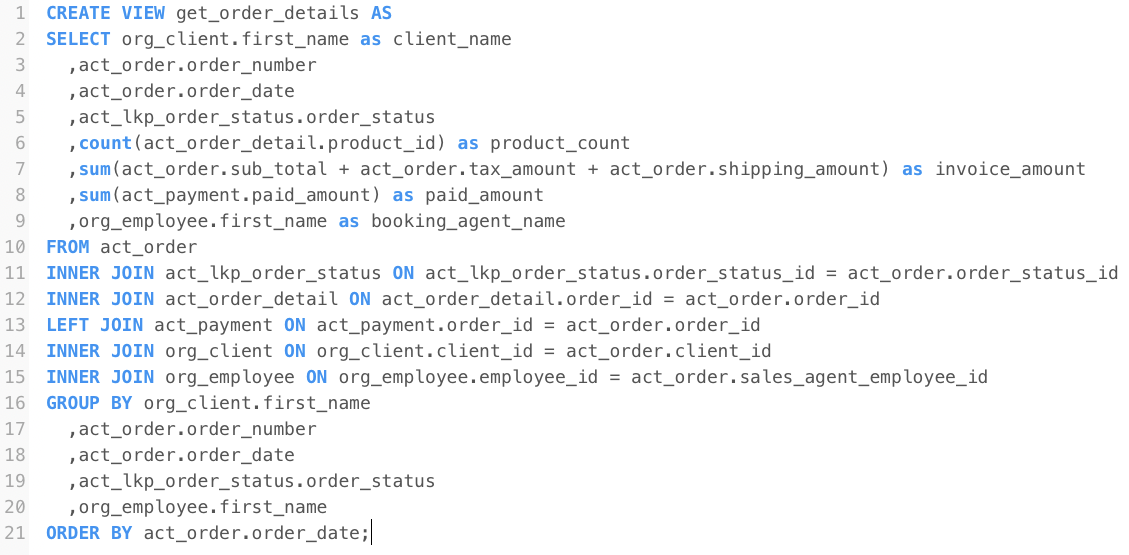
CREATE VIEW get_order_details AS
SELECT
    org_client.first_name as client_name,
    act_order.order_number,
    act_order.order_date,
    act_lkp_order_status.order_status,
    count(act_order_detail.product_id) as product_count,
    sum(act_order.sub_total "+" act_order.tax_amount "+" act_order.shipping_amount) as invoice_amount,
    sum(act_payment.paid_amount) as paid_amount,
    org_employee.first_name as booking_agent_name
FROM act_order
INNER JOIN act_lkp_order_status ON act_lkp_order_status.order_status_id = act_order.order_status_id
INNER JOIN act_order_detail ON act_order_detail.order_id = act_order.order_id
LEFT JOIN act_payment ON act_payment.order_id = act_order.order_id
INNER JOIN org_client ON org_client.client_id = act_order.client_id
INNER JOIN org_employee ON org_employee.employee_id = act_order.sales_agent_employee_id
GROUP BY
    org_client.first_name,
    act_order.order_number,
    act_order.order_date,
    act_lkp_order_status.order_status,
    org_employee.first_name
ORDER BY act_order.order_date;
Comments Not Found