
Oracle
'=' (equal to) Operator
The = (equal to) operator in Oracle SQL is one of the most basic comparison operators used in Data Query Language (DQL). This operator is employed to compare a column's value with a specific value. When querying a database, the = operator checks if the value in a specified column is exactly equal to a given value. If the values match, the row will be included in the query result.
Here’s an example query to find all books written by a specific author:
SELECT * FROM books
WHERE author_name = 'J.K. Rowling';
Now, let’s dive deeper into the = operator and explore how it works in Oracle SQL.
Key Points about the = Operator in Oracle DQL:
Basic Usage:
- The
=operator is used to compare two values for equality. - It returns rows where the column value exactly matches the given value.
SELECT * FROM authors WHERE author_id = 101;- The
Working with Text Data:
- For text data, ensure the values are enclosed in single quotes.
SELECT * FROM books
WHERE title = 'The Hobbit';
Working with Numeric Data:
- You can use the
=operator to compare numeric data as well. No quotes are required for numeric values.
SELECT * FROM rentals WHERE rental_id = 5;- You can use the
Case Sensitivity:
- In Oracle, string comparisons are case-sensitive by default when using the
=operator.
SELECT * FROM members WHERE first_name = 'John'; -- Will not return 'john' OR 'JOHN'- In Oracle, string comparisons are case-sensitive by default when using the
NULL Values Handling:
- The
=operator cannot be used to compareNULLvalues. To check forNULL, you must useIS NULL.
SELECT * FROM books WHERE author_name IS NULL; -- This works, but using '=' for NULL will not.- The
Comparison with Dates:
- The
=operator can also be used to compare date values.
SELECT * FROM rentals WHERE rental_date = '2023-09-19';- The
Best Practices:
- Always ensure that the data type of the column matches the value you're comparing with. For example, don’t compare a text value to a numeric column.
- For string comparisons, ensure the correct use of case sensitivity if required in your application.
- Handle
NULLvalues carefully, as the=operator does not evaluateNULLas equal toNULL.
Best Practices for Using the = Operator:
Ensure Data Type Matching:
- Always match the data type of the column with the value you’re using in the comparison. For example, comparing a string to a numeric column may cause errors.
Optimize for Performance:
- When using the
=operator on large datasets, ensure that the column used in the comparison is indexed to improve query performance.
- When using the
Use Case Sensitivity Correctly:
- Be cautious of case-sensitive string comparisons. If case-insensitive comparison is desired, you can use
UPPER()orLOWER()functions.
- Be cautious of case-sensitive string comparisons. If case-insensitive comparison is desired, you can use
Handle NULLs Appropriately:
- Always use
IS NULLfor checkingNULLvalues instead of the=operator to avoid unexpected results.
- Always use
By understanding how the = operator works and following best practices, you can write efficient queries to retrieve precise data from your Oracle database.
To gain complete access, login with gmail or outlook, no need of signup. click here
TEST CODE
In Oracle, to fetch records for clients identified as female, you can use the following query:
SELECT *
FROM org_client
WHERE gender = 'F';In Oracle, to fetch orders where the order status is equal to 5, you can use the following query:
SELECT *
FROM act_order
WHERE order_status_id = 5;In Oracle, to retrieve orders with shipping dates matching December 12th, 2023, you can use the following query:
SELECT *
FROM act_order
WHERE shipped_date = TO_DATE('2023-12-12', 'YYYY-MM-DD');Example 1:
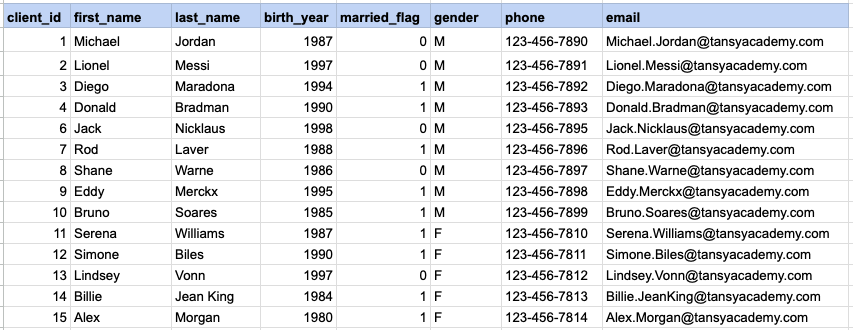
Let's explore the procedure of retrieving information from a designated table using the SQL '=' (equal to) operator with string data. Fetch records for clients identified as females.
Example 1 - Raw data from client table
Example 1 - Query
SELECT *
FROM org_client
WHERE gender = 'F';
Example 1 - Query data mapping
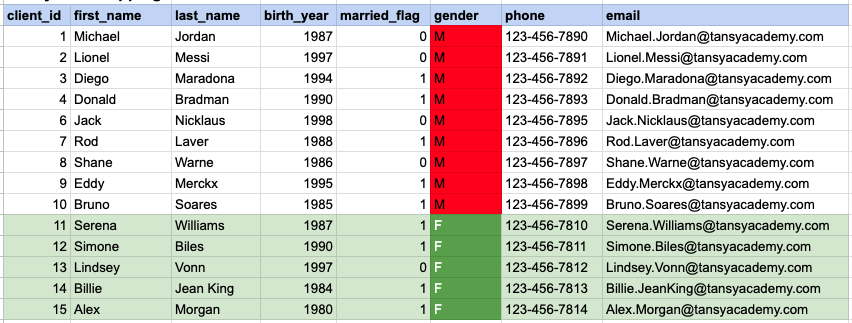
In the provided image, the green color signifies the data that has been selected or satisfies the conditions specified in our query. Data points in red indicate information that does not meet the criteria set by the query.
Example 1 - Query Output

Example 2:
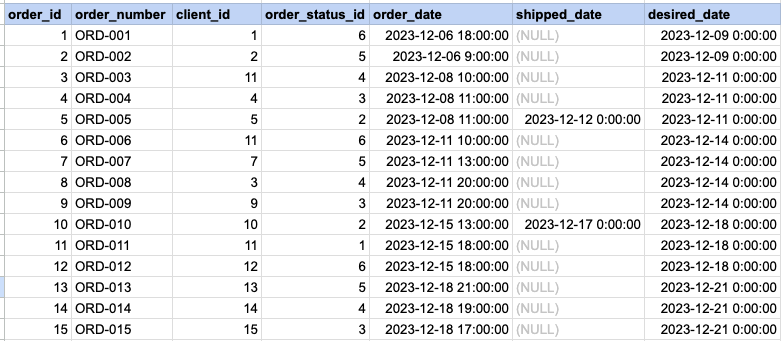
Let's delve into the process of retrieving information from a specified table using the SQL '=' (equal) operator with numeric data. Retrieve orders with statuses that match the value 5.
Example 2 - Raw data from orders table
Example 2 - Query
SELECT *
FROM act_order
WHERE order_status_id = 5;
Example 2 - Query data mapping
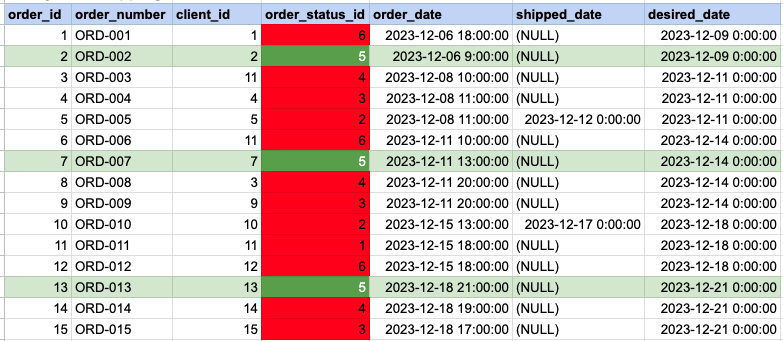
In the provided image, the green color signifies the data that has been selected or satisfies the conditions specified in our query. Data points in red indicate information that does not meet the criteria set by the query.
Example 2 - Query Output

Example 3:
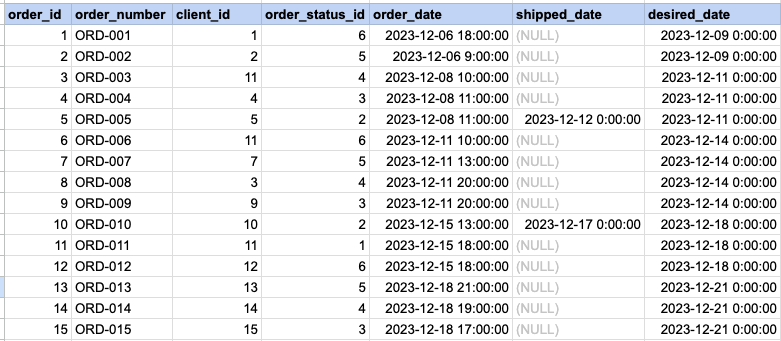
Let's explore the process of retrieving information from a designated table using the SQL '=' (equal) operator with date data. Fetch orders with shipping dates that match December 12th.
Example 3 - Raw data from orders table
Example 3 - Query
SELECT *
FROM act_order
WHERE shipped_date = '2023-12-12';
Example 3 - Query data mapping
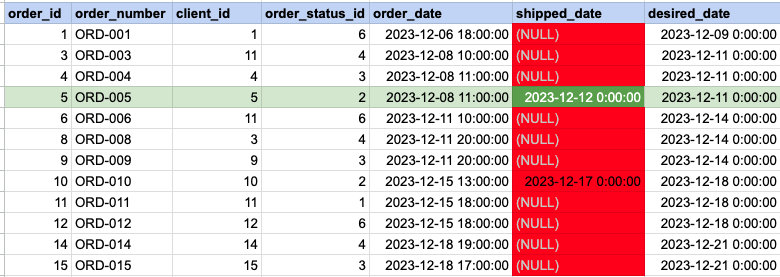
In the provided image, the green color signifies the data that has been selected or satisfies the conditions specified in our query. Data points in red indicate information that does not meet the criteria set by the query. Please be aware that the query will attempt to filter based on the value of December 12th. Since many records have NULL for the shipped date value, NULL cannot be compared as it is not an actual value. Consequently, these null records will be excluded from the results as well.
Example 3 - Query Output

Comments Not Found