
Oracle
ORDER BY
In Oracle, the ORDER BY clause is used in SQL queries to sort the result set based on one or more columns. By default, the sorting is in ascending order, but it can be changed to descending order by specifying the DESC keyword. The ORDER BY clause is typically placed at the end of a SELECT statement and can sort based on numeric, text, or date columns. Sorting helps in organizing data in a meaningful way, especially when generating reports or lists.
Key Information on ORDER BY in Oracle
Basic Syntax
- The
ORDER BYclause can be added at the end of theSELECTquery. - You can specify multiple columns for sorting.
Example:
SELECT * FROM books ORDER BY title ASC;- The
Sorting by Multiple Columns
- When sorting by multiple columns, Oracle first sorts by the first column and then by the second if there are duplicates in the first column.
Example:
SELECT * FROM books ORDER BY author_name, publication_year DESC;- Bullet Points
- First,
author_namewill be sorted alphabetically. - Within the same author,
publication_yearwill be sorted in descending order.
- First,
Ascending (
ASC) and Descending (DESC) Orders- By default, Oracle sorts data in ascending order (
ASC), but you can change this to descending (DESC).
Example:
SELECT * FROM rentals ORDER BY rental_date DESC;- By default, Oracle sorts data in ascending order (
Using Column Position
- Instead of specifying column names, you can use the column’s position in the
SELECTlist for sorting.
Example:
SELECT author_name, title FROM books ORDER BY 2; -- Sorts by the second column (title)- Instead of specifying column names, you can use the column’s position in the
Combining
ORDER BYwithWHEREClause- You can combine the
ORDER BYclause with aWHEREclause to filter and then sort data.
Example:
SELECT * FROM membership WHERE status = 'active' ORDER BY join_date;- You can combine the
Best Practices
- Bullet Points
- Avoid using column positions in
ORDER BY, as it can lead to confusion when modifying theSELECTlist. - Always be explicit by using column names for clarity and maintainability.
- Use indexes on columns frequently used in
ORDER BYto improve query performance.
- Avoid using column positions in
- Bullet Points
By using the ORDER BY clause effectively, you can ensure that your result sets are sorted in a way that makes sense for your data and application.
To gain complete access, login with gmail or outlook, no need of signup. click here

TEST CODE
In Oracle, to sort the "act_order" table data by the "order_date" column in ascending order (ASC), you can execute the following SQL statement:
SELECT *
FROM act_order
ORDER BY order_date ASC;In Oracle, to select and sort data from the "act_order" table by the "order_date" column in ascending order (ASC), you would execute the following SQL statement:
SELECT *
FROM act_order
ORDER BY order_date ASC;In Oracle, to select and sort data from the "act_order" table by the "order_date" column in descending order (DESC), you would execute the following SQL statement:
SELECT *
FROM act_order
ORDER BY order_date DESC;In Oracle, to select and sort data from the "prd_product" table by the "product_name" column in ascending order (A to Z), you would execute the following SQL statement:
SELECT *
FROM prd_product
ORDER BY product_name ASC;In Oracle, to select and sort data from the "prd_product" table by the "product_name" column in descending order (Z to A), you would execute the following SQL statement:
SELECT *
FROM prd_product
ORDER BY product_name DESC;In Oracle, to select and sort data from the "act_order_detail" table by the computed column (quantity * unit_rate) in ascending order (smaller amounts at the top), you would execute the following SQL statement:
SELECT order_detail_id, product_id, quantity, unit_rate, (quantity * unit_rate) AS total_price
FROM act_order_detail
ORDER BY (quantity * unit_rate) ASC;In Oracle, to select and sort data from the "act_order_detail" table by the computed column (quantity * unit_rate) in descending order (higher amounts at the top), you would execute the following SQL statement:
SELECT order_detail_id, product_id, quantity, unit_rate, (quantity * unit_rate) AS total_price
FROM act_order_detail
ORDER BY (quantity * unit_rate) DESC;In Oracle, to select data from the "prd_product" and "act_order_detail" tables, specifying product names and total units sold with the most sold items at the top, you would execute the following SQL statement:
SELECT a.product_name, SUM(b.quantity) AS units_sold
FROM prd_product a
INNER JOIN act_order_detail b ON b.product_id = a.product_id
GROUP BY a.product_name
ORDER BY SUM(b.quantity) DESC;In Oracle, to select data from the "org_client" and "act_order" tables, specifying client names and order numbers with recent orders listed first, you would execute the following SQL statement:
SELECT a.first_name AS client_name, b.order_number
FROM org_client a
INNER JOIN act_order b ON b.client_id = a.client_id
ORDER BY b.order_date DESC;In Oracle, to select data from the "org_client" table and sort it first by birth year in descending order (younger clients first), and then alphabetically by first name and last name in ascending order, you would execute the following SQL statement:
SELECT client_id, birth_year, first_name, last_name
FROM org_client
ORDER BY birth_year DESC, first_name ASC, last_name ASC;Example 1:
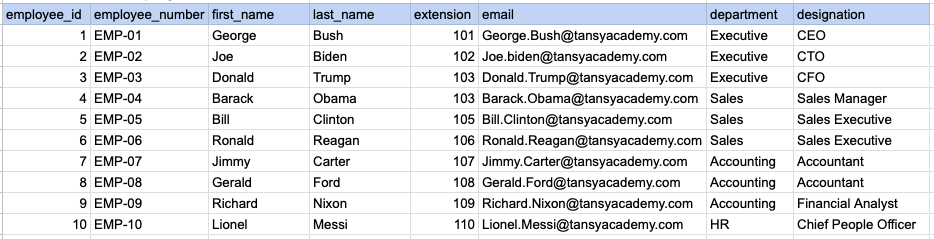
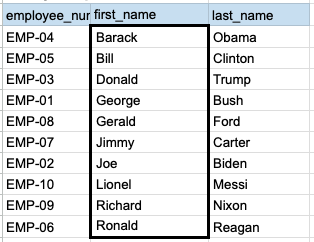
Let's understand the process of extracting data from employee table using ORDER BY sql clause. In this case, we aim to sort the data by employee's last name.
Example 1 - Raw data from employee table
Example 1 - Query
SELECT employee_number, first_name, last_name
FROM org_employee
ORDER BY first_name;
Example 1 - Query data mapping
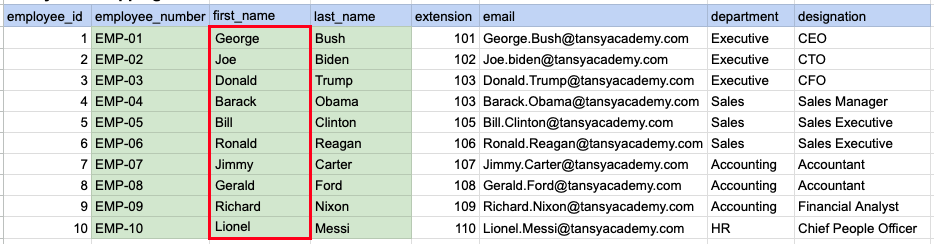
In the depicted illustration, the data highlighted in green represents the selected information that aligns with our query criteria. Additionally, the red box signifies the column requiring alphabetical sorting prior to generating the ultimate output.
Example 1 - Query Output
Example 2:
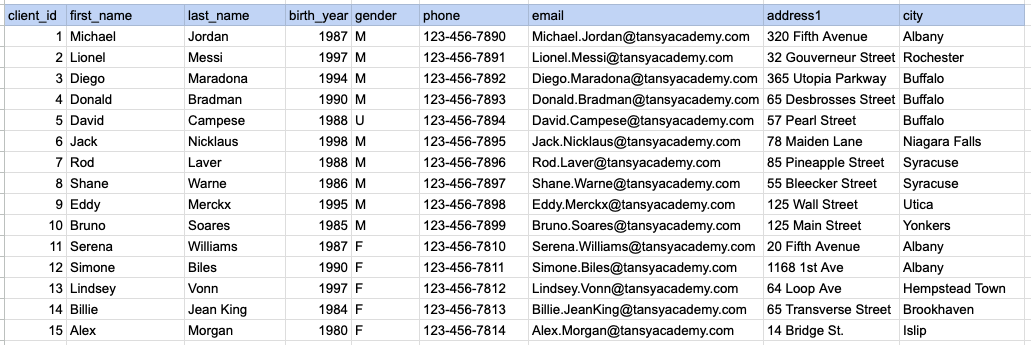
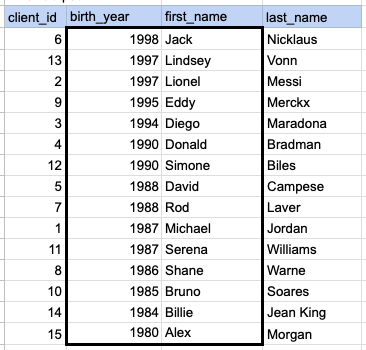
Let's explore the procedure of retrieving data from the client's table using the SQL ORDER BY clause. In this example, our initial objective is to arrange the data in descending order based on the year of birth. Following that, we proceed to sort the output from step 1 based on the first name in ascending order.
Example 2 - Raw data from client table
Example 2 - Query
SELECT client_id, birth_year, first_name, last_name
FROM org_client
ORDER BY birth_year DESC, first_name ASC;
Example 2 - Query data mapping
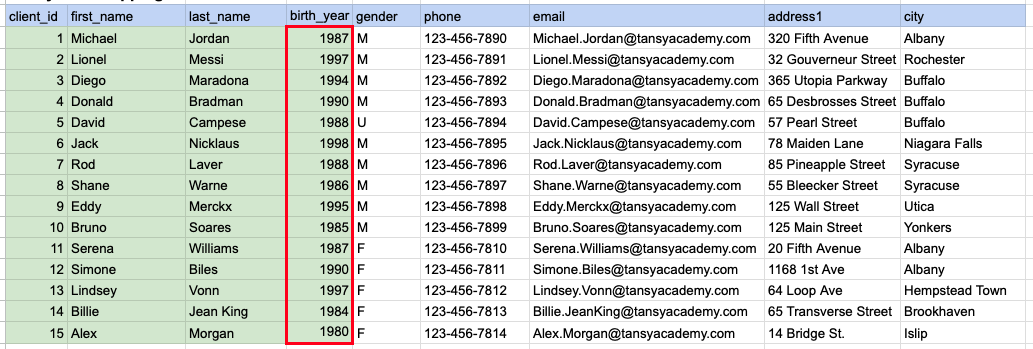
In the image above, the green color indicates the data that has been chosen or meets the criteria for our query. Red box indicates that as step1 we need to sort the data by year of birth in descending order.
Example 2 - Step 2
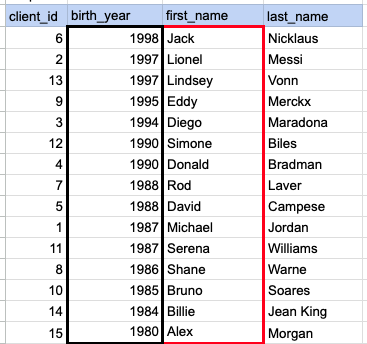
In the depicted image, the data has been arranged in descending order based on the specified year of birth, and an additional sorting is necessary based on the first name in ascending order.
Example 2 - Query Output
Comments Not Found