
Oracle
LIKE Operator
The LIKE operator in Oracle SQL is used to search for a specified pattern in a column. This operator is particularly useful when you want to match string data with specific formats or characters. The LIKE operator can be combined with wildcards such as % (which represents zero or more characters) and _ (which represents a single character). This functionality allows for flexible searching in textual data.
Here’s a brief overview of how to use the LIKE operator effectively:
Basic Syntax
- The basic syntax for the
LIKEoperator is:SELECT column1, column2 FROM table_name WHERE column_name LIKE pattern;
- The basic syntax for the
Wildcards
- Wildcards enhance the functionality of the
LIKEoperator:- Percent (%): Matches any sequence of characters.
- Example:
This query retrieves all books with titles starting with "Harry".SELECT * FROM books WHERE title LIKE 'Harry%';
- Example:
- **Underscore (_) **: Matches a single character.
- Example:
This query retrieves titles like "Harry" and "Hurry".SELECT * FROM books WHERE title LIKE 'H_rry';
- Example:
- Percent (%): Matches any sequence of characters.
- Wildcards enhance the functionality of the
Case Sensitivity
- The
LIKEoperator is case-sensitive by default. To perform case-insensitive searches, use theUPPERorLOWERfunctions:SELECT * FROM books WHERE UPPER(title) LIKE UPPER('harry%');
- The
Combining with Other Conditions
- You can combine the
LIKEoperator with other conditions usingANDorOR:SELECT * FROM books WHERE title LIKE 'Harry%' AND author = 'J.K. Rowling';
- You can combine the
Best Practices
- Use wildcards judiciously to optimize query performance.
- Avoid starting patterns with
%as it can lead to full table scans. - Ensure proper indexing on columns that are frequently searched with
LIKEfor better performance.
Here’s a complete example of using the LIKE operator:
SELECT * FROM books
WHERE title LIKE 'A%'
AND author LIKE 'J%';
This query retrieves all books whose titles start with "A" and authors whose names start with "J".
To gain complete access, login with gmail or outlook, no need of signup. click here

TEST CODE
In Oracle, to retrieve entries for clients with last names that begin with 'Me%', where '%' signifies the possibility of zero or more characters following 'Me', you can use the following query:
SELECT *
FROM org_client
WHERE last_name LIKE 'Me%';In Oracle, to fetch records for clients whose first names conclude with '%ne', where '%' signifies the possibility of zero or more characters preceding 'ne', you can use the following query:
SELECT *
FROM org_client
WHERE first_name LIKE '%ne';In Oracle, to fetch records for clients with the second character in their last name being 'a', you can use the following query:
SELECT *
FROM org_client
WHERE last_name LIKE '_a%';In Oracle, to fetch records for clients with last names that include 'an' at any position. To ensure compatibility and avoid potential case-sensitive database issues, we will convert the entire last name column to lowercase before making the comparison.
SELECT *
FROM org_client
WHERE LOWER(last_name) LIKE '%an%';In Oracle, to fetch records for clients whose last names have 'i' as the second character and 's' as the last character, you can use the following query:
SELECT *
FROM org_client
WHERE last_name LIKE '_i%s';In Oracle, to retrieve entries for clients with first names that begin with 'D' and end with 'd', you can use the following query:
SELECT *
FROM org_client
WHERE first_name LIKE 'D%d';Example 1:
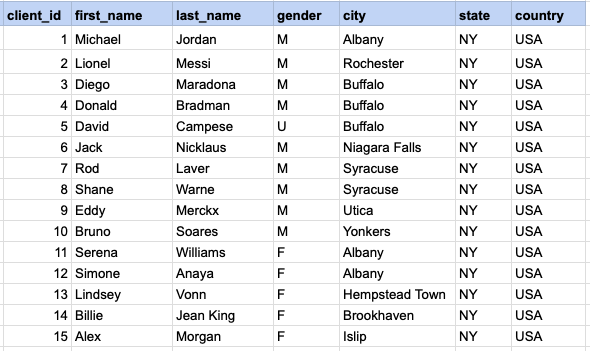
Let's delve into the process of extracting data from a specified table using the SQL LIKE operator. Retrieve entries for clients with last names that begin with 'Me%', where '%' signifies the possibility of zero or more characters following 'Me'.
Example 1 - Raw data from client table
Example 1 - Query
SELECT *
FROM org_client
WHERE last_name LIKE 'Me%';
Example 1 - Query data mapping
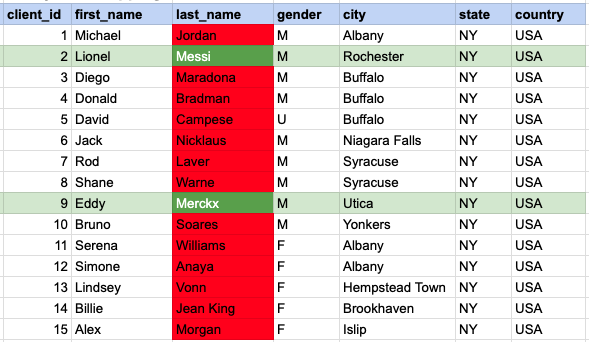
In the provided image, the green color signifies the data that has been selected or satisfies the conditions specified in our query. Data points in red indicate information that does not meet the criteria set by the query.
Example 1 - Query Output

Example 2:
Fetch records for clients whose first names conclude with '%ne'.
Example 2 - Query
SELECT *
FROM org_client
WHERE last_name LIKE 'Me%';
Example 2 - Query data mapping
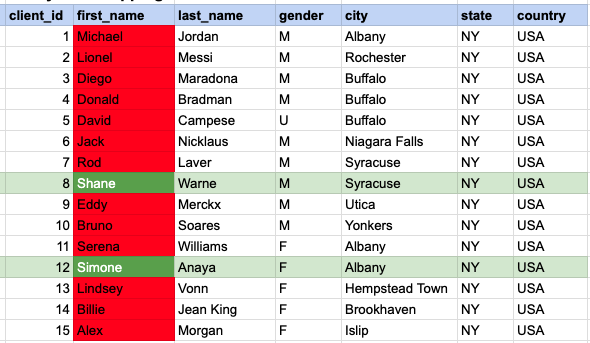
In the provided image, the green color signifies the data that has been selected or satisfies the conditions specified in our query. Data points in red indicate information that does not meet the criteria set by the query.
Example 2 - Query Output

Example 3:
Fetch records for clients with the second character in their last name being 'a'.
Example 3 - Query
SELECT *
FROM org_client
WHERE last_name LIKE 'a%';
Example 3 - Query data mapping
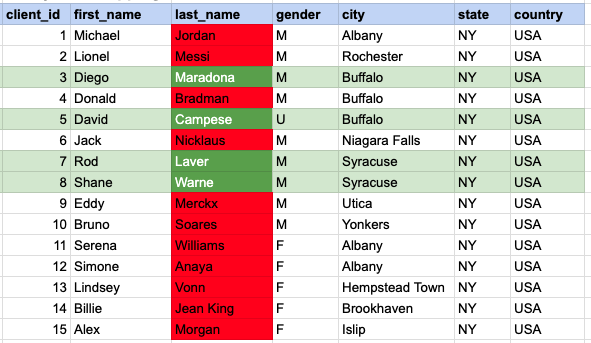
In the provided image, the green color signifies the data that has been selected or satisfies the conditions specified in our query. Data points in red indicate information that does not meet the criteria set by the query.
Example 3 - Query Output

Example 4:
Fetch records for clients with last names that include 'an' at any position. To ensure compatibility and avoid potential case-sensitive database issues, we will convert the entire last name column to lowercase before making the comparison.
EExample 4 - Query
SELECT *
FROM org_client
WHERE lower(last_name) LIKE '%an%';
Example 4 - Query data mapping
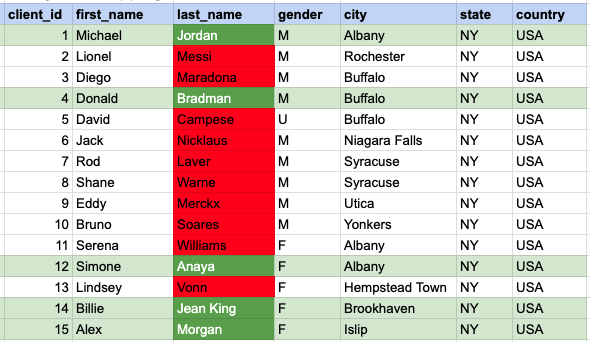
Example 4 - Query Output
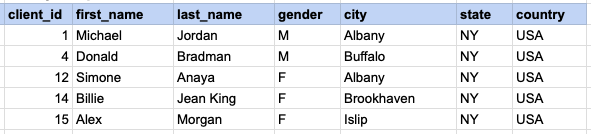
Example 5:
Fetch records for clients whose last names have 'i' as the second character and 's' as the last character.
Example 5 - Query
SELECT *
FROM org_client
WHERE last_name LIKE '_i%s';';
Example 5 - Query data mapping
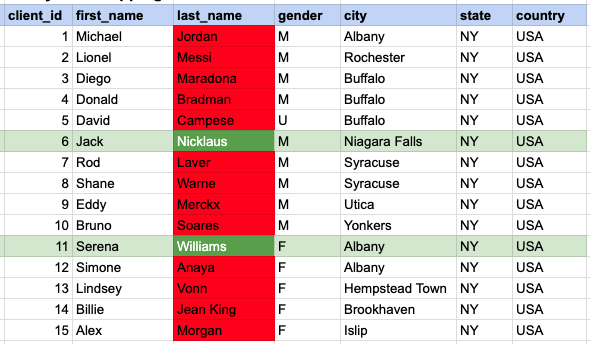
In the provided image, the green color signifies the data that has been selected or satisfies the conditions specified in our query. Data points in red indicate information that does not meet the criteria set by the query.
Example 5 - Query Output

Example 6:
Retrieve entries for clients with first names that begin with 'D' and end with 'd'.
Example 6 - Query
SELECT *
FROM org_client
WHERE first_name LIKE 'D%d';
Example 6 - Query data mapping
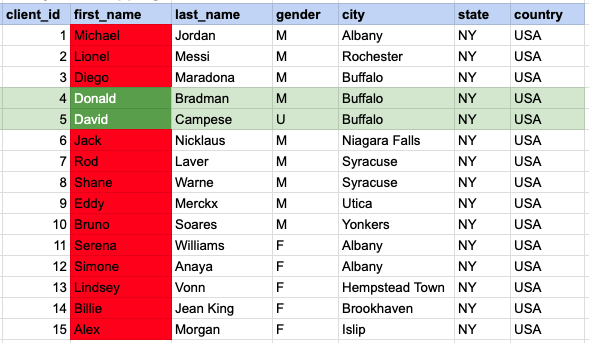
In the provided image, the green color signifies the data that has been selected or satisfies the conditions specified in our query. Data points in red indicate information that does not meet the criteria set by the query.
Example 6 - Query Output

Comments Not Found