
Oracle
ERD (Data Model)
An Entity-Relationship Diagram (ERD) is a crucial tool in database design that visually represents the structure of a database. It shows entities (like tables), their attributes (columns), and the relationships between entities. For beginners, understanding ERDs can help in grasping how data is organized and how different pieces of data relate to each other within a relational database system like Oracle.
Key Components of ERD:
Entities
- Represent objects or things in the database.
- Typically mapped to tables in the database.
Attributes
- Characteristics or properties of entities.
- Correspond to columns in tables.
Relationships
- Define how entities interact with each other.
- Represented by lines connecting entities.
Primary Keys
- Unique identifiers for each entity.
- Ensures each record can be uniquely identified.
Foreign Keys
- Attributes that create a link between entities.
- They are used to establish relationships between tables.
Example of an ERD with Sample SQL Code
Let’s consider a simple ERD involving tables related to a library system: Authors, Books, Library, Membership, and Rentals.
Entities and Relationships
AuthorsandBooks: An author can write multiple books, but each book is written by one author.LibraryandBooks: A library contains multiple books.MembershipandRentals: A member can rent multiple books, and each rental is associated with one member.
Creating Tables
-- Creating Authors table
CREATE TABLE Authors (
    AuthorID INT PRIMARY KEY,
    Name VARCHAR2(100)
);

-- Creating Books table
CREATE TABLE Books (
    BookID INT PRIMARY KEY,
    Title VARCHAR2(100),
    AuthorID INT,
    FOREIGN KEY (AuthorID) REFERENCES Authors(AuthorID)
);

-- Creating Library table
CREATE TABLE Library (
    LibraryID INT PRIMARY KEY,
    Name VARCHAR2(100)
);

-- Creating Membership table
CREATE TABLE Membership (
    MembershipID INT PRIMARY KEY,
    MemberName VARCHAR2(100)
);

-- Creating Rentals table
CREATE TABLE Rentals (
    RentalID INT PRIMARY KEY,
    BookID INT,
    MembershipID INT,
    RentalDate DATE,
    FOREIGN KEY (BookID) REFERENCES Books(BookID),
    FOREIGN KEY (MembershipID) REFERENCES Membership(MembershipID)
);
Populating the Tables with Sample Data
-- Inserting data into Authors table
INSERT INTO Authors (AuthorID, Name) VALUES (1, 'J.K. Rowling');
INSERT INTO Authors (AuthorID, Name) VALUES (2, 'George R.R. Martin');

-- Inserting data into Books table
INSERT INTO Books (BookID, Title, AuthorID) VALUES (1, 'Harry Potter and the Sorcerer\'s Stone', 1);
INSERT INTO Books (BookID, Title, AuthorID) VALUES (2, 'A Game of Thrones', 2);

-- Inserting data into Library table
INSERT INTO Library (LibraryID, Name) VALUES (1, 'Central Library');

-- Inserting data into Membership table
INSERT INTO Membership (MembershipID, MemberName) VALUES (1, 'John Doe');

-- Inserting data into Rentals table
INSERT INTO Rentals (RentalID, BookID, MembershipID, RentalDate) VALUES (1, 1, 1, SYSDATE);
Visual Representation
In the ERD:
- Authors and Books are connected by a line showing a one-to-many relationship (one author can write many books).
- Books and Library are connected to indicate that books are part of the library collection.
- Membership and Rentals are connected showing that members can rent books.
Understanding ERDs and how they relate to database tables helps in designing and managing databases efficiently. This foundational knowledge is essential for anyone learning database management with Oracle.
Components of an ERD
Entities
These are objects or concepts that can have data stored about them. An entity represents a table in a database. Entities are usually nouns, such as Customer, Order, or Product.
Attributes
These are the data we store about an entity. They represent the columns in a table. For example, an Employee entity might have attributes such as Employee_ID, Name, and Department.
Relationships
These illustrate how entities share information in the database and are the lines that connect entities. Relationships show how two entities share information and interact with each other. They can be one-to-one, one-to-many, or many-to-many.
Primary Key (PK)
This is a unique attribute (or combination of attributes) that identifies a specific instance of an entity. Each entity in the ERD must have a primary key.
Foreign Key (FK)
This is an attribute in one entity that links to the primary key of another entity, establishing a relationship between the two entities.
Types of ERDs
Conceptual ERD
This is the most abstract form of ERD. It focuses on the high-level design and concept without including details like primary keys or attributes. It's used in the initial planning phase.
Logical ERD
This type adds more detail to the conceptual ERD by including key attributes for each entity and relationships. It does not include detailed attributes or methods but focuses on the structure of data.
Physical ERD
This is the most detailed ERD and includes all entities, relationships, key attributes, and constraints. It is directly used to implement the database schema in a specific database management system (DBMS).
CONCEPTUAL DATA MODEL
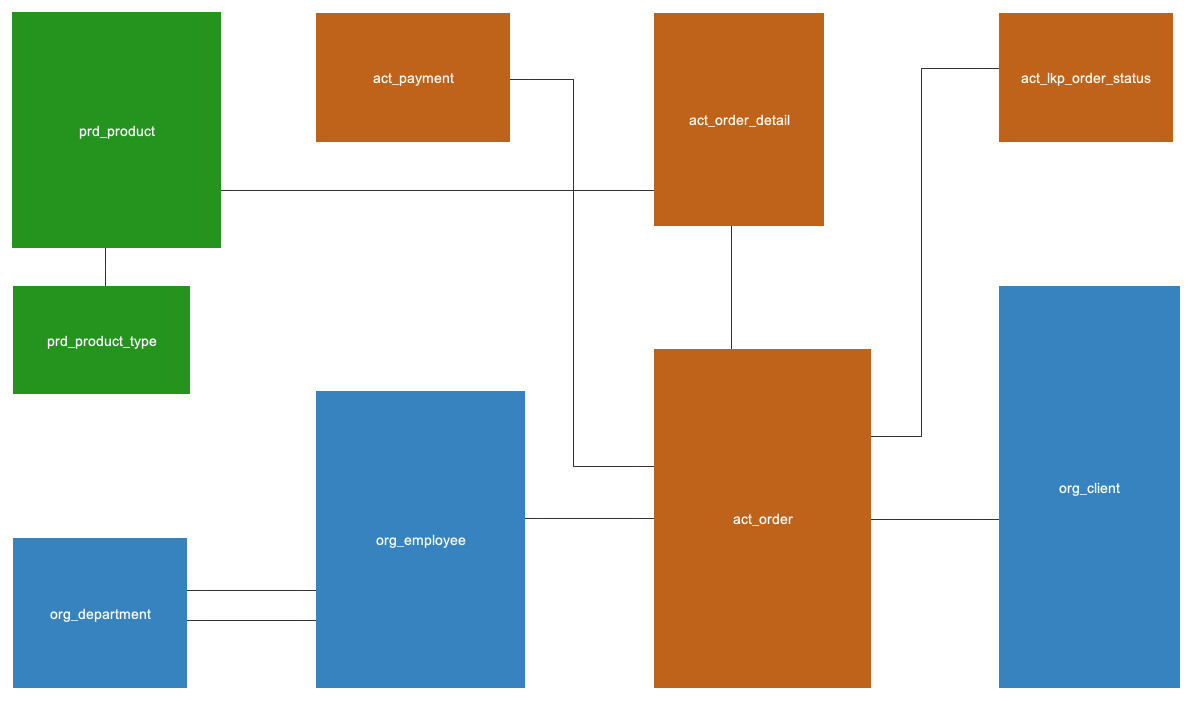
Only entities and their corresponding relationships are depicted here.
LOGICAL DATA MODEL
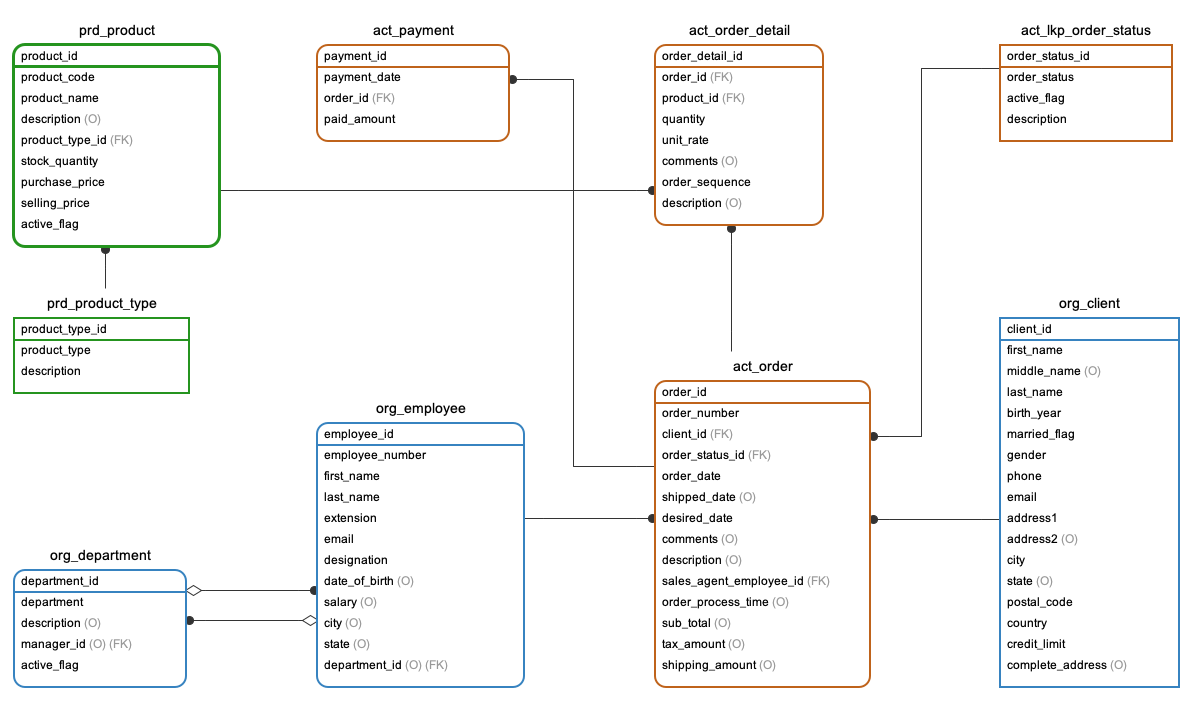
Here, we display entities along with their relationships, attributes, primary keys, foreign keys, and whether attribtues are optional or mandatory. Note that data types are missing from this ERD, this is not specific to any database vendors like MySQL or Oracle.
PHYSICAL DATA MODEL
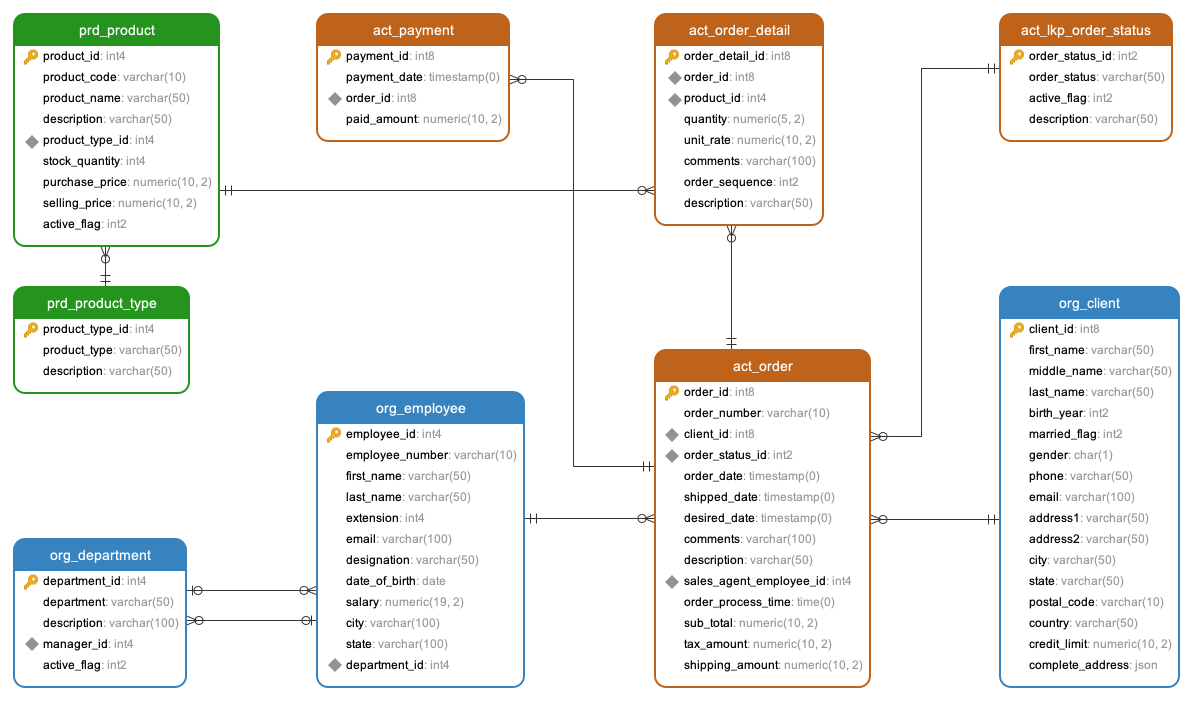
This pertains specifically to certain database vendors such as MySQL, Oracle, PostgreSQL, or MS SQL Server. Therefore, the data types presented here are tailored to a specific database vendor. In this instance, this physical ERD was designed for PostgreSQL, hence you will observe data types intended for PostgreSQL.
Comments Not Found