
Oracle
DISTINCT
In Oracle, the DISTINCT keyword is used within a SELECT statement to remove duplicate rows from the result set. This is particularly useful when you want to retrieve unique values from one or more columns in a table. The DISTINCT keyword ensures that each row in the result is unique, meaning duplicate entries are filtered out. It is a powerful tool when dealing with large datasets where duplicates are not needed.
Here’s a step-by-step breakdown of how the DISTINCT keyword works in Oracle:
Using DISTINCT with a Single Column
You can useDISTINCTto retrieve unique values from a single column in a table. For example, if you want to get a list of all unique authors from thebookstable:SELECT DISTINCT author FROM books;- This query will return a list of unique authors without any duplicates.
Using DISTINCT with Multiple Columns
You can applyDISTINCTto multiple columns to get unique combinations of values across those columns. For instance, if you want to retrieve unique combinations ofauthorandtitlefrom thebookstable:SELECT DISTINCT author, title FROM books;- This query will return all unique combinations of authors and their books.
- Each row in the result will be distinct based on both
authorandtitle.
Using DISTINCT with COUNT
TheDISTINCTkeyword can also be combined with aggregate functions likeCOUNTto count only distinct values in a column. For example, to count the number of unique authors in thebookstable:SELECT COUNT(DISTINCT author) FROM books;- This query will return the count of unique authors in the table.
Best Practices for Using DISTINCT
WhileDISTINCTis useful, it should be used judiciously since it may slow down query performance, especially on large datasets. Here are some best practices:- Avoid overusing
DISTINCTin queries unless absolutely necessary. Analyze your data structure first to see if duplicates can be eliminated at the source. - Indexing the columns used in a
DISTINCTquery can improve performance, as Oracle can efficiently eliminate duplicates by leveraging the index.
- Avoid overusing
By using the DISTINCT keyword appropriately, you can ensure that your Oracle queries return only the unique data you need.
To gain complete access, login with gmail or outlook, no need of signup. click here

TEST CODE
In Oracle, to select distinct state names from the clients table, use the following query:
SELECT DISTINCT state
FROM clients
ORDER BY state;In Oracle, to select distinct city names from the clients table, use the following query:
SELECT DISTINCT city
FROM clients
ORDER BY city;In Oracle, to retrieve unique combinations of city and state names from the clients table, use the following query:
SELECT DISTINCT city, state
FROM clients
ORDER BY city, state;In Oracle, you can retrieve unique order dates from the "act_order" table using the SELECT DISTINCT statement. The query below uses the TRUNC() function to truncate the time part of the order_date column, ensuring only distinct dates are selected.
SELECT DISTINCT TRUNC(order_date) AS order_date
FROM act_order
ORDER BY order_date;In Oracle, to retrieve unique product type IDs from the "prd_product" table using the SELECT DISTINCT statement, execute the following query:
SELECT DISTINCT product_type_id
FROM prd_product
ORDER BY product_type_id;Example 1:
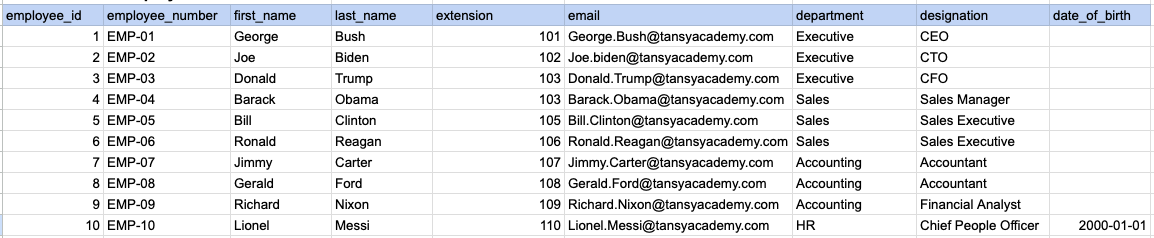
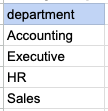
Let's understand the process of extracting data from a specified table using DISTINCT sql clause. In this case, we aim to retrieve distinct/unique department names from the employee table.
Example 1 - Raw data from employee table
Example 1 - Query
SELECT DISTINCT department
FROM org_employee
ORDER BY department;
Example 1 - Query data mapping
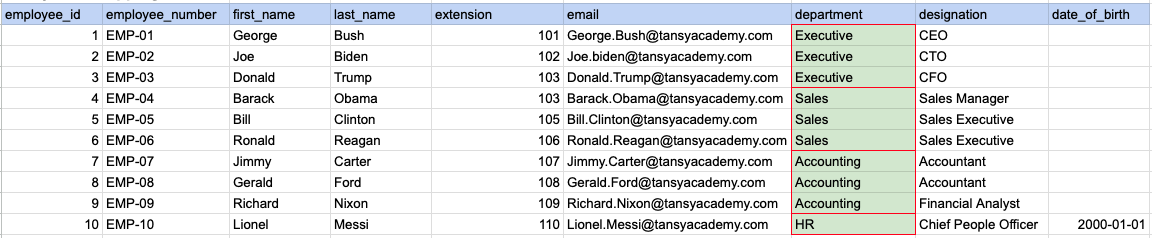
In the image above, the green color indicates the data that has been chosen or meets the criteria for our query.
Example 1 - Query Output
Example 2:
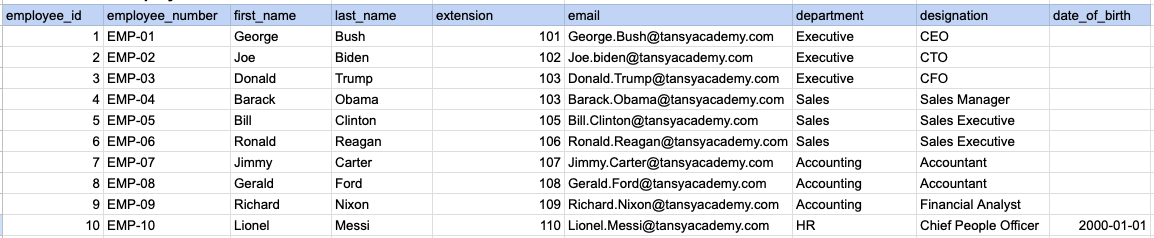
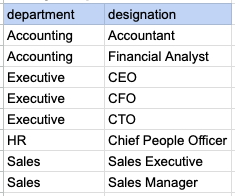
Let's understand the process of extracting multiple columns from a specified table using DISTINCT sql clause. Here, a row will be considered as distinct if all selected columns together form a unique combination.
Example 2 - Raw data from employee table
Example 2 - Query
SELECT DISTINCT department, designation
FROM org_employee
ORDER BY department, designation ;
Example 2 - Query data mapping
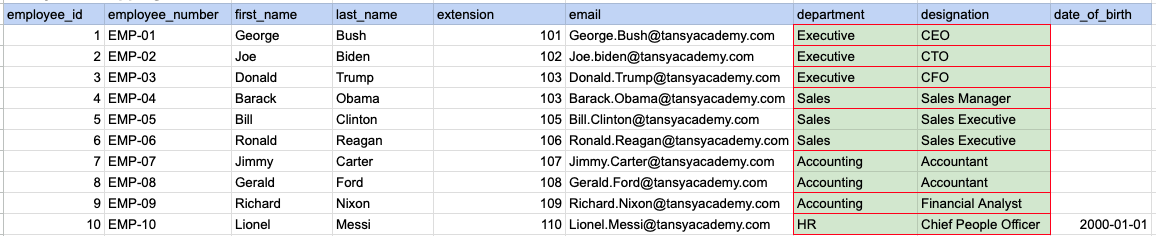
In the image above, the green color indicates the data that has been chosen or meets the criteria for our query.
Example 2 - Query Output
Example 3:
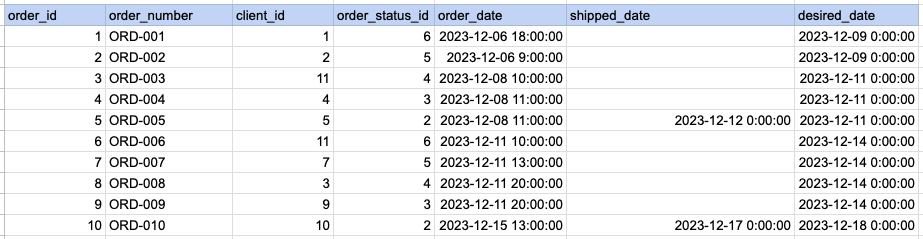
Let's understand the process of extracting order date using DISTINCT sql clause on timestamp column. Here we are trying to get distinct order dates.
Example 3 - Raw data from order table
Example 3 - Query
SELECT DISTINCT DATE(order_date) as order_date
FROM act_order
ORDER BY DATE(order_date);
Example 3 - Step 1 Extract date from order date and time column.
As step 1 first we have to extract date part alone from date and time.
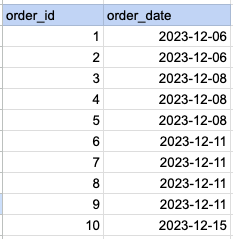
Example 3 - Query data mapping
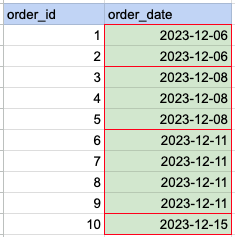
In the image above, the green color indicates the data that has been chosen or meets the criteria for our query.
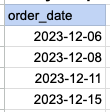
Example 3 - Query Output
Comments Not Found