
Oracle
'AND' and 'OR' Operators
In Oracle's Data Query Language (DQL), the AND and OR operators are used to filter data by combining multiple conditions in a WHERE clause of a SELECT query. The AND operator is used when all conditions must be true for a row to be included in the result, while the OR operator is used when at least one of the conditions must be true. Understanding how to use these operators is key to building complex queries and retrieving specific data from the database.
Key Points about AND and OR Operators:
Using the
ANDOperator
TheANDoperator is used when all the specified conditions in the query must be true for the row to be included in the result set.SELECT * FROM books WHERE author = 'John Doe' AND year_published > 2015;- This query retrieves all books written by 'John Doe' and published after 2015.
- All conditions must be met.
Using the
OROperator
TheORoperator is used when at least one condition must be true for the row to be included in the result set.SELECT * FROM books WHERE author = 'John Doe' OR year_published > 2015;- This query retrieves books either written by 'John Doe' or published after 2015.
- Only one condition needs to be true.
Combining
ANDandOR
You can combine bothANDandORoperators in the same query, but it's important to use parentheses to ensure correct order of operations.SELECT * FROM books WHERE (author = 'John Doe' OR author = 'Jane Smith') AND year_published > 2015;- This query retrieves books written by either 'John Doe' or 'Jane Smith', but only if they were published after 2015.
- The parentheses group the
ORconditions together.
Order of Evaluation
Oracle evaluatesANDbeforeORunless parentheses are used to explicitly define the evaluation order.- In the query below:
SELECT * FROM books WHERE author = 'John Doe' OR (year_published > 2015 AND genre = 'Fiction');- Books are retrieved either if the author is 'John Doe' or if they were published after 2015 and belong to the 'Fiction' genre.
- In the query below:
Best Practices
- Use parentheses to clarify and control the order of operations when combining
ANDandOR. - Avoid overusing
OR, as it can slow down queries. Try to rewrite your conditions usingINorUNIONif possible.SELECT * FROM books WHERE author IN ('John Doe', 'Jane Smith') AND year_published > 2015;
- Use parentheses to clarify and control the order of operations when combining
By using AND and OR operators correctly, you can create efficient and precise queries to extract relevant data from your Oracle database.
To gain complete access, login with gmail or outlook, no need of signup. click here

TEST CODE
To choose male customers located in the state of New York, you can use the AND clause to filter records based on both gender and state.
SELECT *
FROM org_client
WHERE gender = 'M'
AND state = 'NY';In Oracle, you can retrieve customers who are either from the state of Pennsylvania or the city of Miami by using the OR clause. This clause helps in filtering records based on either condition being true.
SELECT *
FROM org_client
WHERE city = 'Miami'
OR state = 'PA';In Oracle, to select customers from the state of New York who, at the secondary level, have a credit limit greater than 7000 or reside in the city of Albany, use the following query:
SELECT *
FROM org_client
WHERE state = 'NY'
AND (city = 'Albany' OR credit_limit > 7000);SQL's AND and OR operators
Here are examples illustrating the use of SQL's AND and OR operators.
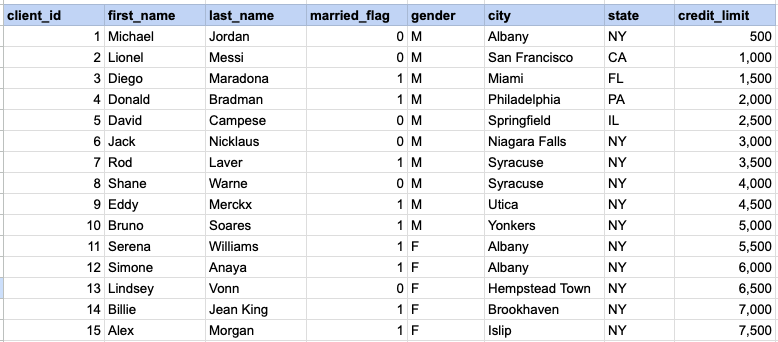
Example 1 - Raw data from client table
Example 1 - AND operator
SELECT *
FROM org_client
WHERE gender = 'M'
AND state = 'NY';
Example 1 - Query data mapping
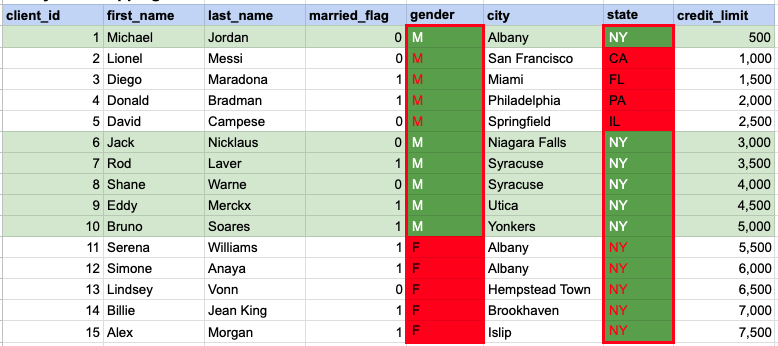
In the given image, the green hue indicates the data that has been chosen or meets the criteria specified in our query. When using the AND operator, both column values must satisfy the specified criteria.
Example 1 - Query Output

Example 2 - OR operator
SELECT *
FROM org_client
WHERE city = 'Miami'
OR state = 'PA';
Example 2 - Query data mapping
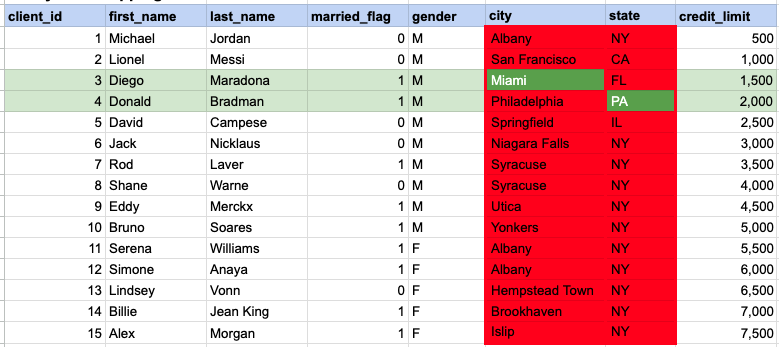
In the given image, the green hue indicates the data that has been chosen or meets the criteria specified in our query. In the case of the OR operator, at least one of the column values needs to meet the specified criteria.
Example 2 - Query Output

Example 3 - AND operator
SELECT *
FROM org_client
WHERE state = 'NY'
AND (city = 'Albany' OR credit_limit > 7000);
Example 3 - Query data mapping
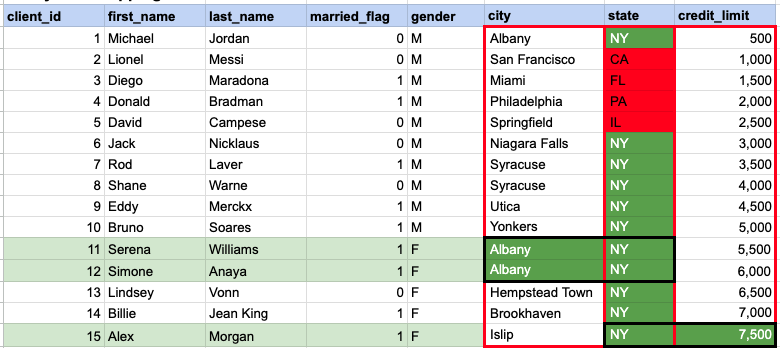
In the given image, the green hue indicates the data that has been chosen or meets the criteria specified in our query. In this instance, a specific row must satisfy the conditions based on the state, and subsequently, there should be a match in at least one value between the city and credit limit.
Example 3 - Query Output

Comments Not Found