
Oracle
EXISTS, ANY and ALL Clause
In Oracle SQL, the EXISTS, ANY, and ALL clauses are powerful tools used in data retrieval operations. They help you filter results based on the existence of certain conditions in subqueries. Understanding these clauses is essential for effective querying in databases, especially when working with multiple related tables. Below, you'll find an overview of each clause, along with examples and best practices.
1. EXISTS Clause
The EXISTS clause checks for the existence of rows returned by a subquery. If the subquery returns any rows, EXISTS evaluates to true.
- Syntax:
SELECT column1, column2
FROM authors a
WHERE EXISTS (
    SELECT 1
    FROM books b
    WHERE b.author_id = a.id
);
2. ANY Clause
The ANY clause is used to compare a value to any value in a list or returned by a subquery. It evaluates to true if at least one of the comparisons is true.
- Syntax:
SELECT *
FROM books
WHERE price > ANY (
    SELECT price
    FROM books
    WHERE genre = 'Fiction'
);
3. ALL Clause
The ALL clause is similar to ANY, but it requires that the comparison must be true for all values returned by the subquery.
- Syntax:
SELECT *
FROM books
WHERE price > ALL (
    SELECT price
    FROM books
    WHERE genre = 'Non-Fiction'
);
4. Use Cases
- EXISTS: Useful when you need to check the presence of related records in another table.
- ANY: Ideal for scenarios where you want to see if a value is greater than or less than any value in a set.
- ALL: Best for cases where you need to ensure a condition holds true against all values returned by a subquery.
5. Best Practices
- Use EXISTS over COUNT: Prefer
EXISTSfor checking row existence, as it often performs better than usingCOUNTin subqueries. - Select only necessary columns: In subqueries, use
SELECT 1instead of selecting all columns for better performance. - Use ALL cautiously: Be mindful of using
ALL, as it can lead to unexpected results if not properly understood. - Test subqueries independently: Always run your subqueries separately to ensure they return the expected results.
By following these guidelines and understanding the clauses, you can enhance your SQL querying skills effectively.
To gain complete access, login with gmail or outlook, no need of signup. click here

TEST CODE
In Oracle, to select all customers who have placed an order, you can use the EXISTS operator with the following query:
SELECT *
FROM org_client
WHERE EXISTS (SELECT 1 FROM act_order WHERE org_client.client_id = act_order.client_id);In Oracle, to identify married couples whose credit limit surpasses the credit limit of every bachelor, you can use the ALL operator with the following query:
SELECT *
FROM org_client
WHERE credit_limit > ALL (SELECT credit_limit FROM org_client WHERE married_flag = 0)
AND married_flag = 1;In Oracle, to identify single female clients born in the same year as any single male clients, you can use the ANY operator with the following query:
SELECT *
FROM org_client
WHERE birth_year = ANY (SELECT birth_year FROM org_client WHERE gender = 'M' AND married_flag = 0)
AND gender = 'F'
AND married_flag = 0;SQL EXISTS Clause
SELECT * FROM org_client
WHERE EXISTS (SELECT 1 FROM act_order WHERE org_client.client_id = act_order.client_id);
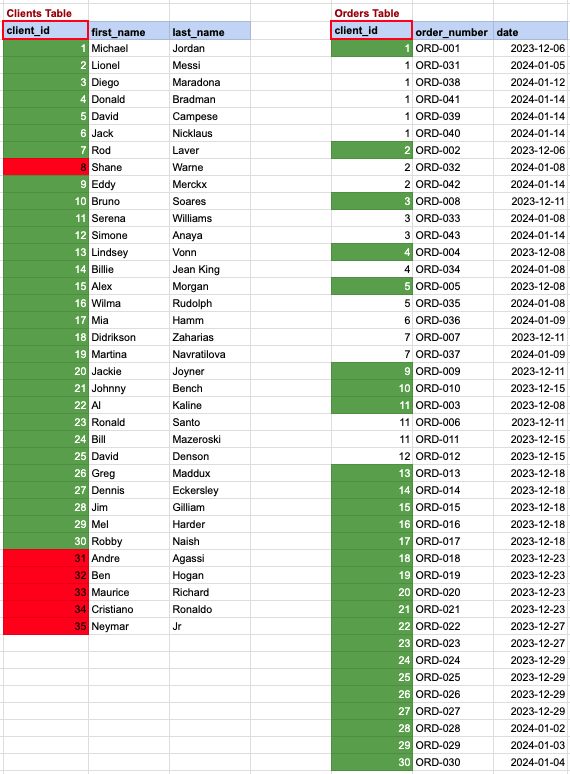
SQL EXISTS Clause - data mapping
In this scenario, we aim to list clients who have made at least one order. Referring to the image, the clients from the 'clients' table, highlighted with a green background, meet our criteria, as they have placed one or more orders in the 'orders' table on the right. Conversely, clients marked with a red background are those who haven't placed any orders in the table on the right.
SQL ALL Clause
SELECT * FROM org_client
WHERE credit_limit > ALL (SELECT credit_limit FROM org_client WHERE married_flag = 0)
AND married_flag = 1;
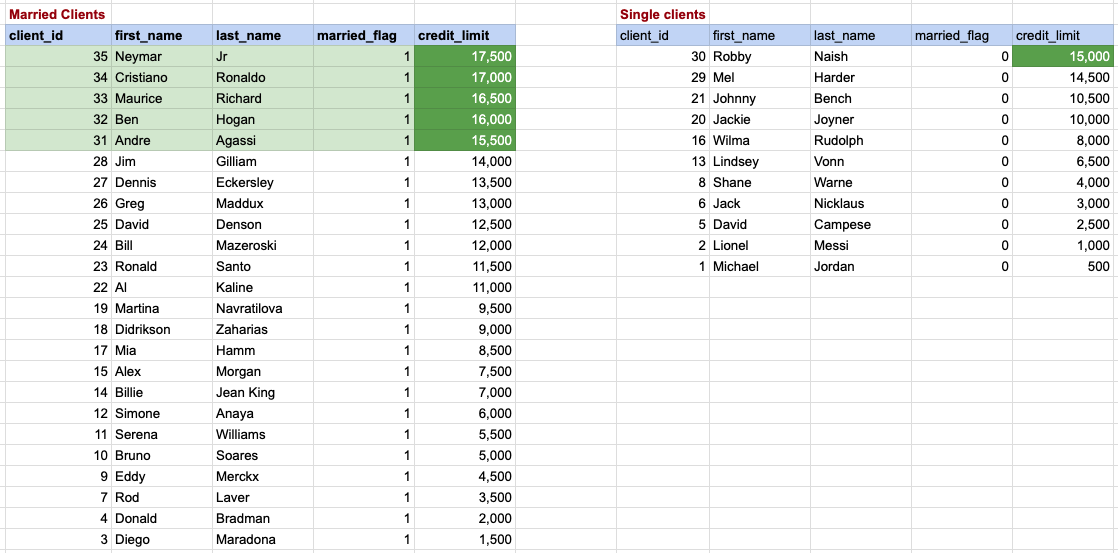
SQL ALL Clause data mapping
In this context, we are focused on identifying married couples whose credit limit is higher than the highest credit limit among bachelors. The bachelors and their respective credit limits are displayed on the right side, arranged in descending order with the top credit limit being 15,000. Therefore, for married clients to have a higher credit rating than all bachelors, they must exceed this top credit limit. Rows with a green background on the left represent the data of married couples that fulfill our criteria.
SQL ANY Clause
SELECT * FROM org_client
WHERE birth_year = ANY (SELECT birth_year FROM org_client WHERE gender = 'M' AND married_flag = 0)
AND gender = 'F'
AND married_flag = 0;
SQL ANY Clause data mapping
In this case, our goal is to find single female clients who share the same birth year as any of the single male clients. The data for single females, along with their birth years, is displayed on the left, while the information for single males is listed on the right. Single female clients whose data is highlighted with a green background are those whose birth year matches with that of a single male from the right side.

Comments Not Found