
Oracle
RIGHT JOIN
A RIGHT JOIN is a type of join that returns all records from the right table (the second table) and the matched records from the left table (the first table). If there is no match, NULL values are returned for columns from the left table. This join is useful when you want to retrieve all data from one table, regardless of whether there is a corresponding entry in another table.
Key Points about RIGHT JOIN
Definition
- Returns all rows from the right table and matched rows from the left table.
- NULLs are displayed for non-matching rows from the left table.
Syntax
- The basic syntax for a RIGHT JOIN in Oracle is:
SELECT columns
FROM left_table
RIGHT JOIN right_table
ON left_table.common_column = right_table.common_column;
- The basic syntax for a RIGHT JOIN in Oracle is:
Example with Books and Authors
- Suppose we have two tables:
authorsandbooks. Theauthorstable contains information about authors, while thebookstable contains information about books written by those authors. Here's an example SQL query using RIGHT JOIN:SELECT a.author_name, b.book_title FROM authors a RIGHT JOIN books b ON a.author_id = b.author_id;
- Suppose we have two tables:
Output Explanation
- In this query, all books will be listed, along with the author's name. If a book does not have a corresponding author, the
author_namewill be NULL.
- In this query, all books will be listed, along with the author's name. If a book does not have a corresponding author, the
Best Practices
- Use Meaningful Names: Always use clear and meaningful table aliases to improve readability.
- Filter Results: Use WHERE clauses to filter results when necessary, which helps in reducing the dataset for performance.
- Consider Data Size: Be cautious when using joins on large datasets, as they can impact performance.
- Test Your Queries: Always test your join queries to ensure they return the expected results.
Summary
The RIGHT JOIN is a powerful tool in Oracle SQL for retrieving comprehensive data from two related tables. By understanding its structure and usage, you can effectively analyze and present data in various scenarios.
To gain complete access, login with gmail or outlook, no need of signup. click here

TEST CODE
To provide details for all products, including their product types, and include product types that do not have any assigned products using a RIGHT JOIN, you can use the following query:
SELECT prd_product.product_id,
       prd_product.product_code,
       prd_product.product_name,
       prd_product.selling_price,
       prd_product.purchase_price,
       prd_product_type.product_type_id,
       prd_product_type.product_type
FROM prd_product
RIGHT JOIN prd_product_type ON prd_product_type.product_type_id = prd_product.product_type_id;EXAMPLE 1 - SQL RIGHT JOIN
Here is a clear example of a RIGHT JOIN. Retrieve information of all products along with their respective product type, including product types that have not been associated with any products.
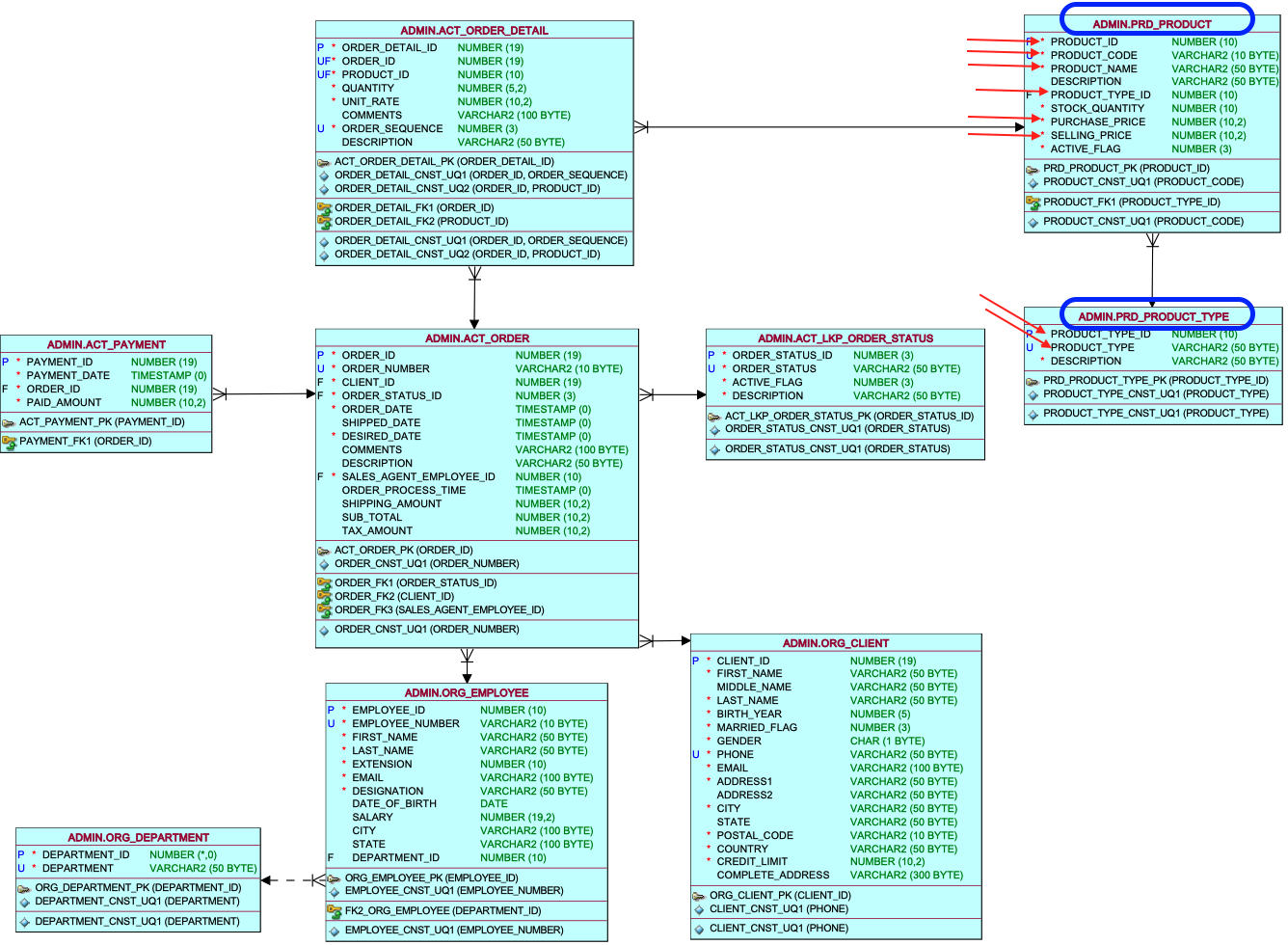
EXAMPLE 1 - Tansy Academy Data Model
In this task, you will create a query involving two tables, named Products and ProductType, marked are the columns necessary for the query.
EXAMPLE 1 - RIGHT JOIN query
To achieve this, you need to execute a RIGHT JOIN between the product table and the product type detail table, utilizing the primary key and foreign key column, wherein the product type ID column serves as the joining column. In this scenario, the product table functions as the left table, and the product type detail table is considered the right table. The left table, which contains the essential primary business information, focuses on the product list as the primary requirement. At a secondary level, we seek prodcut type name, so we treat the product type as the secondary table, positioned on the right side of the join
SELECT prd_product.product_id,
prd_product.product_code,
prd_product.product_name,prd_product.selling_price,
prd_product.purchase_price
    prd_product_type.product_type_id,
prd_product_type.product_type
FROM prd_product
RIGHT OUTER JOIN prd_product_type ON prd_product_type.product_type_id = prd_product.product_type_id
ORDER BY prd_product.product_id;
EXAMPLE 1 - Query Data Mapping
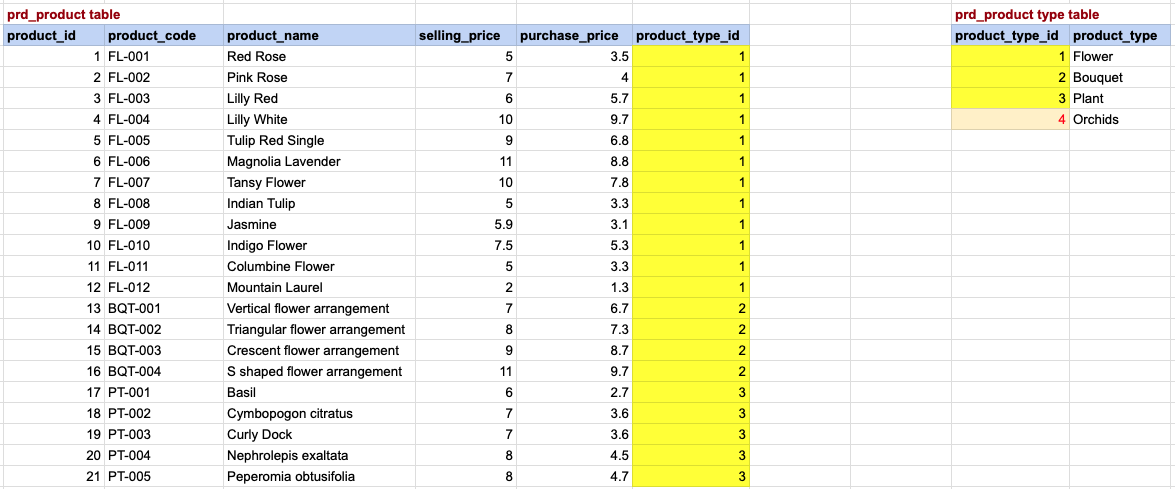
In this visual representation, a yellow background denotes a correspondence between the primary key and foreign key. Meanwhile, a light yellow background with red font on the right side signifies products lacking a corresponding row in the product type table. These product typess will be included in the final result, but with NULL values for product details. It's important to recognize that a RIGHT JOIN incorporates all rows from the right table, which, in this case, is the product type table.
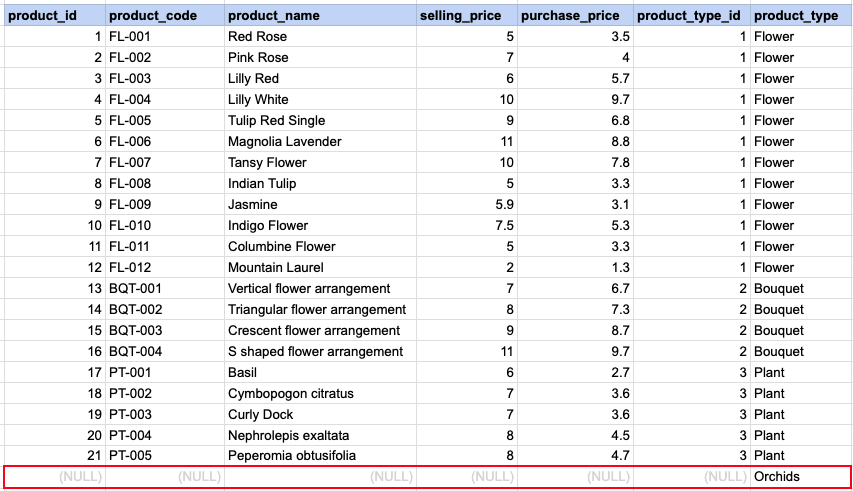
EXAMPLE 1 - Final OUTput
Please note that for rows in the left table that do not find a corresponding match in the right table, the values are marked as null.
Comments Not Found