
Oracle
SELECT *
In Oracle, the SELECT * statement is used to retrieve all the columns from a table. It is part of the Data Query Language (DQL), which is used to query the database for retrieving data. While SELECT * is simple and useful for beginners, it’s important to understand that it retrieves every column, which might not always be efficient or necessary, especially for large tables with many columns.
How to use SELECT * in Oracle
Basic Syntax
The basic syntax forSELECT *is:SELECT * FROM table_name;SELECTis the keyword that tells Oracle to retrieve data.*means all columns.FROMspecifies the table from which data is retrieved.
Example Usage
Suppose you have a table namedbooks, which contains information about books in a library, and you want to retrieve all the data from this table:SELECT * FROM books;This query will return every column and every row in the
bookstable.Working with Multiple Tables
If you want to retrieve data from multiple tables (e.g.,authorsandbooks), you can use aJOIN. However, if you useSELECT *, it will fetch all columns from both tables:SELECT * FROM authors JOIN books ON authors.author_id = books.author_id;- This will return all columns from both
authorsandbookswhere there is a matchingauthor_id.
- This will return all columns from both
Filtering with WHERE Clause
You can combineSELECT *with aWHEREclause to filter the rows returned. For example, if you want to get all books written by a specific author:SELECT * FROM books WHERE author_id = 1;- This query retrieves all columns for books that have an
author_idof1.
- This query retrieves all columns for books that have an
Best Practices
AlthoughSELECT *is convenient, it’s not always efficient, especially in large databases. Here are some best practices:Only select necessary columns: Instead of
SELECT *, specify the columns you need. For example:SELECT title, publication_year FROM books;Avoid using
SELECT *in production: UsingSELECT *can slow down your application if the table has many columns or unnecessary data is fetched.Improve readability: When you specify columns, it makes the SQL query more readable and easier to maintain.
By following these best practices, you can write more efficient and maintainable SQL queries.
To gain complete access, login with gmail or outlook, no need of signup. click here

TEST CODE
Fetch all columns and rows from the org_employee table.
SELECT * FROM org_employee;Fetch all columns and rows from the org_client table.
SELECT * FROM org_client;Fetch all columns and rows from the act_payment table.
SELECT * FROM act_payment;Fetch specific columns and all rows from the org_client table.
SELECT client_id, first_name, last_name, gender, city
FROM org_client;Fetch specific columns and all rows from the org_client table. The order of columns in the result set may differ from the table definition.
SELECT city, gender, first_name, last_name, email, client_id
FROM org_client;Retrieve all rows from org_client table, selecting only specific columns.
SELECT city, gender, first_name, last_name, email FROM org_client;Select specific columns and retrieve all rows from org_client.
SELECT city
    gender,
    first_name,
    last_name,
    email
FROM org_client;Fetch all rows from org_client table, selecting specified columns.
SELECT city, gender, first_name, last_name, email
FROM org_client
ORDER BY first_name;Choose one column from the org_client table.
SELECT email
FROM org_client;Example 1:
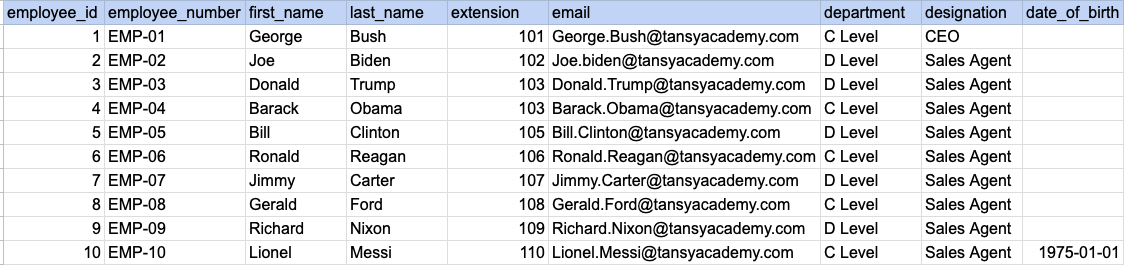
Let's understand the process of extracting data from a specified table. In this case, we aim to retrieve all rows and columns from the employee table.
Example 1 - Raw data from employee table
Example 1 - Query
SELECT *
FROM org_employee;
Example 1 - Query data mapping
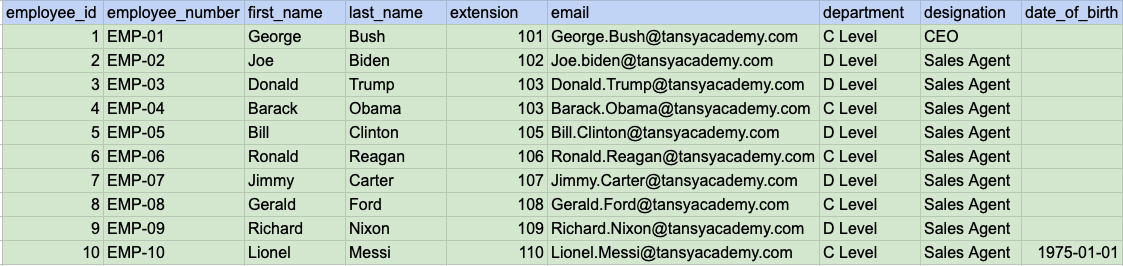
In above image, the color green signifies that the output for our query will include all rows and columns being selected.
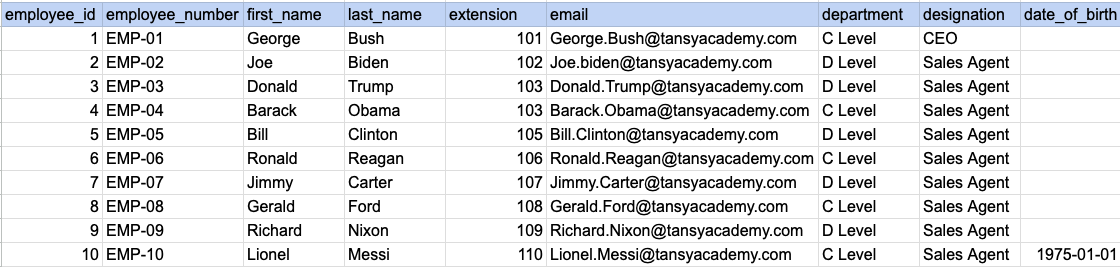
Example 1 - Query Output
Example 2:
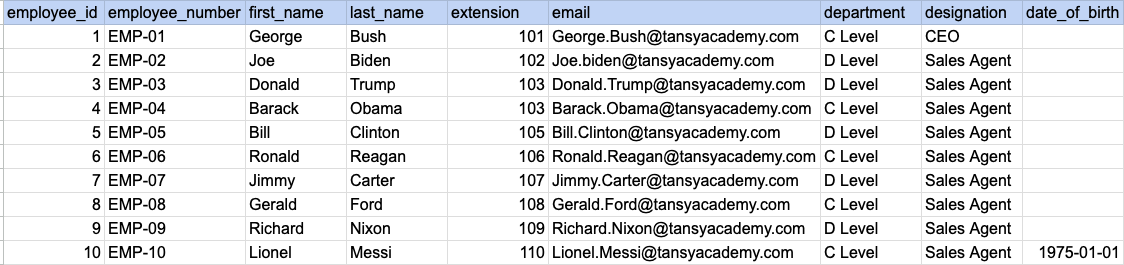
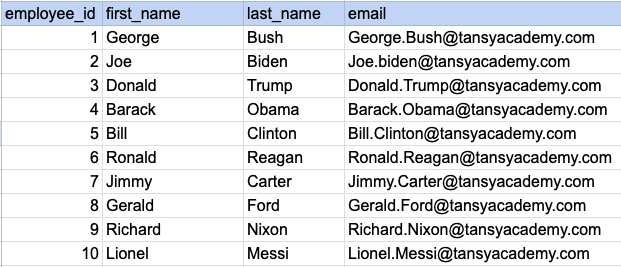
Let's understand the process of extracting desired columns from a specified table. In this case, we aim to retrieve 4 columns from the employee table.
Example 2 - Raw data from employee table
Example 2 - Query
SELECT employee_id, first_name, last_name, email
 FROM org_employee;
Example 2 - Query data mapping
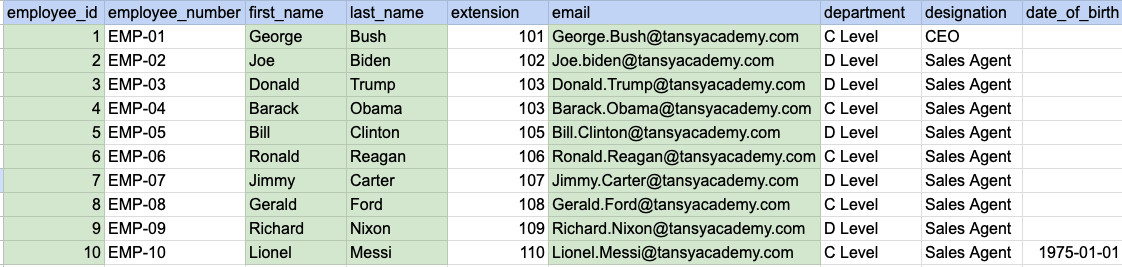
In above image, the color green signifies that the output for our query will include data from desired columns(employee_id, first_name, last_name and email).
Example 2 - Query Output
Comments Not Found