
Oracle
IN Operator
The IN operator in Oracle is a powerful tool used to filter query results based on whether a value exists within a specified set of values. It simplifies querying by avoiding multiple OR conditions and allows you to easily check if a column's value matches any value in a given list. This is especially useful when you need to search for multiple values within a column efficiently.
Key Points about the IN Operator:
Basic Usage
- The
INoperator checks whether a value exists within a list of specified values. - Syntax:
SELECT column_name FROM table_name WHERE column_name IN (value1, value2, ...); - Example:
This query retrieves the titles of books written by authors with IDs 101, 102, or 103.SELECT title FROM books WHERE author_id IN (101, 102, 103);
- The
Using
INwith Subqueries- The
INoperator can also be used with a subquery to filter results based on another query. - Example:
This query returns the names of authors who published books in the year 2023.SELECT name FROM authors WHERE author_id IN (SELECT author_id FROM books WHERE published_year = 2023);
- The
Negating
INwithNOT IN- You can reverse the behavior of
INusing theNOT INoperator, which retrieves rows where the column’s value does not match any in the list. - Example:
This retrieves books that are not classified as 'Fiction' or 'Sci-Fi'.SELECT title FROM books WHERE genre NOT IN ('Fiction', 'Sci-Fi');
- You can reverse the behavior of
Combining with Other Operators
- The
INoperator can be combined with other conditions in theWHEREclause. - Example:
This retrieves books written by authors with IDs 101 or 102, and published after 2020.SELECT title FROM books WHERE author_id IN (101, 102) AND published_year > 2020;
- The
Best Practices
- Avoid too many values in the
INlist: If your list contains too many values, consider using a subquery or a join to optimize performance. - Ensure values in the
INlist are distinct: Duplicate values can slow down performance and lead to confusing results. - Use
EXISTSfor better performance when filtering based on subqueries, especially with large datasets.
- Avoid too many values in the
Example of Combining All Concepts
SELECT b.title, a.name
FROM books b
JOIN authors a ON b.author_id = a.author_id
WHERE b.author_id IN (SELECT author_id FROM authors WHERE country = 'USA')
AND b.genre NOT IN ('Horror', 'Thriller')
AND b.published_year > 2018;
This query retrieves the titles and author names for books written by authors from the USA, excluding books in the 'Horror' or 'Thriller' genres, and published after 2018.
Best Practices for Using IN Operator:
Limit the number of values inside
IN:- If possible, avoid long lists of values in the
INclause. If the list becomes too large, performance may degrade.
- If possible, avoid long lists of values in the
Substitute with
JOINwhen necessary:- For large datasets, consider using a
JOINinstead of a subquery withINfor better performance. This often reduces execution time and is more efficient.
- For large datasets, consider using a
Be cautious with
NOT IN:- Be careful when using
NOT IN, especially with NULL values in the list, as it may cause unexpected results. UsingNOT EXISTSis generally safer.
- Be careful when using
To gain complete access, login with gmail or outlook, no need of signup. click here

TEST CODE
In Oracle, the IN operator is used to filter rows based on a list of string values. This query retrieves all rows from the "org_employee" table where the designation column corresponds to any of the specified values ('Sales Manager', 'Financial Analyst', 'CFO'):
SELECT *
FROM org_employee
WHERE designation IN ('Sales Manager', 'Financial Analyst', 'CFO');In Oracle, the IN operator is used to filter rows based on a list of numeric values. This query retrieves all rows from the "org_client" table where the birth year column matches any of the specified values (1990, 1980):
SELECT *
FROM org_client
WHERE birth_year IN (1990, 1980);In Oracle, the IN operator is used to filter rows based on a list of datetime values. This query retrieves all rows from the "act_order" table where the desired_date column matches any of the specified values ('2023-12-09', '2023-12-10', '2023-12-18', '2023-12-25'):
SELECT *
FROM act_order
WHERE desired_date IN (TO_DATE('09/12/23', 'DD/MM/YY'), TO_DATE('10/12/23', 'DD/MM/YY'), TO_DATE('18/12/23', 'DD/MM/YY'), TO_DATE('25/12/23', 'DD/MM/YY'));Example 1:
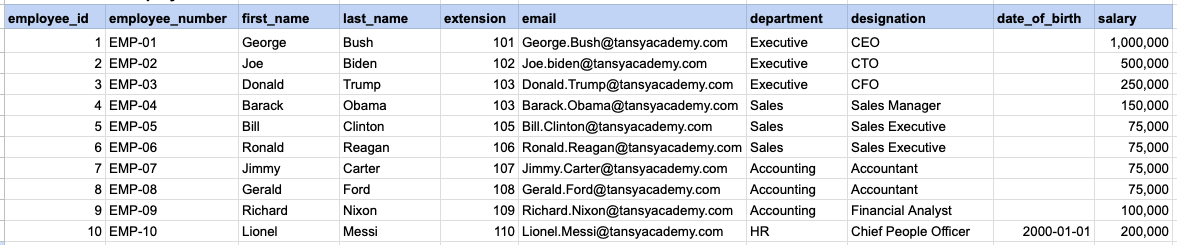
Let's explore the procedure of extracting information from a designated table using the IN SQL operator with string data. This query retrieves all rows from the employees table where the designation column corresponds to any of the specified values ('Sales Manager', 'Financial Analyst', 'CFO').
Example 1 - Raw data from employee table
Example 1 - Query
SELECT *
FROM org_employee
WHERE designation IN ('Sales Manager', 'Financial Analyst', 'CFO');
Example 1 - Query data mapping
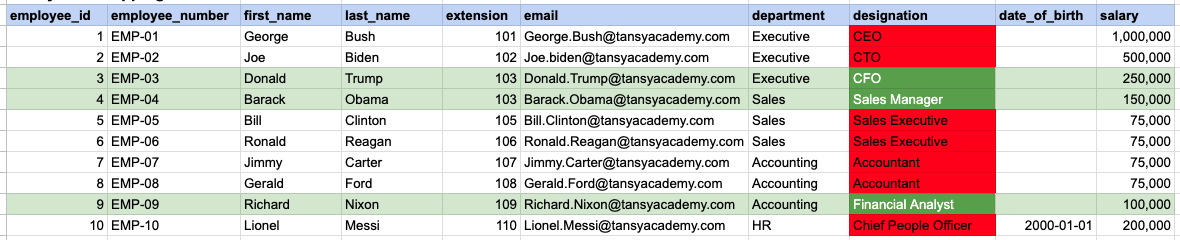
In the provided image, the green color signifies the data that has been selected or satisfies the conditions specified in our query. Data points in red indicate information that does not meet the criteria set by the query.
Example 1 - Query Output

Example 2:
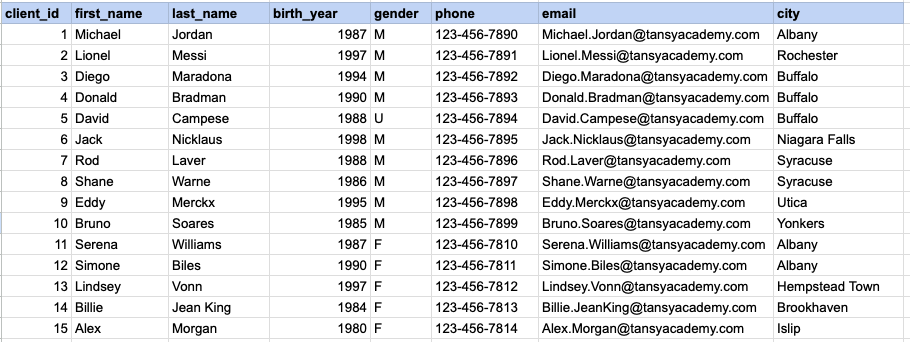
Let's explore the procedure for extracting information from a designated table using the IN SQL operator on integer data. The query fetches all rows from the clients table where the birth year column matches any of the specified values (1990, 1980).
Example 2 - Raw data from client table
Example 2 - Query
SELECT *
FROM org_client
WHERE birth_year IN (1990, 1980);
Example 2 - Query data mapping
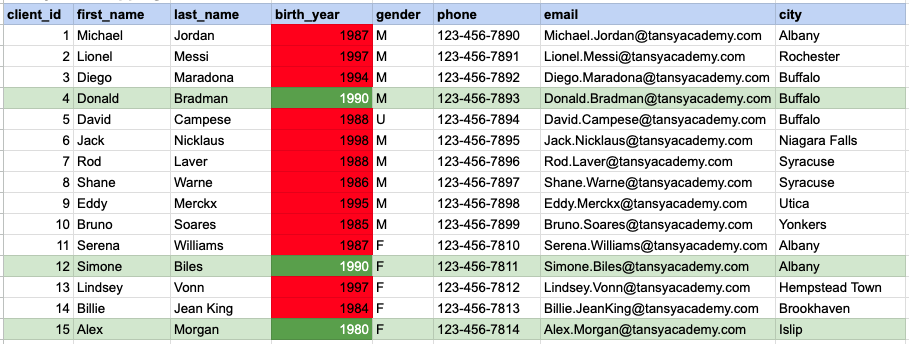
In the provided image, the green color signifies the data that has been selected or satisfies the conditions specified in our query. Data points in red indicate information that does not meet the criteria set by the query.
Example 2 - Query Output

Example 3:
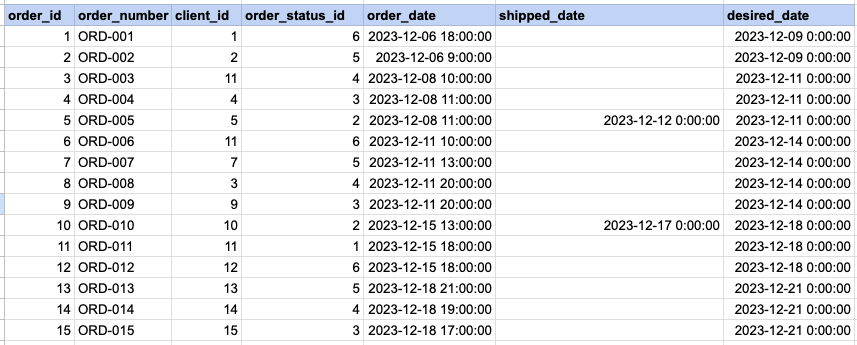
Let's explore the procedure for extracting information from a designated table using the IN SQL operator on date time data. This query retrieves all rows from the orders table where the desired ship date column corresponds to any of the specified values ('2023-12-09', '2023-12-10', '2023-12-18', '2023-12-25').
Example 3 - Raw data from order table
Example 3 - Query
SELECT *
FROM act_order
WHERE desired_date IN ('2023-12-09', '2023-12-10', '2023-12-18', '2023-12-25');
Example 3 - Query data mapping
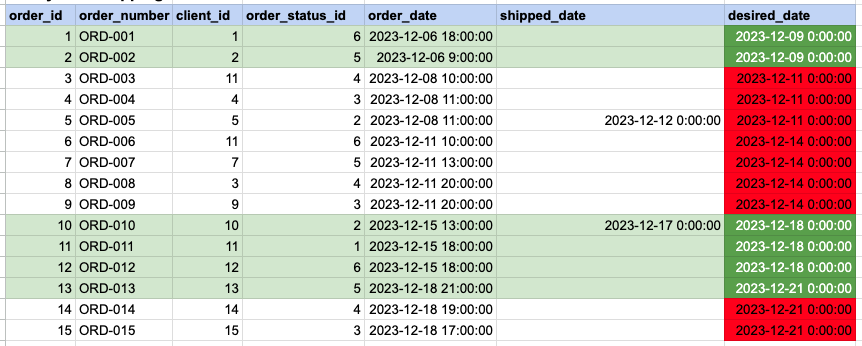
In the provided image, the green color signifies the data that has been selected or satisfies the conditions specified in our query. Data points in red indicate information that does not meet the criteria set by the query.
Example 3 - Query Output

Comments Not Found