
Oracle
Primary Key
In a relational database management system (RDBMS) like Oracle, a PRIMARY KEY is a crucial constraint that ensures each record within a table is unique and identifiable. The primary key serves as a unique identifier for each row, which helps maintain data integrity and allows efficient access and retrieval of records. No two rows in a table can have the same primary key value, and it cannot be NULL.
Here’s a more detailed look at primary keys:
Defining a Primary Key
- A primary key is defined using the
PRIMARY KEYconstraint when creating or altering a table. - It ensures that the values in the primary key column(s) are unique across the table.
- A primary key is defined using the
Creating a Table with a Primary Key
- When you create a table, you can specify a column (or a set of columns) as the primary key.
CREATE TABLE authors (
    author_id INT PRIMARY KEY,
    name VARCHAR2(100) NOT NULL,
    birth_date DATE
);
Composite Primary Keys
- A primary key can consist of multiple columns, known as a composite primary key, to ensure uniqueness across a combination of columns.
CREATE TABLE books (
    book_id INT,
    author_id INT,
    title VARCHAR2(200),
    PRIMARY KEY (book_id, author_id)
);
Adding a Primary Key to an Existing Table
- If you have an existing table, you can add a primary key constraint using the
ALTER TABLEstatement.
ALTER TABLE library ADD CONSTRAINT pk_library PRIMARY KEY (library_id);- If you have an existing table, you can add a primary key constraint using the
Primary Key and Indexes
- Oracle automatically creates an index on the primary key column(s) to speed up data retrieval.
Primary Key Constraints in Relationships
- Primary keys are often used in relationships between tables. For instance, a foreign key in another table references the primary key of a different table.
CREATE TABLE rentals (
    rental_id INT PRIMARY KEY,
    book_id INT,
    member_id INT,
    rental_date DATE,
    FOREIGN KEY (book_id) REFERENCES books(book_id),
    FOREIGN KEY (member_id) REFERENCES membership(member_id)
);
By defining primary keys, you ensure the uniqueness and integrity of data in your Oracle database tables, which is fundamental for effective database management.
Detailed Breakdown of Primary Key Characteristics and Purposes
Uniqueness
Guaranteed Uniqueness:Each row in a table is uniquely identified by the primary key, meaning no two rows can have the same primary key value. This uniqueness guarantee is crucial for accurately identifying and interacting with individual records.
Non-nullability
Cannot be Null:A primary key column cannot have a NULL value. Every row must have a primary key value to ensure that it can be uniquely identified. This rule helps maintain data integrity by preventing records from becoming "invisible" or unidentifiable due to a lack of an identifier.
Immutability
Stability and Permanence:Once assigned, the primary key value of a record should not change. While this is more of a best practice than a strict rule enforced by all database systems, it's important for maintaining data integrity and consistency over time. Changing primary key values can lead to issues with data relationships and integrity.
Indexing
Automatic Indexing:Most database systems automatically create an index for the primary key, making search and retrieval operations much faster. An index, in this context, is a data structure that improves the speed of data retrieval operations on a database table at the cost of additional writes and storage space to maintain the index data structure.
Simplification of Relationships
Facilitating Relationships:In relational databases, primary keys play a crucial role in establishing relationships between tables. A primary key from one table can be referenced in another table to create a "foreign key" relationship, enabling the relational database to link data across tables efficiently. This relationship is foundational for operations like joins, which combine data from multiple tables based on these keys.
Composite Primary Keys
Single or Multiple Columns:While a primary key can be a single column, it can also consist of multiple columns. This is known as a composite primary key. It is used when no single column uniquely identifies each row, but a combination of columns does. Each part of this composite key must be part of the primary key in every row.
Use Cases and Examples
For example, in a "Users" table, the primary key might be a "UserID" column, where each user is assigned a unique identifier. In an "Orders" table, the primary key could be an "OrderID." If an order can be uniquely identified by combining "OrderDate" and "OrderNumber", these two columns together could serve as a composite primary key.
Conclusion
Primary keys are a cornerstone of database design, ensuring data integrity, improving performance, and enabling the relational model's powerful data linkage capabilities. Properly defining primary keys is essential for effective database and application design, ensuring that data remains consistent, accessible, and meaningful.
Understanding Primary Keys through a Library Analogy
Imagine you're in a library full of books. Each book has a unique identification number, often called an ISBN (International Standard Book Number). This number is specific to that book and no other book in the library (or the world) has the same ISBN. When you want to find a specific book, you can just use this number to locate it quickly among thousands of others.
In database terms, this ISBN acts like a primary key for the book in the library's catalog system. Just as the ISBN uniquely identifies each book, a primary key in a database table uniquely identifies each record. This means that every record, or row of data, in a table can be quickly and precisely accessed by its primary key, avoiding any mix-up or duplication among the vast amount of data stored in the database.
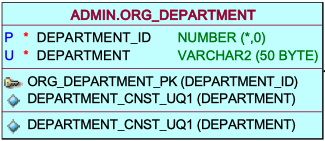
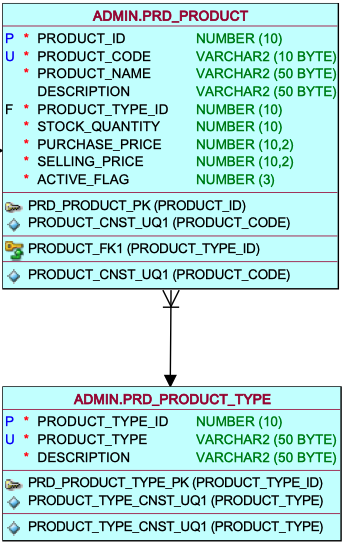
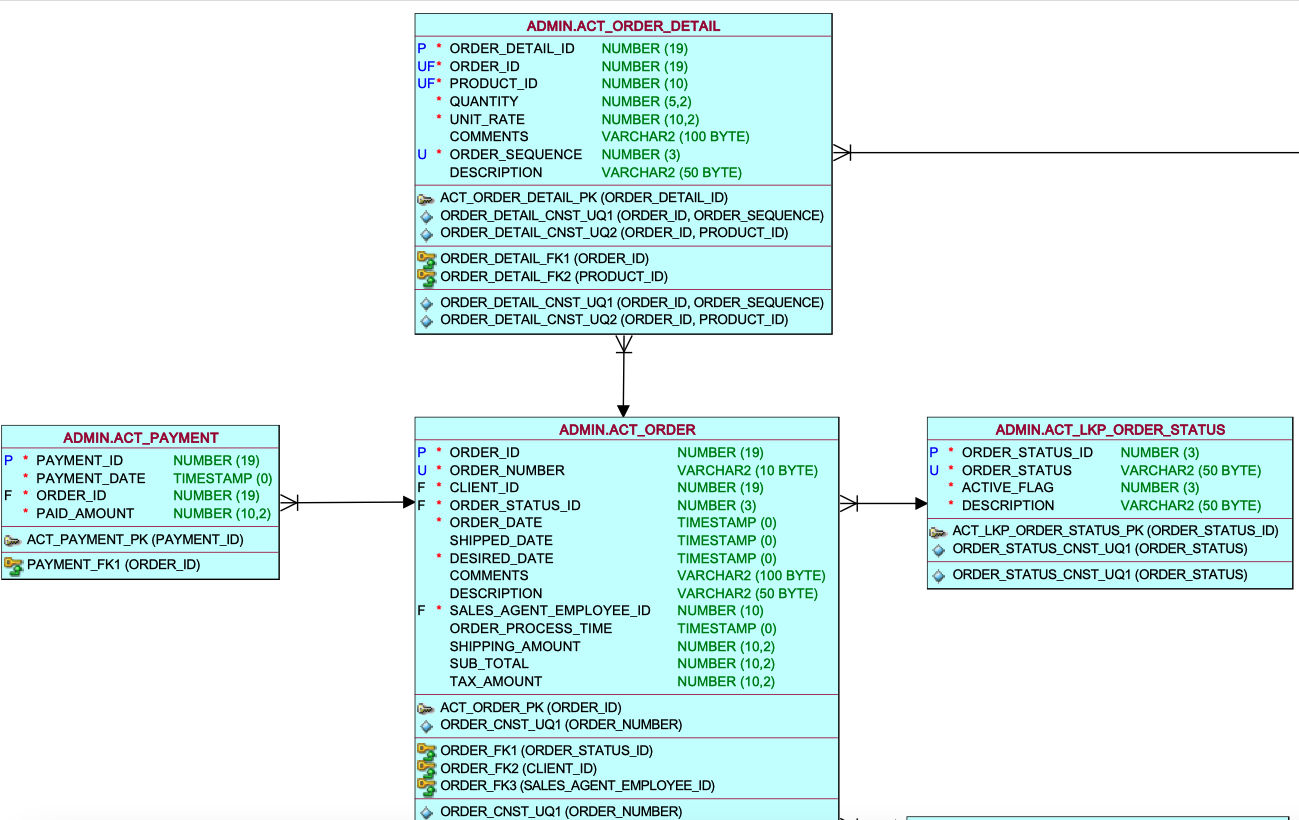
TABLES WITH FIRST COLUMNS AS PRIMARY KEY


Comments Not Found