
Oracle
IS NOT NULL Operator
The IS NOT NULL operator in Oracle's Data Query Language (DQL) is used to check whether a column contains any value other than NULL. It helps you filter out records where a column does not have a missing or undefined value. This is useful when working with data that might be incomplete or when you want to ensure that you're only working with valid, meaningful entries in a query result.
Example:
Consider the books table with columns book_id, title, and author_id. The IS NOT NULL operator will return only the rows where the author_id has been specified, meaning it is not NULL.
SELECT title, author_id
FROM books
WHERE author_id IS NOT NULL;
This query will list only those books where the author_id column is populated.
Understanding IS NOT NULL Operator in Oracle
Purpose of
IS NOT NULL:- The
IS NOT NULLoperator is used to filter records where a specific column contains a non-null value. - It ensures that you do not retrieve records where the data in the column is missing.
- The
Usage in a Query:
The operator can be applied to any column that may have
NULLvalues to ensure those records are excluded from the result.Example using the
librarytable:SELECT library_name FROM library WHERE address IS NOT NULL;- This query will fetch only libraries where the
addressfield is not empty.
- This query will fetch only libraries where the
How it works:
- It acts as a filter condition in the
WHEREclause. - Unlike other comparison operators (
=,>, etc.), you can't directly compare a column toNULL. This is why theIS NOT NULLoperator exists.
- It acts as a filter condition in the
Common Use Cases:
- When you need to display only the valid records from a table where certain fields are expected to contain data.
- In reports, where you want to ignore missing or irrelevant data.
SQL Example with Multiple Conditions:
You can combine
IS NOT NULLwith other conditions usingANDorOR. For instance, checking bothauthor_idandpublished_yearin thebookstable:SELECT title, author_id FROM books WHERE author_id IS NOT NULL AND published_year IS NOT NULL;- This query will return only the books that have both an
author_idand apublished_year.
- This query will return only the books that have both an
Best Practices for Using
IS NOT NULL:Always ensure you are using
IS NOT NULLwhere relevant data is critical, especially in fields where you expect the data to be complete.Avoid applying
IS NOT NULLon columns whereNULLvalues are expected as part of the business logic, to prevent excluding valid records.- Tip: In performance-sensitive queries, ensure that the column you apply
IS NOT NULLto is indexed if necessary, as scanning forNULLor non-NULLvalues may affect query performance.
- Tip: In performance-sensitive queries, ensure that the column you apply
By understanding how to properly use the IS NOT NULL operator, you can ensure that your queries return only the records containing the necessary data, while also avoiding incomplete or missing information.
To gain complete access, login with gmail or outlook, no need of signup. click here
TEST CODE
In Oracle, to retrieve records using the IS NOT NULL operator on a date column and select orders that have been shipped, you can use the following query:
SELECT *
FROM act_order
WHERE shipped_date IS NOT NULL;In Oracle, to fetch data by utilizing the IS NOT NULL operator on a date column and specifically choose employees who have provided their date of birth, you can use the following query:
SELECT *
FROM org_employee
WHERE date_of_birth IS NOT NULL;Example 1:
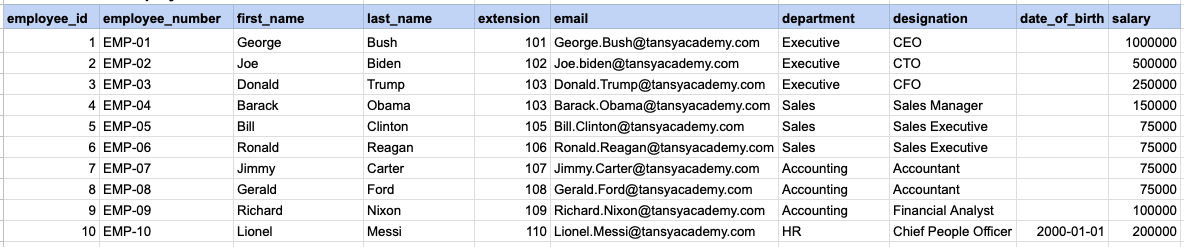
Let's explore the procedure of extracting information from a designated table using the IS NOT NULL SQL operator. This query retrieves employees who have provided their date of birth.
Example 1 - Raw data from employee table
Example 1 - Query
SELECT *
FROM org_employee
WHERE date_of_birth IS NOT NULL;
Example 1 - Query data mapping
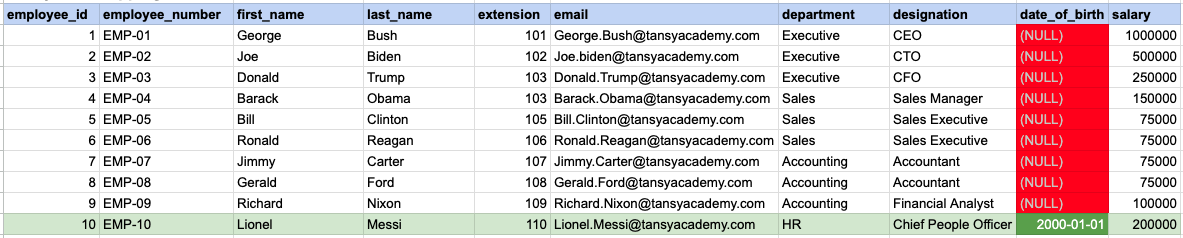
In the provided image, the green color signifies the data that has been selected or satisfies the conditions specified in our query. Data points in red indicate information that does not meet the criteria set by the query.
Example 1 - Query Output

Example 2:
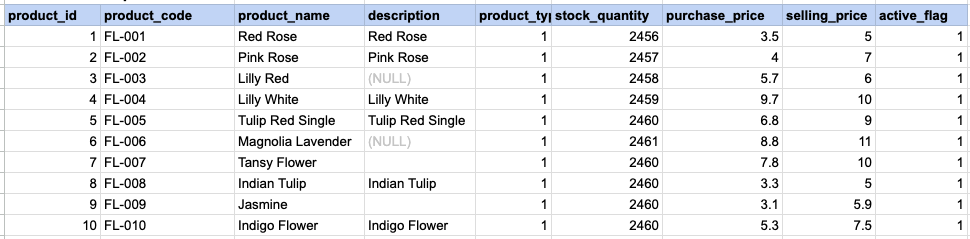
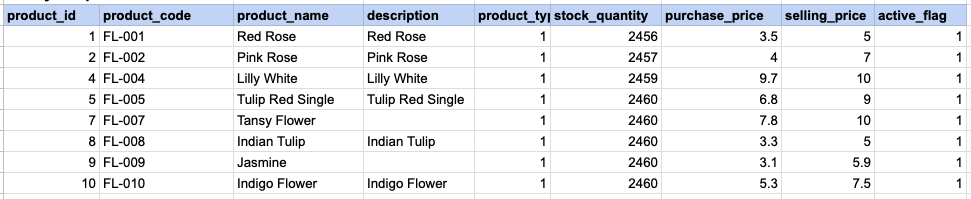
Let's delve into the process of retrieving information from a specified table using the SQL IS NOT NULL operator on string data. The query retrieves all rows from the products table where the description is not null.
Example 2 - Raw data from product table
Example 2 - Query
SELECT *
FROM prd_product
WHERE description IS NOT NULL;
Example 2 - Query data mapping
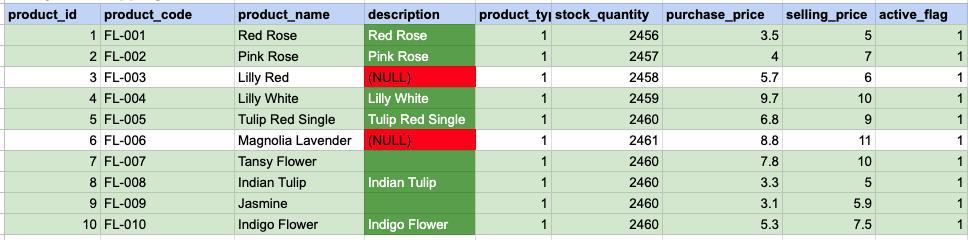
In the provided image, the green color signifies the data that has been selected or satisfies the conditions specified in our query. Data points in red indicate information that does not meet the criteria set by the query. NOTE that description value for product id 7 and 9 compose a empty string, this is not a null.
Example 2 - Query Output
Example 3:
Using '<> NULL' is not permissible; instead, you must use 'IS NOT NULL'. As demonstrated below, employing '<> NULL' results in an empty result set.
SELECT *
FROM prd_product
WHERE description <> NULL;
Example 3 - Empty result set

Comments Not Found