
Oracle
BETWEEN Operator
The BETWEEN operator in Oracle is used in SELECT queries to filter data based on a specified range. This range includes the values at both ends. It's a useful tool when you want to retrieve rows where a column value lies within two bounds, such as finding books published between two dates or memberships created within a specific period.
Here’s an introduction followed by detailed points explaining how to use the BETWEEN operator in Oracle, with a focus on beginners.
Example SQL Query
Let's consider a books table with columns title, author_id, and published_year. We want to select all books published between 2000 and 2010.
SELECT title, author_id, published_year
FROM books
WHERE published_year BETWEEN 2000 AND 2010;
Steps to Use the BETWEEN Operator
Basic Syntax
TheBETWEENoperator is used in theWHEREclause to define a range for filtering.- The syntax is:
WHERE column_name BETWEEN lower_value AND upper_value; - Example:
WHERE published_year BETWEEN 2000 AND 2010; - This filters rows where
published_yearis between 2000 and 2010, inclusive.
- The syntax is:
Inclusive Range
- The
BETWEENoperator includes the boundary values, meaning it will return rows where the value is exactly equal tolower_valueorupper_value. - For example,
BETWEEN 2000 AND 2010will include rows withpublished_yearof 2000 and 2010.
- The
Using with Dates
You can also use theBETWEENoperator with date columns to filter records based on date ranges.- Example: Let's say we want to find memberships started between January 1, 2021, and December 31, 2022.
SELECT membership_id, member_name, start_date
FROM membership
WHERE start_date BETWEEN TO_DATE('2021-01-01', 'YYYY-MM-DD') AND TO_DATE('2022-12-31', 'YYYY-MM-DD');
- Example: Let's say we want to find memberships started between January 1, 2021, and December 31, 2022.
Numeric Data Types
TheBETWEENoperator works well with numeric data types as well. For example, filtering books withbook_idbetween 100 and 200:SELECT book_id, title FROM books WHERE book_id BETWEEN 100 AND 200;Using NOT BETWEEN
You can useNOT BETWEENto exclude a range of values.- Example: Exclude books published between 1990 and 2000.
SELECT title, author_id, published_year
FROM books
WHERE published_year NOT BETWEEN 1990 AND 2000;
- Example: Exclude books published between 1990 and 2000.
Best Practices
- Ensure Boundaries are Correct: Double-check the boundary values in the
BETWEENclause, especially for date ranges, to ensure they include the desired results. - Use
BETWEENfor Readability: TheBETWEENoperator often improves the readability of queries when dealing with ranges, compared to using multipleANDconditions likecolumn >= lower_value AND column <= upper_value. - Avoid Null Values: Be cautious when using
BETWEENwith columns that may containNULLvalues, asBETWEENdoes not includeNULLresults.
- Ensure Boundaries are Correct: Double-check the boundary values in the
To gain complete access, login with gmail or outlook, no need of signup. click here

TEST CODE
In Oracle, to select clients from the "org_client" table where the birth year is between 1985 and 1995, you would execute the following SQL statement:
SELECT *
FROM org_client
WHERE birth_year BETWEEN 1985 AND 1995;In Oracle, to select employees from the "org_employee" table where the salary is between $50,000 and $100,000, you would execute the following SQL statement:
SELECT *
FROM org_employee
WHERE salary BETWEEN 50000 AND 100000;In Oracle, to select order data from the "act_order" table where the order date is between '2023-12-10' and '2023-12-17', you would execute the following SQL statement:
SELECT *
FROM act_order
WHERE order_date BETWEEN TO_DATE('10/12/23', 'DD/MM/YY') AND TO_DATE('17/12/23', 'DD/MM/YY');Example 1:
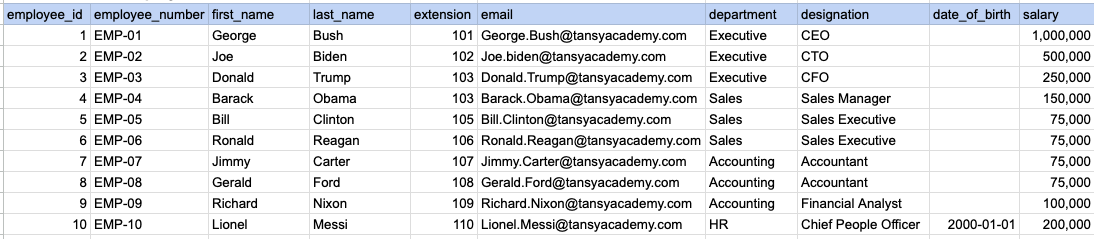
Let's explore the procedure of extracting information from a designated table using the BETWEEN SQL operator with currency data. In this instance, our goal is to fetch employee data where the salary falls between 100k and 250k.
Example 1 - Raw data from employee table
Example 1 - Query
SELECT *
FROM org_employee
WHERE salary BETWEEN 100000 AND 250000;
Example 1 - Query data mapping
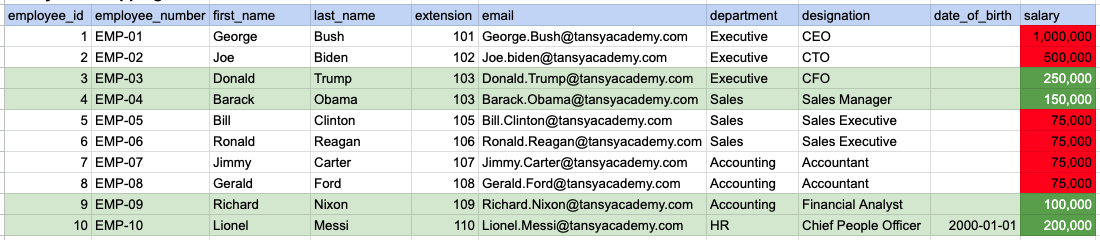
In the provided image, the green color signifies the data that has been selected or satisfies the conditions specified in our query. Data points in red indicate information that does not meet the criteria set by the query.
Example 1 - Query Output

Example 2:
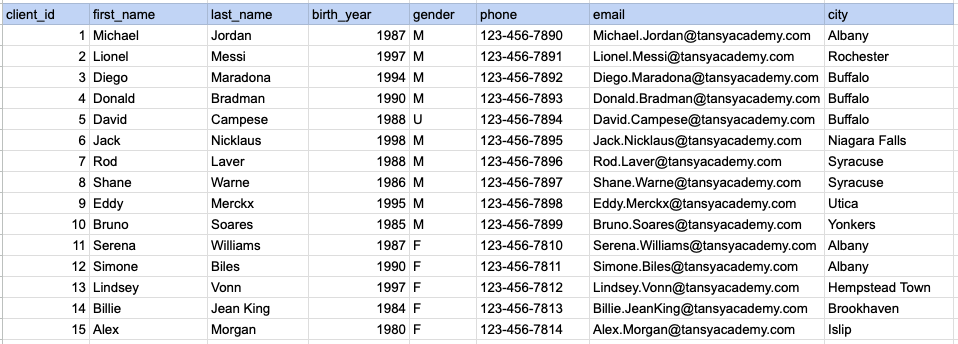
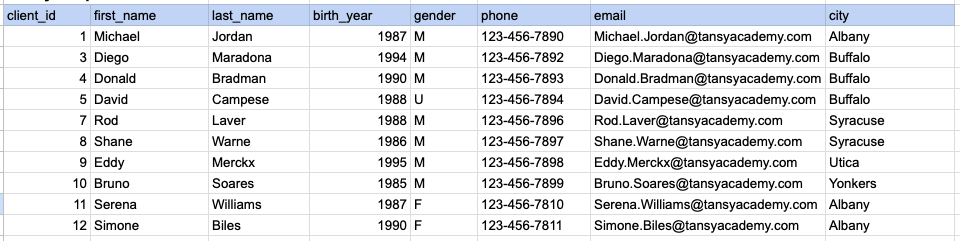
Let's explore the procedure for extracting information from a designated table using the BETWEEN SQL operator on integer data. In this instance, our goal is to fetch client data where the birth year falls between 1985 and 1995.
Example 2 - Raw data from client table
Example 2 - Query
SELECT *
FROM org_client
WHERE birth_year BETWEEN 1985 AND 1995;
Example 2 - Query data mapping
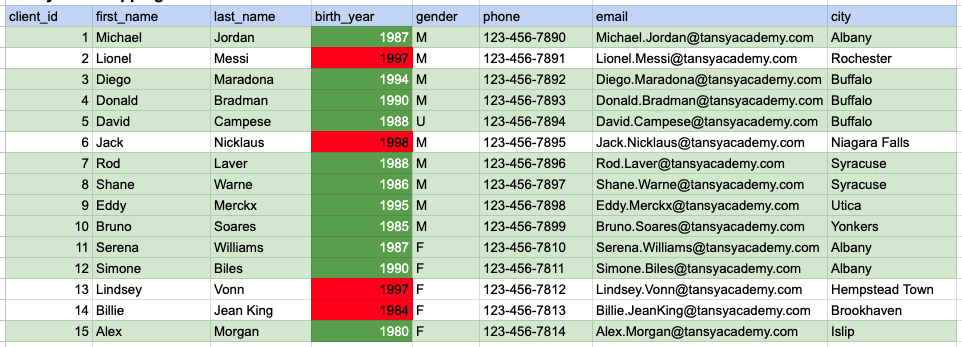
In the provided image, the green color signifies the data that has been selected or satisfies the conditions specified in our query. Data points in red indicate information that does not meet the criteria set by the query.
Example 2 - Query Output
Example 3:
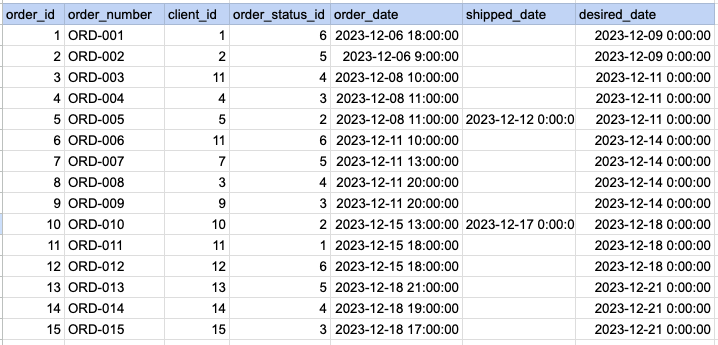
Let's explore the procedure for extracting information from a designated table using the BETWEEN SQL operator on date time data. In this instance, our goal is to fetch order data where the order date falls between Dec 12th and Dec 17th.
Example 3 - Raw data from order table
Example 3 - Query
SELECT *
FROM act_order
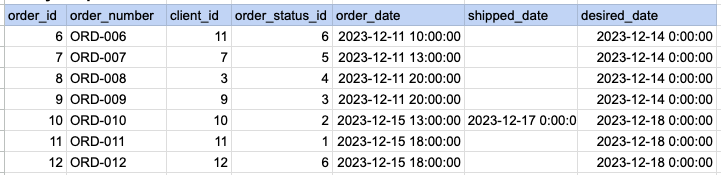
WHERE order_date BETWEEN '2023-12-10' AND '2023-12-17';
Example 3 - Query data mapping
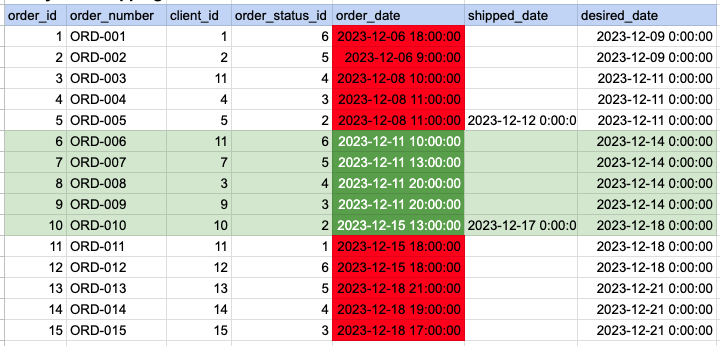
In the provided image, the green color signifies the data that has been selected or satisfies the conditions specified in our query. Data points in red indicate information that does not meet the criteria set by the query.
Example 3 - Query Output
Comments Not Found