
Oracle
GROUP RANK
In Oracle, the RANK() function is used to assign a unique rank to each distinct row within a partition of a result set, based on the values of specified columns. When combined with the GROUP BY clause, it allows you to rank groups of data. This can be particularly useful when you want to analyze data such as book rentals by different authors and see how they rank based on rental frequency.
Key Points about GROUP RANK
Definition:
RANK()is a window function that provides a rank number to rows within a partition.- Ties receive the same rank, and the next rank(s) are skipped.
Syntax:
- Basic syntax for using
RANK():SELECT column1, RANK() OVER (PARTITION BY column2 ORDER BY column3) AS rank_column FROM table_name;
- Basic syntax for using
Example:
- To rank authors based on the number of books rented:
SELECT author_id, COUNT(rental_id) AS total_rentals,
       RANK() OVER (ORDER BY COUNT(rental_id) DESC) AS rental_rank
FROM rentals
GROUP BY author_id;
- To rank authors based on the number of books rented:
Understanding the Example:
COUNT(rental_id): Counts the total rentals per author.RANK() OVER (ORDER BY COUNT(rental_id) DESC): Ranks authors based on total rentals in descending order.GROUP BY author_id: Groups the results by author.
Best Practices:
- Always specify the
PARTITION BYclause to avoid ambiguity in ranking within groups. - Use
ORDER BYin theRANK()function to define the criteria for ranking.
- Always specify the
Additional Tips
Handling Ties:
- Remember that
RANK()assigns the same rank to tied values, which can affect subsequent ranks. Consider usingDENSE_RANK()if you want to avoid gaps in ranking.
- Remember that
Performance Considerations:
- Be mindful of performance when using window functions with large datasets; indexes can help improve query performance.
By using the RANK() function effectively, you can gain insights into data distributions and trends within your Oracle database.
To gain complete access, login with gmail or outlook, no need of signup. click here

TEST CODE
In Oracle, to utilize the RANK() function to assign rankings to employee salaries within specific departments, you can use the following query:
SELECT
  employee_number,
  department,
  salary,
  RANK() OVER (PARTITION BY department ORDER BY salary DESC) AS salary_rank
FROM
org_employee;SQL GROUP RANK
Utilize the RANK() function to assign rankings to employee salaries within specific departments.
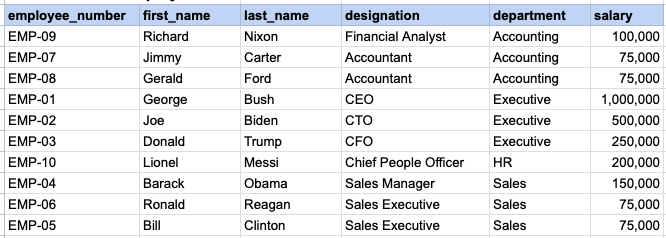
RAW EMPLOYEE DATA
QUERY DATA MAPPING
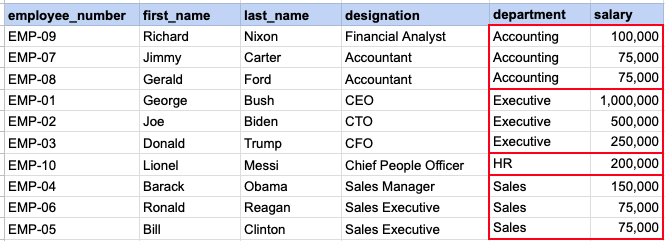
This image demonstrates that we need to rank each salary within a specified department.
QUERY OUT PUT
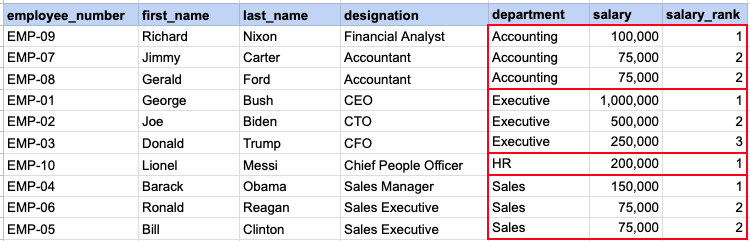
Here you can see ranking of each salary with in a given department.
Comments Not Found