
Oracle
SQL Aliases
SQL aliases are temporary names given to table or column names in a query. They are useful for making the output more readable and simplifying complex queries. Aliases are especially helpful when dealing with long or complex names and when performing operations that require clearer labels. In Oracle, aliases are created using the AS keyword, although it is optional.
Key Points about SQL Aliases
Creating Column Aliases
- You can assign a new name to a column for the duration of the query.
- Example:
SELECT title AS book_title
FROM books;
Creating Table Aliases
- Table aliases simplify referencing tables, especially in joins.
- Example:
SELECT a.author_name, b.title
FROM authors AS a
JOIN books AS b ON a.author_id = b.author_id;
Using Aliases for Calculated Columns
- You can use aliases to name calculated fields.
- Example:
SELECT rental_price * rental_days AS total_cost
FROM rentals;
Case Sensitivity
- Aliases are case-insensitive unless enclosed in double quotes.
- Example:
SELECT title AS "Book Title"
FROM books;
Best Practices
- Use meaningful aliases that enhance readability.
- Avoid using reserved keywords as aliases.
- Keep aliases concise but descriptive.
- Example of best practice:
SELECT b.title AS book_title, m.member_name AS borrower
FROM books AS b
JOIN rentals AS r ON b.book_id = r.book_id
JOIN membership AS m ON r.member_id = m.member_id;
Using SQL aliases effectively can significantly improve the clarity of your queries, making them easier to understand and maintain.
To gain complete access, login with gmail or outlook, no need of signup. click here
TEST CODE
In Oracle, you can use the TO_CHAR function to format the time component of a date. Here is the equivalent query:
SELECT a.order_number AS "Order Number",
       TO_CHAR(a.order_date, 'YYYY-MM-DD') AS "Order Date",
       TO_CHAR(a.order_date, 'HH:MI:SS AM') AS "Order Time",
       b.order_status AS "Order Status"
FROM act_order a
INNER JOIN act_lkp_order_status b ON b.order_status_id = a.order_status_id;Example 1:Table and Column ALIAS
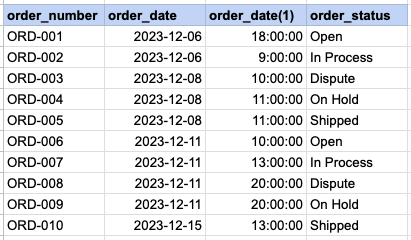
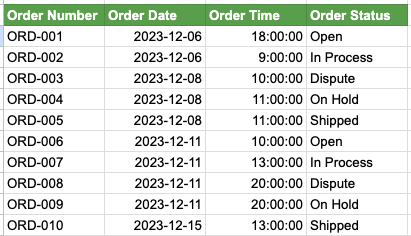
We have two SQL queries for comparison. In Query 1, SQL aliases are not used, leading to less clear output column names, particularly the one extracting time from the order date. In contrast, Query 2 employs SQL aliases, resulting in a more easily understandable column headers, such as Order Time. Additionally, it is evident that lengthy table names are extensively used throughout Query 1, whereas in Query 2, table aliases are employed to abbreviate these table names.'
Example 1 - Query with no alias
SELECT act_order.order_number
    cast(act_order.order_date as date),
    cast(act_order.order_date as time),
    act_lkp_order_status.order_status
FROM act_order
INNER JOIN act_lkp_order_status on act_lkp_order_status.order_status_id = act_order.order_status_id ;
Example 1 - Query with alias
SELECT a.order_number as 'Order Number'
    cast(a.order_date as date) as 'Order Date',
    cast(a.order_date as time) as 'Order Time',
    b.order_status as 'Order Status'
FROM act_order a
INNER JOIN act_lkp_order_status b on b.order_status_id = a.order_status_id ;

-- Oracle TO_CHAR(a.order_date,'HH:MI:SS AM')
Example 1 - Query output with no ALIASES
Example 1 - Query output using ALIASES
Comments Not Found