
Oracle
Assignment - List Tables and Columns - Facebook Application System
Objective:
You are required to create a list of tables and columns for a Facebook-like Social Media Application that manages user profiles, posts, friends, messages, and interactions. Your task is to identify relevant tables and specify key columns for each.
Requirements:
You will need to define the necessary tables and columns to support the following functionalities required for the Social Media Application.
1. User Profile Management
- Tracking user details (name, email, profile picture, bio)
- Managing user registration and login information
- Managing user preferences and privacy settings
- Storing user posts, activities, and interactions
2. Post Management
- Allowing users to create, edit, and delete posts (text, image, video)
- Managing post visibility (public, private, friends-only)
- Tracking likes, comments, and shares on each post
- Handling user mentions, hashtags, and tagging of friends in posts
3. Friends and Follower Management
- Managing friend requests and friend lists
- Tracking mutual friends and friend suggestions
- Handling follower and following relationships
- Managing privacy settings for friend and follower lists
4. Messaging and Chat Management
- Tracking private messages between users (one-on-one and group chats)
- Storing message history with timestamps
- Managing message statuses (sent, delivered, read)
- Providing real-time chat functionality and notifications
5. Comment and Interaction Management
- Allowing users to comment on posts, photos, and videos
- Tracking user reactions (like, love, wow, etc.)
- Managing comment threads and replies
- Handling user reports and moderation of inappropriate comments
6. Notifications Management
- Sending real-time notifications for user interactions (likes, comments, friend requests)
- Managing notification settings for users (push notifications, email notifications)
- Tracking unread and read notifications for each user
- Handling personalized notifications for birthdays, events, and friend suggestions
7. Photo and Video Management
- Allowing users to upload and manage photo and video content
- Organizing media into albums and categories
- Tracking views, reactions, and comments on photos and videos
- Managing media privacy settings (public, private, friends-only)
8. Group and Event Management
- Allowing users to create and join groups based on interests
- Managing group memberships and privacy settings (open, closed, secret groups)
- Tracking group posts, events, and interactions
- Creating and managing events, including invitations and RSVPs
9. Advertisement and Promotion Management
- Managing ads and sponsored posts for businesses and users
- Targeting ads based on user preferences and behaviors
- Tracking ad impressions, clicks, and conversion rates
- Managing ad payments and billing for advertisers
10. Analytics and Reporting
- Real-time dashboards for user engagement tracking (daily active users, post reach)
- Customizable reports on post performance, user growth, and demographics
- Data visualization and analytics tools for user activity
- Tracking interactions across platform features (posts, comments, messages)
11. Security and Access Control
- Role-based access control for admins, moderators, and users
- Multi-factor authentication for user login
- Monitoring and auditing access to sensitive user data
- Managing blocked accounts and privacy violations
12. User Feedback and Moderation
- Collecting user feedback on the platform and features
- Tracking user-reported issues (e.g., inappropriate content, harassment)
- Moderation tools for admin actions (deleting posts, banning users)
- Managing community guidelines and terms of service compliance
13. Page and Fan Management
- Allowing users to create and manage business or fan pages
- Tracking page followers and engagement metrics (likes, shares, comments)
- Managing page posts, media, and events
- Handling page administration (multiple admins, roles)
14. Search and Discovery
- Allowing users to search for posts, friends, pages, and groups
- Managing search results based on relevance and user preferences
- Tracking popular trends, hashtags, and topics
- Providing personalized content discovery for users
Sample Tables:
Note: These are just a few example tables; you will need to design additional tables based on the functionalities outlined above for the Social Media Application.
Users
Posts
Comments
Messages
Friends
Sample Columns:
Table Name: Users
Sample Columns:
UserID: Unique identifier for each user (Primary Key)FirstName: User's first nameLastName: User's last nameEmail: User's email address (used for login)ProfilePicture: Link to the user's profile pictureDateOfBirth: User's date of birth for account verification and birthday features
Additional Guidelines:
- Ensure every table has a primary key.
- Define foreign keys where needed to establish relationships between tables.
- Include important columns relevant to the business scenario (e.g., for posts, include columns like
PostContent,PostDate,UserID, andPrivacySetting).
Final Notes:
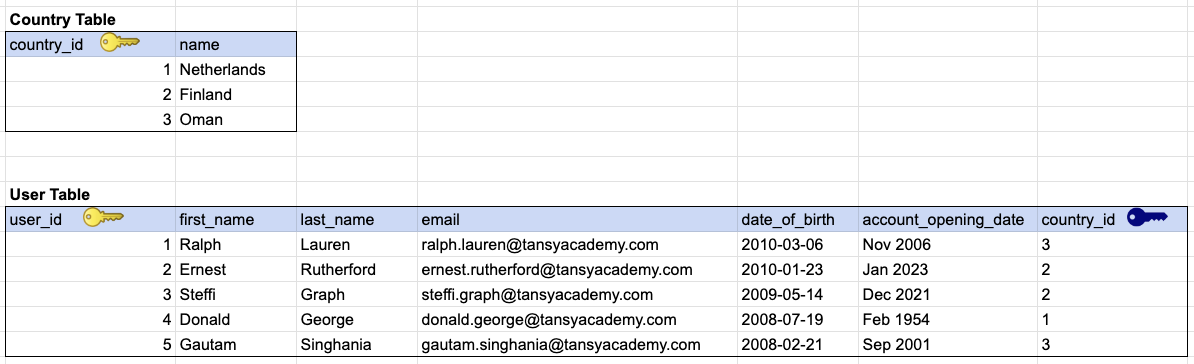
We recommend that you define the necessary tables and columns, along with sample data, using tools like Google Sheets or any relational database design tool.
Students enrolled in our online Zoom class will receive guidance throughout this assignment, and their progress will be manually reviewed incrementally until they reach a certain level of completion.
As a beginner, it is recommended that you complete the table and column listings for 50-75% of the functionalities mentioned above. Completing listings for 100% of the functionalities is a real BONUS.
GOOD LUCK WITH YOUR ASSIGNMENT!!!
Don't forget to contact us if you need any further assistance with your assignments, and most importantly, for a manual review and approval of your work.
To gain complete access, login with gmail or outlook, no need of signup. click here
SAMPLE TABLE DESIGN
Comments Not Found