
Oracle
DB Function
In Oracle Database, functions are a powerful feature used to perform operations on data and return a result. They can be used in SQL queries to simplify complex calculations, format data, and retrieve information efficiently. Functions can either be built-in or user-defined. Built-in functions are provided by Oracle and include operations such as mathematical calculations, string manipulation, and date formatting. User-defined functions, on the other hand, are created by users to perform specific tasks tailored to their needs.
Here’s a brief overview of database functions in Oracle, particularly for beginners:
Built-in Functions
- Mathematical Functions: Perform arithmetic operations. For example,
ROUNDrounds a number to a specified number of decimal places. - String Functions: Manipulate string data. For instance,
SUBSTRextracts a substring from a string. - Date Functions: Handle date and time data. For example,
SYSDATEreturns the current date and time. - Conversion Functions: Convert data from one type to another. For example,
TO_CHARconverts dates or numbers to strings.
- Mathematical Functions: Perform arithmetic operations. For example,
Using Functions in Queries
- You can use functions directly in SQL queries to process data. Here’s how you can use built-in functions with sample tables:
-- Example using the books table to format the publication date SELECT book_title, TO_CHAR(publication_date, 'YYYY-MM-DD') AS formatted_date FROM books;- Another example to round prices of books:
-- Example using the books table to round book prices
SELECT
    book_title,
    ROUND(price, 2) AS rounded_price
FROM
    books;
User-Defined Functions
- Creating Functions: You can create custom functions to encapsulate complex logic.
- Example: Creating a function to calculate late fees for library rentals.
-- Create a function to calculate late fees CREATE OR REPLACE FUNCTION calculate_late_fee(return_date DATE, due_date DATE) RETURN NUMBER IS late_fee NUMBER; BEGIN IF return_date > due_date THEN late_fee := (return_date - due_date) * 0.50; -- $0.50 per day late ELSE late_fee := 0; END IF; RETURN late_fee; END;- Using User-Defined Functions in Queries:
-- Example using the function to calculate late fees for rentals
SELECT
    rental_id,
    calculate_late_fee(return_date, due_date) AS late_fee
FROM
    rentals;
By understanding and utilizing database functions, you can greatly enhance your ability to manipulate and retrieve data in Oracle databases.
Types of Functions in Oracle
- Built-in Functions:Oracle provides a wide range of built-in functions for direct use in SQL queries, categorized into character, numeric, date, conversion, and aggregate functions.
- User-Defined Functions:Users can create their own functions to perform operations not covered by built-in functions. These can accept parameters, perform complex calculations, access the database, and return a value.
Characteristics of Oracle Functions
- Return Type:Every function must declare a return type, which can be any PL/SQL data type.
- Parameters:Functions can have parameters of IN, OUT, or IN OUT type.
- Deterministic Keyword:Functions can be declared with the DETERMINISTIC keyword for performance optimization.
- Purity Level:Functions can specify a purity level using the
PRAGMA RESTRICT_REFERENCESdeclaration.
Creating User-Defined Functions
CREATE OR REPLACE FUNCTION get_employee_name (p_employee_id NUMBER)
RETURN VARCHAR2
IS
  v_employee_name VARCHAR2(100);
BEGIN
  SELECT first_name || ' ' || last_name  INTO v_employee_name
  FROM employees
  WHERE employee_id = p_employee_id;

  RETURN v_employee_name;
END;
This function returns the full name of an employee based on their employee ID.
Using Functions in SQL Queries
SELECT get_employee_name(101) FROM dual;Advantages of Using Functions
- Reusability
- Modularity
- Maintainability
- Performance
Considerations
- Performance Overhead
- Permissions
Oracle Database functions, when used correctly, can significantly enhance the efficiency, readability, and performance of database applications.
ORACLE DB FUNCTION EXAMPLE
We want to create a PostgreSQL DB function that takes an order_id as input and returns the subtotal for all products in that order. The subtotal for each product can be calculated by multiplying the quantity by the unit_rate from the act_order_detail table. The function will sum these amounts to get the subtotal for the entire order.
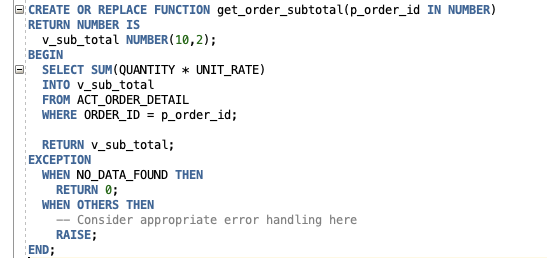
CREATE OR REPLACE FUNCTION get_order_subtotal(p_order_id IN NUMBER)
RETURN NUMBER IS
  v_sub_total NUMBER(10,2);
BEGIN
  SELECT SUM(quantity * unit_rate)
  INTO v_sub_total
  FROM act_order_detail
  WHERE order_id = p_order_id;

  RETURN v_sub_total;
EXCEPTION
  WHEN NO_DATA_FOUND THEN
    RETURN 0;
  WHEN OTHERS THEN
    -- Consider appropriate error handling here
    RAISE;
END;
Comments Not Found