
Oracle
CASE statement
The CASE statement in Oracle is a powerful conditional expression that allows you to perform conditional logic directly within your SQL queries. It helps in returning specific values based on different conditions, making your queries more dynamic and versatile. This is particularly useful when you want to create computed columns in your result set or transform data based on certain criteria.
Key Features of the CASE Statement
Basic Syntax
- The
CASEstatement can be used in two formats:- Simple CASE: Compares an expression to a set of simple expressions to determine the result.
- ** searched CASE:** Evaluates a set of Boolean expressions to determine the result.
- The
Usage in Queries
- You can use the
CASEstatement in various parts of your SQL queries:- In
SELECTstatements - In
ORDER BYclauses - In
WHEREclauses
- In
- You can use the
Example Query
SELECT
    book_id,
    title,
    CASE
        WHEN availability = 'Y' THEN 'Available'
        WHEN availability = 'N' THEN 'Not Available'
        ELSE 'Unknown'
    END AS status
FROM
    books;
Best Practices
- Keep your
CASEstatements simple and easy to read. - Avoid nesting
CASEstatements when possible to enhance readability. - Use meaningful aliases for computed columns.
- Keep your
Additional Considerations
CASEstatements can return different data types; ensure that all returned values are compatible.- Be mindful of performance when using
CASEin large datasets.
By utilizing the CASE statement effectively, you can enhance the functionality of your SQL queries and better analyze your data within the Oracle database.
To gain complete access, login with gmail or outlook, no need of signup. click here
TEST CODE
In Oracle, to organize customers based on their credit limit and create a temporary column called client_category using the CASE statement, you can use the following query:
SELECT client_id,
       first_name,
       last_name,
       married_flag,
       gender,
       city,
       state,
       credit_limit,
       CASE
           WHEN credit_limit >= 7000 THEN 'Platinum'
           WHEN credit_limit >= 5000 THEN 'Gold'
           ELSE 'Silver'
       END AS client_category
FROM org_client
ORDER BY credit_limit DESC;In Oracle, to translate gender abbreviations into full descriptive text, you can use the following query:
SELECT client_id,
       first_name,
       last_name,
       CASE
           WHEN gender = 'F' THEN 'Female'
           WHEN gender = 'M' THEN 'Male'
           ELSE 'No Data'
       END AS gender
FROM org_client;In Oracle, to generate counts for categories using a CASE statement, you can use the following query:
SELECT COUNT(CASE WHEN gender = 'F' THEN 1 END) AS female_count,
       COUNT(CASE WHEN gender = 'M' THEN 1 END) AS male_count
FROM org_client;Example 1:
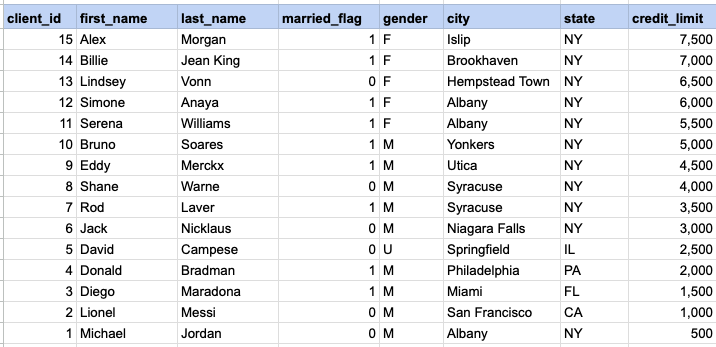
Organize customers based on their credit limit. The client category is a temporary column created with the CASE statement as part of the SELECT statement and is not present in the database table.
Example 1 - Raw data from client table
Example 1 - CASE statement
SELECT client_id, first_name, last_name,
married_flag ,gender ,city ,state ,credit_limit,
CASE WHEN credit_limit >= 7000 then 'Platinum'
WHEN credit_limit >= 5000 then 'Gold'
ELSE 'Silver'
END client_category
FROM org_client
ORDER BY credit_limit DESC
Example 1 - Query data mapping and final output
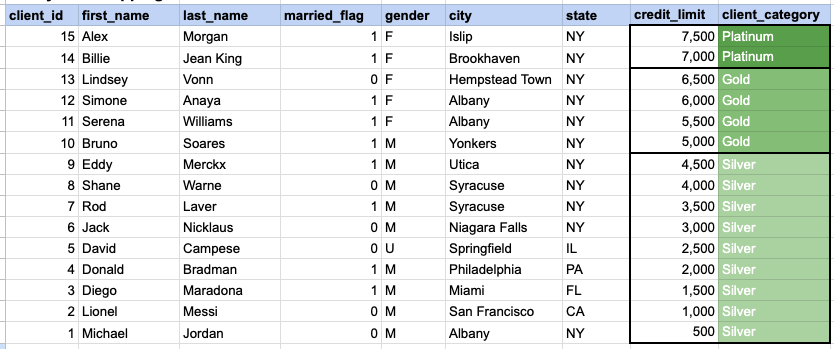
In the provided image, the client category is a temporary column generated as part of the SELECT statement. This column does not exist in the database, and its values are generated based on the conditions specified in the CASE statement.
Comments Not Found