
Oracle
Sub Queries
Subqueries, or nested queries, are a powerful feature in Oracle's Data Query Language (DQL) that allow you to embed one query within another. They can be used to perform complex filtering, aggregation, or calculations based on data from multiple tables. Subqueries enhance the flexibility of your SQL statements, making it easier to retrieve data based on dynamic criteria.
Key Points About Subqueries
Definition:
- A subquery is a query within another SQL query.
- It can return a single value, a single row, or a set of rows.
Types of Subqueries:
- Single-row subquery: Returns only one row.
- Multiple-row subquery: Returns multiple rows.
- Correlated subquery: References columns from the outer query.
Common Uses:
- To filter results based on conditions from another table.
- To calculate aggregates like sums or averages.
- To check for existence of rows in another table.
Code Samples
Example 1: Single-row Subquery
This example retrieves the details of the author with the highest number of books.
SELECT *
FROM authors
WHERE author_id = (
    SELECT author_id
    FROM books
    GROUP BY author_id
    ORDER BY COUNT(*) DESC
    FETCH FIRST 1 ROW ONLY
);
Example 2: Multiple-row Subquery
This example finds all books published after the most recent publication date.
SELECT *
FROM books
WHERE publication_date > (
    SELECT MAX(publication_date)
    FROM books
);
Example 3: Correlated Subquery
This example retrieves all authors who have published books in a specific genre.
SELECT a.*
FROM authors a
WHERE EXISTS (
    SELECT 1
    FROM books b
    WHERE b.author_id = a.author_id AND b.genre = 'Science Fiction'
);
Best Practices for Using Subqueries
Use Appropriate Subquery Types:
- Choose single-row or multiple-row subqueries based on your requirement.
Avoid Excessive Nesting:
- Limit the number of nested subqueries for better readability and performance.
Optimize for Performance:
- Analyze execution plans to ensure subqueries do not slow down queries.
Use Joins When Possible:
- Sometimes, joins can be more efficient than subqueries. Consider using them when appropriate.
Comment Your Code:
- Add comments to complex subqueries to enhance understanding.
This structure provides a clear overview and practical examples for beginners learning about subqueries in Oracle.
To gain complete access, login with gmail or outlook, no need of signup. click here

TEST CODE
To display the names of employees earning more than the company's average salary in Oracle, you can use the following query:
SELECT employee_number, first_name, last_name, designation, salary
FROM org_employee
WHERE salary > (SELECT AVG(salary) FROM org_employee);SQL SUB QUERY EXAMPLE
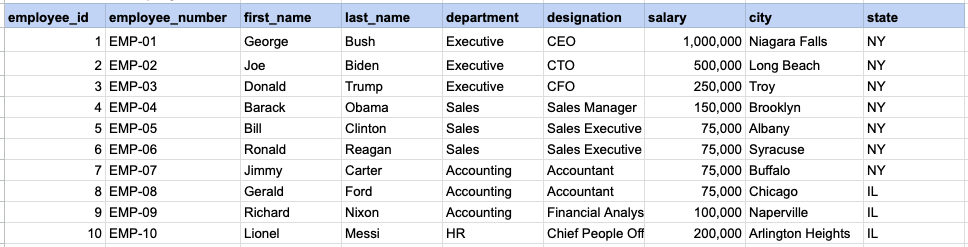
Raw data from employee table
Query
SELECT employee_number, first_name, last_name, designation, salary
FROM org_employee
WHERE salary >= (SELECT AVG(salary) FROM org_employee);
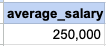
Step1, Execute sub query
First, run the subquery '(SELECT AVG(salary) FROM org_employee)' to obtain its result, which in this instance is the average salary.
Sub query output
Step 2, apply sub query output as filter criteria on main query
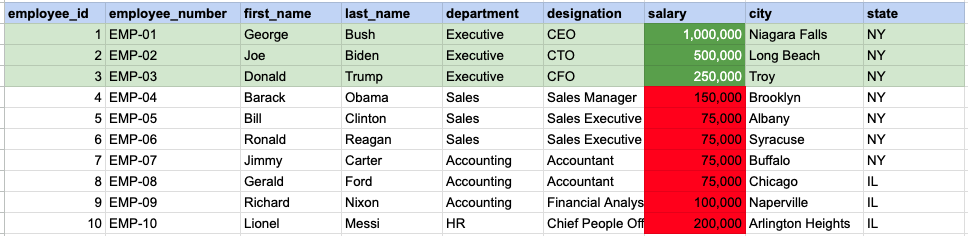
In this step, we filter for employees whose salary is greater than or equal to 250,000, which is the average salary determined from the subquery output.
FINAL, main query output

Comments Not Found