
Oracle
Assignment - List Tables and Columns - Library Management System
Objective:
You are required to address a set of Data Definition Language (DDL) tasks for a Library Management System. Each query focuses on distinct DDL tasks, including the creation of tables, application of constraints, and establishment of relationships between tables.
Requirements:
You will need to complete at least 20 different DDL tasks, covering table creation, primary keys, foreign keys, constraints, and indexes. Each task represents a key part of designing the structure of the Library Management System.
Question 1: Define the LIBRARY_BRANCH Table with Relationships
Write the SQL statement to create a LIBRARY_BRANCH table that includes:
branch_idas a primary key with auto-increment functionality.branch_nameas a string of maximum length 255 characters, not null.locationas a string with a maximum length of 255 characters, not null.created_atas a datetime field, default it to system timestamp, not null.
Question 2: Create the EMPLOYEE Table
Create an EMPLOYEE table:
employee_idas a primary key with auto-increment functionality.first_nameas strings, not null.last_nameas strings, not null.emailas a unique string, not null.hire_dateas a date field, not null.salaryas a decimal (10, 2) field, not null.branch_idas a foreign key referencing the BOOK table, not null.created_atas a datetime field, not null.
Question 3: Create the AUTHOR Table with Constraints
Create a AUTHOR table with the following specifications:
author_idas a primary key with auto-increment functionality.first_nameas a string with a maximum length of 100 characters, and cannot be null.last_nameas a string with a maximum length of 100 characters.emailas a unique string, not null.phone_numberas a string, not null.created_atas a datetime field, default it to system timestamp, not null.
Question 4: Create the BOOK_CATEGORY Table with a Foreign Key
Define a BOOK_CATEGORY table:
book_category_idas a primary key with auto-increment functionality.category_nameas a string of maximum length 100 characters, not null.created_atas a datetime field, default it to system timestamp, not null.
Question 5: Create the PUBLISHER Table
Write a DDL SQL statement to create a PUBLISHER table with the following details:
publisher_idas the primary key with auto-increment functionality.publisher_nameas a string with a maximum length of 255 characters, unique, not null.created_atas a datetime field, default it to system timestamp, not null.
Question 6: Create the BOOK Table
Write a DDL SQL statement to create a BOOK table with the following requirements:
book_idas a primary key with auto-increment functionality.titleas a string of maximum length 255 characters, not null.publication_yearas an integer, not null.publisher_idas an integer, not null.isbnas a unique string of length 13, not null.created_atas a datetime field, default it to system timestamp, not null.
Question 7: Define the BOOK_AUTHOR Table
Write the SQL statement to create a many-to-many relationship between books and authors. This will require the BOOK_AUTHOR table, which includes:
book_idas a foreign key referencing the BOOK table, not null.author_idas a foreign key referencing the AUTHOR table, not null.
Question 8: Create the BOOK_INVENTORY Table
Write a DDL SQL statement to create a BOOK_INVENTORY table:
inventory_idas the primary key with auto-increment functionality.book_idas a foreign key referencing the BOOK table, not null.branch_idas a foreign key referencing the LIBRARY_BRANCH table, not null.quantityas an integer, not null.created_atas a datetime field, default it to system timestamp, not null.
Question 9: Create the OVERDUE_POLICY Table with Constraints
Write a DDL SQL statement to create an OVERDUE_POLICY table:
policy_idas a primary key with auto-increment functionality.max_days_allowedas an integer, not null.fine_per_dayas a decimal (5, 2), not null.created_atas a datetime field, default it to system timestamp, not null.- Add a
CHECKconstraint to ensuremax_days_allowedis greater than 0.
Question 10: Create the MEMBER Table with Constraints
Create a MEMBER table with the following specifications:
member_idas a primary key with auto-increment functionality.first_nameas a string with a maximum length of 100 characters, not null.last_nameas a string with a maximum length of 100 characters.emailas a unique string, not null.phone_numberas a string, not null.genderas a string, null.membership_expiry_dateas a date field, with the default value of the current date.created_atas a datetime field, default it to system timestamp, not null.- Add a
CHECKconstraint to ensuregenderis M or F.
Question 11: Create the MEMBERSHIP_TYPE Table with Constraints
Write a DDL SQL statement to create a MEMBERSHIP_TYPE table:
membership_type_idas a primary key with auto-increment functionality.membership_typeas a string (e.g., "Free", "Premium"), not null.active_flagas a boolean, default to true, not null.validity_daysas a number, not null.created_atas a datetime field, default it to system timestamp, not null.- Add a
CHECKconstraint to ensure thesubscription_typeis in ("Free", "Standard:, "Premium").
Question 12: Create the MEMBERSHIP_PAYMENT Table with Constraints
Write a DDL SQL statement to create a MEMBERSHIP_PAYMENT table:
payment_idas a primary key with auto-increment functionality.membership_type_idas a foreign key referencing the MEMBERSHIP_TYPE table, not null.amount_paidas a decimal (10, 2), not null.payment_dateas a datetime, not null.member_idas a foreign key referencing the MEMBER table, not null.created_atas a datetime field, default it to system timestamp, not null.- Add a
CHECKconstraint to ensure theamount_paidis greater than 0.
Question 13: Create the LOAN Table
Define a LOAN table with the following details:
loan_idas a primary key with auto-increment functionality.loan_dateas a date field, not null, with the default value of the current date, null.due_dateas a date field, not null.return_dateas a date field, nullable.book_idas a foreign key referencing the BOOK table, not null.member_idas a foreign key referencing the MEMBER table, not null.issue_branch_idas a foreign key referencing the LIBRARY_BRANCH table, not null.return_branch_idas a number, null.created_atas a datetime field, default it to system timestamp, not null.
Question 14: Create the FINE Table
Define a FINE table with the following specifications:
fine_idas a primary key with auto-increment functionality.fine_amountas a decimal (5, 2), not null.fine_dateas a date, not null.overdue_daysas a number, not null.return_timeas a time, not null.loan_idas a foreign key referencing the LOAN table, not null.collected_by_employee_idas a foreign key referencing the EMPLOYEE table, not null.collected_branch_idas a foreign key referencing the LIBRARY_BRANCH table, not null.created_atas a datetime field, default it to system timestamp, not null.
Question 15: Create the AUDIT_LOG Table
Define an AUDIT_LOG table to track changes in the library system:
log_idas a primary key with auto-increment functionality.log_dateas a date field, not null.actionas a string to describe the action performed.employee_idas a foreign key referencing the EMPLOYEE table.
Question 16: Create the EMPLOYEE_LOGIN Table
Write a DDL SQL statement to create an EMPLOYEE_LOGIN table (one-to-one relationship with employee table):
employee_idas a foreign key referencing the CUSTOMER table.login_idcan use alpha numeric login id or email as login id, not null.passwordmust encrypt the password before storing it in the database table, not null.active_flaguse numeric, 0 or 1, you can lock the customer login when required, not null.last_login_datetimeas a timestamp, last successfull login date for a given employee.
Question 17: Add a Column to the EMPLOYEE Table
Write a SQL statement to add a phone_number column of type VARCHAR(15) to the EMPLOYEE table.
Question 18: Alter a Column in the MEMBER Table
Write a SQL statement to alter the email column in the MEMBER table, increasing its length to 300 characters.
Question 19: Drop a Column from the EMPLOYEE_LOGIN Table
Write a SQL statement to drop the active_flag column from the EMPLOYEE_LOGIN table.
Question 20: Rename the AUDIT_LOG Table
Write a SQL statement to rename the AUDIT_LOG table to AUDIT_LOGS.
Question 21: Drop the EMPLOYEE_LOGIN Table
Write a SQL statement to drop the EMPLOYEE_LOGIN table.
Question 22: Add a Primary Key on the BOOK_AUTHOR Table
- Set up a composite primary key using
author_idandbook_id.
Question 23: Add a Foreign Key column to the BOOK Table
Add a foreign key in the BOOK table to reference the BOOK_CATEGORY table.
Question 24: Alter the LOAN Table to Add a Foreign Key
Write a SQL statement to add a branch_id foreign key to the LOAN table, referencing the LIBRARY_BRANCH table.
Question 25: Add a Foreign Key to BOOK Table
Add a foreign key in the BOOK table to referencing to PUBLISHER table.
Question 26: Add a Foreign Key column to the LOAN Table
Add a foreign key in the LOAN table to reference the EMPLOYEE table (indicating which employee issued the loan).
Question 27: Add a CHECK Constraint on the LOAN Table
Write a SQL statement to add a CHECK constraint to the LOAN table ensuring that the loan_date is before the due_date.
Question 28: Add a UNIQUE Constraint on the BOOK_CATEGORY Table
Write a SQL statement to add a UNIQUE constraint to the BOOK_CATEGORY table ensuring that the category_name is not repeated.
Question 29: Add a default Constraint on the EMPLOYEE Table
Write a SQL statement to add a current system timestamp DEFAULT constraint to the EMPLOYEE table on created_at column.
Question 30: Add Indexes to the BOOK and MEMBER Tables
Write SQL statements to:
- Add an index on the
titlecolumn in the BOOK table. - Add an index on the
last_namecolumn in the MEMBER table.
Question 31: Drop an Index from the BOOK Table
Write a SQL statement to drop the index on the title column in the BOOK table.
Question 32: Enforce UNIQUE constraints on all applicable tables.
Apply UNIQUE constraints to columns across the entire database wherever duplicate data is not permitted.
GOOD LUCK WITH YOUR ASSIGNMENT!!!
Don't forget to contact us if you need any further assistance with your assignments, and most importantly, for a manual review and approval of your work.
To gain complete access, login with gmail or outlook, no need of signup. click here
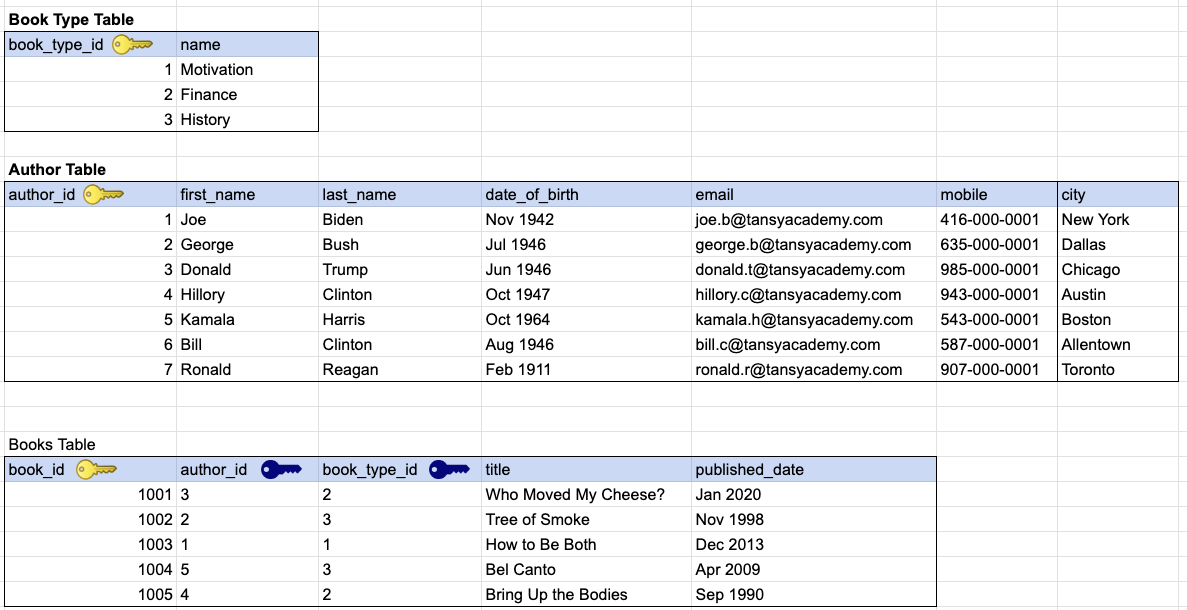
SAMPLE TABLE DESIGN
Comments Not Found