
Oracle
Chapter 7 - DQL (Data Query Language)
DQL ASSIGNMENT1 - Library Management System
Objective:
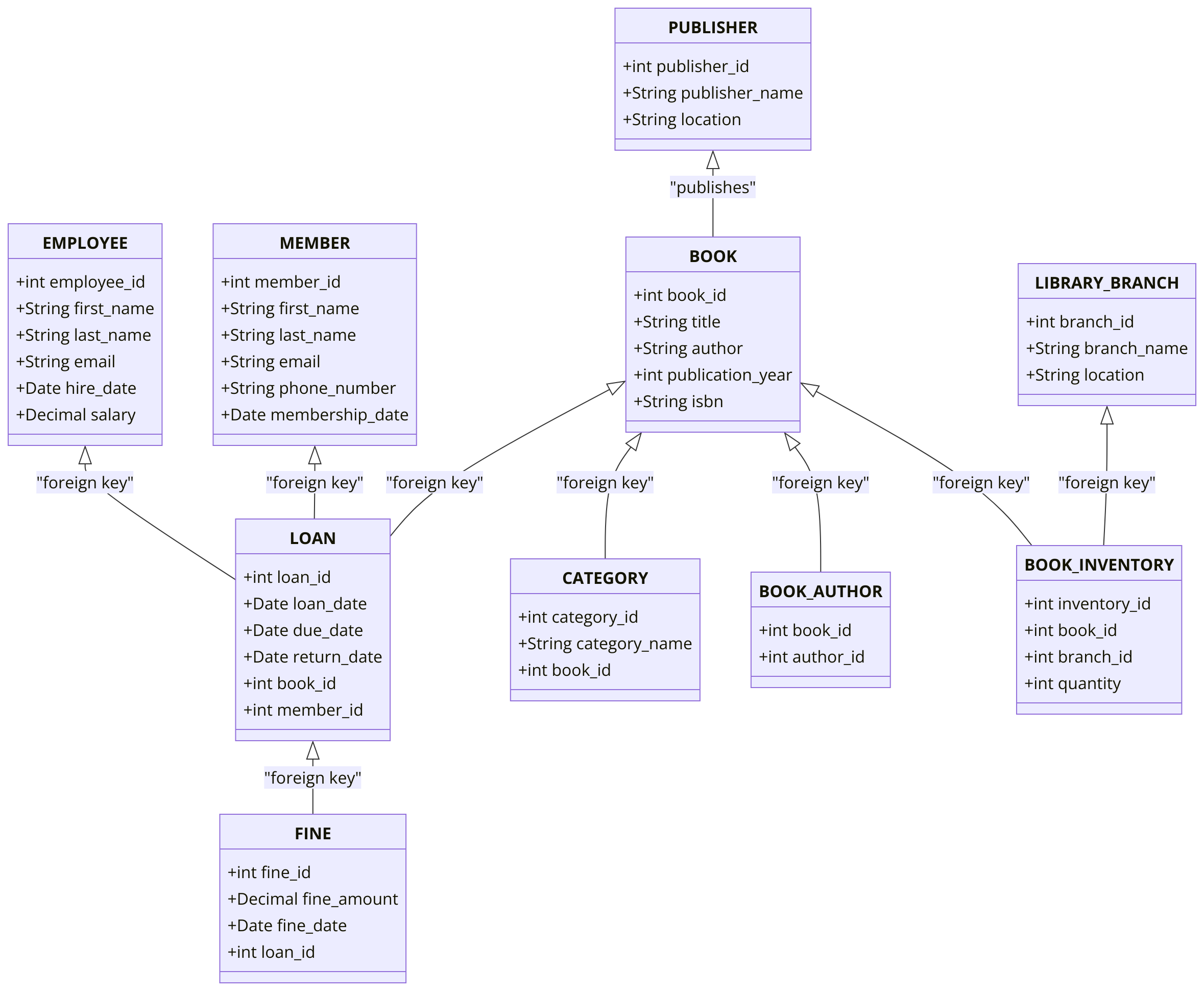
You are required to address a set of Data Query Language (DQL) tasks for a Library Management System using the tables provided. Each task focuses on different aspects of querying data from the system using SELECT statements with various conditions, functions, and joins.
1. SELECT Command
- Select all columns from the
BOOKtable. - Select the
title,author, andisbnof all books. - Select the
first_nameandemailfrom theMEMBERtable. - Select the
loan_dateanddue_datefrom theLOANtable.
2. WHERE Command
- Select all members where
membership_dateis after '2020-01-01'. - Select all books where
publication_yearis before 2000. - Select all loans where
due_dateis before '2023-01-01'. - Select all books where
isbnstarts with '978'.
3. ORDER BY Command
- Select all books and order them by
titlein ascending order. - Select all members and order them by
last_namein descending order. - Select all loans and order them by
loan_datein ascending order. - Select all employees and order them by
hire_datein descending order.
4. LIMIT and ROWNUM Command
- Select the first 10 books from the
BOOKtable usingROWNUM. - Select the first 5 loans from the
LOANtable. - Select the top 3 members who joined the most recently.
- Select the first 5 overdue loans, ordered by
due_date.
5. DISTINCT Command
- Select distinct
authorfrom theBOOKtable. - Select distinct
category_namefrom theCATEGORYtable. - Select distinct
last_namefrom theMEMBERtable. - Select distinct
branch_namefrom theLIBRARY_BRANCHtable.
6. GROUP BY Command
- Group by
authorfrom theBOOKtable and count the number of books per author. - Group by
category_namefrom theCATEGORYtable and count the number of books per category. - Group by
branch_namefrom theLIBRARY_BRANCHtable and calculate the total number of books per branch. - Group by
loan_datefrom theLOANtable and count the number of loans per day.
7. HAVING Command
- Select
category_namefrom theCATEGORYtable and group by it, having more than 3 books per category. - Group by
branch_nameand calculate the total number of employees per branch, having more than 5 employees. - Group by
loan_datefrom theLOANtable, having more than 3 loans on a particular day. - Group by
authorand filter the groups having more than 5 books written by that author.
8. INNER JOIN Command
- Select all loans along with the corresponding member details using
INNER JOINbetween theLOANandMEMBERtables. - Select all books and their corresponding category using
INNER JOINbetween theBOOKandCATEGORYtables. - Select all loans and the corresponding book titles using
INNER JOINbetween theLOANandBOOKtables. - Select all employees and the branches they are assigned to using
INNER JOINbetweenEMPLOYEEandLIBRARY_BRANCH.
9. LEFT JOIN Command
- Select all members and their loans using
LEFT JOIN, including members without any loans. - Select all books and their categories using
LEFT JOIN, including books without categories. - Select all loans and their books using
LEFT JOIN, including loans that don’t reference a specific book. - Select all branches and their employees using
LEFT JOIN, including branches without any employees.
10. COUNT, SUM, AVG Command
- Count the total number of books in the
BOOKtable. - Count the number of distinct
category_namein theCATEGORYtable. - Calculate the sum of
fine_amountfor all fines in theFINEtable. - Calculate the average
salaryfor all employees in theEMPLOYEEtable.
11. CASE Command
- Select all loans and use a
CASEstatement to show 'Overdue' ifdue_dateis past the current date, and 'On Time' otherwise. - Select all members and categorize them as 'New Member' if their
membership_dateis after '2022-01-01', otherwise 'Old Member'. - Use a
CASEstatement to label loans as 'Completed' if thereturn_dateis not null, otherwise 'Pending'. - Use a
CASEstatement in theFINEtable to categorize fines as 'Low', 'Medium', or 'High' based on thefine_amount.
12. EXISTS and NOT EXISTS Command
- Select all books where a loan exists in the
LOANtable usingEXISTS. - Select all members where no loans exist in the
LOANtable usingNOT EXISTS. - Select all categories where books exist in the
BOOKtable usingEXISTS. - Select all employees where no loans were issued using
NOT EXISTS.
13. SUBQUERY Command
- Select all books whose
book_idis in the result of a subquery selectingbook_idfrom theLOANtable wheredue_dateis past. - Select all employees who issued loans, using a subquery to get
employee_idfrom theLOANtable. - Select all books that have not been loaned using a subquery.
- Select all members who have not been fined using a subquery in the
FINEtable.
14. RANK and DENSE_RANK Command
- Rank members based on the number of loans using
RANK(). - Use
DENSE_RANK()to rank books by the number of times they were borrowed. - Rank loans by
loan_dateusingRANK(). - Use
DENSE_RANK()to rank employees based on theirhire_date.
15. PIVOT and UNPIVOT
- Pivot the
LOANdata byloan_dateandbook_id. - Unpivot the fine data to show
fine_amountandfine_datein one row for each member. - Pivot the book inventory by
branch_nameandquantity. - Unpivot employee salaries by
salaryandbranch_id.
16. UNION and UNION ALL Command
- Select all books from the
BOOKandBOOK_INVENTORYtables usingUNION. - Select all members from different branches using
UNION ALL. - Use
UNIONto combine completed and pending loans. - Use
UNION ALLto select all categories from two different departments.
17. COALESCE, NVL, NULLIF Command
- Select all books and use
COALESCEto replace nullpublication_yearwith 'Unknown'. - Use
NVLto replace nullphone_numbervalues in theMEMBERtable. - Use
NULLIFto comparedue_dateandreturn_datein theLOANtable and returnNULLif they are the same. - Select all employees and use
COALESCEto replace nullemailvalues with 'Not Provided'.
18. STRING Functions
- Select all books'
titlein uppercase using theUPPER()function. - Select all members'
first_namein lowercase using theLOWER()function. - Use
CONCAT()to combine thefirst_nameandlast_nameof members. - Select all books'
isbnand find the length of the string usingLENGTH().
19. DATE Functions
- Select all members and show their
membership_dateformatted as 'YYYY-MM-DD' usingTO_CHAR(). - Add 1 year to all
due_datevalues in theLOANtable usingADD_MONTHS(). - Subtract 1 month from all
hire_datevalues usingMONTHS_BETWEEN(). - Select all employees and extract the year from their
hire_dateusingEXTRACT().
20. NUMERIC Functions
- Select the
fine_amountfrom theFINEtable and round it to the nearest integer usingROUND(). - Select all employees'
salaryand useCEIL()to round up. - Use
FLOOR()to round down thefine_amountin theFINEtable. - Select the highest
fine_amountfrom theFINEtable usingMAX().
21. CAST and CONVERT Command
- Select all members and cast the
member_idas a string usingCAST(). - Convert
fine_amountin theFINEtable toDECIMALusingCONVERT(). - Cast
loan_idin theLOANtable toNUMBER. - Convert the
loan_datefrom theLOANtable intoVARCHAR.
22. CONCAT and CONCAT_WS Functions
- Use
CONCAT()to joinfirst_nameandlast_namewith a space in between in theMEMBERtable. - Use
CONCAT_WS()to combine thebranch_nameandlocationwith a comma in theLIBRARY_BRANCHtable. - Use
CONCAT()to combine thetitleandauthorfrom theBOOKtable. - Use
CONCAT_WS()to combinefirst_name,last_name, andemailfrom theEMPLOYEEtable.
23. LIKE and NOT LIKE
- Select books whose
titlecontains 'History' usingLIKE. - Select members whose
emailends with 'library.com' usingLIKE. - Select books where
isbndoes not start with '978' usingNOT LIKE. - Select branches where
locationcontains 'Downtown' usingLIKE.
24. EXISTS and NOT EXISTS
- Select books where loans exist in the
LOANtable usingEXISTS. - Select employees where no loans exist using
NOT EXISTS. - Select branches where books exist in the
BOOK_INVENTORYtable usingEXISTS. - Select categories where no books exist using
NOT EXISTS.
25. JOIN Commands
- Select all members and their corresponding loans using
INNER JOINbetweenMEMBERandLOAN. - Select all books and their corresponding categories using
INNER JOINbetweenBOOKandCATEGORY. - Select all employees and the branches they work at using
LEFT JOINbetweenEMPLOYEEandLIBRARY_BRANCH. - Select all loans and the corresponding books using
INNER JOINbetweenLOANandBOOK.
26. BETWEEN Command
- Select all books where
publication_yearis between 1990 and 2020. - Select all loans where the
loan_dateis between '2022-01-01' and '2022-12-31'. - Select all employees where the
hire_dateis between '2010-01-01' and '2020-01-01'. - Select all fines where
fine_amountis between 10 and 100.
27. IN and NOT IN Command
- Select all books where
book_idis in (1, 2, 3, 5). - Select all members where the
member_idis in (101, 202, 303). - Select all loans where the
statusis not in ('Overdue', 'Completed'). - Select all employees where the
branch_idis in (1, 2, 5).
28. UNION Command
- Select all books from the
BOOKandBOOK_INVENTORYusingUNION. - Select members from different branches using
UNION ALL. - Use
UNIONto combine loans from two different years. - Use
UNION ALLto combine book categories across two different departments.
29. ARRAY Command
- Select all
category_nameand convert it into an array usingCOLLECT(). - Use
UNNEST()to expand arrays from theCATEGORYtable. - Convert author names into an array using
COLLECT()in theBOOK_AUTHORtable. - Use
ARRAYfunctions to select and manipulate data from theFINEtable.
GOOD LUCK WITH YOUR ASSIGNMENT!!!
Don't forget to contact us if you need any further assistance with your assignments, and most importantly, for a manual review and approval of your work.
Comments Not Found