
Oracle
Comparison Operators
Comparison operators are essential in SQL for filtering records based on specific criteria. They allow you to compare values in your queries, making it possible to retrieve only the data that meets your requirements. In Oracle's Data Query Language (DQL), these operators are used in the WHERE clause to refine your results when selecting data from tables. Below, we'll explore the various comparison operators available in Oracle SQL and provide examples to help beginners understand their usage.
Types of Comparison Operators
Comparison operators are used to compare two expressions. Here are the most common ones:- Equal (
=): Checks if two values are equal. - Not Equal (
<>or!=): Checks if two values are not equal. - Greater Than (
>): Checks if the left value is greater than the right value. - Less Than (
<): Checks if the left value is less than the right value. - Greater Than or Equal To (
>=): Checks if the left value is greater than or equal to the right value. - Less Than or Equal To (
<=): Checks if the left value is less than or equal to the right value.
- Equal (
Usage in SQL Queries
Comparison operators can be applied in SQL queries to filter data effectively. Here’s how to use them with an example using thebookstable.SELECT * FROM books WHERE price > 20;This query retrieves all books with a price greater than 20.
Combining Comparison Operators
You can combine multiple comparison operators using logical operators likeANDandORto create complex conditions. For example:SELECT * FROM books WHERE price < 30 AND author_id = 1;This query fetches books that are priced under 30 and authored by the author with ID 1.
Best Practices
To effectively use comparison operators, consider the following best practices:- Use Parentheses: When combining multiple conditions, use parentheses for clarity.
- Be Specific: Aim to filter your queries as much as possible to improve performance.
- Data Types: Ensure that the data types being compared are compatible to avoid errors.
- NULL Values: Remember that comparisons with
NULLwill not yield true; useIS NULLorIS NOT NULLinstead.
By understanding and applying these comparison operators in Oracle SQL, you can write more precise queries that retrieve the exact data you need.
To gain complete access, login with gmail or outlook, no need of signup. click here

TEST CODE
To fetch records for clients identified as female, use the following query:
SELECT *
FROM org_client
WHERE gender = 'F';To fetch records for clients identified as male, filtering out those who are female, use the following query:
SELECT *
FROM org_client
WHERE gender <> 'F';SELECT * FROM org_employee WHERE salary > 150000 ORDER BY salary;
SELECT *
FROM org_employee
WHERE salary > 150000
ORDER BY salary;To fetch records for employees with salaries below 150,000, excluding the amount of 150,000 itself, use the following query:
SELECT *
FROM org_employee
WHERE salary < 150000
ORDER BY salary;To fetch records for employees with salaries equal to or greater than 150,000, including the amount of 150,000 itself, use the following query:
SELECT *
FROM org_employee
WHERE salary >= 150000
ORDER BY salary;To fetch records for employees with salaries equal to or less than 150,000, including the amount of 150,000 itself, use the following query:
SELECT *
FROM org_employee
WHERE salary <= 150000
ORDER BY salary;To retrieve clients whose birth year falls within the range of 1985 and 1995 using the BETWEEN SQL operator, use the following query:
SELECT *
FROM org_client
WHERE birth_year BETWEEN 1985 AND 1995;To retrieve all rows from the employees table where the designation column matches any of the specified values ('Sales Manager', 'Financial Analyst', 'CFO') using the IN operator, use the following query:
SELECT *
FROM org_employee
WHERE designation IN ('Sales Manager', 'Financial Analyst', 'CFO');To retrieve entries for clients with last names that begin with 'Me%', where '%' signifies the possibility of zero or more characters following 'Me', use the following query:
SELECT *
FROM org_client
WHERE last_name LIKE 'Me%';To retrieve entries for clients whose first names do not conclude with 'e', use the following query:
SELECT *
FROM org_client
WHERE first_name NOT LIKE '%e';To retrieve records for orders that have not been shipped yet using the IS NULL operator on a date column, use the following query:
SELECT *
FROM act_order
WHERE shipped_date IS NULL;To retrieve records for orders that have been shipped using the IS NOT NULL operator on a date column, use the following query:
SELECT *
FROM act_order
WHERE shipped_date IS NOT NULL;To retrieve all rows from the employees table where the designation column does not correspond to any of the specified values ('Sales Manager', 'Financial Analyst', 'CFO') using the NOT IN operator, use the following query:
SELECT *
FROM org_employee
WHERE designation NOT IN ('Sales Manager', 'Financial Analyst', 'CFO');Equal To (=)
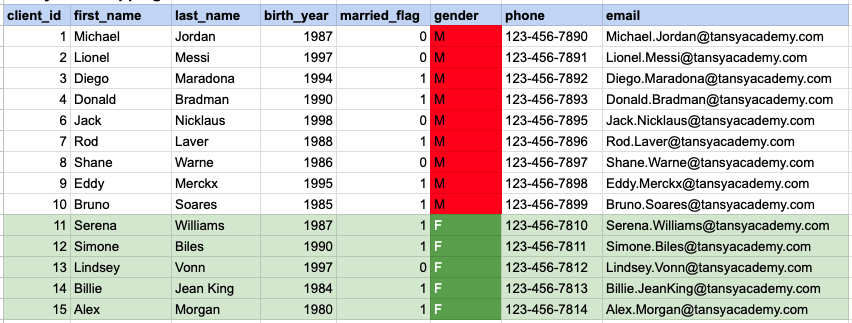
SELECT *
FROM org_client
WHERE gender = 'F';
In the provided image, the green color signifies the data that has been selected or satisfies the conditions specified in our query. Data points in red indicate information that does not meet the criteria set by the query.
IN OPERATOR
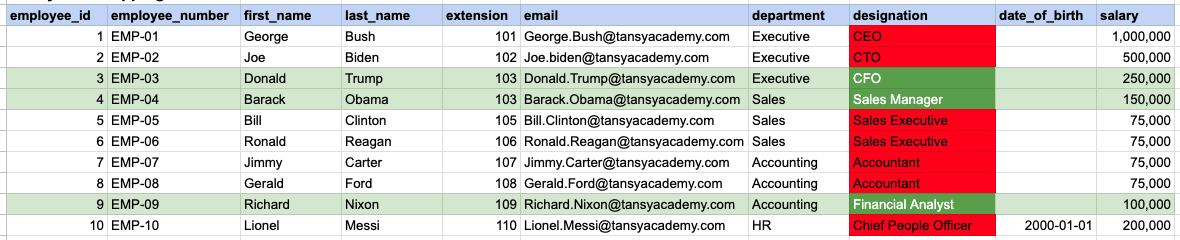
SELECT *
FROM org_employee
WHERE designation IN ('Sales Manager', 'Financial Analyst', 'CFO');
In the provided image, the green color signifies the data that has been selected or satisfies the conditions specified in our query. Data points in red indicate information that does not meet the criteria set by the query.
BETWEEN OPERATOR
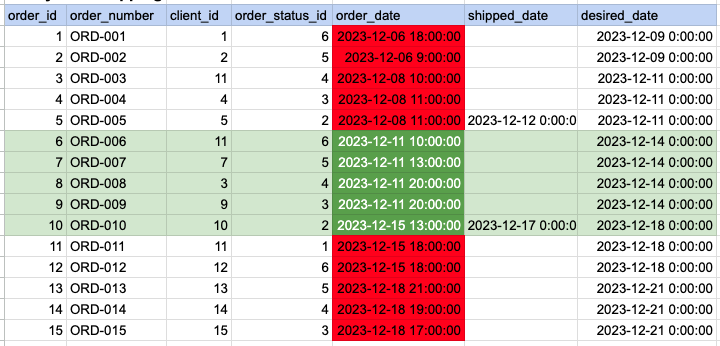
SELECT *
FROM act_order
WHERE order_date BETWEEN '2023-12-10' AND '2023-12-17';
In the provided image, the green color signifies the data that has been selected or satisfies the conditions specified in our query. Data points in red indicate information that does not meet the criteria set by the query.
LIKE OPERATOR
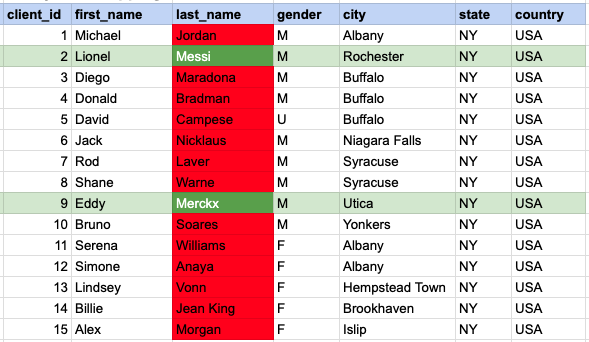
SELECT *
FROM org_client
WHERE last_name LIKE 'Me%';
In the provided image, the green color signifies the data that has been selected or satisfies the conditions specified in our query. Data points in red indicate information that does not meet the criteria set by the query. Retrieve entries for clients with last names that begin with 'Me%', where '%' signifies the possibility of zero or more characters following 'Me'.
IS NULL OPERATOR
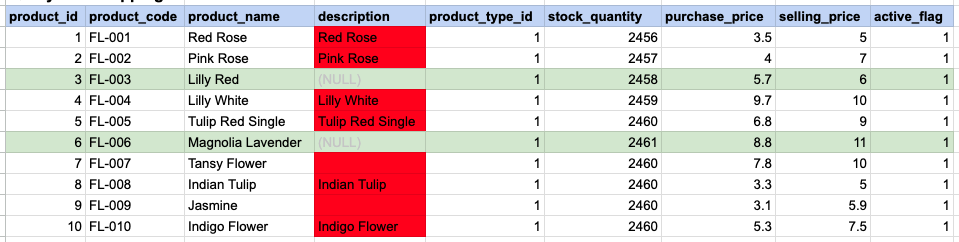
SELECT *
FROM prd_product
WHERE description IS NULL;
In the provided image, the green color signifies the data that has been selected or satisfies the conditions specified in our query. Data points in red indicate information that does not meet the criteria set by the query. NOTE that description value for product id 7 and 9 compose a empty string, this is not a null.
Comments Not Found