
Oracle
'< >' or '!=' Operator (not equal)
In Oracle SQL, the <> and != operators are used to compare two values and check for inequality. Both operators work similarly and can be used interchangeably to determine whether two expressions are not equal. These operators are useful in filtering query results where certain conditions must exclude specific values. For example, you can use them to exclude records with a particular author name, book title, or membership type from your result set.
Here’s an explanation of how these operators work and how you can use them in SQL queries:
Basic Usage of
<>and!=- These operators check whether two expressions are not equal.
- You can use them in the
WHEREclause of a query to filter rows that do not meet the equality condition.
Example with
<>OperatorSELECT * FROM books WHERE author_id <> 101;- This query selects all rows from the
bookstable where theauthor_idis not equal to101.
- This query selects all rows from the
Example with
!=OperatorSELECT * FROM memberships WHERE membership_type != 'Premium';- This query retrieves all memberships from the
membershipstable where themembership_typeis not 'Premium'.
- This query retrieves all memberships from the
Using in Combination with Other Conditions
- You can combine the
<>or!=operators with other conditions usingANDorORto form more complex queries.
SELECT book_title, author_id FROM books WHERE author_id <> 102 AND book_genre = 'Science Fiction';- This query retrieves books where the
author_idis not 102 and the genre is 'Science Fiction'.
- You can combine the
Best Practices
- Avoid using
!=when possible, as<>is considered the SQL standard for "not equal" operations. - Be mindful when using these operators with
NULLvalues. Oracle treats comparisons withNULLas unknown. UseIS NOT NULLfor such cases.SELECT * FROM rentals WHERE return_date IS NOT NULL AND member_id <> 300;
- Avoid using
By understanding the usage of <> and != operators in Oracle SQL, you can write effective queries to filter out unwanted results while ensuring your code remains clear and maintainable.
To gain complete access, login with gmail or outlook, no need of signup. click here

TEST CODE
In Oracle SQL, you can achieve the same result using the <> operator for "not equal" comparisons:
SELECT *
FROM org_client
WHERE gender <> 'F';In Oracle SQL, you would also use the <> operator to filter orders with statuses other than 5:
SELECT *
FROM act_order
WHERE order_status_id <> 5;In Oracle SQL, you would use the <> operator to filter orders with shipping dates not equal to December 12th:
SELECT *
FROM act_order
WHERE shipped_date <> to_date('12/12/23', 'DD/MM/YY');Example 1:
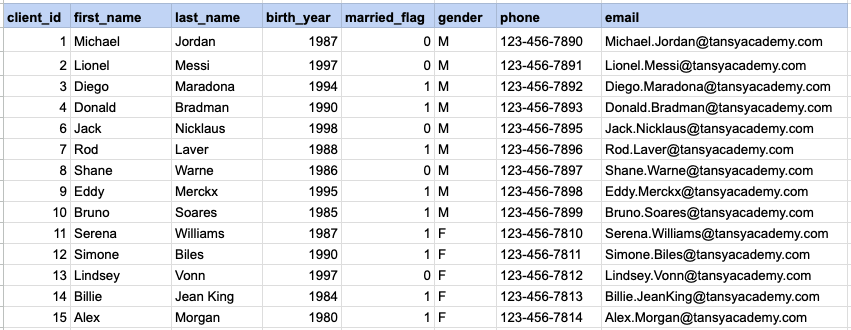
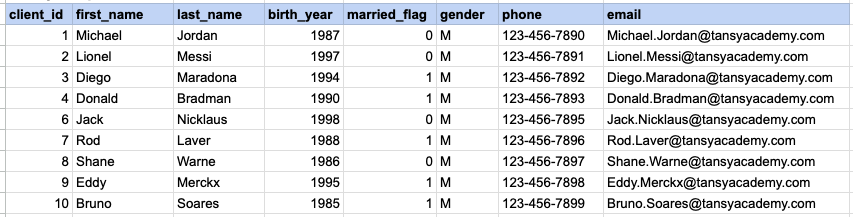
Let's examine the process of extracting information from a specified table using the SQL '!=' or '<>' (not equal) operator with string data. Retrieve records for clients labeled as male while excluding those identified as female.
Example 1 - Raw data from client table
Example 1 - Query
SELECT *
FROM org_client
WHERE gender <> 'F';
Example 1 - Query data mapping
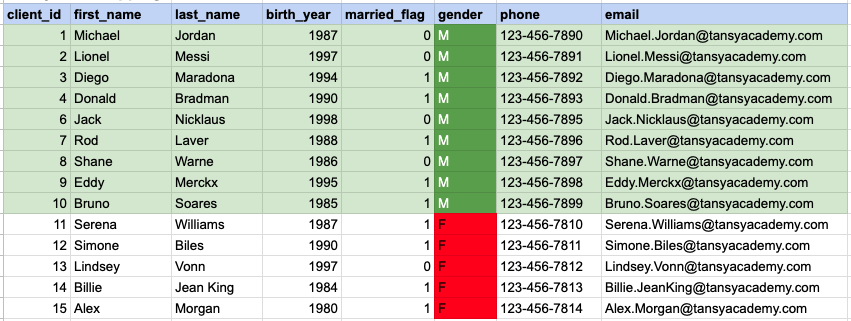
In the provided image, the green color signifies the data that has been selected or satisfies the conditions specified in our query. Data points in red indicate information that does not meet the criteria set by the query.
Example 1 - Query Output
Example 2:
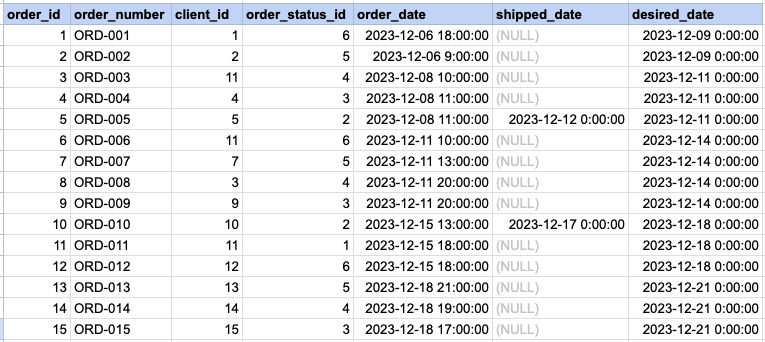
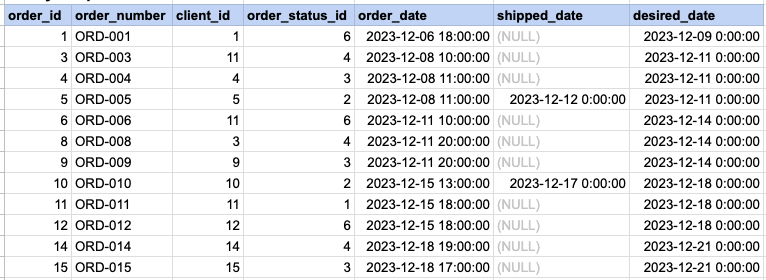
Let's explore the procedure of extracting information from a designated table using the SQL '!=' or '<>' (not equal) operator with numeric data. Fetch orders with statuses different from 5.
Example 2 - Raw data from orders table
Example 2 - Query
SELECT *
FROM act_order
WHERE order_status_id != 5;
Example 2 - Query data mapping
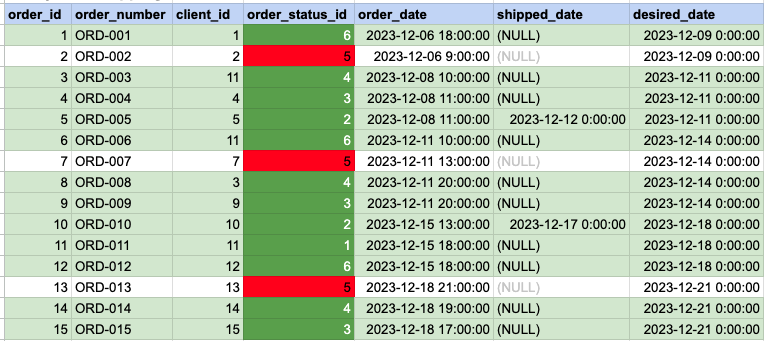
In the provided image, the green color signifies the data that has been selected or satisfies the conditions specified in our query. Data points in red indicate information that does not meet the criteria set by the query.
Example 2 - Query Output
Example 3:
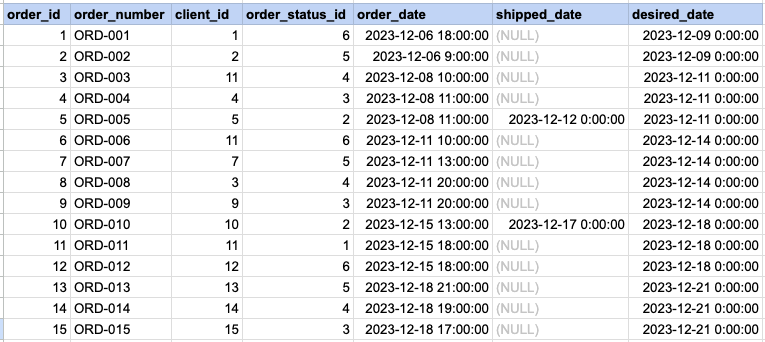
Let's delve into the process of extracting information from a specified table using the SQL '!=' or '<>' (not equal) operator with date data. Retrieve orders with shipping dates other than December 12th.
Example 3 - Raw data from orders table
Example 3 - Query
SELECT *
FROM act_order
WHERE shipped_date != '2023-12-12';
Example 3 - Query data mapping
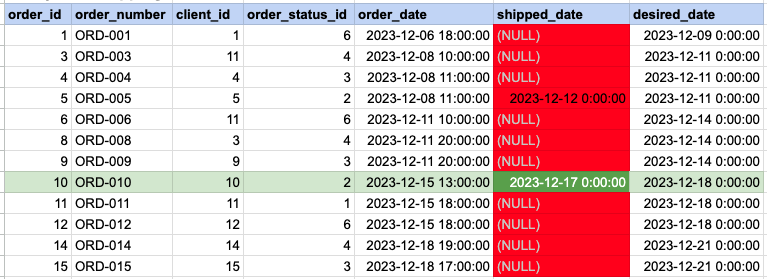
In the provided image, the green color signifies the data that has been selected or satisfies the conditions specified in our query. Data points in red indicate information that does not meet the criteria set by the query. Please be aware that the query will attempt to filter based on the value of December 12th. Since many records have NULL for the shipped date value, NULL cannot be compared as it is not an actual value. Consequently, these records will be excluded from the results as well.
Example 3 - Query Output

Comments Not Found