
Oracle
Database Table
A database table in Oracle is a structured collection of data organized into rows and columns. Each table represents a specific entity or object in the system, such as books in a library, and is used to store and retrieve data efficiently. Tables are fundamental elements in relational databases, and each table must have a unique name within a schema. The data in a table is structured into columns, which define the data types and constraints, and rows, which hold the actual data entries.
Key Points about Database Tables in Oracle:
Table Creation
- Tables are created using the
CREATE TABLEstatement. - Each column is defined with a specific data type (e.g.,
VARCHAR2,NUMBER,DATE).
CREATE TABLE books ( book_id NUMBER PRIMARY KEY, title VARCHAR2(255), author_id NUMBER, published_date DATE );- Tables are created using the
Columns in a Table
- Columns define the structure of the data stored in the table.
- Each column has a name and a data type, which determines the kind of data it can store.
- Example:
book_idstores numbers.titlestores character strings.
Rows in a Table
- Rows contain the actual data in the table.
- Each row is an individual record in the table, representing one entity (e.g., one book).
- You can insert rows using the
INSERTstatement:
INSERT INTO books (book_id, title, author_id, published_date)
VALUES (1, 'The Great Gatsby', 10, TO_DATE('1925-04-10', 'YYYY-MM-DD'));
Table Naming Conventions
- Table names should be descriptive and reflect the contents, such as
authors,books, orlibrary_members. - Use underscores to separate words for readability (e.g.,
library_membership).
- Table names should be descriptive and reflect the contents, such as
Constraints in Tables
- Constraints are rules applied to columns to ensure data integrity.
- Common constraints include:
PRIMARY KEY: Uniquely identifies each row.FOREIGN KEY: Links a column to a primary key in another table.NOT NULL: Ensures the column cannot be empty.
CREATE TABLE authors (
   author_id NUMBER PRIMARY KEY,
   name VARCHAR2(100)NOT  NULL
);
Querying Data from Tables
- To retrieve data from a table, use the
SELECTstatement:
SELECT title, published_date FROM books WHERE author_id = 10;- To retrieve data from a table, use the
This structure makes it easy for new students to understand how database tables work and how to interact with them.
To gain complete access, login with gmail or outlook, no need of signup. click here

Database Tables and Their Components
Database tables are designed to store data in a structured format, using rows and columns. Each table represents a specific type of entity, such as users, products, or orders, with the columns representing attributes of that entity. Understanding these components is crucial for effective database design and management.
Components of Database Tables
- Table Name
The unique identifier for a table within a database, descriptive of the data it holds.
- Columns/Fields
Columns represent the attributes of the entity. Each column has a specific data type and can be defined with various constraints:
- Data Type: The kind of data a column can hold (e.g., VARCHAR, INT, DATE).
- Constraints: Rules for the data stored in a column, including NOT NULL, UNIQUE, PRIMARY KEY, FOREIGN KEY, CHECK, and DEFAULT.
- Rows/Records
Individual instances of the entity, with each row having a unique identifier through the primary key.
- Indexes
Special lookup tables that speed up data retrieval, analogous to an index in a book.
- Relationships
Defines how tables relate to each other, including One-to-One, One-to-Many, and Many-to-Many relationships.
Sample SQL Code
Creating a Table
CREATE TABLE Students (
    StudentID INT PRIMARY KEY,
    FirstName VARCHAR(50) NOT NULL,
    LastName VARCHAR(50) NOT NULL,
    Email VARCHAR(100) UNIQUE,
    Age INT CHECK (Age > 0),
    EnrollmentDate DATE DEFAULT CURRENT_DATE
);
Inserting Data
INSERT INTO Students (StudentID, FirstName, LastName, Email, Age)
VALUES (1, 'John', 'Doe', 'john.doe@example.com', 20);
Querying Data
SELECT * FROM Students WHERE Age >= 18;Updating Data
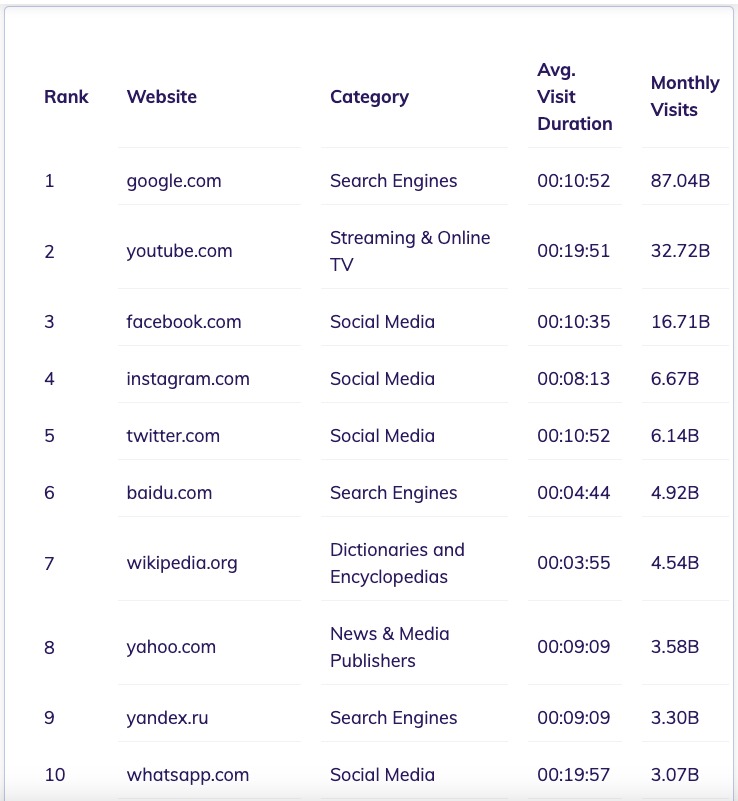
UPDATE Students SET Email = 'new.email@example.com' WHERE StudentID = 1;DATA TABLE - TOP 10 WEBSITES
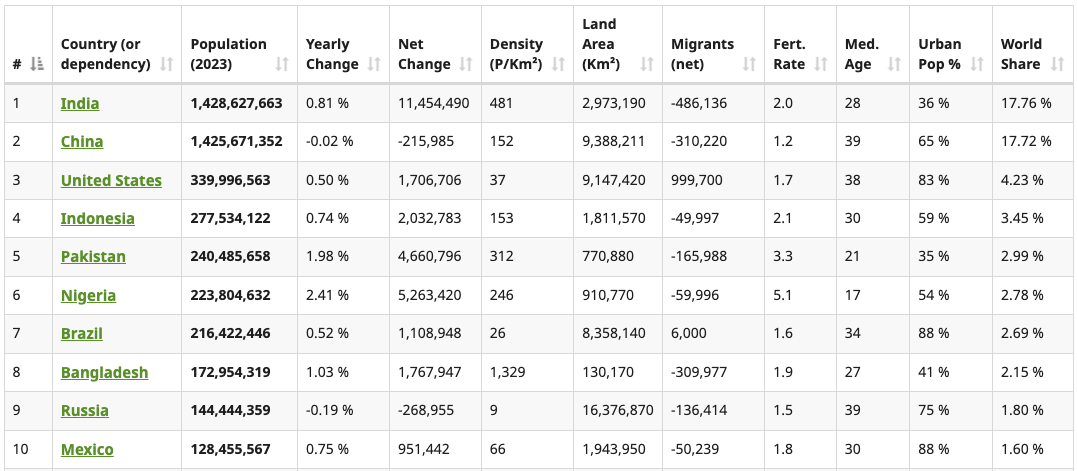
DATA TABLE - TOP 10 POPULATED COUNTRIES
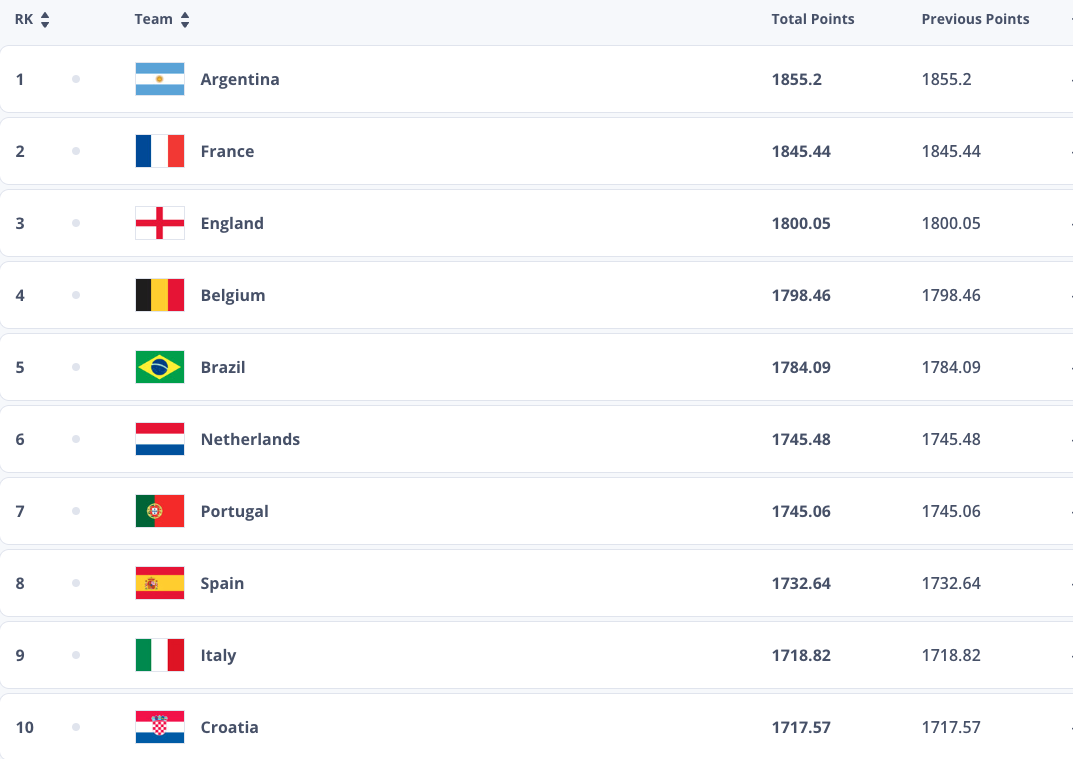
DATA TABLE - TOP 10 FOOTBALL TEAMS
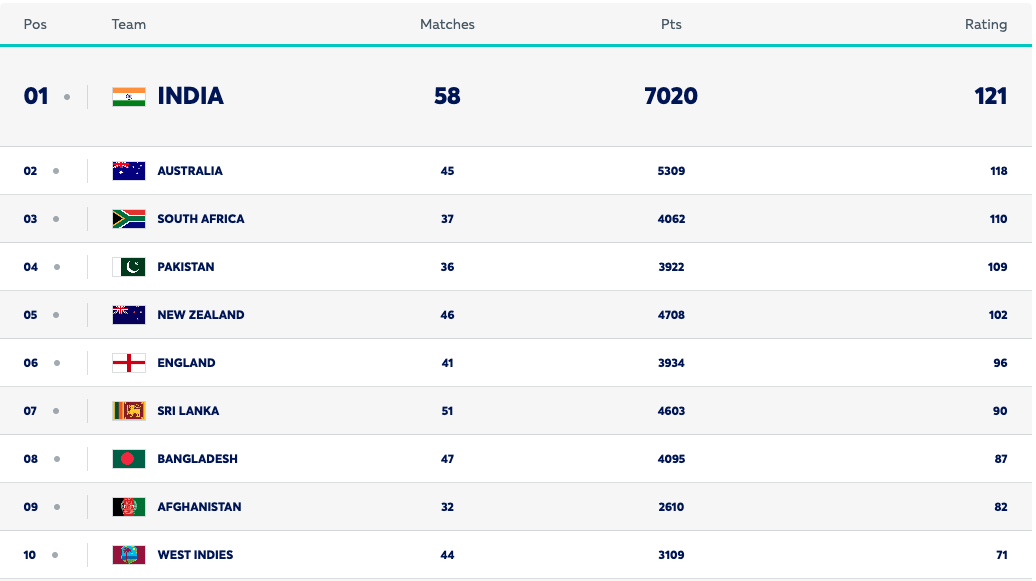
DATA TABLE - TOP 10 CRICKET TEAMS
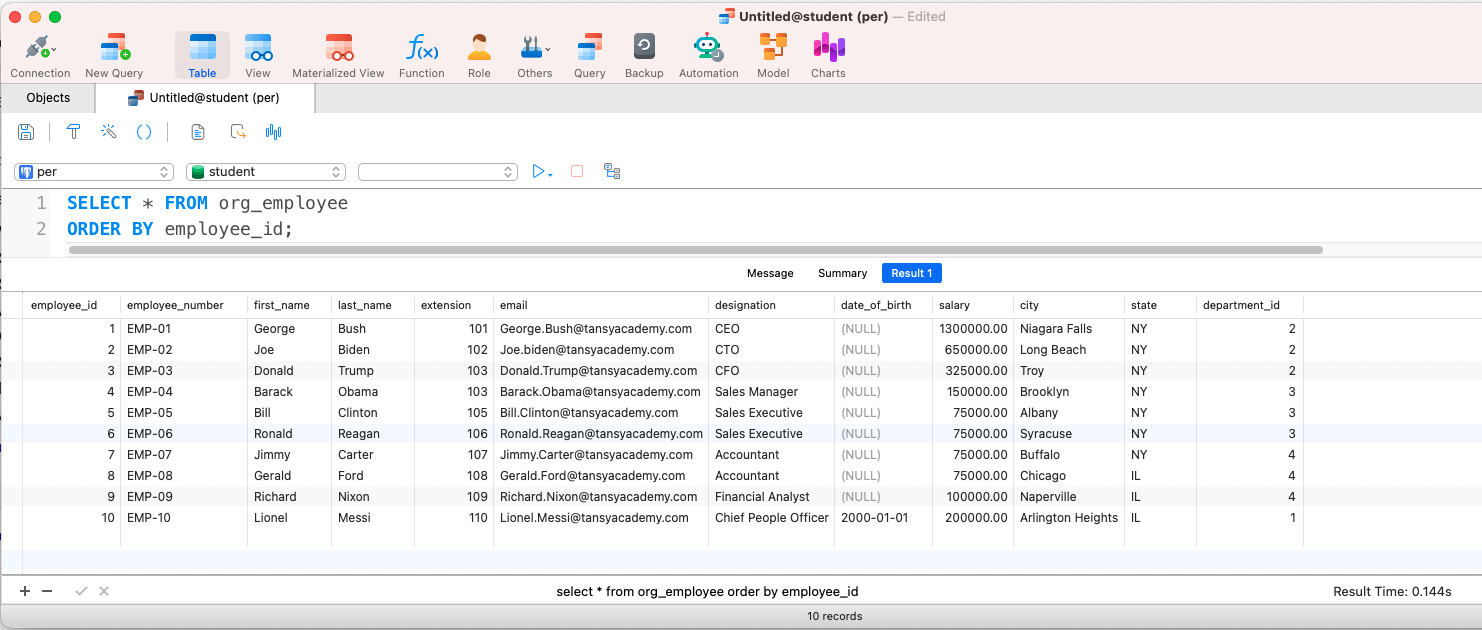
POSTGRESQL - EMPLOYEE TABLE WITH DATA
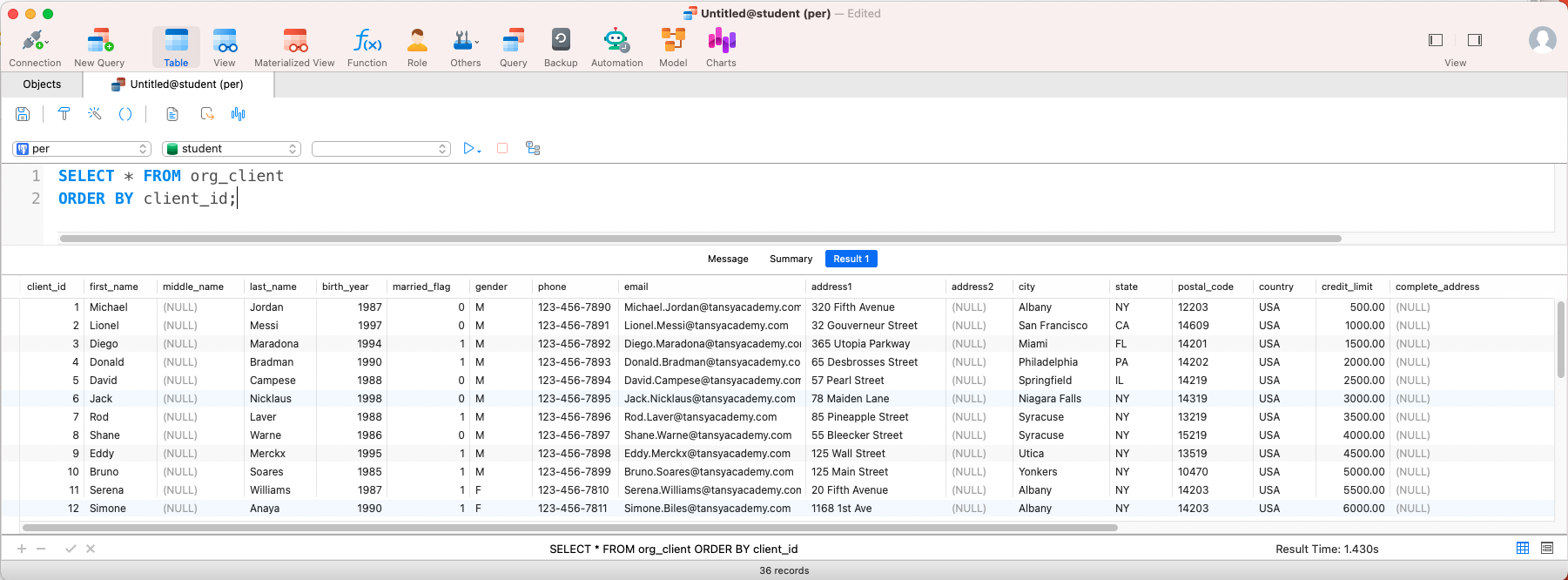
POSTGRESQL - CLIENTS TABLE WITH DATA
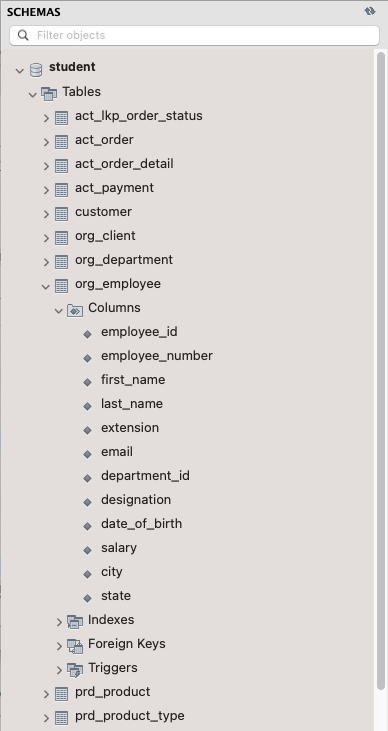
MYSQL TABLE LISTING
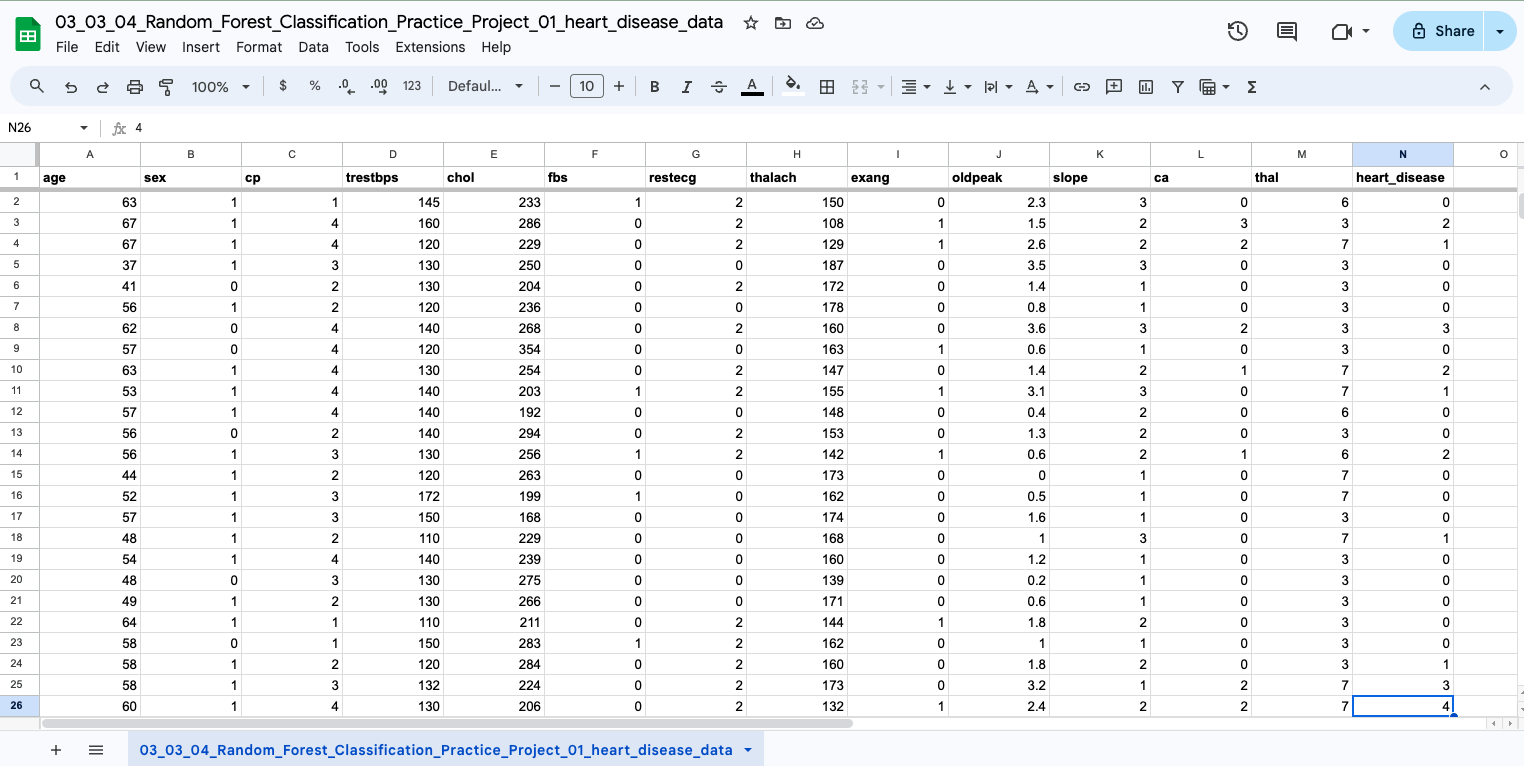
EXCEL DATA TABLE - PATIENT DATA
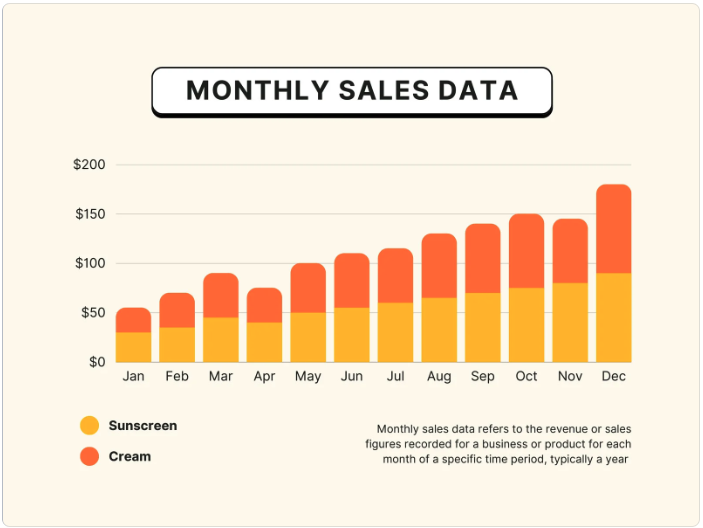
GRAPH DATA - NOT A SQL TABLE
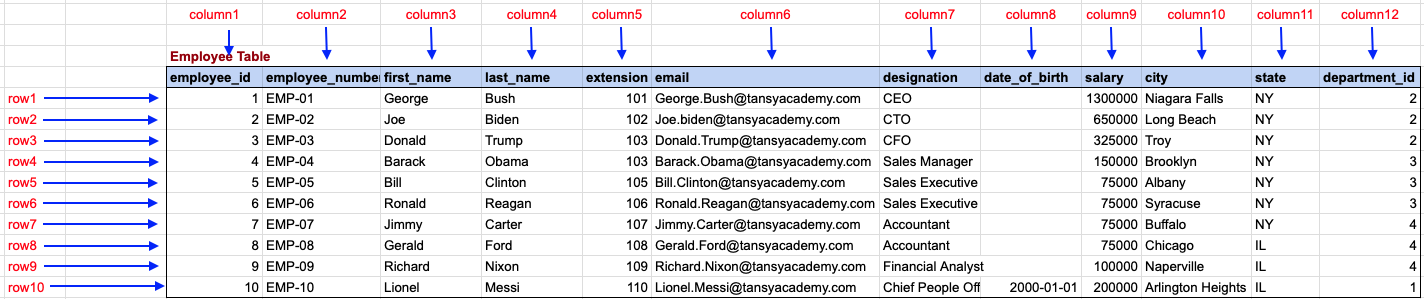
Employee Table with Data
Employee JSON Document, NOT A SQL TABLE
[
{
    "employee_id": 1,
    "employee_number": "EMP-01",
    "first_name": "George",
    "last_name": "Bush",
    "extension": 101,
    "email": "George.Bush@tansyacademy.com",
    "designation": "CEO",
    "date_of_birth": null,
    "salary": 130000,
    "city": "Niagara Falls",
    "state": "NY",
    "department_id": 2
},
{
    "employee_id": 2,
    "employee_number": "EMP-02",
    "first_name": "Joe",
    "last_name": "Biden",
    "extension": 102,
    "email": "Joe.biden@tansyacademy.com",
    "designation": "CTO",
    "date_of_birth": null,
    "salary": 65000,
    "city": "Long Beach",
    "state": "NY",
    "department_id": 2
}
]
Comments Not Found