
Oracle
NOT IN Operator
The NOT IN operator in Oracle is part of the Data Query Language (DQL) and is used to filter records based on a condition where a specified value does not match any value in a list or subquery. This operator is helpful when you want to exclude certain records from your result set, making it a valuable tool for querying and filtering data effectively.
How to use the NOT IN Operator in Oracle
Basic Usage
TheNOT INoperator allows you to filter data by excluding rows with specific values in a column. Here's an example SQL query using theNOT INoperator:SELECT book_title FROM books WHERE author_id NOT IN (1, 2, 3);- This query will retrieve the titles of all books except those written by authors with IDs 1, 2, and 3.
Working with Subqueries
You can also useNOT INwith subqueries to exclude records based on another table:SELECT member_name FROM membership WHERE member_id NOT IN (SELECT member_id FROM rentals WHERE return_date IS NULL);- In this query, the result will exclude members who currently have rented books that are not yet returned.
NULL Handling
- Important:
NOT INcan behave unexpectedly if the list or subquery containsNULLvalues. WhenNULLis present, the comparison will return unknown results, and no rows may be returned. For example:
SELECT book_title FROM books WHERE author_id NOT IN (1, NULL, 3);- This query will return no rows, because the
NULLcomparison makes it impossible to know whether other values are excluded.
- Important:
Alternative:
NOT EXISTS- A common best practice to avoid issues with
NULLis to useNOT EXISTSinstead ofNOT IN, especially when working with subqueries:
SELECT member_name FROM membership m WHERE NOT EXISTS (SELECT 1 FROM rentals r WHERE m.member_id = r.member_id AND r.return_date IS NULL);- This query will reliably exclude members with unreturned rentals without being affected by
NULLvalues.
- A common best practice to avoid issues with
Best Practices for Using the NOT IN Operator
Avoiding
NULLValues in Lists or Subqueries- Always be mindful of
NULLvalues when using theNOT INoperator. If there's a chance thatNULLmight appear in the list or subquery, consider usingNOT EXISTSor filtering outNULLvalues before applyingNOT IN.
- Always be mindful of
Indexing for Performance
- Ensure that the columns used with
NOT INare indexed, as this can improve query performance, especially with large datasets.
- Ensure that the columns used with
Readable Queries
- Write clear and readable queries by using aliases and formatting your SQL properly. This helps when revisiting or debugging queries later.
To gain complete access, login with gmail or outlook, no need of signup. click here

TEST CODE
In Oracle, the NOT IN operator is used to exclude rows based on specified string values. This query retrieves all rows from the "org_employee" table where the designation column does not match any of the specified values ('Sales Manager', 'Financial Analyst', 'CFO'):
SELECT *
FROM org_employee
WHERE designation NOT IN ('Sales Manager', 'Financial Analyst', 'CFO');In Oracle, the NOT IN operator is used to exclude rows based on specified numeric values. This query retrieves all rows from the "org_client" table where the birth year column does not match any of the specified values (1990, 1980):
SELECT *
FROM org_client
WHERE birth_year NOT IN (1990, 1980);In Oracle, the NOT IN operator is used to exclude rows based on specified datetime values. This query retrieves all rows from the "act_order" table where the desired_date column does not match any of the specified values ('2023-12-09', '2023-12-10', '2023-12-18', '2023-12-25'):
SELECT *
FROM act_order
WHERE desired_date NOT IN (TO_DATE('09/12/23', 'DD/MM/YY'), TO_DATE('10/12/23', 'DD/MM/YY'), TO_DATE('18/12/23', 'DD/MM/YY'), TO_DATE('25/12/23', 'DD/MM/YY'));Example 1:
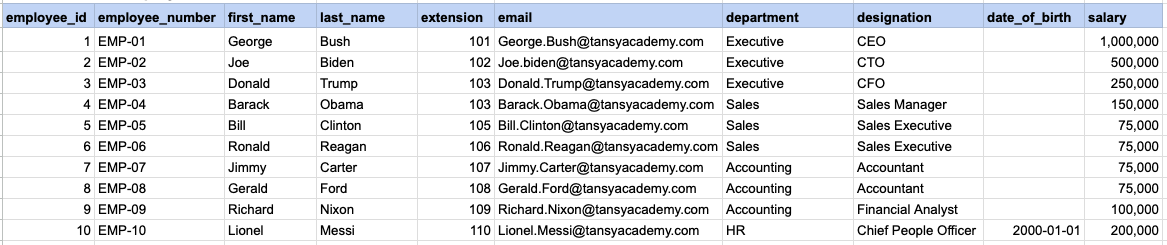
Let's explore the procedure of extracting information from a designated table using the NOT IN SQL operator with string data. This query retrieves all rows from the employees table where the designation column does not corresponds to any of the specified values ('Sales Manager', 'Financial Analyst', 'CFO').
Example 1 - Raw data from employee table
Example 1 - Query
SELECT *
FROM org_employee
WHERE designation NOT IN ('Sales Manager', 'Financial Analyst', 'CFO');
Example 1 - Query data mapping
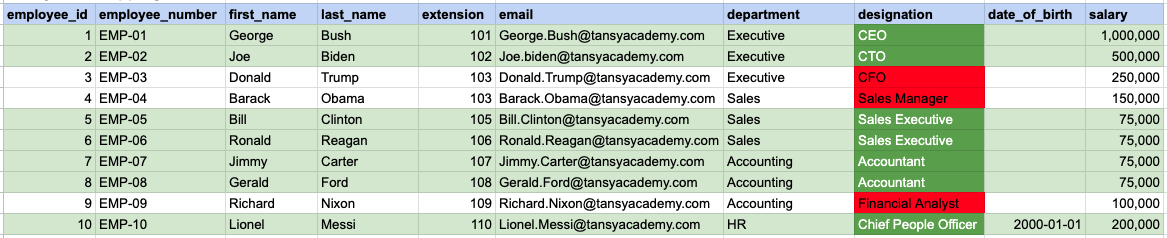
In the provided image, the green color signifies the data that has been selected or satisfies the conditions specified in our query. Data points in red indicate information that does not meet the criteria set by the query.
Example 1 - Query Output

Example 2:
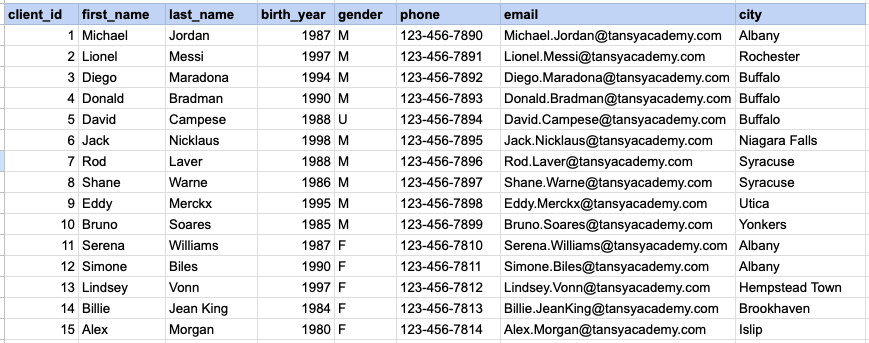
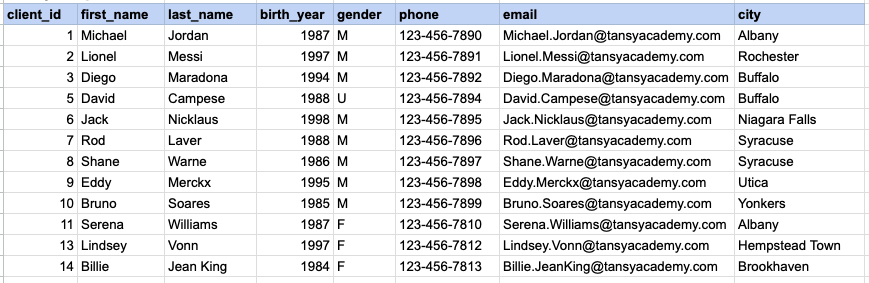
Let's explore the procedure for extracting information from a designated table using the NOT IN SQL operator on integer data. The query fetches all rows from the clients table where the birth year column do not match any of the specified values (1990, 1980).
Example 2 - Raw data from client table
Example 2 - Query
SELECT *
FROM org_client
WHERE birth_year NOT IN (1990, 1980);
Example 2 - Query data mapping
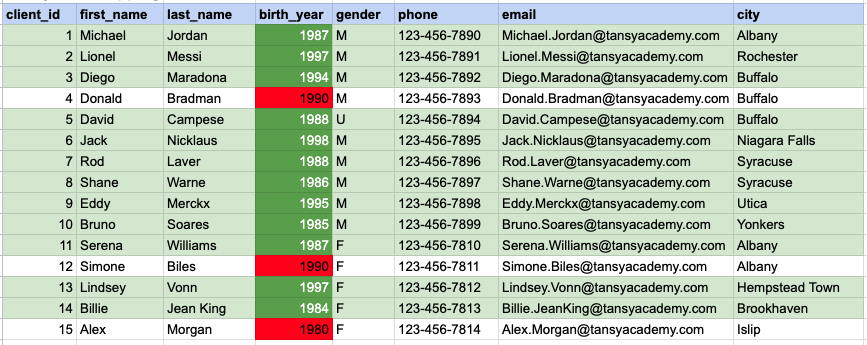
In the provided image, the green color signifies the data that has been selected or satisfies the conditions specified in our query. Data points in red indicate information that does not meet the criteria set by the query.
Example 2 - Query Output
Example 3:
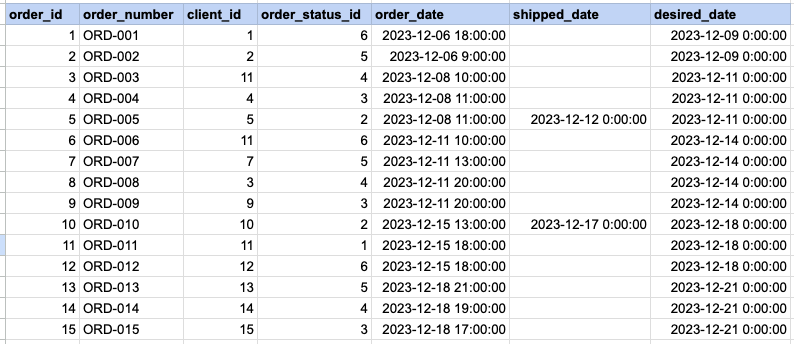
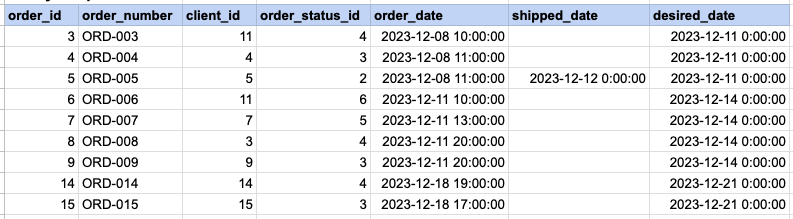
Let's explore the procedure for extracting information from a designated table using the NOT IN SQL operator on date time data. This query retrieves all rows from the orders table where the desired ship date column does not corresponds to any of the specified values ('2023-12-09', '2023-12-10', '2023-12-18', '2023-12-25').
Example 3 - Raw data from order table
Example 3 - Query
SELECT *
FROM act_order
WHERE desired_date NOT IN ('2023-12-09', '2023-12-10', '2023-12-18', '2023-12-25');
Example 3 - Query data mapping
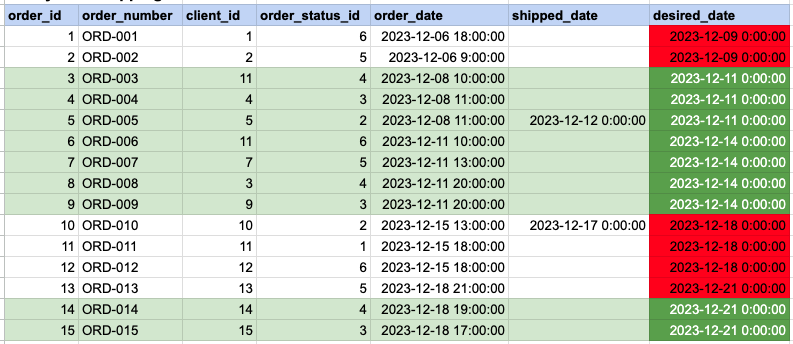
In the provided image, the green color signifies the data that has been selected or satisfies the conditions specified in our query. Data points in red indicate information that does not meet the criteria set by the query.
Example 3 - Query Output
Comments Not Found