
Oracle
SQL DML ASSIGNMENT1 - Library Management System
Objective:
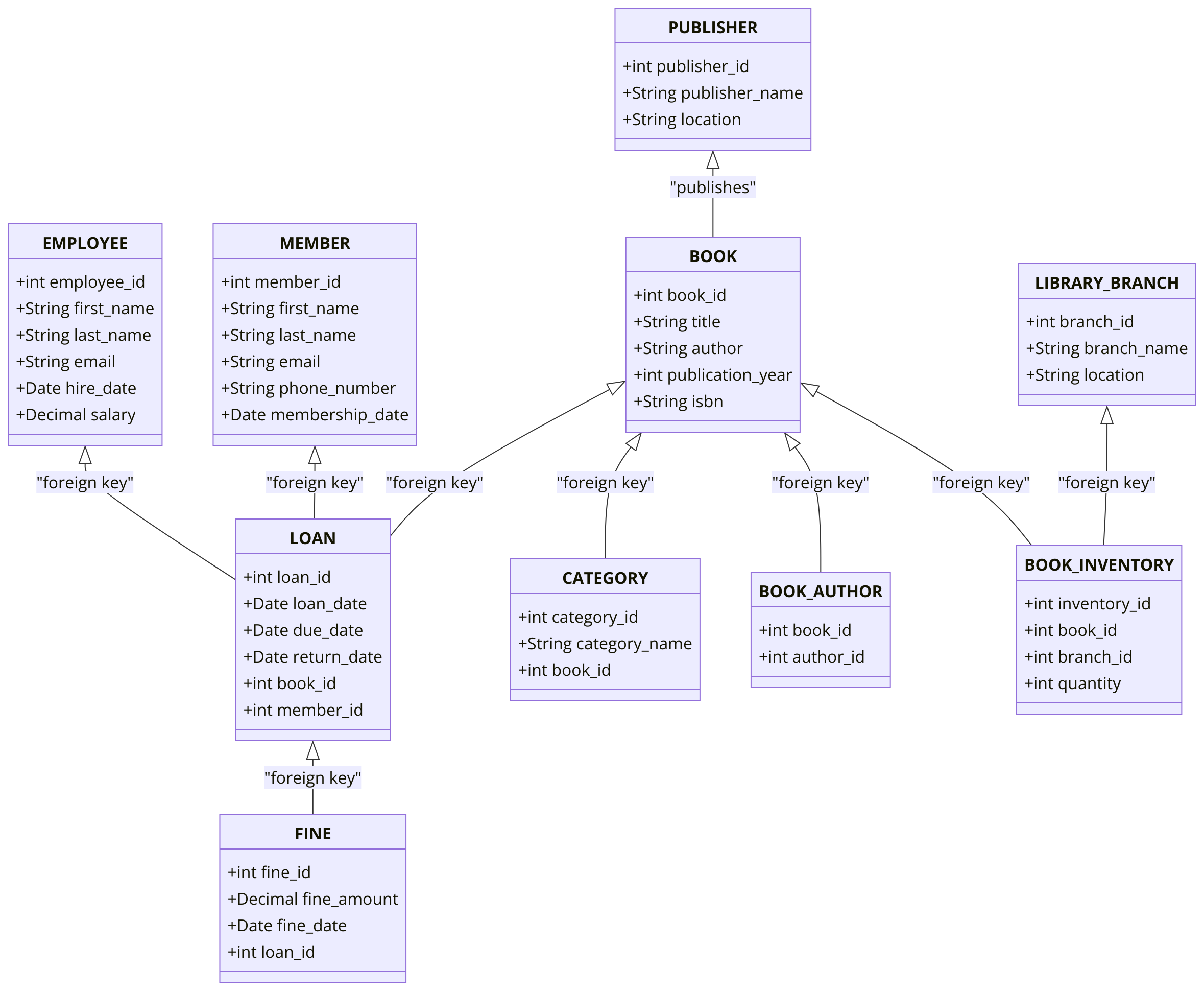
You are required to address a set of Data Manipulation Language (DML) tasks for a Library Management System. Each query focuses on distinct DML tasks, including inserting, updating, deleting, using subqueries, joins, and working with complex operations between tables. The tables and relationships have already been defined based on the DDL from your chapter 5 assignments.
Requirements:
You will need to complete at least 25 different DML tasks, covering inserting, updating, deleting, working with joins, subqueries, and data manipulations.
Question 1: Insert Data into all Tables
Write SQL queries to populate each table created in the Chapter 5 assignment with at least 10 rows of data.
Question 2: Insert a New Book
Write a DML SQL statement to insert a new record into the BOOK table with the following details:
- title: 'The Great Gatsby'
- author: 'F. Scott Fitzgerald'
- publication_year: 1925
- isbn: '9781234567890'
Question 3: Insert Multiple Members using single SQL statement.
Insert two new members into the MEMBER table with the following details:
- First member: first_name: 'John', last_name: 'Doe', email: 'john.doe@example.com', phone_number: '1234567890'
- Second member: first_name: 'Jane', last_name: 'Smith', email: 'jane.smith@example.com', phone_number: '0987654321'
Question 4: Insert a Loan Record
Write a DML SQL statement to insert a new loan into the LOAN table:
- loan_date: Current date
- due_date: 30 days from the current date
- book_id: 1
- member_id: 2
Question 5: Insert a Record into the MEMBER Table with Default Values
Insert a record into the MEMBER table using default value for created_at.
Question 6: Insert into BOOK_AUTHOR Table
Write a SQL statement to insert a record into the BOOK_AUTHOR table, associating book_id = 1 with author_id = 1.
Question 7: Insert a New Fine
Write a SQL statement to insert a new fine into the FINE table for a specific loan:
- fine_amount: 15.50
- fine_date: Current date
- loan_id: 2
Question 8: Insert Data into CATEGORY Table
Write a SQL statement to insert a new category into the CATEGORY table:
- category_name: 'Classic Literature'
- book_id: 1
Question 9: Insert Multiple Employees
Insert two records into the EMPLOYEE table with the following details:
- First employee: first_name: 'Alice', last_name: 'Johnson', email: 'alice.johnson@example.com', hire_date: '2020-01-15', salary: 50000.00
- Second employee: first_name: 'Bob', last_name: 'Williams', email: 'bob.williams@example.com', hire_date: '2021-02-20', salary: 45000.00
Question 10: Insert into BOOK_INVENTORY Table
Write a SQL statement to insert a new record into the BOOK_INVENTORY table:
- book_id: 1
- branch_id: 1
- quantity: 10
Question 11: Insert a New Publisher
Write a SQL statement to insert a new publisher into the PUBLISHER table:
- publisher_name: 'Penguin Books'
- location: 'New York'
Question 12: Select Into Backup Table
Write a SQL statement to create a backup of all rows in the BOOK table into a new table called BOOK_BACKUP.
Question 13: Insert Data Using Subquery
Write a SQL statement to insert a new loan into the LOAN table. Use a subquery to get the book_id for the book titled 'The Great Gatsby' and member_id for the member whose last_name is 'Smith'.
Question 14: Update Member Information
Write a SQL statement to update the email and phone_number of the member with member_id = 1.
Question 15: Update Loan Due Date
Write a SQL statement to update the due_date for all loans where the book_id = 1, extending the due date by 7 days.
Question 16: Update with JOIN
Write a SQL statement to update the quantity in the BOOK_INVENTORY table for all branches that have books with title = 'The Great Gatsby'.
Question 17: Update with Subquery
Write a SQL statement to update the due_date in the LOAN table based on the latest loan date from the LOAN table.
Question 18: Perform an UPSERT on MEMBER Table
Write a SQL statement to insert a new member or update the email if the member_id already exists in the MEMBER table.
Question 19: Delete a Loan
Write a SQL statement to delete a loan where loan_id = 3.
Question 20: Delete with JOIN
Write a SQL statement to delete all loans where the book's isbn = '9781234567890' using a JOIN between the BOOK and LOAN tables.
Question 21: Delete with INNER JOIN
Write a SQL statement to delete all loans for books published by 'Penguin Books', using an INNER JOIN between the BOOK, PUBLISHER, and LOAN tables.
Question 22: Truncate the EMPLOYEE_LOGIN Table
Write a SQL statement to truncate the EMPLOYEE_LOGIN table, removing all rows without generating individual delete triggers.
Question 23: Add JSON Column to BOOK Table
Write a SQL statement to add a meta_data column of type JSON to the BOOK table.
Question 24: Insert into JSON Column
Write a SQL statement to insert JSON data into the meta_data column of the BOOK table. The JSON should contain keys like "publisher", "published_on", and "language".
Question 25: Update JSON Column
Write a SQL statement to update the meta_data JSON column of the BOOK table, adding or updating the "language" field for a specific book.
Question 26: Delete JSON Data
Write a SQL statement to remove the "publisher" field from the meta_data JSON column for a specific book.
Question 27: SUPER Complex INSERT.
- Create a DATE_DIM table with columns: date_id, calendar_date, year, month, day_of_the_month, week_day_number, week_day_name, yearly_week_number, month_start_date_flag, month_end_date_flag, year_start_date_flag, year_end_date_flag, holiday_flag
- The date_id should be populated in the YYYYMM format (e.g., 202401).
- Populate the DATE_DIM table with data for current year and the next year.
GOOD LUCK WITH YOUR ASSIGNMENT!!!
Don't forget to contact us if you need any further assistance with your assignments, and most importantly, for a manual review and approval of your work.
Sample ERD Data Model for Library Management System
To gain complete access, login with gmail or outlook, no need of signup. click here
Comments Not Found