
Oracle
PIVOT
The SQL PIVOT operator in Oracle allows you to transform rows into columns, providing a more readable format for data analysis. This is especially useful when you want to summarize data from a dataset by grouping and aggregating information, making it easier to understand trends or comparisons. For example, if you have a table of book rentals and you want to see how many books were rented each month, PIVOT can help you create a concise report.
Key Features of SQL PIVOT
Transforming Data
The PIVOT clause allows for the conversion of unique values from one column into multiple columns in the output.Aggregation Functions
You can specify aggregate functions like COUNT, SUM, or AVG to summarize data as it pivots.Syntax Overview
The basic syntax for using the PIVOT operator is:SELECT * FROM ( SELECT column1, column2, aggregate_column FROM table_name ) PIVOT ( aggregate_function(aggregate_column) FOR column_to_pivot IN (value1, value2, value3) );
Example Code
Here’s an example using a hypothetical rentals table that tracks book rentals:
SELECT *
FROM (
    SELECT rental_month, book_id, COUNT(rental_id) AS rental_count
    FROM rentals
    GROUP BY rental_month, book_id
)
PIVOT (
    SUM(rental_count)
    FOR rental_month IN ('January' AS Jan, 'February' AS Feb, 'March' AS Mar)
);
Best Practices for Using SQL PIVOT
Understand Your Data
Before using PIVOT, ensure you fully understand the data structure and the results you want to achieve.Limit the Number of Pivoted Columns
To maintain clarity, avoid pivoting too many columns at once.Use Aggregation Wisely
Choose the appropriate aggregation function based on the data context to ensure meaningful results.Test Queries in Smaller Batches
Start with smaller datasets to test your PIVOT queries for accuracy before applying them to larger datasets.
By following these guidelines and understanding how PIVOT works, you'll be able to effectively summarize and analyze your data in Oracle SQL.
SQL PIVOT TECHNIQUE
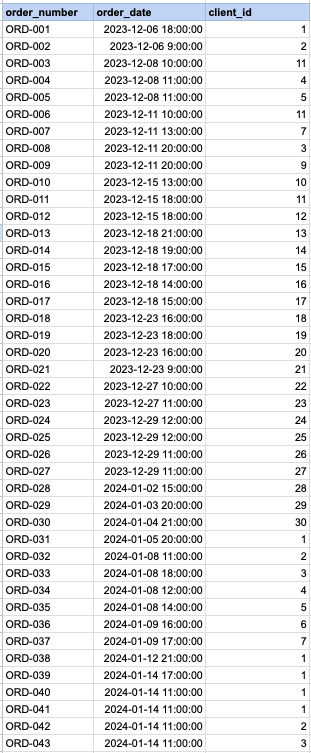
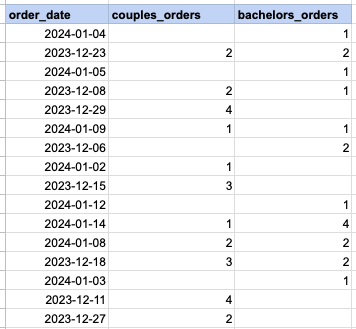
Let's delve into the specifics of implementing the pivot technique across different SQL databases like MySQL, PostgreSQL, Oracle, and Microsoft SQL Server. In our example, we aim to utilize the SQL pivot method to organize daily order counts, distinguishing between orders placed by couples and those by bachelors.
Raw data from order table
Step1, Get client's marital status
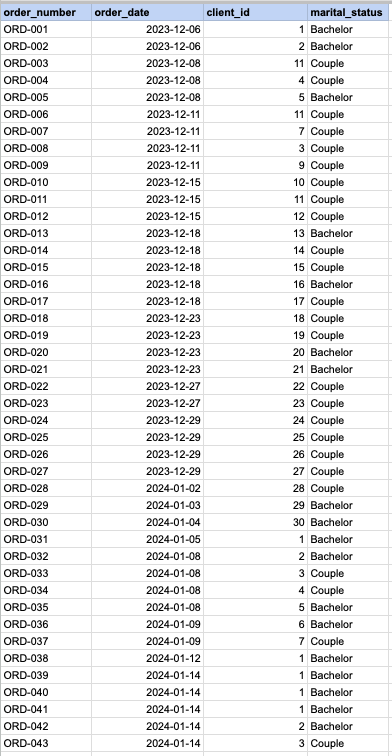
Utilize below query to merge the 'Orders' table with the 'Clients' table, thereby obtaining the marital status of clients from the 'Clients' table. Additionally, transform the 'OrderDateTime' into just the 'OrderDate'.
SELECT a.order_number, DATE(a.order_date), a.client_id
    CASE WHEN b.married_flag = 1 THEN 'Married'
ELSE 'Single' END AS marital_status
FROM act_order a
INNER JOIN org_client b on b.client_id = a.client_id
order by order_id;
Step 1 output
MySQL and PostGreSQL PIVOT technique
SELECT DATE(a.order_date) as order_date
    SUM(CASE WHEN b.married_flag = 1 THEN 1 END) AS couples_orders,
    SUM(CASE WHEN b.married_flag = 0 THEN 1 END) AS bachelors_orders
FROM act_order a
INNER JOIN org_client b on b.client_id = a.client_id
GROUP BY DATE(a.order_date);
MS SQL SERVER PIVOT technique
SELECT * FROM
(SELECT  CONVERT(DATE, a.order_date) as order_date , a.client_id
    CASE WHEN b.married_flag = 1 THEN 'Married'
ELSE 'Single' END AS marital_status
FROM act_order a
INNER JOIN org_client b on b.client_id = a.client_id
) t
PIVOT(
 COUNT(client_id)
FOR marital_status IN (
[Married],
[Single])
) AS pivot_table;
Oracle PIVOT technique
SELECT * FROM
(SELECT  TO_CHAR(a.order_date,'DD/MM/YY') as order_date , a.client_id
    CASE WHEN b.married_flag = 1 THEN 'Married'
ELSE 'Single' END AS marital_status
FROM act_order a
INNER JOIN org_client b on b.client_id = a.client_id
) t
PIVOT(
COUNT(client_id)
FOR marital_status IN ('Married','Single')
)
FINAL OUTPUT
Comments Not Found