
Oracle
Arithmetic Operators
Arithmetic operators in Oracle's Data Query Language (DQL) allow you to perform mathematical calculations within your SQL queries. These operators can be used to manipulate numeric data types and are essential for tasks such as calculating totals, averages, and more. Understanding how to use these operators effectively will help you perform more complex queries and analyses on your database.
Here’s a breakdown of the arithmetic operators available in Oracle:
Basic Arithmetic Operators
- Addition (
+): Adds two values. - Subtraction (
-): Subtracts one value from another. - Multiplication (
*): Multiplies two values. - Division (
/): Divides one value by another.
- Addition (
Using Arithmetic Operators in Queries
- You can use these operators in the
SELECTstatement to perform calculations on columns. For example:SELECT author_id, book_price, book_price * 1.1 AS price_with_tax FROM books; - This example calculates the price of books including a 10% tax.
- You can use these operators in the
Combining Multiple Operations
- You can combine multiple arithmetic operations in a single query:
SELECT author_id, (book_price * quantity) AS total_price FROM rentals; - This computes the total price based on the quantity rented.
- You can combine multiple arithmetic operations in a single query:
Working with Aggregate Functions
- Arithmetic operators can also be used with aggregate functions:
SELECT author_id, SUM(book_price) AS total_revenue FROM rentals GROUP BY author_id; - This query calculates the total revenue generated by each author.
- Arithmetic operators can also be used with aggregate functions:
Best Practices
- Always ensure that your calculations handle potential division by zero:
SELECT author_id, book_price / NULLIF(quantity, 0) AS price_per_unit FROM rentals; - Use
NULLIFto prevent division by zero errors.
- Always ensure that your calculations handle potential division by zero:
By mastering arithmetic operators, you'll enhance your ability to analyze and manipulate data effectively within Oracle databases.
To gain complete access, login with gmail or outlook, no need of signup. click here
TEST CODE
To create a new column named "total_amount" by summing the amounts from the "sub_total", "tax_amount", and "shipping_amount" columns, you can use the following query:
SELECT order_number, client_id, order_status_id, order_date,
       sub_total, tax_amount, shipping_amount,
       (sub_total + tax_amount + shipping_amount) AS total_amount
FROM act_order
ORDER BY order_number;To create a new column titled "profit_per_unit" by subtracting the purchase price from the selling price, use the following query:
SELECT product_id, product_code, product_name,
       purchase_price, selling_price,
       (selling_price - purchase_price) AS profit_per_unit
FROM prd_product;To add a new column that calculates the subtotal for each product by multiplying the quantity by the unit rate, use the following query:
SELECT order_id, product_id,
       quantity, unit_rate,
       (quantity * unit_rate) AS sub_total
FROM act_order_detail;RAW DATA FOR ADDITION OPERATOR
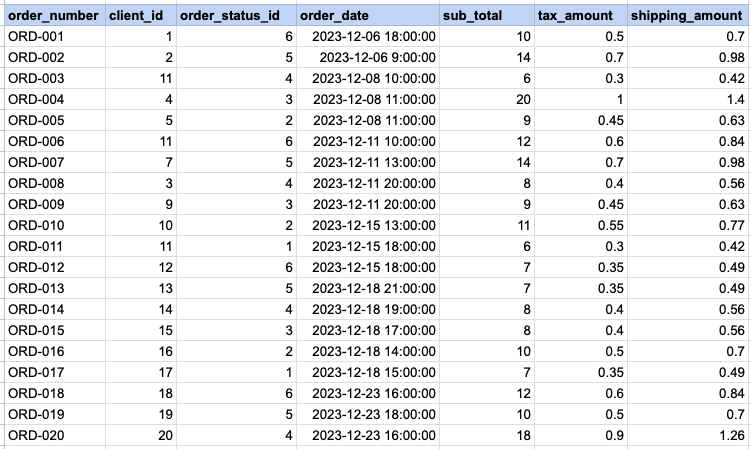
SELECT order_number, client_id, order_status_id, order_date
    sub_total, tax_amount, shipping_amount,
    (sub_total + tax_amount + shipping_amount) AS total_amount
FROM act_order
ORDER BY order_number;
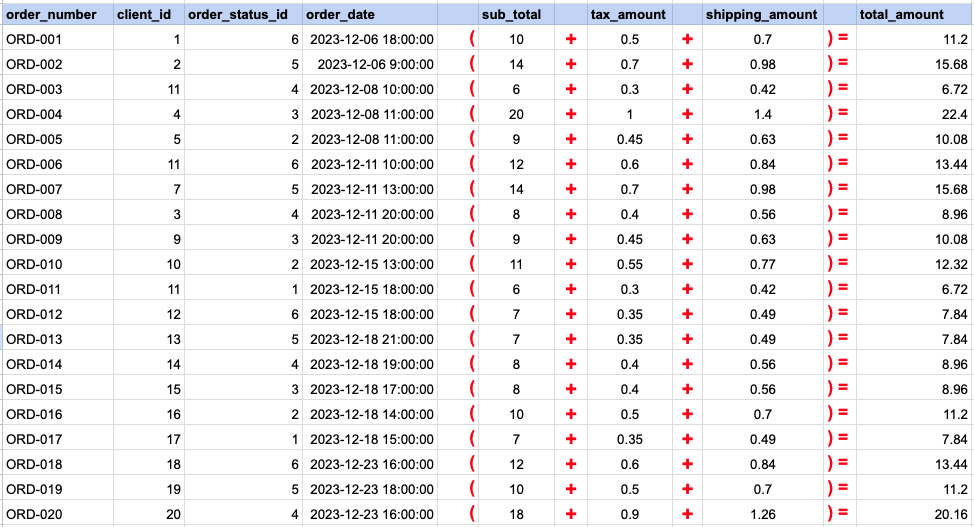
Data Mapping for ADDITION OPERATOR
In this data mapping illustration, it's shown how the 'Total Amount' column, which does not originally exist in the raw data, is generated. This is accomplished by using an addition arithmetic operator within an SQL SELECT statement. This operation effectively adds values from existing columns to compute the total amount for each record.
RAW DATA FOR SUBSTRACTION OPERATOR
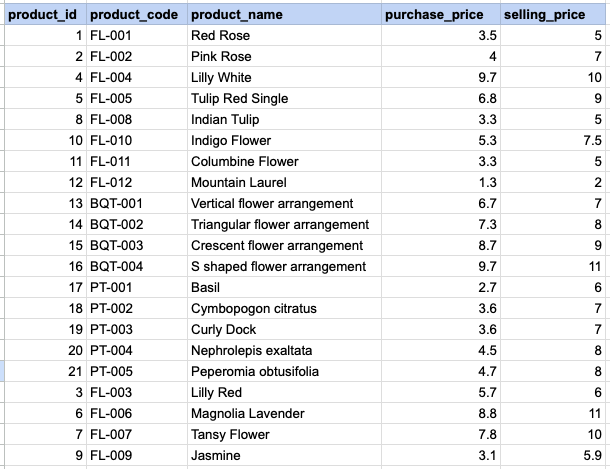
SELECT product_id, product_code,
product_name,purchase_price, selling_price
    (selling_price - purchase_price) as profit_per_unit
FROM prd_product;
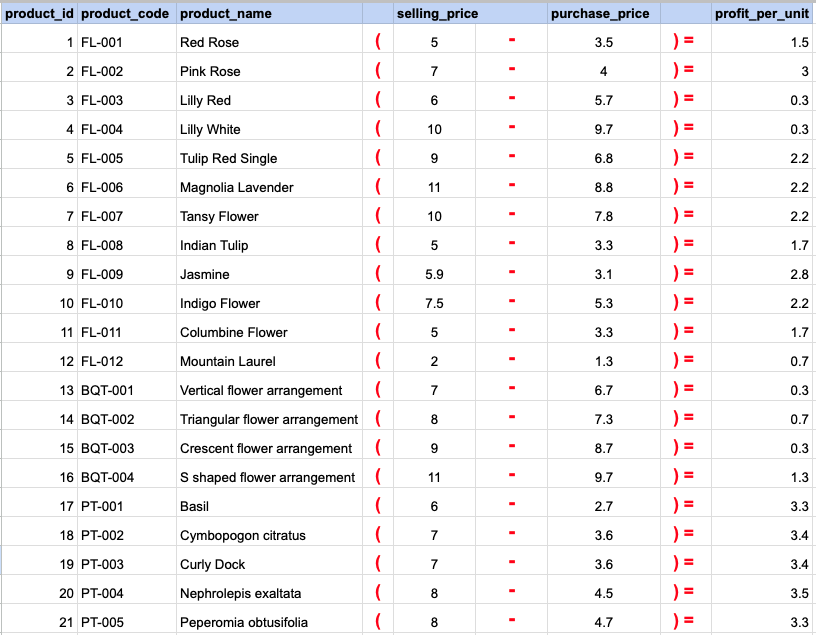
Data Mapping for SUBSTRACTION OPERATOR
In this data mapping illustration, it's shown how the 'Profit' column, which does not originally exist in the raw data, is generated. This is accomplished by using an substraction arithmetic operator within an SQL SELECT statement. This operation effectively subtracts values from existing columns to compute the profit amount for each record.
RAW DATA FOR MULTIPLICATION OPERATOR
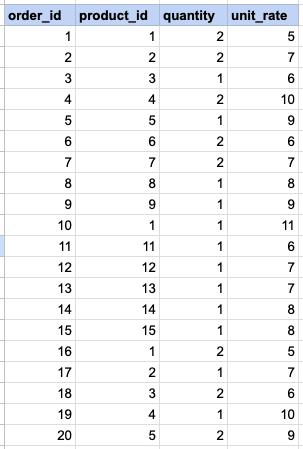
SELECT order_id, product_id,quantity, unit_rate
    ( quantity * unit_rate) as sub_total
FROM act_order_detail;
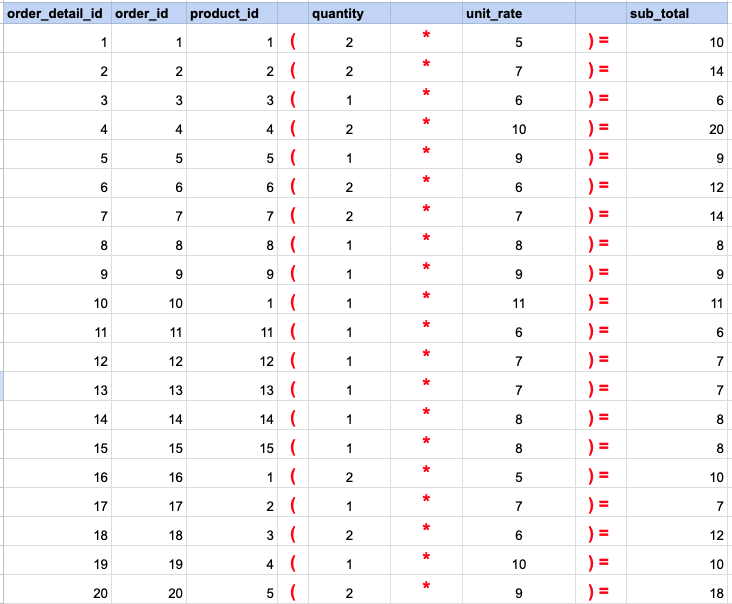
Data Mapping for MULTIPLICATION OPERATOR
In this data mapping illustration, it's shown how the 'Sub Total' column, which does not originally exist in the raw data, is generated. This is accomplished by using an multiplication arithmetic operator within an SQL SELECT statement. This operation effectively multiplies values from existing columns to compute the total amount for each record.
SELECT order_number, client_id, order_status_id, order_date
    sub_total, tax_amount, shipping_amount,
    (sub_total + tax_amount + shipping_amount) AS total_amount
FROM act_order
ORDER BY order_number;
SELECT product_id, product_code,
product_name,purchase_price, selling_price
(selling_price - purchase_price) as profit_per_unit
FROM prd_product;SELECT order_id, product_id,quantity, unit_rate
( quantity * unit_rate) as sub_total
FROM act_order_detail;
Comments Not Found