
Oracle
IS NULL Operator
The IS NULL operator in Oracle is used in Data Query Language (DQL) to check whether a column contains a NULL value. A NULL value in SQL represents missing or unknown data. The IS NULL condition helps you find rows where a column has no value assigned, and it's often used in SELECT statements to filter data. Using this operator ensures that queries handle missing information properly when retrieving results from a table.
Here’s a breakdown of how the IS NULL operator works, followed by an example using a library-related table.
Understanding the IS NULL Operator
Basic Syntax
The basic syntax of theIS NULLoperator in Oracle is:SELECT column_name(s) FROM table_name WHERE column_name IS NULL;Example Query
Suppose you have a tablebooksin your library system, and you want to find all books that don't have an assigned publication year (publication_yearisNULL):SELECT book_id, title, author_id FROM books WHERE publication_year IS NULL;- This query will return rows where the
publication_yearcolumn has no value (i.e., it'sNULL).
- This query will return rows where the
Checking Multiple Columns for NULL
You can use theIS NULLoperator with multiple columns in yourWHEREclause:SELECT book_id, title FROM books WHERE author_id IS NULL OR publication_year IS NULL;- This will return rows where either
author_idorpublication_yearisNULL.
- This will return rows where either
Combining with Other Conditions
TheIS NULLoperator can be combined with other logical conditions likeANDandOR. For example:SELECT membership_id, member_name FROM membership WHERE membership_type IS NULL AND join_date > '2023-01-01';- This query finds memberships where the
membership_typeis missing and thejoin_dateis after January 1, 2023.
- This query finds memberships where the
Best Practices
- Always use
IS NULL(not= NULL) to check forNULLvalues. - Ensure you handle
NULLvalues appropriately in queries to avoid incorrect results, especially in calculations or comparisons. - When working with
NULLvalues, consider how they affect query performance, particularly with indexes and filtering.
- Always use
By understanding how to use the IS NULL operator effectively, you can retrieve data that is missing or incomplete, improving the accuracy of your queries.
To gain complete access, login with gmail or outlook, no need of signup. click here
TEST CODE
In Oracle, you can use the IS NULL operator to filter rows based on a NULL value in the shipped_date column. This query retrieves all orders that have not been shipped yet:
SELECT *
FROM act_order
WHERE shipped_date IS NULL;In Oracle, you can use the IS NULL operator to filter rows based on a NULL value in the date_of_birth column. This query retrieves all employees who have not provided their date of birth:
SELECT *
FROM org_employee
WHERE date_of_birth IS NULL;Example 1:
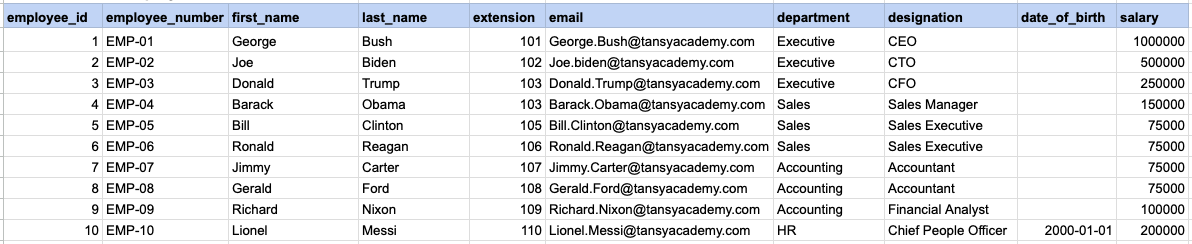
Let's explore the procedure of extracting information from a designated table using the IS NULL SQL operator. This query retrieves employees who have not provided their date of birth.
Example 1 - Raw data from employee table
Example 1 - Query
SELECT *
FROM org_employee
WHERE date_of_birth IS NULL;
Example 1 - Query data mapping
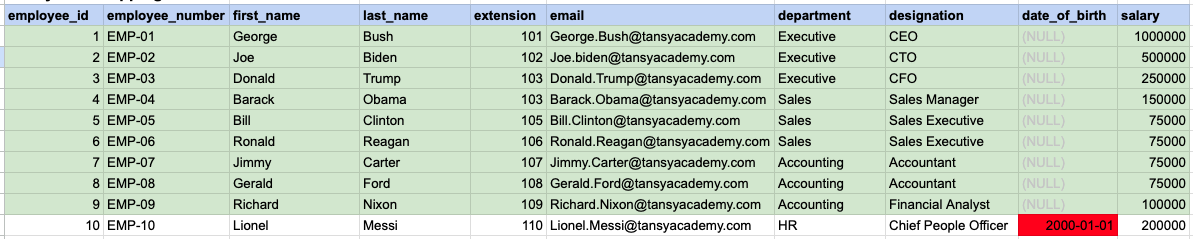
In the provided image, the green color signifies the data that has been selected or satisfies the conditions specified in our query. Data points in red indicate information that does not meet the criteria set by the query.
Example 1 - Query Output

Example 2:
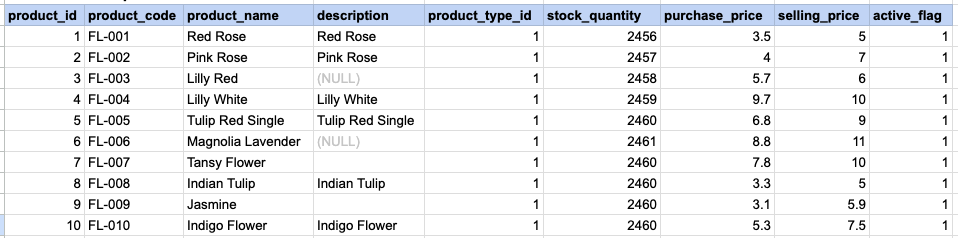
Let's delve into the process of retrieving information from a specified table using the SQL IS NULL operator on string data. The query retrieves all rows from the products table where the description is null.
Example 2 - Raw data from product table
Example 2 - Query
SELECT *
FROM prd_product
WHERE description IS NULL;
Example 2 - Query data mapping
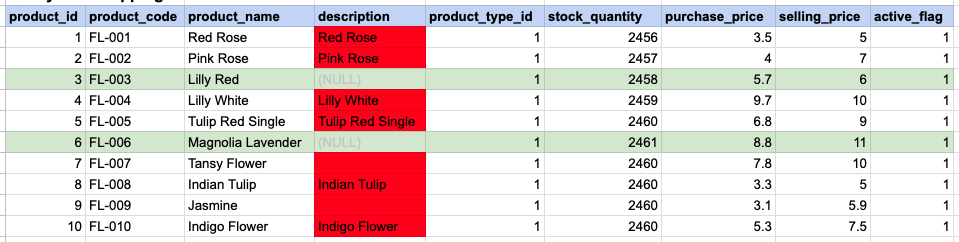
In the provided image, the green color signifies the data that has been selected or satisfies the conditions specified in our query. Data points in red indicate information that does not meet the criteria set by the query. NOTE that description value for product id 7 and 9 compose a empty string, this is not a null.
Example 2 - Query Output

Example 3:
Using '= NULL' is not permissible; instead, you must use 'IS NULL'. As demonstrated below, employing '= NULL' results in an empty result set.
SELECT *
FROM prd_product
WHERE description = NULL;
Example 3 - Empty result set

Comments Not Found