
Oracle
COUNT, SUM, AVG, MIN, MAX Functions
In Oracle, Data Query Language (DQL) functions like COUNT, SUM, AVG, MIN, and MAX are essential for performing calculations on data stored in tables. These aggregate functions help analyze datasets by providing summarized results. They are commonly used in SELECT statements to derive insights from a single column or across multiple rows. Understanding how to use these functions can greatly enhance your ability to manipulate and analyze data.
Key Functions
COUNT
- Counts the number of rows that match a specified condition.
- Example:
SELECT COUNT(*) AS total_books FROM books;
SUM
- Calculates the total sum of a numeric column.
- Example:
SELECT SUM(price) AS total_revenue FROM rentals;
AVG
- Computes the average value of a numeric column.
- Example:
SELECT AVG(price) AS average_price FROM books;
MIN
- Returns the smallest value in a specified column.
- Example:
SELECT MIN(price) AS lowest_price FROM books;
MAX
- Returns the largest value in a specified column.
- Example:
SELECT MAX(price) AS highest_price FROM books;
Best Practices
Use DISTINCT with COUNT
- When you need to count unique values, use the DISTINCT keyword.
- Example:
SELECT COUNT(DISTINCT author_id) AS unique_authors FROM books;
Combine with GROUP BY
- Aggregate functions can be combined with GROUP BY to summarize data by specific categories.
- Example:
SELECT author_id, COUNT(*) AS total_books FROM books GROUP BY author_id;
Use Filters with WHERE
- Filter results using the WHERE clause to refine your calculations.
- Example:
SELECT SUM(price) AS total_revenue FROM rentals WHERE rental_date > '2023-01-01';
Be Mindful of NULL Values
- Aggregate functions ignore NULL values, so consider how they affect your results.
Optimize Performance
- Use indexes on columns frequently used in aggregate functions to improve performance.
By mastering these aggregate functions, you can enhance your ability to analyze and derive insights from your data in Oracle databases.
To gain complete access, login with gmail or outlook, no need of signup. click here

TEST CODE
In Oracle, to determine the total count of rows in the employee table, you can use the following query:
SELECT COUNT(*)
FROM org_employee;In Oracle, to count the number of unique departments in the employee table, you can use the following query:
SELECT COUNT(DISTINCT department)
FROM org_employee;In Oracle, to compute the overall sum of salaries for the company as specified in the employee table, you can use the following query:
SELECT SUM(salary)
FROM org_employee;In Oracle, to compute the average salary across all employees, you can use the following query:
SELECT AVG(salary)
FROM org_employee;In Oracle, to identify the lowest salary value from the employee table, you can use the following query:
SELECT MIN(salary)
FROM org_employee;In Oracle, to ascertain the highest salary from the employee table, you can use the following query:
SELECT MAX(salary)
FROM org_employee;In Oracle, to retrieve details of employees with the lowest salary, you can use the following query:
SELECT a.*
FROM org_employee a
INNER JOIN (SELECT MIN(salary) AS min_salary FROM org_employee) b
ON a.salary = b.min_salary;In Oracle, to determine the total salaries for each department and order the results by the total salary in descending order, you can use the following query:
SELECT department,
       SUM(salary) AS total_salary
FROM org_employee
GROUP BY department
ORDER BY total_salary DESC;In Oracle, to determine the number of employees for each department, you can use the following query:
SELECT department,
       COUNT(*) AS employee_count
FROM org_employee
GROUP BY department;In Oracle, to determine the highest salary for each department, you can use the following query:
SELECT department,
       MAX(salary) AS highest_salary
FROM org_employee
GROUP BY department;In Oracle, to determine the lowest salary for each department, you can use the following query:
SELECT department,
       MIN(salary) AS lowest_salary
FROM org_employee
GROUP BY department;Example 1:
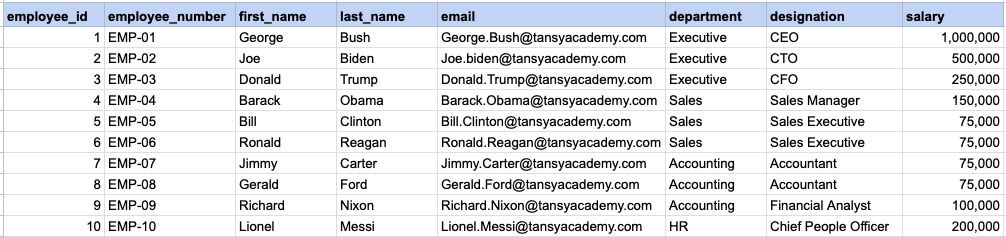
Here are few SQL examples showcasing the utilization of COUNT, SUM, and MAX SQL functions.
Example 1 - Raw data from employee table
Example 1 - COUNT
SELECT COUNT(*)
FROM org_employee;
Example 1 - Query data mapping
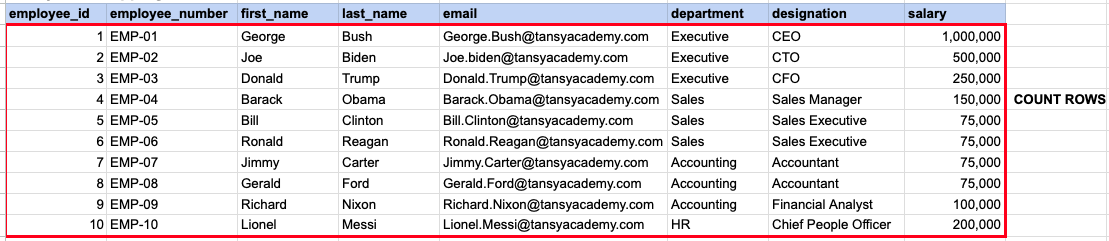
Essentially, you are required to determine the count of rows in the table.
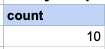
Example 1 - Query Output
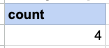
Example 2 - COUNT DISTINCT
SELECT COUNT(DISTINCT department)
FROM org_employee;
Example 2 - Query data mapping
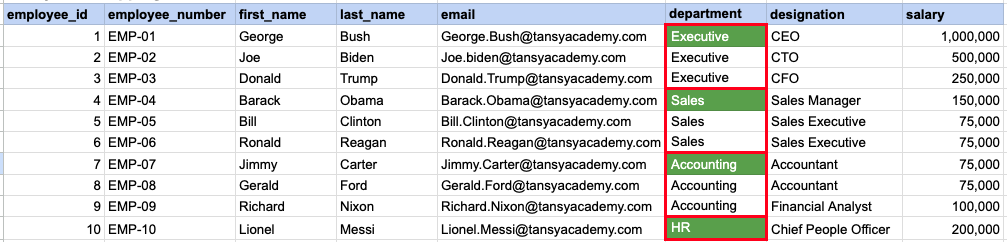
The green-colored boxes that have been highlighted represent unique department names that will be considered for the count.
Example 2 - Query Output
Example 3 - SUM by categroy using GROUP BY
SELECT department
    SUM(salary)
FROM org_employee
GROUP BY department
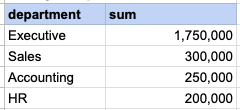
ORDER BY SUM(salary) DESC;
Example 3 - Query data mapping
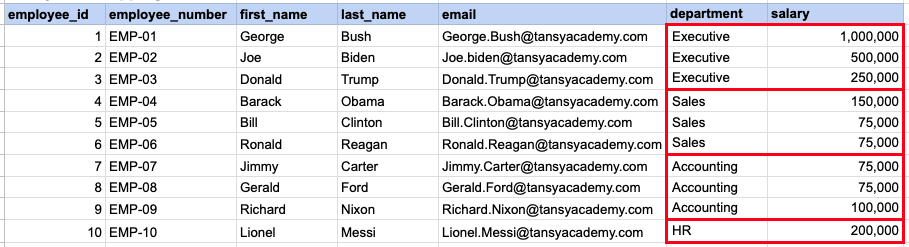
The salaries from each department are aggregated by department, summing them together.
Example 3 - Query Output
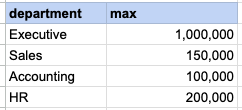
Example 4 - MAX by categroy using GROUP BY
SELECT department
    MAX(salary)
FROM org_employee
GROUP BY department;
Example 4 - Query data mapping
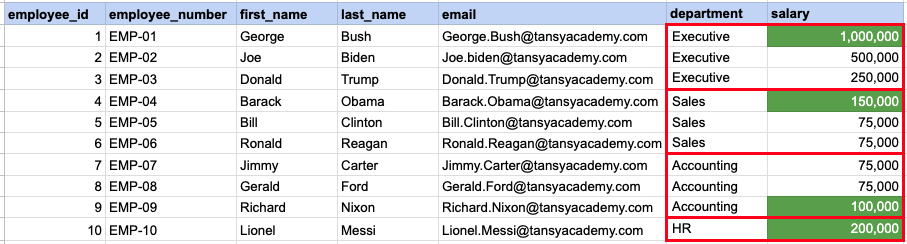
Green-colored boxes represent the highest salary from each corresponding department.
Example 4 - Query Output
Comments Not Found