
Oracle
CONCAT
In Oracle, the CONCAT function is used in Data Query Language (DQL) to join two strings together. It is often used when you want to combine text data from different columns or add static text to existing data in a query. Note that CONCAT only allows two arguments at a time, but if you need to concatenate more than two strings, you can nest the CONCAT function or use the || operator, which is an alternative for string concatenation.
Here’s a breakdown of how to use CONCAT in Oracle:
Basic Syntax of
CONCAT:- The basic syntax for
CONCATis as follows:CONCAT(string1, string2)string1: The first string or column to concatenate.string2: The second string or column to concatenate.
- The basic syntax for
Example with Database Tables:
Consider the followingauthorstable:author_id first_name last_name 1 John Doe 2 Jane Austen To concatenate the first name and last name of the authors, you can use the
CONCATfunction:SELECT CONCAT(first_name, last_name) AS full_name FROM authors;- This query will return:
JohnDoeJaneAusten
- This query will return:
Using
CONCATwith Spaces:
If you want to add a space between the first name and last name, you can nest theCONCATfunction or use the||operator:SELECT CONCAT(first_name, ' ' || last_name) AS full_name FROM authors;- The output will now show:
John DoeJane Austen
- The output will now show:
Concatenating More than Two Strings:
When you need to concatenate more than two strings, you can either nest theCONCATfunction or use the||operator. For example, to concatenate the first name, a space, and the last name:SELECT CONCAT(CONCAT(first_name, ' '), last_name) AS full_name FROM authors;Or:
SELECT first_name || ' ' || last_name AS full_name
FROM authors;
Using
CONCATinWHEREClause:
You can also useCONCATin aWHEREclause. For example, if you want to find an author whose full name is "John Doe":SELECT * FROM authors WHERE CONCAT(first_name, ' ' || last_name) = 'John Doe';Best Practices:
- Use the
||operator for concatenating more than two strings for better readability. - Always ensure the data types being concatenated are strings; if not, convert them using
TO_CHARto avoid errors. - Avoid concatenating large amounts of data directly in the query for performance reasons.
- Use the
By following these practices, you will be able to use CONCAT effectively in Oracle queries to combine text data.
To gain complete access, login with gmail or outlook, no need of signup. click here

TEST CODE
To combine the first name and last name into a full name in PostgreSQL, you can use the `||` operator:
SELECT employee_id, employee_number, first_name || ' ' || last_name AS employee_full_name
FROM org_employee;SQL CONCAT, combine multiple columns
Example 1 - Raw data from employee table
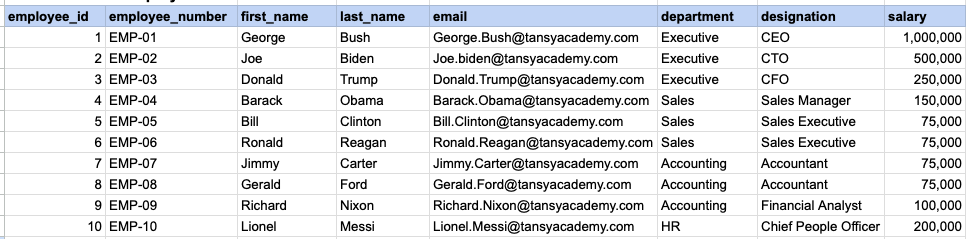
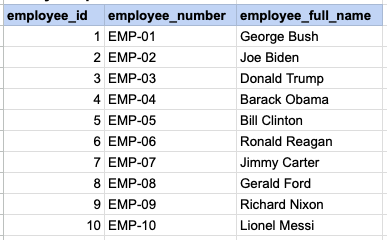
Example 1 - CONCAT employee first and last name
SELECT employee_id, employee_number
    concat(first_name , ' ' , last_name) as employee_full_name
FROM org_employee;
Example 1 - Query data mapping
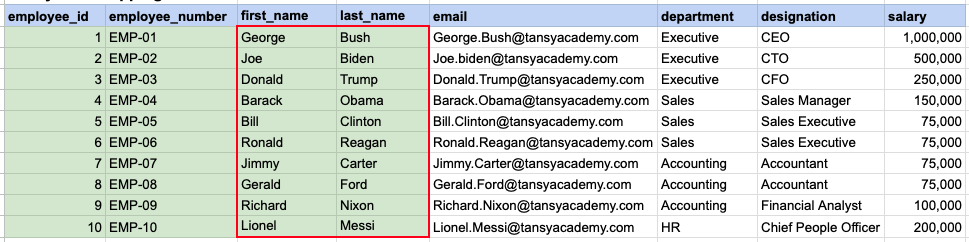
The contents of the first_name and last_name columns will be merged to create a unified column, separated by a space.
Example 1 - Query Output
Example 2 - Raw data from client table
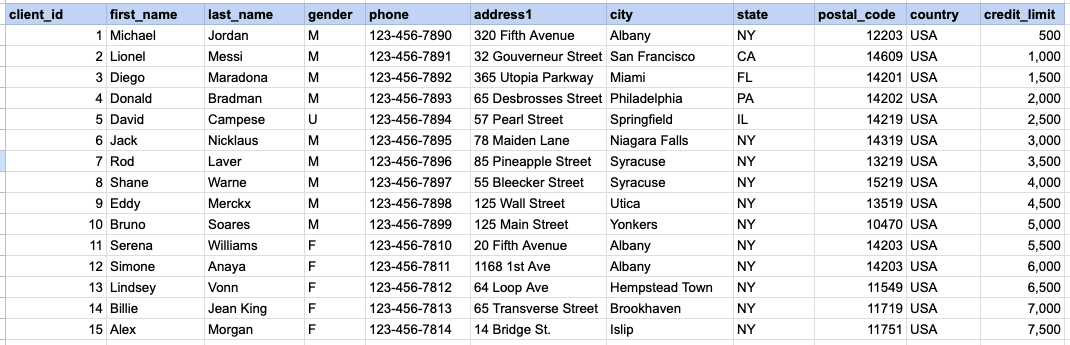
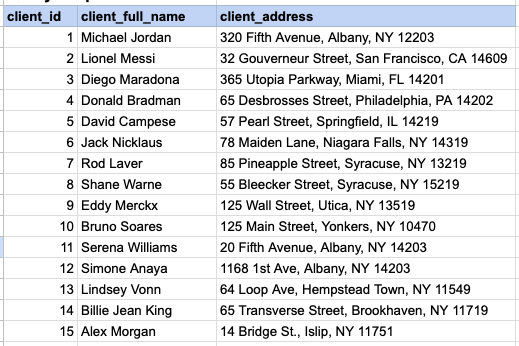
Example 2 - CONCAT client name and address
SELECT client_id
    first_name || ' ' || last_name as client_full_name,
    address1 || ', ' || city || ', ' || state || ' '  || postal_code as client_address
FROM org_client
Example 2 - Query data mapping
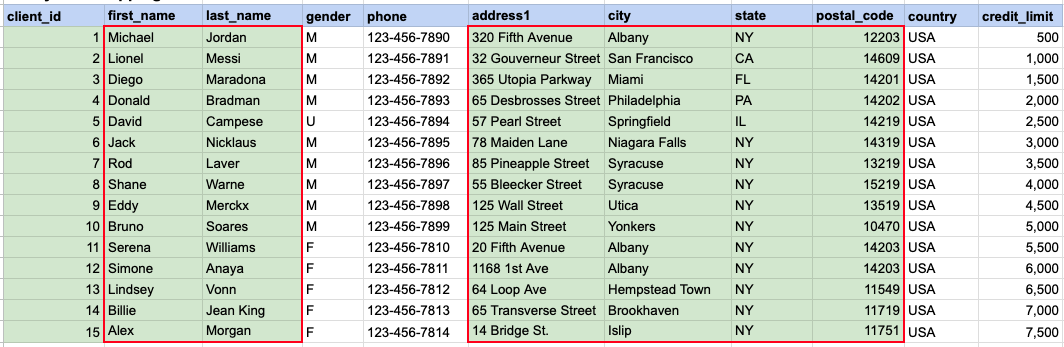
The first_name and last_name columns will be amalgamated to generate a consolidated column named 'client full name', with a space as the separator. Subsequently, the address, city, state, and zip will be amalgamated to produce the client's address.
Example 2 - Query Output
Comments Not Found