
Oracle
Chapter 7 - DQL (Data Query Language)
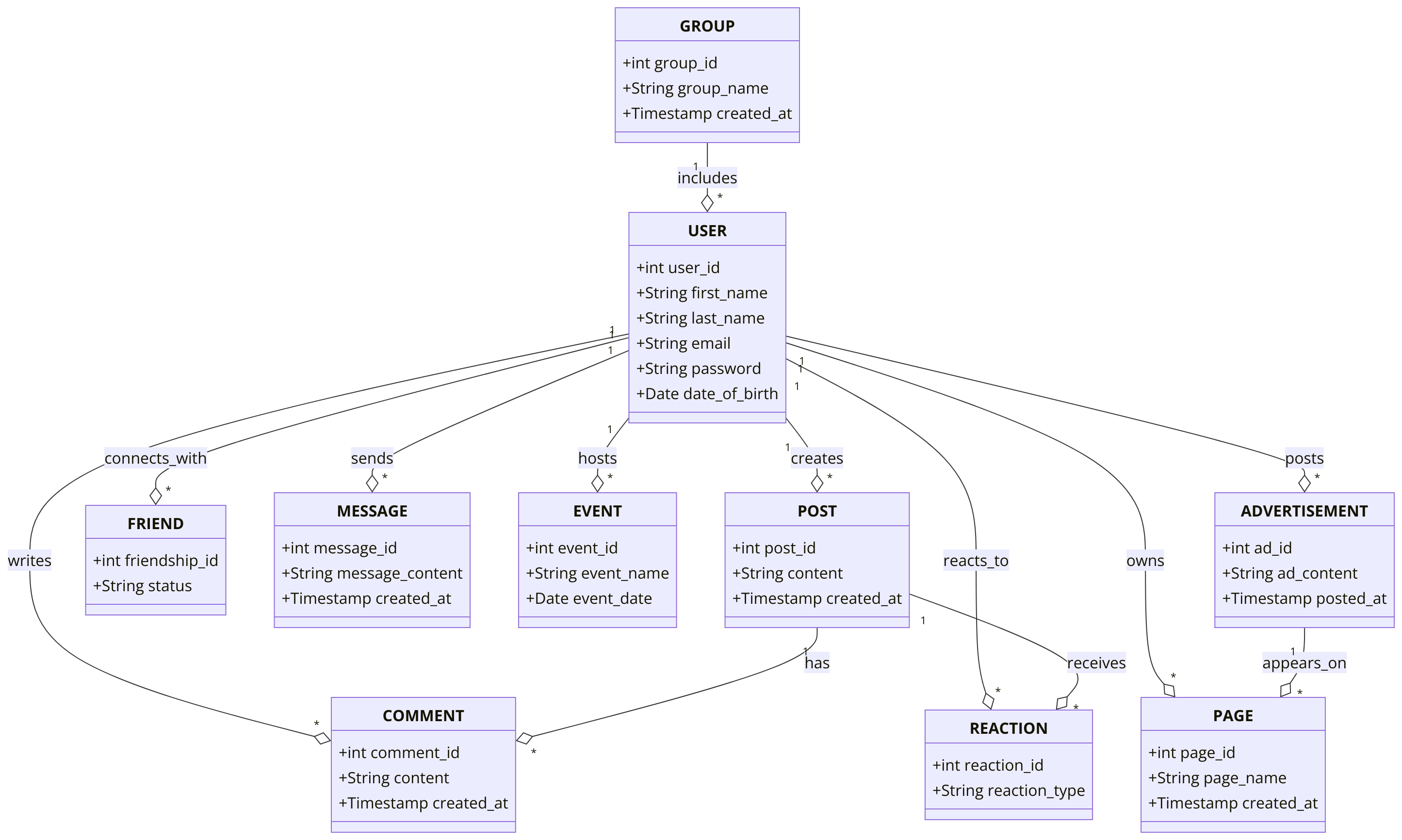
DQL ASSIGNMENT2 - Facebook Application System
Objective:
You are required to address a set of Data Query Language (DQL) tasks for a Facebook Application System using the tables provided. Each task focuses on different aspects of querying data from the system using SELECT statements with various conditions, functions, and joins.
1. SELECT Command
- Select all columns from the
USERtable. - Select the
first_name,last_name, andemailof all users. - Select the
contentandcreated_atfrom thePOSTtable. - Select the
statusandfriendship_idfrom theFRIENDtable.
2. WHERE Command
- Select all users where
date_of_birthis before '1990-01-01'. - Select all posts where
contentcontains the word 'announcement'. - Select all friends where
statusis 'Accepted'. - Select all comments where
created_atis after '2023-01-01'.
3. ORDER BY Command
- Select all users and order them by
last_namein ascending order. - Select all posts and order them by
created_atin descending order. - Select all events and order them by
event_datein ascending order. - Select all advertisements and order them by
posted_atin descending order.
4. LIMIT and ROWNUM Command
- Select the first 10 users from the
USERtable usingROWNUM. - Select the first 5 posts from the
POSTtable. - Select the top 3 most recent events ordered by
event_date. - Select the first 5 friends, ordered by
friendship_id.
5. DISTINCT Command
- Select distinct
statusfrom theFRIENDtable. - Select distinct
reaction_typefrom theREACTIONtable. - Select distinct
page_namefrom thePAGEtable. - Select distinct
subscription_typefrom theSUBSCRIPTIONtable.
6. GROUP BY Command
- Group by
statusfrom theFRIENDtable and count the number of friendships per status. - Group by
reaction_typefrom theREACTIONtable and count the number of reactions per type. - Group by
subscription_typefrom theSUBSCRIPTIONtable and calculate the number of users per subscription type. - Group by
user_idfrom thePOSTtable and calculate the total number of posts per user.
7. HAVING Command
- Select
reaction_typefrom theREACTIONtable and group by it, having more than 5 reactions per type. - Group by
user_idfrom thePOSTtable and calculate the total posts per user, having more than 5 posts per user. - Group by
statusfrom theFRIENDtable, having more than 5 friends with 'Accepted' status. - Group by
subscription_typefrom theSUBSCRIPTIONtable, having more than 3 users in the 'Premium' category.
8. INNER JOIN Command
- Select all posts along with the user details using
INNER JOINbetween thePOSTandUSERtables. - Select all comments along with the post and user details using
INNER JOINbetweenCOMMENT,POST, andUSERtables. - Select all reactions and their corresponding posts and users using
INNER JOINbetweenREACTION,POST, andUSER. - Select all advertisements and the corresponding page details using
INNER JOINbetweenADVERTISEMENTandPAGE.
9. LEFT JOIN Command
- Select all users and their posts using
LEFT JOIN, including users without any posts. - Select all users and their comments using
LEFT JOIN, including users without any comments. - Select all pages and their corresponding advertisements using
LEFT JOIN, including pages without advertisements. - Select all events and their corresponding users using
LEFT JOIN, including events without users.
10. COUNT, SUM, AVG Command
- Count the total number of users in the
USERtable. - Count the number of distinct
reaction_typein theREACTIONtable. - Calculate the sum of all posts for each user in the
POSTtable. - Calculate the average number of friends per user in the
FRIENDtable.
11. CASE Command
- Select all posts and use a
CASEstatement to categorize them as 'Recent' if thecreated_atis within the last 30 days, otherwise 'Old'. - Select all users and categorize them as 'Active' if they have posted within the last 7 days, otherwise 'Inactive'.
- Use a
CASEstatement to show the friendshipstatusas 'Friends' ifstatusis 'Accepted', otherwise 'Not Friends'. - Use a
CASEstatement in theREACTIONtable to categorize reactions as 'Positive' ifreaction_typeis 'Like' or 'Love', otherwise 'Neutral'.
12. EXISTS and NOT EXISTS Command
- Select all users where a post exists in the
POSTtable usingEXISTS. - Select all users where no post exists in the
POSTtable usingNOT EXISTS. - Select all posts where comments exist using
EXISTS. - Select all events where no advertisements exist using
NOT EXISTS.
13. SUBQUERY Command
- Select all users whose
user_idis in the result of a subquery selectinguser_idfrom thePOSTtable wherecreated_atis within the last 30 days. - Select all posts where the
post_idis in the result of a subquery selectingpost_idfrom theREACTIONtable wherereaction_typeis 'Like'. - Select all friends where the
friend_idis in the result of a subquery selectingfriend_user_idfrom theFRIENDtable wherestatusis 'Pending'. - Select all comments where the
comment_idis in the result of a subquery selectingcomment_idfrom theCOMMENTtable wherecontentcontains 'great'.
14. RANK and DENSE_RANK Command
- Rank users based on the number of posts they have made using
RANK(). - Use
DENSE_RANK()to rank users based on the number of friends they have. - Rank posts by their
created_atdate usingRANK(). - Use
DENSE_RANK()to rank reactions based on the number of times they appear.
15. PIVOT and UNPIVOT
- Pivot the
REACTIONdata byreaction_typeandpost_id. - Unpivot the comment details to show the
contentandcreated_atfor each comment by user. - Pivot the post data by
user_idandcreated_at. - Unpivot user details by
first_name,last_name, andemail.
16. UNION and UNION ALL Command
- Select all posts from the
POSTandREACTIONtables usingUNION. - Select all users from different regions using
UNION ALL. - Use
UNIONto combine active and inactive users. - Use
UNION ALLto select all events and advertisements.
17. COALESCE, NVL, NULLIF Command
- Select all users and use
COALESCEto replace nullphone_numbervalues with 'No Phone'. - Use
NVLto replace nullreaction_typein theREACTIONtable with 'No Reaction'. - Use
NULLIFto compareuser_idandfriend_idin theFRIENDtable and returnNULLif they are the same. - Select all comments and use
COALESCEto replace nullcontentwith 'No Comment'.
18. STRING Functions
- Select all users'
first_namein uppercase using theUPPER()function. - Select all posts'
contentin lowercase using theLOWER()function. - Use
CONCAT()to combine thefirst_nameandlast_nameof users. - Select all users'
emailand find the length of the string usingLENGTH().
19. DATE Functions
- Select all users and show their
date_of_birthformatted as 'YYYY-MM-DD' usingTO_CHAR(). - Add 1 year to all
created_atvalues in thePOSTtable usingADD_MONTHS(). - Subtract 1 month from all
event_datevalues usingMONTHS_BETWEEN(). - Select all users and extract the year from their
date_of_birthusingEXTRACT().
20. NUMERIC Functions
- Select the total number of friends each user has and round it to the nearest integer using
ROUND(). - Select all
reaction_typefrom theREACTIONtable and useCEIL()to round up the count. - Use
FLOOR()to round down the number of posts in thePOSTtable. - Select the highest
reaction_idfrom theREACTIONtable usingMAX().
21. CAST and CONVERT Command
- Select all users and cast the
user_idas a string usingCAST(). - Convert
reaction_idin theREACTIONtable toNUMBER. - Cast
post_idin thePOSTtable toVARCHAR. - Convert the
created_atfrom thePOSTtable intoTEXT.
22. JSON Select
- Select specific keys from a JSON column in the
PAGEtable. - Parse a JSON column from the
USERtable to extract profile details. - Use
JSON_VALUEto select a specific key from aJSONcolumn in thePAGEtable.
23. CONCAT and CONCAT_WS Functions
- Use
CONCAT()to joinfirst_nameandlast_namewith a space in between in theUSERtable. - Use
CONCAT_WS()to combine thepage_nameandcreated_atwith a comma in thePAGEtable. - Use
CONCAT()to combine thecontentandcreated_atfrom thePOSTtable. - Use
CONCAT_WS()to combinefirst_name,last_name, andemailfrom theUSERtable.
24. LIKE and NOT LIKE
- Select users whose
emailcontains 'facebook.com' usingLIKE. - Select posts where
contentcontains 'photo' usingLIKE. - Select users whose
last_namedoes not start with 'A' usingNOT LIKE. - Select pages where
page_namecontains 'Business' usingLIKE.
25. EXISTS and NOT EXISTS
- Select all users where posts exist in the
POSTtable usingEXISTS. - Select all posts where comments exist using
EXISTS. - Select all users where no friends exist using
NOT EXISTS. - Select all pages where no advertisements exist using
NOT EXISTS.
26. JOIN Commands
- Select all users and their corresponding posts using
INNER JOINbetweenUSERandPOST. - Select all comments and their corresponding posts using
INNER JOINbetweenCOMMENTandPOST. - Select all reactions and the corresponding posts using
INNER JOINbetweenREACTIONandPOST. - Select all users and their friends using
INNER JOINbetweenUSERandFRIEND.
27. BETWEEN Command
- Select all users where the
date_of_birthis between '1980-01-01' and '2000-12-31'. - Select all posts where the
created_atis between '2023-01-01' and '2023-12-31'. - Select all friends where the
friendship_idis between 1 and 1000. - Select all events where the
event_dateis between '2023-05-01' and '2023-10-31'.
28. IN and NOT IN Command
- Select all users where the
user_idis in (1, 2, 3, 4). - Select all posts where the
post_idis in (101, 202, 303). - Select all reactions where the
reaction_typeis not in ('Haha', 'Angry'). - Select all friends where the
statusis in ('Accepted', 'Pending').
29. ARRAY Command
- Select all
reaction_typeand convert it into an array usingCOLLECT(). - Use
UNNEST()to expand arrays from theREACTIONtable. - Convert page names into an array using
COLLECT()in thePAGEtable. - Use
ARRAYfunctions to select and manipulate data from theCOMMENTtable.
GOOD LUCK WITH YOUR ASSIGNMENT!!!
Don't forget to contact us if you need any further assistance with your assignments, and most importantly, for a manual review and approval of your work.
Comments Not Found