
PostgreSQL
DB Function
In PostgreSQL, database functions are a powerful feature that allows you to encapsulate logic into reusable code. Functions can perform operations on data, return values, and be used in queries to simplify complex operations. They can be used to encapsulate frequently used operations, enforce business rules, and improve query performance. This section will cover the basics of creating and using functions in PostgreSQL with examples related to banking systems.
1. Creating a Simple Function
To create a function in PostgreSQL, use the
CREATE FUNCTIONstatement. Functions can be written in various languages, but the most common is PL/pgSQL.CREATE OR REPLACE FUNCTION get_balance(account_id INT) RETURNS NUMERIC AS $$ DECLARE balance NUMERIC; BEGIN SELECT balance INTO balance FROM accounts WHERE id = account_id; RETURN balance; END; $$ LANGUAGE plpgsql;- Explanation: This function,
get_balance, retrieves the balance for a given account ID from theaccountstable.
2. Using Functions in Queries
You can use functions directly in SQL queries to compute values or retrieve information.
SELECT get_balance(123) AS balance;- Explanation: This query calls the
get_balancefunction with the account ID123and returns the balance.
3. Creating a Function with Parameters
Functions can accept multiple parameters to make them more versatile.
CREATE OR REPLACE FUNCTION transfer_funds(from_account INT, to_account INT, amount NUMERIC) RETURNS VOID AS $$ BEGIN UPDATE accounts SET balance = balance - amount WHERE id = from_account; UPDATE accounts SET balance = balance + amount WHERE id = to_account; END; $$ LANGUAGE plpgsql;- Explanation: This function,
transfer_funds, transfers a specified amount from one account to another.
4. Handling Exceptions in Functions
You can handle exceptions in functions to manage errors gracefully.
CREATE OR REPLACE FUNCTION safe_transfer(from_account INT, to_account INT, amount NUMERIC) RETURNS VOID AS $$ BEGIN IF amount <= 0 THEN RAISE EXCEPTION 'Amount must be positive'; END IF; PERFORM transfer_funds(from_account, to_account, amount); EXCEPTION WHEN others THEN RAISE NOTICE 'Transfer failed: %', SQLERRM; END; $$ LANGUAGE plpgsql;- Explanation: This function,
safe_transfer, includes error handling to ensure that the amount is positive and catches any errors during the transfer.
5. Creating Functions with RETURN TABLE
Functions can also return tables, which is useful for complex queries.
CREATE OR REPLACE FUNCTION get_recent_transactions(account_id INT) RETURNS TABLE(transaction_id INT, transaction_date DATE, amount NUMERIC) AS $$ BEGIN RETURN QUERY SELECT id, transaction_date, amount FROM transactions WHERE account_id = account_id ORDER BY transaction_date DESC; END; $$ LANGUAGE plpgsql;- Explanation: This function,
get_recent_transactions, returns a table of recent transactions for a given account.
Feel free to adjust these examples to better suit your content needs or to add more detailed explanations as necessary!
When to Use Postgres DB Functions:
- Reusable Code:For complex calculations or operations that are used frequently, to avoid redundancy and simplify maintenance.
- Simplify SQL Statements:To hide complex computations within a SELECT statement, making the SQL queries simpler.
- Centralized Logic:Business logic can be centralized, making updates more manageable if the logic changes.
- Improve Readability:Functions can make SQL statements more readable and easier to understand by others.
- Security:Functions can provide better security by allowing users to execute functions without direct table access.
When Not to Use Postgres DB Functions:
- Performance Considerations:Functions can cause performance issues due to single-threaded execution.
- Portability Issues:Stored functions are not easily portable across different database systems.
- Debugging Difficulty:Debugging stored functions can be more challenging compared to application code.
- Overhead of Context Switching:Mixing SQL and procedural logic can affect performance due to context switching.
- Complex Error Handling:Error handling within stored functions can be cumbersome.
Sample Scenarios for Using Postgres DB Functions:
- Tax Calculation for an e-commerce platform based on product category or customer location.
- Password Hashing for secure storage of user passwords in a database.
- Age Calculation for users on a community website from their birthdate.
- Discount Logic for a retail database, varying by customer tier, product type, and time of year.
- Order Total calculation by summing up line items, applying taxes, discounts, and shipping costs in a sales database.
Sample Scenarios Against Using Postgres DB Functions:
- Simple Data Retrieval where a SELECT query is sufficient without additional computation.
- High-Volume Batch Operations where the function call overhead could impact performance.
- Cross-Platform Development when the application needs to be database agnostic.
- Real-Time Data Analysis on large datasets where function overhead may slow down the process.
- Simple Operations that are straightforward or used only once might not necessitate a stored function.
VOLATILE Functions
Definition:A VOLATILE function is expected to return different results for the same inputs and can perform database changes.
Characteristics:- May modify the database state.
- May return different results on each invocation.
- Can depend on database state that might change.
- Results cannot be cached by the query planner.
- Not suitable for use in index expressions where performance is critical.
Example Use Case:Functions that log user activities or return current system status.
STABLE Functions
Definition:A STABLE function returns the same results for the same inputs within a single transaction.
Characteristics:
- Can read from the database without changing its state.
- Result depends on the input and the database state at the start of the transaction.
Implications:
- The function can be optimized within queries and subqueries by the query planner.
- Suitable for use in index creation when applied to columns.
Example Use Case:Functions that calculate taxes based on constant rates within a transaction.
IMMUTABLE Functions
Definition:An IMMUTABLE function consistently returns the same results for the same inputs, irrespective of the database state.
Characteristics:- Does not modify the database and does not depend on the database state.
- Result depends solely on the input parameters. Must be side-effect-free.
- The query planner can make substantial optimizations, including precomputing results and aggressive query transformations.
- Safe for use in indexes, as the result will always be consistent for the same inputs.
Example Use Case:Functions that perform pure calculations, such as converting temperatures between scales.
VOLATILE Functions Code
CREATE OR REPLACE FUNCTION random_number()
RETURNS float AS $$
BEGIN
  RETURN random(); -- Generates a random number
END;
$$ LANGUAGE plpgsql VOLATILE;
IMMUTABLE Functions Code
CREATE OR REPLACE FUNCTION celsius_to_fahrenheit(p_celsius DECIMAL)
RETURNS DECIMAL AS $$
BEGIN
  RETURN (p_celsius * 9 / 5) + 32; -- Converts Celsius to Fahrenheit
END;
$$ LANGUAGE plpgsql IMMUTABLE;
POSTGRESQL DB FUNCTION EXAMPLE
We want to create a PostgreSQL DB function that takes an order_id as input and returns the subtotal for all products in that order. The subtotal for each product can be calculated by multiplying the quantity by the unit_rate from the act_order_detail table. The function will sum these amounts to get the subtotal for the entire order.
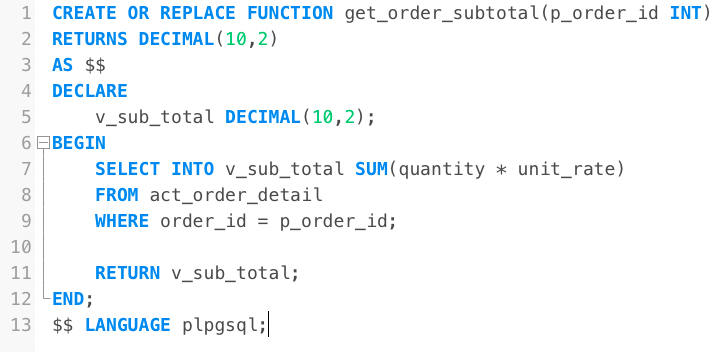
CREATE OR REPLACE FUNCTION get_order_subtotal(p_order_id INT) RETURNS DECIMAL(10,2) AS $$ DECLARE v_sub_total DECIMAL(10,2); BEGIN SELECT INTO v_sub_total SUM(quantity * unit_rate) FROM act_order_detail WHERE order_id = p_order_id; RETURN v_sub_total; END; $$ LANGUAGE plpgsql;- Explanation: This function,
Comments Not Found