
PostgreSQL
IS NOT NULL Operator
In PostgreSQL, under the Data Query Language (DQL) category, the IS NOT NULL condition is used to filter records that have a non-null value in a specific column. In database systems, a null value represents the absence of any data or value. When querying data, sometimes you want to ensure that you retrieve only records where specific columns have meaningful, non-null values. The IS NOT NULL condition helps to exclude records with missing values from the query results.
Here’s a basic breakdown and sample usage of the IS NOT NULL condition:
1. Syntax of IS NOT NULL
- The basic syntax for using
IS NOT NULLin a SQL query is:SELECT column_name(s) FROM table_name WHERE column_name IS NOT NULL;
2. Example: Using IS NOT NULL in a Banking Database
Imagine you have a customers table that stores information about bank customers. The table contains the following fields:
customer_idfirst_namelast_nameemailaccount_balance
If you want to retrieve all customers who have a registered email address (i.e., email is not null), you would use the following query:
SELECT customer_id, first_name, last_name, email
FROM customers
WHERE email IS NOT NULL;
3. Step-by-Step Breakdown:
- Query Table Structure
- Use the query to understand the structure of the table before filtering.
\d customers; - Selecting Non-Null Values
- Use the
IS NOT NULLcondition to ensure that only records with meaningful data in specific columns (likeemailin this case) are retrieved.SELECT customer_id, first_name, last_name, email FROM customers WHERE email IS NOT NULL; - Output: This query will list all customers who have a registered email address.
- Use the
- Multiple Conditions
- You can combine
IS NOT NULLwith other conditions usingANDorORoperators.
For example, you can query for customers who not only have an email but also a positive account balance:
SELECT customer_id, first_name, last_name, email, account_balance FROM customers WHERE email IS NOT NULL AND account_balance > 0; - You can combine
- Checking Across Multiple Columns
- You can use
IS NOT NULLto check multiple columns for non-null values.
SELECT customer_id, first_name, last_name, email, account_balance FROM customers WHERE email IS NOT NULL AND account_balance IS NOT NULL; - You can use
4. Summary:
IS NOT NULLis used to filter out rows where a specific column has a null value.- It helps retrieve only meaningful data from the database.
- You can combine
IS NOT NULLwith other conditions to form complex queries.
To gain complete access, login with gmail or outlook, no need of signup. click here

TEST CODE
In PostgreSQL, to retrieve records using the IS NOT NULL operator on a date column and select orders that have been shipped, you can use the following query:
SELECT *
FROM act_order
WHERE shipped_date IS NOT NULL;In PostgreSQL, to fetch data by utilizing the IS NOT NULL operator on a date column and specifically choose employees who have provided their date of birth, you can use the following query:
SELECT *
FROM org_employee
WHERE date_of_birth IS NOT NULL;Example 1:
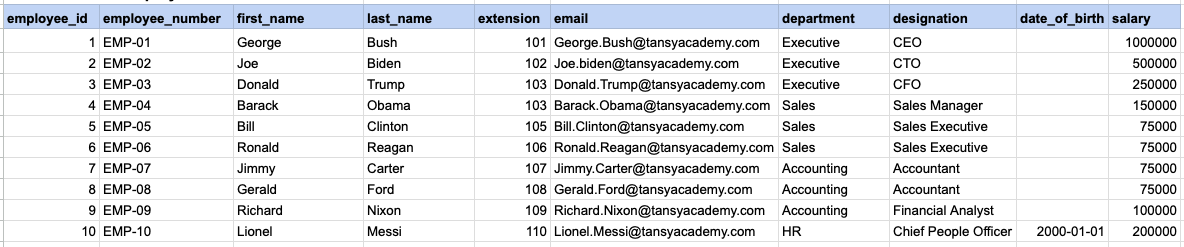
Let's explore the procedure of extracting information from a designated table using the IS NOT NULL SQL operator. This query retrieves employees who have provided their date of birth.
Example 1 - Raw data from employee table
Example 1 - Query
SELECT *
FROM org_employee
WHERE date_of_birth IS NOT NULL;
Example 1 - Query data mapping
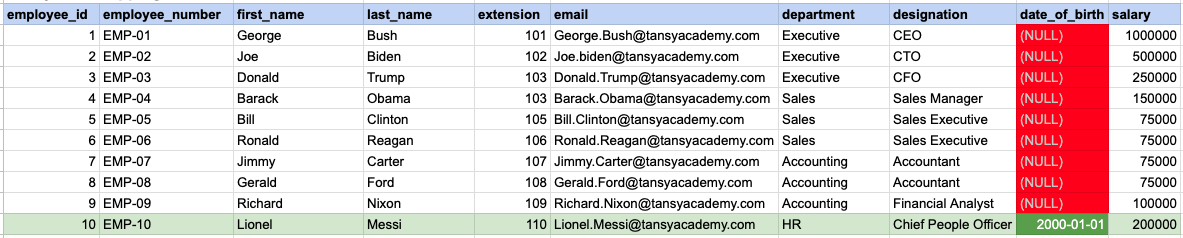
In the provided image, the green color signifies the data that has been selected or satisfies the conditions specified in our query. Data points in red indicate information that does not meet the criteria set by the query.
Example 1 - Query Output

Example 2:
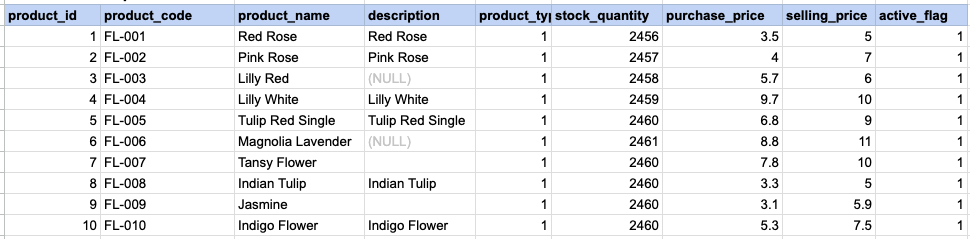
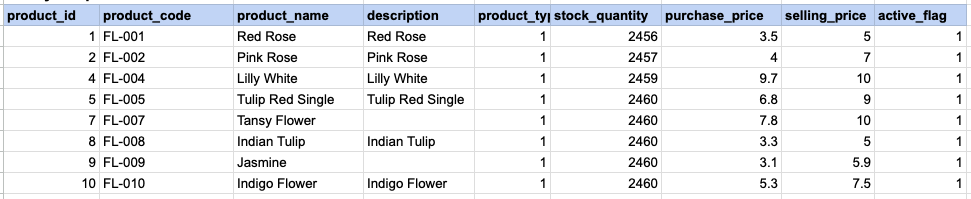
Let's delve into the process of retrieving information from a specified table using the SQL IS NOT NULL operator on string data. The query retrieves all rows from the products table where the description is not null.
Example 2 - Raw data from product table
Example 2 - Query
SELECT *
FROM prd_product
WHERE description IS NOT NULL;
Example 2 - Query data mapping
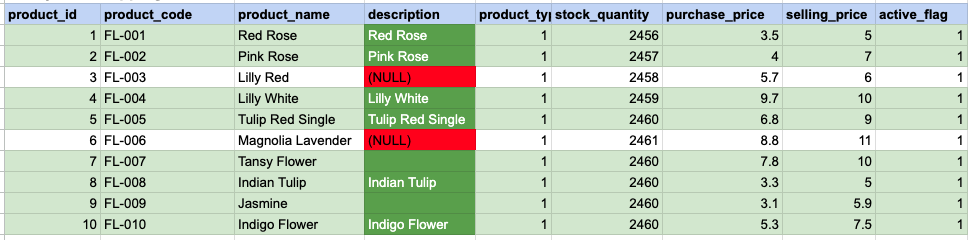
In the provided image, the green color signifies the data that has been selected or satisfies the conditions specified in our query. Data points in red indicate information that does not meet the criteria set by the query. NOTE that description value for product id 7 and 9 compose a empty string, this is not a null.
Example 2 - Query Output
Example 3:
Using '<> NULL' is not permissible; instead, you must use 'IS NOT NULL'. As demonstrated below, employing '<> NULL' results in an empty result set.
SELECT *
FROM prd_product
WHERE description <> NULL;
Example 3 - Empty result set

Comments Not Found