
PostgreSQL
Database Index
A database index is a performance optimization feature that speeds up the retrieval of rows from a table. It works like an index in a book, allowing you to quickly locate the desired data without scanning the entire table. Indexes are especially useful when dealing with large datasets and frequent queries, helping to reduce query execution time.
In PostgreSQL, creating an index is straightforward and can greatly enhance performance. Here's an overview of how to use indexes in PostgreSQL with relevant examples for banking-related tables.
- Creating an Index
- You can create an index on one or more columns of a table to improve query performance. The basic syntax is:
CREATE INDEX index_name ON table_name (column_name); - Example: For a
customerstable, if you frequently search bycustomer_id, you can create an index as follows:CREATE INDEX idx_customer_id ON customers (customer_id);
- You can create an index on one or more columns of a table to improve query performance. The basic syntax is:
- Types of Indexes
- Single-Column Index: Indexes on a single column.
- Example:
CREATE INDEX idx_account_number ON accounts (account_number);
- Example:
- Multi-Column Index: Indexes on multiple columns.
- Example:
CREATE INDEX idx_customer_account ON transactions (customer_id, account_number);
- Example:
- Single-Column Index: Indexes on a single column.
- Viewing Existing Indexes
- To see a list of all indexes on a table, use:
\d table_name - Example: For the
transactionstable:\d transactions
- To see a list of all indexes on a table, use:
- Dropping an Index
- If an index is no longer needed, you can drop it with:
DROP INDEX index_name; - Example: To remove the
idx_customer_idindex:DROP INDEX idx_customer_id;
- If an index is no longer needed, you can drop it with:
- Unique Indexes
- Ensures that all values in the indexed column(s) are unique.
- Example:
CREATE UNIQUE INDEX idx_unique_account_number ON accounts (account_number);
- Example:
- Ensures that all values in the indexed column(s) are unique.
- Partial Indexes
- Indexes on a subset of data based on a condition.
- Example:
CREATE INDEX idx_active_customers ON customers (customer_id)
WHERE active = true;
- Example:
- Indexes on a subset of data based on a condition.
- Performance Considerations
- While indexes improve query performance, they can slow down write operations (INSERT, UPDATE, DELETE) due to the additional overhead of maintaining the index.
By understanding and utilizing indexes effectively, you can enhance the performance of your PostgreSQL database and ensure efficient data retrieval.
Simple English Explanation of Database Index
Think of a database like a big library, and each piece of information in the database is like a book in the library. Now, if you wanted to find a book on dinosaurs in this huge library, it would take a long time to look through every single book. That's where an index comes in handy.
A database index works like the index at the back of a book or the catalog in a library. It's a special list that the database uses to find information quickly. Instead of looking through every "book" (or piece of information) in the "library" (database), the database looks at the index to see exactly where the information you asked for is located. This way, it can go straight to it without wasting time searching through everything.
So, just like you'd use a library catalog to find your book on dinosaurs fast, a database uses an index to find the information you need quickly. It makes searching for data much faster, especially when there's a lot of it.
Analogy: The Recipe Box
Imagine you have a large box filled with hundreds of recipes. Each recipe is written on a separate card. If you want to find a recipe for "chocolate cake," you would have to go through each card one by one until you find it. This process is slow and mirrors how a database works without any indexes—scanning each row (or "card") for the information you need.
Now, suppose you decide to organize these recipe cards to make finding recipes faster. You create several dividers, each labeled with a category: desserts, main dishes, appetizers, etc. Inside the "desserts" section, you further organize the recipes alphabetically. Now, when you want to find that chocolate cake recipe, you go directly to the "desserts" section and quickly find the card among the neatly ordered dessert recipes. This method of organizing recipes is akin to using an index in a database.
The Index in Action
- Before Indexing: You sift through every recipe card for "chocolate cake," which takes a lot of time.
- After Indexing: You go straight to the "desserts" divider and easily find "chocolate cake" among the alphabetically sorted recipes.
Real-World Example: The Grocery Store
Consider how grocery stores are organized. Each aisle has a sign indicating what products can be found there (e.g., dairy, fruits, cereals). When you enter the store looking for milk, you don't wander every aisle; you head straight to the dairy section.
In this scenario:
- The grocery store is the database.
- Each aisle is a table within the database.
- The signs indicating product categories are the indexes.
- The products are the rows of data.
Just as the signs (indexes) in the grocery store help you find products faster by directing you to the right aisle, a database index allows quick data retrieval by eliminating the need to scan every row in a table.
Benefits in Everyday Terms
- Saves Time: Just as organizing recipes or using grocery aisle signs saves you time, indexing saves time when retrieving data from a database.
- Improves Efficiency: You can find what you're looking for much faster, whether it's a recipe in a box or an item in a store, just as an index improves a database's efficiency in handling queries.
This analogy simplifies the concept of database indexing, showing how organizing information helps in quickly finding what we need, a principle that's beneficial both in everyday life and in the technical realm of databases.
Implementing Indexing
To improve search performance, the website's database administrator decides to create indexes on the Category and Price columns of the Products table.
SQL Example for Creating Indexes
Assume a Products table structure:
CREATE TABLE Products (
    ProductID INT PRIMARY KEY,
    ProductName VARCHAR(255),
    Category VARCHAR(50),
    Price DECIMAL(10,2),
    StockStatus VARCHAR(10)
);

-- Creating an index on the 'Category' column
CREATE INDEX idx_category ON Products (Category);

-- Creating an index on the 'Price' column
CREATE INDEX idx_price ON Products (Price);
Impact of Indexing
With these indexes in place, when a customer searches for all products in the "Electronics" category or looks for items under $100, the DBMS utilizes the idx_category and idx_price indexes to quickly locate and retrieve relevant product records. The search operation becomes significantly faster, improving the website's responsiveness and user satisfaction.
Real-World Benefits
- Enhanced Search Performance: Product searches that previously took seconds now return results almost instantaneously.
- Scalability: As the product catalog grows, the indexes help maintain quick search response times, ensuring the website can handle increased traffic and data volume.
- Improved User Experience: Customers enjoy a smoother browsing experience with minimal waiting times, encouraging them to explore more products and potentially increasing sales.
Considerations
- Storage Overhead: Indexes consume additional disk space.
- Maintenance Cost: Inserting, updating, or deleting product records requires the indexes to be updated, which can slightly slow down these operations. However, for a read-heavy application like an e-commerce website, the benefits of faster searches typically outweigh these costs.
Conclusion
In this real-world example, by carefully selecting which columns to index based on common search patterns, the website can offer a vastly improved shopping experience, demonstrating the critical role of indexing in database and application performance optimization.
DATABASE INDEX USAGE
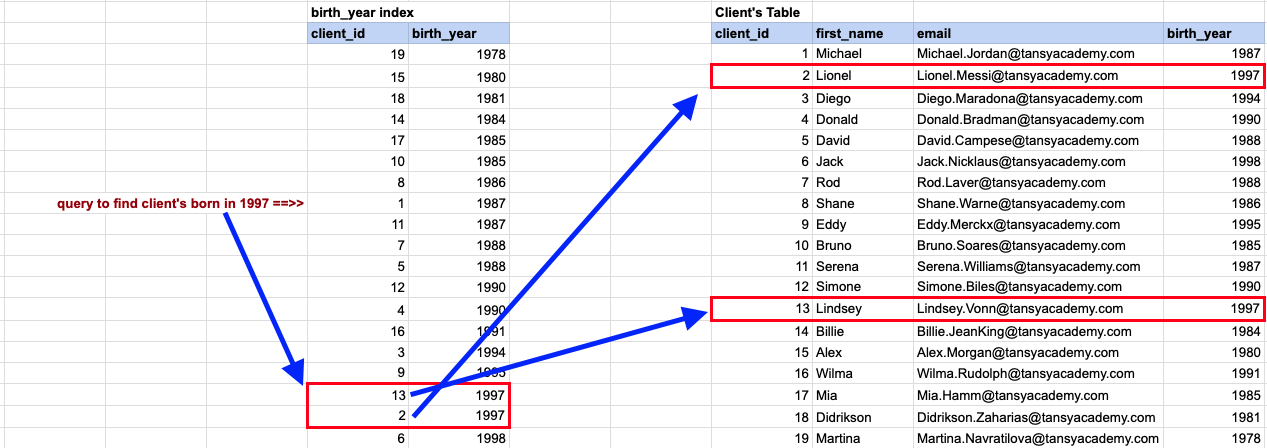
- Query Submission: A database user submits a query to retrieve a list of clients born in
1997. - Step 1 (Index Lookup): The query accesses the index directly to locate entries corresponding to the year
1997. Since the index is sorted, it completely avoids scanning through all index rows. - Step 2 (Primary Key Reference): The index contains direct references to the primary key.
- Step 3 (Targeted Row Retrieval): The necessary rows are retrieved using the index without needing to examine all rows in the original clients table, since the matching primary keys are already identified.
Comments Not Found