
PostgreSQL
Chapter 7 - DQL (Data Query Language)
DQL ASSIGNMENT3 - SQL Logic for Dashboard Reporting in a Banking Management System
SQL Assignment:
As part of this SQL assignment, you are required to design SQL queries that will extract the necessary data from a relational database to generate insights for a Banking Application System Dashboard. The dashboard will focus on key areas such as customer information, account management, transactions, loans, and employee performance.
1. Customer Overview
- Task: Write SQL queries to generate the following metrics:
- Number of Customers: Write a query to count the total number of customers in the system.
- Customer Email List: Write a query to retrieve the list of unique customer emails for marketing purposes.
- Customer Account Balances: Write a query that lists customers along with their total account balances, grouped by customer.
- Recent Customers: Write a query that lists customers who joined in the last 30 days.
2. Account Overview
- Task: Write SQL queries to pull account-related insights:
- Number of Accounts by Type: Write a query to count how many accounts exist for each account type (e.g., savings, checking).
- Total Account Balance: Write a query to calculate the total balance of all accounts (for a gauge or bar chart).
- Active vs Dormant Accounts: Write a query to identify active and dormant accounts based on recent transactions.
- Accounts with Overdrafts: Write a query to list accounts where the balance has gone below 0.
3. Transaction Overview
- Task: Use SQL to pull transaction-related insights:
- Total Transactions by Account: Write a query that retrieves the total number of transactions per account.
- Transaction Type Breakdown: Write a query to retrieve a breakdown of the number of debit vs credit transactions.
- High-Value Transactions: Write a query that lists all transactions above a certain threshold (e.g., greater than 10,000 USD).
- Transactions by Month: Write a query that shows the number of transactions for each month (for a line graph).
4. Loan Overview
- Task: Create SQL queries to monitor loans:
- Total Loan Amounts by Customer: Write a query that retrieves the total loan amounts for each customer.
- Active vs Closed Loans: Write a query to count active loans (where loan_end_date is null) versus closed loans.
- Overdue Loans: Write a query that lists loans that are overdue based on the current date and loan_end_date.
5. Employee Overview
- Task: Use SQL to manage employee-related data:
- Number of Employees per Branch: Write a query to retrieve the number of employees working at each branch.
- Employee Salary Report: Write a query to retrieve the salary details for all employees.
- Employee Loan Issuance Activity: Write a query that retrieves the number of loans issued by each employee.
6. Branch Overview
- Task: Write SQL queries to generate insights about bank branches:
- List of Branches: Write a query that lists all branches along with their locations.
- Branch Account Balances: Write a query that retrieves the total balance of accounts managed by each branch.
- Branch Loan Issuance: Write a query that shows the total loan amounts issued by each branch.
Key Visuals and Corresponding SQL Queries:
Note: All dashboard queries must work against current month or current year filters
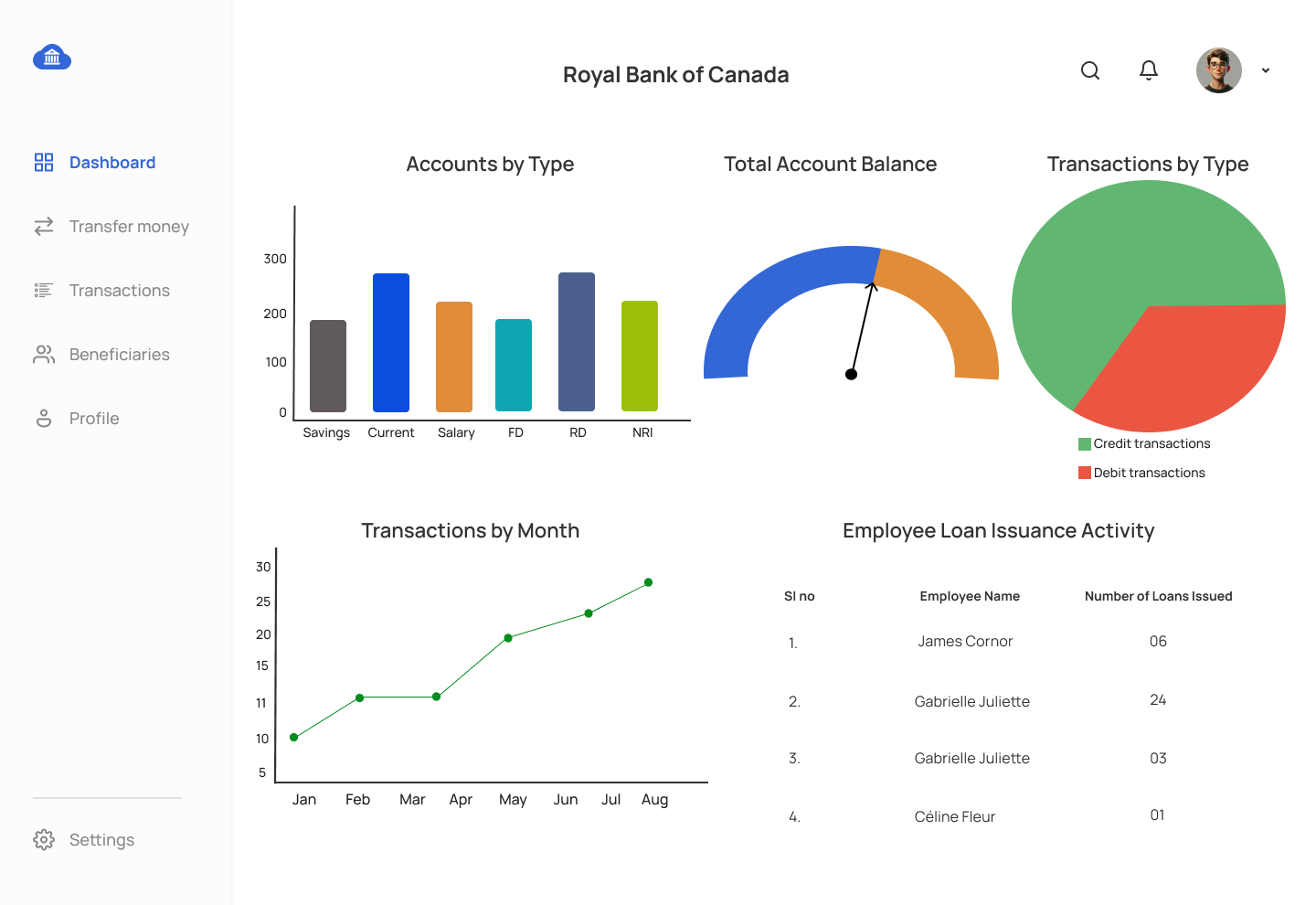
1. Bar Chart - Accounts by Type
- Query: Write an SQL query to retrieve the number of accounts for each account type from the ACCOUNT table.
- X-Axis: Account types.
- Y-Axis: Number of accounts.
2. Pie Chart - Transactions by Type
- Query: Write a query to retrieve the number of debit and credit transactions from the TRANSACTION table.
- Sections: Debit and Credit transactions.
3. Line Graph - Transactions by Month
- Query: Write a query that retrieves the total number of transactions for each month from the TRANSACTION table.
- X-Axis: Month (grouped by transaction_date).
- Y-Axis: Number of transactions.
4. Gauge - Total Account Balance
- Query: Write an SQL query to calculate the total account balance from the ACCOUNT table.
- Display: Total balance across all accounts.
5. Table - Employee Loan Issuance Activity
- Query: Write an SQL query to retrieve the number of loans issued by each employee from the LOAN and EMPLOYEE tables.
- Columns: Employee Name, Number of Loans Issued.
Data Sources (Tables Mapped):
- Customer Data: `CUSTOMER` table .
- Account Data: `ACCOUNT` table, `ACCOUNT_HISTORY` table.
- Transaction Data: `TRANSACTION` table.
- Loan Data: `LOAN` table, `LOAN_PAYMENT` table.
- Employee Data: `EMPLOYEE` table.
- Branch Data: `BRANCH` table.
- Audit Log Data: `AUDIT_LOG` table.
GOOD LUCK WITH YOUR ASSIGNMENT!!!
Don't forget to contact us if you need any further assistance with your assignments, and most importantly, for a manual review and approval of your work.
Sample ERD and Data Model for Dashboard Reporting Logic in a Banking Application
Comments Not Found