
PostgreSQL
CASE statement
The CASE statement in PostgreSQL is a powerful feature in Data Query Language (DQL) used to add conditional logic to SQL queries. It is somewhat similar to an if-else statement in other programming languages. You can use CASE to return specific values based on conditions, which makes it very useful for creating dynamic query results. It can be especially helpful in banking systems where you need to categorize or filter data based on certain criteria, like account status, transaction type, or customer type.
Here’s a simple explanation followed by a code sample and detailed steps for beginners:
   SELECT
    customer_id,
    account_type,
    CASE
    WHEN balance < 0 THEN 'Overdrawn'
    WHEN balance = 0 THEN 'Zero Balance'
    ELSE 'Positive Balance'
    END AS account_status
    FROM accounts;
Steps to Understand the CASE Statement
- Basic Syntax:
- The
CASEstatement in PostgreSQL can be written in two forms: simple and searched. - The simple form is used when the condition matches a single value, while the searched form uses boolean expressions.
Basic structure:
CASE WHEN condition THEN result WHEN condition THEN result ELSE default_result END - The
- Use of
WHENandTHEN:- The
WHENclause specifies the condition you want to check. - The
THENclause specifies the result to be returned if the condition is true. - You can have multiple
WHENclauses in a singleCASEstatement to handle various conditions.
Example:
CASE WHEN transaction_amount > 1000 THEN 'High' WHEN transaction_amount BETWEEN 500 AND 1000 THEN 'Medium' ELSE 'Low' END - The
- Use of
ELSE:- The
ELSEclause is optional but highly recommended as a fallback for cases that do not meet anyWHENcondition. - If no conditions match and
ELSEis not provided, PostgreSQL returnsNULL.
Example:
CASE WHEN transaction_type = 'deposit' THEN 'Credit' ELSE 'Debit' END - The
- Common Use Cases in Banking Systems:
- Categorizing accounts based on balance (e.g., overdrawn, zero balance, or positive).
- Labeling transactions based on the amount or type.
- Creating custom filters for customer segments like 'premium' vs. 'regular' customers.
Example:
SELECT transaction_id, customer_id, transaction_amount, CASE WHEN transaction_amount > 1000 THEN 'Large Transaction' ELSE 'Small Transaction' END AS transaction_size FROM transactions; - Nesting
CASEStatements:- You can nest
CASEstatements if you need more complex logic.
Example:
SELECT customer_id, CASE WHEN account_type = 'savings' THEN CASE WHEN balance >= 10000 THEN 'High Net Worth Savings' ELSE 'Regular Savings' END ELSE 'Other Account Type' END AS account_category FROM accounts; - You can nest
By using these basic structures and examples, you can start implementing CASE statements in PostgreSQL for various use cases, especially in contexts like banking and customer data management.
To gain complete access, login with gmail or outlook, no need of signup. click here

TEST CODE
In PostgreSQL, to organize customers based on their credit limit and create a temporary column called client_category using the CASE statement, you can use the following query:
SELECT client_id,
first_name,
last_name,
married_flag,
gender,
city,
state,
credit_limit,
CASE
WHEN credit_limit >= 7000 THEN 'Platinum'
WHEN credit_limit >= 5000 THEN 'Gold'
ELSE 'Silver'
END AS client_category
FROM org_client
ORDER BY credit_limit DESC;In PostgreSQL, to translate gender abbreviations into full descriptive text, you can use the following query:
SELECT client_id,
first_name,
last_name,
CASE
WHEN gender = 'F' THEN 'Female'
WHEN gender = 'M' THEN 'Male'
ELSE 'No Data'
END AS gender
FROM org_client;In PostgreSQL, to generate counts for categories using a CASE statement, you can use the following query:
SELECT COUNT(CASE WHEN gender = 'F' THEN 1 END) AS female_count,
COUNT(CASE WHEN gender = 'M' THEN 1 END) AS male_count
FROM org_client;Example 1:
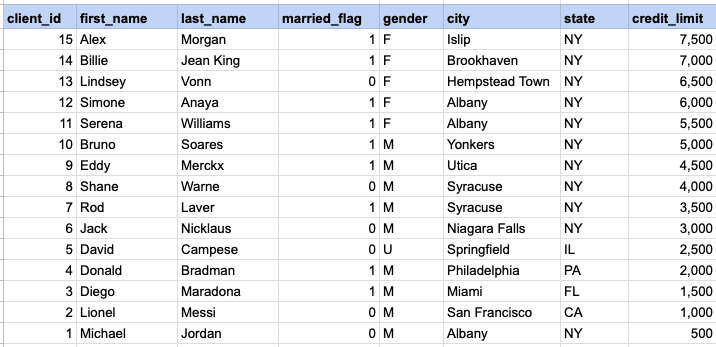
Organize customers based on their credit limit. The client category is a temporary column created with the CASE statement as part of the SELECT statement and is not present in the database table.
Example 1 - Raw data from client table
Example 1 - CASE statement
SELECT client_id, first_name, last_name,
married_flag ,gender ,city ,state ,credit_limit,
CASE WHEN credit_limit >= 7000 then 'Platinum'
WHEN credit_limit >= 5000 then 'Gold'
ELSE 'Silver'
END client_category
FROM org_client
ORDER BY credit_limit DESC
Example 1 - Query data mapping and final output
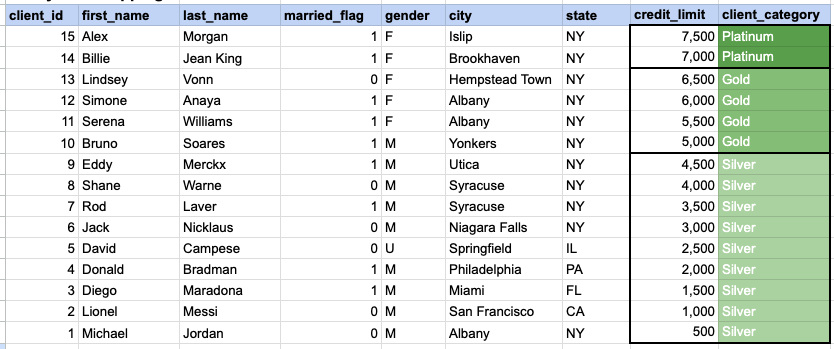
In the provided image, the client category is a temporary column generated as part of the SELECT statement. This column does not exist in the database, and its values are generated based on the conditions specified in the CASE statement.
Comments Not Found